
Caregiver decision guide
Choosing the best smartwatch for a senior with diabetes
If your aging parent has diabetes, a smartwatch alone cannot measure blood sugar — but paired with a CGM, it can alert them and you to dangerous lows. This guide explains what actually works, which features matter most, and how to choose based on your parent's specific situation.
Before you shop for the best smartwatch for seniors with diabetes, stop at the most important correction: a smartwatch alone does not measure blood sugar. In 2026, the FDA has not authorized, cleared, or approved any consumer smartwatch or smart ring that measures glucose non-invasively. The agency specifically warned that inaccurate glucose readings from these devices could lead to insulin or medication dosing errors, including “mental confusion, coma, or death within hours.” [1]
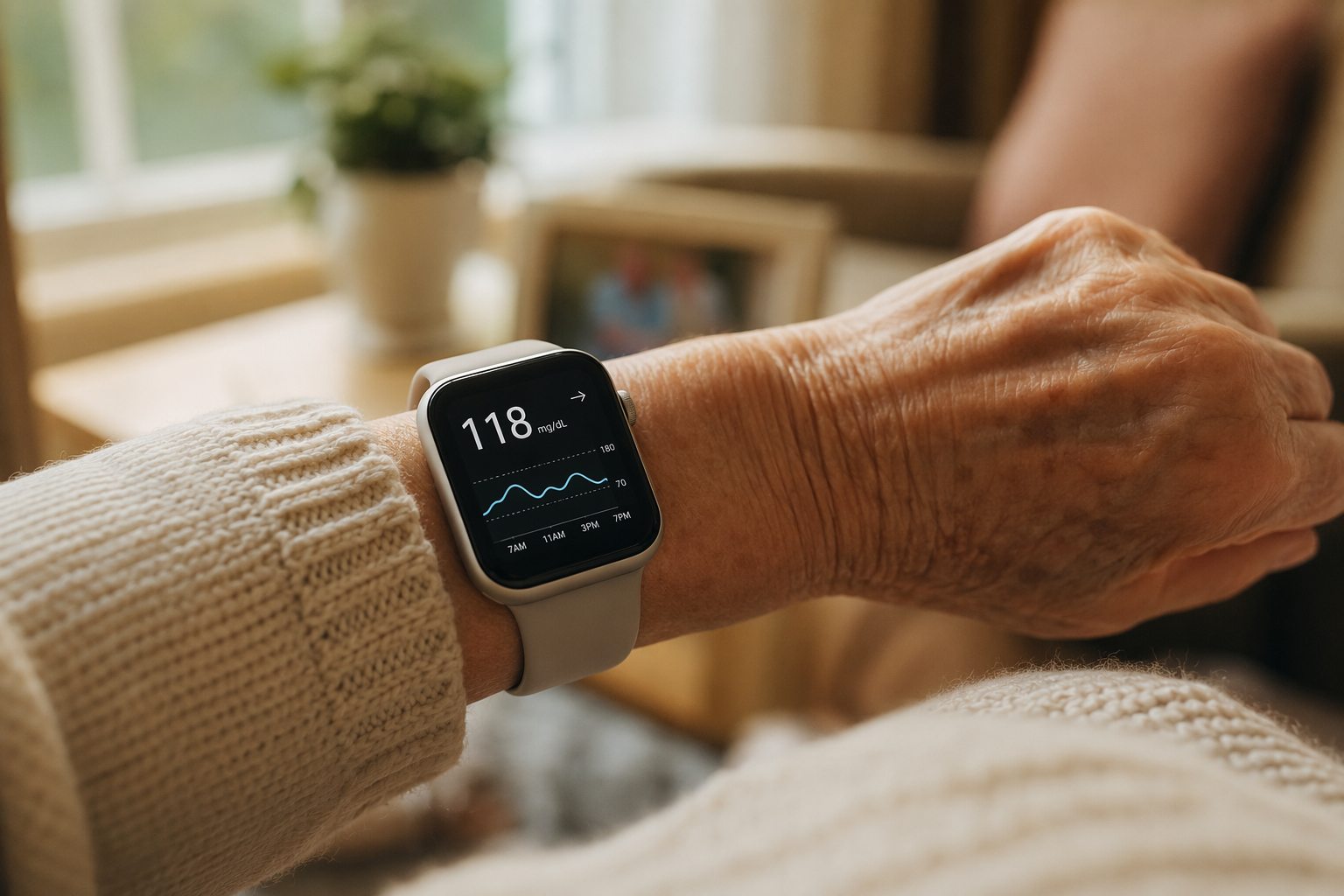
That warning is not a small technical caveat. It is the line between a useful safety setup and a dangerous misunderstanding. A watch can show glucose data, vibrate during a low, display a trend arrow, call for help after a hard fall, and let a caregiver see an alert from across town. But the glucose measurement comes from a continuous glucose monitor, or CGM, worn on the body. The watch is the display and alert surface.
The Working System: Sensor, Watch, Phone, Caregiver
A safe diabetes smartwatch setup usually has four parts. First, a CGM sensor sits on the upper arm or another approved body site and measures glucose in interstitial fluid. Second, the sensor sends data by Bluetooth. Third, a phone or smartwatch receives and displays the reading, trend arrow, and alerts. Fourth, a caregiver app may share urgent lows, highs, or missed signal alerts with family members.
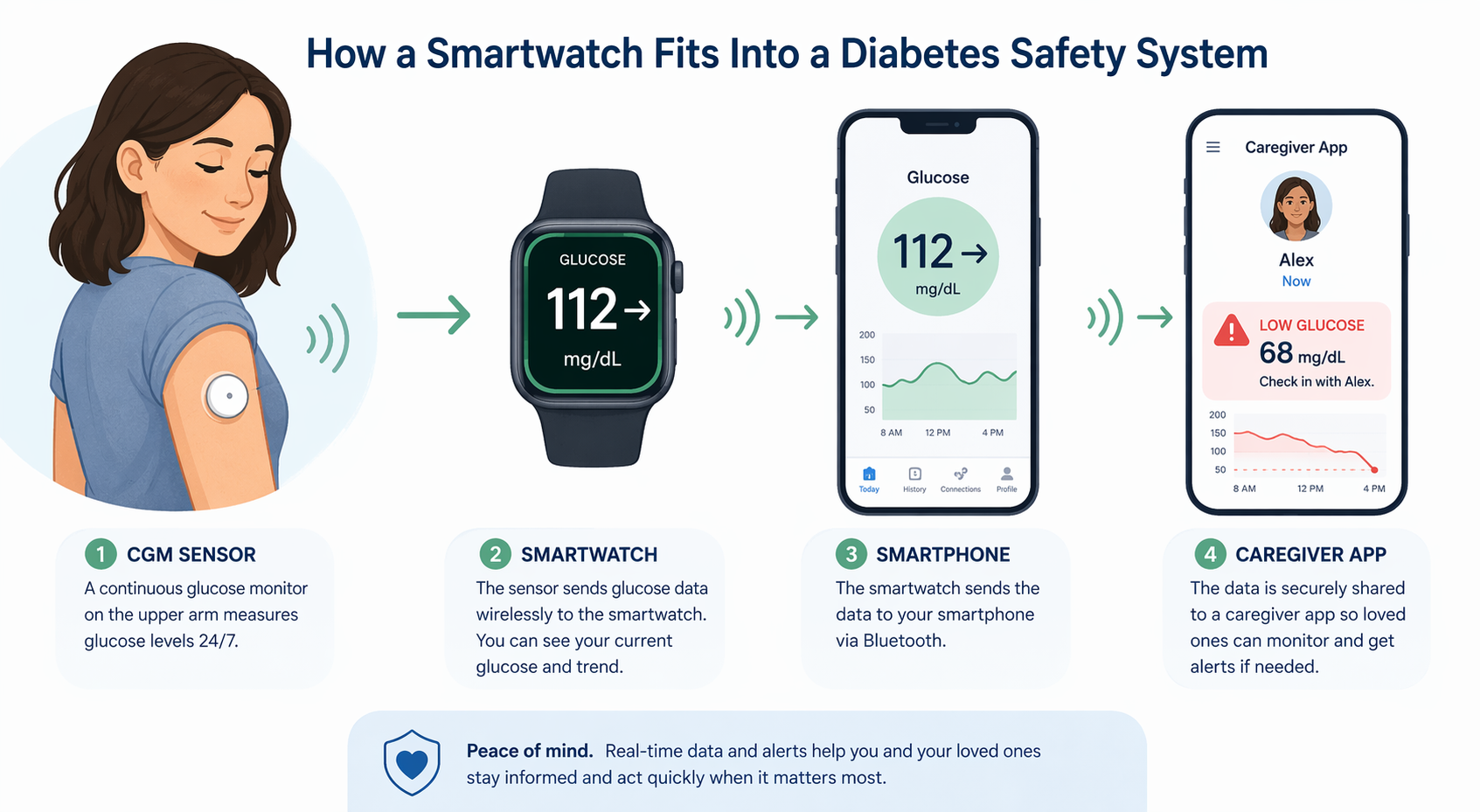
That chain matters because every weak link becomes a real-life problem. If the parent leaves the phone on the kitchen counter, a watch that depends on the phone may stop receiving glucose data in the bedroom. If the watch battery dies before morning, the overnight low alert may never reach the wrist. If the caregiver app is not set up, the adult child who is trying to prevent another 2 a.m. emergency may not know anything is wrong.
| Part of the system | What it does | What it does not do |
|---|---|---|
| CGM sensor | Measures glucose and sends readings at regular intervals | Does not replace clinical judgment or every confirmatory fingerstick your clinician recommends |
| Smartwatch | Displays glucose data, trend arrows, and alerts when compatible | Does not measure blood glucose by itself |
| Smartphone | Often acts as the relay between CGM, watch, cloud, and caregiver app | Does not help if it is out of range, uncharged, or not carried when required |
| Caregiver app | Lets approved family members receive glucose alerts remotely | Does not remove the need for consent, alert planning, and emergency instructions |
For many families, the most useful question is not “Which watch has the most health features?” It is “Will this exact system still alert the right person when my parent is asleep, confused, away from the phone, or too frustrated to open an app?”
Why This Matters More for Older Adults
Diabetes is common in later life: the ADA’s 2026 Standards of Care report that more than 29% of people age 65 and older have diabetes. The same standards note that older adults have about double the hypoglycemia hospitalization rate of younger patients, citing Zhong and colleagues. [2]
Hypoglycemia is not only a number on a screen. In an older adult, it may look like sweating, shakiness, weakness, confusion, irritability, a fall, or simply “not acting right.” Some seniors have hypoglycemia unawareness, meaning they may not feel the early warning signs clearly. That is where wrist alerts can be genuinely helpful: not because the watch is magical, but because the CGM can catch a trend before the person recognizes it.
The best clinical evidence here is not about smartwatch glamour. It is about CGM. In the WISDM randomized clinical trial, adults age 60 and older with type 1 diabetes who used CGM reduced time spent in hypoglycemia by 27 minutes per day compared with standard blood glucose monitoring. [3] That does not prove every senior with diabetes needs a watch. It does support the more careful claim: for older adults at risk of lows, CGM data that is visible and acted on can reduce time in hypoglycemia.
The ADA’s 2026 Standards also recommend CGM for older adults with type 1 or type 2 diabetes who use insulin, to improve glycemic outcomes and reduce hypoglycemia. [2] The watch enters the picture as the practical delivery method: the place where the reading is easiest to see, the vibration is hardest to miss, and the caregiver alert can be tied into the family’s plan.
Compatibility Comes First
If your parent already uses a CGM, start there. A beautiful watch that does not work with the CGM is just an expensive clock. The practical order is: CGM brand, phone ecosystem, watch compatibility, caregiver sharing, then comfort and safety features.
| Route | How glucose reaches the wrist | Best fit |
|---|---|---|
| Apple Watch with Dexcom G7 Direct to Apple Watch | Dexcom G7 can connect directly to Apple Watch by Bluetooth without the phone acting as the intermediary | A senior who uses Dexcom G7 and often leaves the iPhone in another room |
| Apple Watch with FreeStyle Libre 3 | Glucose display generally depends on the phone relay and compatible apps | A senior already in the iPhone ecosystem who reliably keeps the phone nearby |
| Samsung Galaxy Watch 7 or 8 | Dexcom G7 data can be displayed through a phone relay | An Android household already using Samsung phones |
| Garmin Fenix, Venu, or Forerunner | Dexcom G7 data can be shown through Garmin Connect IQ | Someone who values long battery life and can live without built-in fall detection or professional monitoring |
| Pixel Watch 3 | Dexcom G7 data can be displayed through a phone relay | A Google Pixel phone user who keeps the phone close enough for the system to work |
Dexcom G7 Direct to Apple Watch deserves attention because it solves a household problem caregivers know well: many older adults do not carry a phone around the home. Dexcom describes Direct to Watch as allowing the Dexcom G7 sensor to connect directly to Apple Watch using its own Bluetooth connection, without requiring the iPhone as the intermediary for glucose data on the watch. [4]
That does not make Apple Watch the universal answer. It makes it a strong route for a specific situation: a Dexcom G7 user, compatible Apple Watch and iPhone setup, and a parent whose phone habits make phone relay unreliable. If your parent uses a different CGM, uses Android, dislikes wearing a watch to bed, or cannot keep devices charged, the decision changes quickly.
Phone Relay Is Fine Until the Phone Is Missing
A phone-relay setup can work very well for an older adult who keeps the phone nearby, charges it nightly, and understands the alert tones. It is less reassuring for the parent who sets the phone down in the den, walks to the bathroom, then naps in the bedroom while the watch loses the glucose feed. The question is not whether the technology works in a product demo. It is whether it matches the parent’s normal movements inside the home.
A quick home test is useful before you commit emotionally to any route: have your parent wear the watch for a few days, keep the phone where they normally keep it, and notice where alerts do and do not appear. The result may be less flattering than the brochure, but it is more useful.
Safety Features That Actually Matter at 2 A.M.
For a senior with diabetes, the watch is not only about glucose. Low blood sugar can raise the risk of confusion, weakness, and falls. A good setup should be judged as a safety system: glucose alerts, emergency calling, fall detection, battery life, readability, band comfort, water resistance, and caregiver monitoring.
Fall Detection: Hard Falls Are Not the Whole Story
Apple Watch fall detection, available on recent models, is designed to detect hard falls and can call emergency services if the wearer appears immobile for about one minute. That is valuable, especially for a parent who lives alone. But hard-fall detection is not the same as detecting every dangerous event. NCOA’s 2026 medical alert watch review notes research showing that older adults often have softer falls, such as slumping or catching themselves, that may not trigger Apple Watch fall detection. [5]
This is where medical alert watches can beat general-purpose smartwatches. NCOA reports that Medical Guardian’s MGMove costs $199.95 for equipment plus $42.95 per month, includes 24/7 professional monitoring, has a 29-second average response time in its testing, and detects both hard and soft falls. Its caregiver features, including text messaging, medication reminders, and location tracking, are available for an additional $5 per month. [5] NCOA’s reviews include affiliate relationships, so the ranking language should be read cautiously; the concrete testing observations are still useful.
The tradeoff is obvious: a medical alert watch may be better for emergency response, while an Apple, Samsung, Pixel, or Garmin watch may be better for CGM display and broader smartwatch use. If the main fear is “Mom may pass out and no one will answer,” professional monitoring may matter more than app variety.
Battery Life: A Dead Watch Is Not a Safety Device
Battery life is not a spec-sheet detail when overnight hypoglycemia is the concern. A watch that can barely make it through the day may be sitting on the charger during the exact hours you hoped it would help. For CGM alerts, the practical minimum is enough battery to cover the parent’s real waking day and the night, or a charging routine that is simple enough to happen every day.
This is where devices separate sharply. SeniorLiving.org’s review describes Bay Alarm Medical’s SOS Smartwatch as easy to use, with large icons and no smartphone pairing required, but reports battery life of only 6 to 18 hours. [6] That may still fit a parent who charges reliably and mainly needs daytime emergency access. It is less comforting for overnight CGM-related reassurance.
Garmin sits at the opposite end of this tradeoff: the Garmin Venu Sq is listed at $199.99 with a 144-hour battery life and Dexcom CGM display through Connect IQ, but without fall detection or professional monitoring. Long battery life may be the difference between a device that is worn and a device that lives on the nightstand. But for a parent with fall risk, that missing emergency layer may be too large a gap.
Screen, Band, Water, and Hands
The quiet accessibility details decide whether the system survives the first month. A glucose number in tiny type is not helpful to a parent with aging eyes. A stiff clasp is not helpful to someone with arthritis. A watch that must be removed for ordinary water exposure may be forgotten after a shower. A screen that wakes only after a precise wrist gesture may frustrate someone whose movement is limited.
Research on smartwatch use among older adults has identified ease of charging, button size, and interface simplicity as important barriers and facilitators. [7] That finding matches what caregivers often see at home: the device that wins is not always the most advanced one. It is the one the parent will wear, charge, read, and tolerate.
- Choose the largest readable screen your parent will comfortably wear.
- Turn on larger text, high-contrast display settings, and watch-face glucose displays when available.
- Try the band with the parent’s actual hands, not yours; arthritis changes the test.
- Confirm water resistance for showering habits, because removal creates one more chance to forget the watch.
- Build charging around an existing routine, such as breakfast or evening television, rather than hoping a new habit appears.
Caregiver Monitoring Needs Consent, Not Just Setup
Remote monitoring can be a relief after a frightening low. Dexcom Follow allows up to 10 designated followers to monitor a user’s glucose levels remotely. [4] Apple Health Sharing can also let family members view selected health trends, and medical alert platforms may add location tracking, messaging, medication reminders, or professional response.
The uncomfortable part is worth saying plainly: a parent is not a dashboard. Glucose sharing should be set up with consent, clear boundaries, and a plan for what happens when an alert fires. If every mild high triggers a worried phone call, the parent may silence alerts or stop wearing the device. If no one knows who responds to a nighttime low, the alert becomes noise.
A better arrangement is specific. Decide which alerts go to the parent only, which go to caregivers, and which require action. Write down who calls first, who lives close enough to check in person, when to use emergency services, and when to follow the clinician’s instructions for confirming a reading. The watch can send the signal; the family still needs a response plan.
Cost: The Watch Is Only One Line Item
It is easy to compare watch prices and miss the larger recurring cost. The CGM sensor is separate from the watch, and coverage depends on the specific Medicare Part B situation, supplemental insurance, Medicare Advantage plan, commercial insurance, pharmacy benefit, and medical necessity rules. Common CGM monthly costs can land in the low hundreds depending on coverage and cash-pay route, but those figures should not be treated as universal.
Before buying a watch because it looks cheaper than another, verify three things: the clinician supports CGM use for your parent’s diabetes treatment plan, the CGM is covered or affordable on your parent’s plan, and the watch route you want is actually compatible with that CGM and phone. A discounted watch that cannot display the parent’s CGM data is not a bargain.
How to Narrow the Choice
Start with the parent in front of you, not the product category. A retired engineer who charges devices carefully and likes data may do well with a different setup than a parent who ignores notifications, misplaces the phone, and removes anything uncomfortable before bed.
- Identify the CGM first. Dexcom, FreeStyle Libre, and other systems have different watch and phone routes.
- Confirm the phone ecosystem. Apple Watch generally belongs with iPhone; Samsung and Pixel routes depend on Android compatibility; Garmin has its own app pathway.
- Watch your parent’s phone habits. If the phone is often across the house, direct-to-watch capability becomes much more important.
- Name the main safety problem. Overnight lows, falls, wandering or location concern, missed medications, and long-distance caregiving point to different features.
- Test comfort and charging before trusting the setup. A device that is not worn cannot protect anyone.
If Hypoglycemia Is the Main Concern
Prioritize CGM compatibility, alert reliability, and whether alerts reach the wrist when the phone is not nearby. For a Dexcom G7 user in the Apple ecosystem, Direct to Apple Watch is the most interesting route because it reduces dependence on carrying the iPhone around the house. For phone-relay setups, test the actual home range and alert behavior before assuming overnight coverage.
If Falling or Emergency Response Is the Main Concern
Look harder at fall detection type and response model. General smartwatches can provide emergency SOS and hard-fall detection, but a professional medical alert watch may be better when the parent lives alone, cannot reliably speak after an event, or needs a trained monitoring center rather than a family member who might miss a phone call.
If Charging Is the Barrier
Do not minimize battery life. A long-battery Garmin-style route may be more realistic than a feature-rich watch that dies nightly, as long as the missing fall detection or professional monitoring does not create a bigger risk. If the parent already struggles to charge a phone, adding a daily watch-charging requirement may be wishful thinking.
If Simplicity Is the Barrier
A simpler medical alert watch with large icons and no phone pairing may be easier for some seniors than a full smartwatch. The tradeoff is that it may not be the best CGM display route. In that case, separate the problems: one device may handle emergency response, while the CGM and phone handle diabetes data. Fewer devices is nice; safer workflow is better.
The Practical Bottom Line
There is no single best smartwatch for every senior with diabetes. The best choice is the one that fits the CGM, the phone ecosystem, the parent’s habits, and the family’s safety plan.
- Choose around CGM compatibility first; the watch cannot display glucose data it cannot receive.
- Choose direct-to-watch capability when the parent does not reliably carry a phone.
- Choose professional monitoring when emergency response matters more than smartwatch apps.
- Choose long battery life when charging is the weakness that will break the system.
- Verify the diabetes plan, device compatibility, and insurance coverage with the clinician, CGM maker, watch maker, and health plan before buying.
A smartwatch can be a very good diabetes safety tool for an older adult. It just has to be treated as part of a CGM-based system, not as a glucose meter on the wrist.
References
- Do Not Use Smartwatches or Smart Rings to Measure Blood Glucose Levels: FDA Safety Communication, U.S. Food and Drug Administration, February 21, 2024
- 13. Older Adults: Standards of Care in Diabetes—2026, Diabetes Care
- Effect of Continuous Glucose Monitoring on Hypoglycemia in Older Adults With Type 1 Diabetes: A Randomized Clinical Trial, JAMA, 2020
- Direct to Apple Watch, Dexcom
- Best Medical Alert Watches, National Council on Aging, 2026
- Best Smartwatches for Seniors, SeniorLiving.org
- Barriers and Facilitators to Smartwatch Use Among Older Adults, National Library of Medicine
Questions to bring to a clinician or OT
This is not medical, legal, or a family's final decision — only a framework. Bring these questions to a clinician, occupational therapist, or your local Area Agency on Aging.
Find Local HelpRelated reading
Noticed something outdated or inaccurate on this page? Flag a correction. We review every report against CDC, NIA, and AARP HomeFit guidance before updating a page.