
Caregiver decision guide
Personal Emergency Response Systems (PERS) Explained: Types, Features, and How to Choose One
A product-neutral guide for family caregivers and older adults explaining what personal emergency response systems are, how they work, what the four main device types offer, and what evaluation criteria actually matter — from fall detection accuracy and waterproofing to cost, Medicare coverage, and Medicaid waiver options.

Why a Fast Response to a Fall Can Be a Matter of Life and Death
Falls are the leading cause of injury among adults 65 and older in the United States. According to the CDC's most recent fall data, over 14 million older adults — roughly 1 in 4 — report falling every year. About 37% of those falls result in injuries requiring medical attention or restricted activity. More sobering: the age-adjusted fall death rate rose 21% between 2018 and 2024, from 64.7 to 78.4 per 100,000 older adults.
The fall itself is only part of the danger. The more insidious risk is what happens in the hours after — particularly when no one is there to help.
Researchers use the term "long lie" to describe what happens when a person remains on the floor, unable to get up, for one hour or more. Studies estimate this occurs in up to 30% of falls among older adults. The consequences can be severe: dehydration, pressure sores, internal bleeding, hypothermia, and rhabdomyolysis — a condition in which muscle tissue breaks down and releases toxic proteins into the bloodstream. Among those who experience a long lie, research shows roughly half die within six months.
"They could develop rhabdomyolysis, a life-threatening condition that occurs when muscle tissues break down and release their contents into the bloodstream. It can happen when lying on the floor for as little as an hour."
That quote comes from a geriatrician cited in AARP's guide to medical alert and monitoring systems. It is a useful frame for understanding what a personal emergency response system actually does: it does not prevent falls. It shortens the window between a fall and a response — and that window is where the most serious secondary harm occurs.
What a PERS System Actually Is — and How It Works
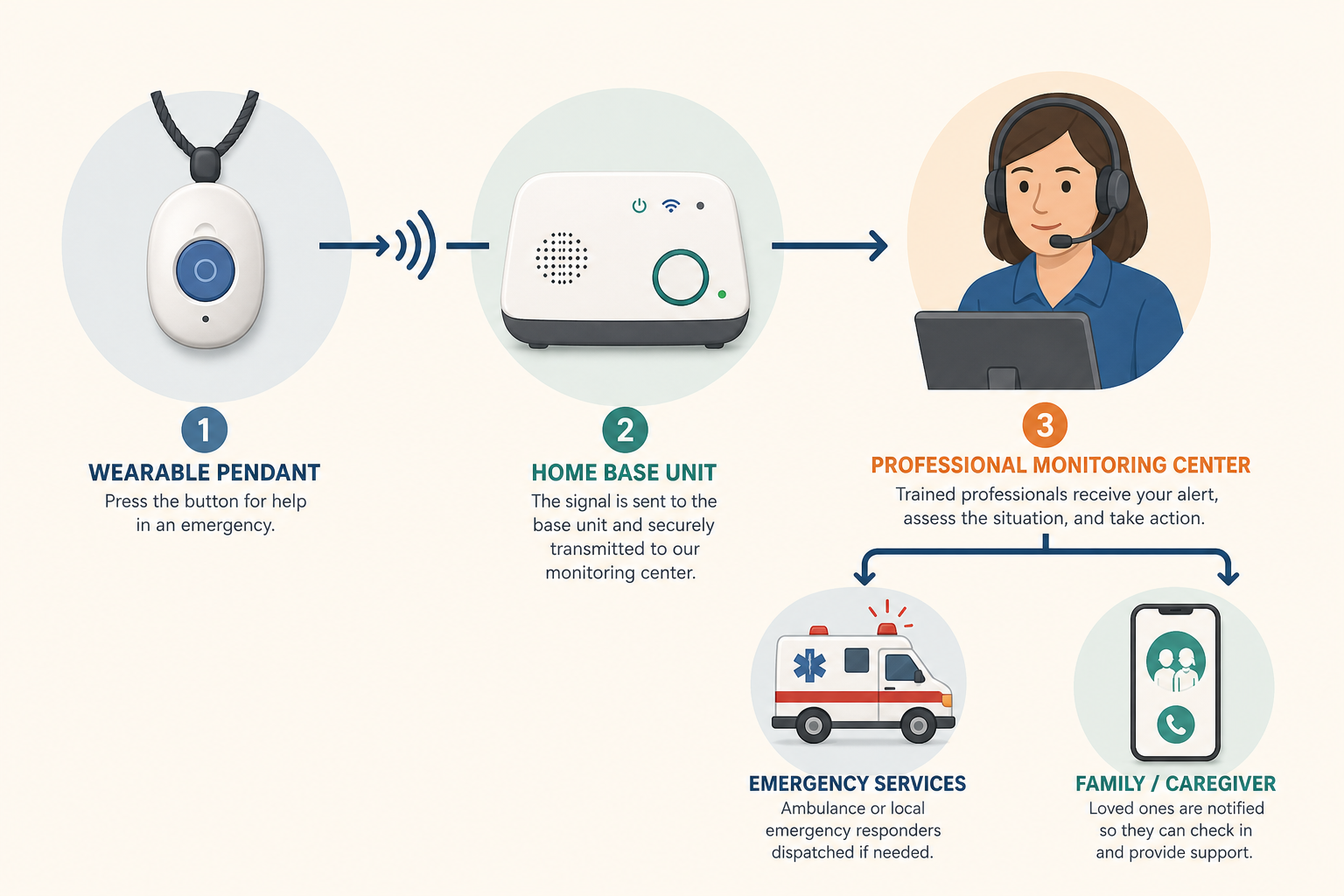
A personal emergency response system — also called a medical alert system — is an integrated three-component system, not a single device. Understanding the full architecture helps clarify why some systems are more reliable than others.
- A wearable help button or passive sensor worn or placed near the user — typically a pendant, wristband, smartwatch-style device, or wall-mounted sensor.
- A base unit or hub installed in the home that connects to a monitoring center via a landline or cellular network. Some mobile systems have the hub built into the wearable device itself.
- A 24/7 professional monitoring center staffed by trained operators who receive the alert, speak with the user through two-way voice communication, assess the situation, and dispatch the appropriate help — emergency services, a family member, or a neighbor.
When an alert is triggered — either by pressing the help button or by automatic fall detection — the wearable signals the base unit, which calls the monitoring center. The operator attempts to speak with the user through the base unit's speaker and microphone. If the user is unresponsive or requests help, the operator follows a pre-established contact protocol, which typically includes contacting a designated family member and, if necessary, dispatching emergency medical services.
Monitored vs. Unmonitored Systems
Some lower-cost systems skip the professional monitoring center entirely, connecting directly to 911 or to a pre-programmed phone number when the button is pressed. These are called unmonitored systems.
For most older adults — particularly those with complex health conditions, dementia, or limited ability to speak clearly in an emergency — monitored systems are strongly preferable. A professional monitoring center can assess the situation, access the user's medical history and contact list, and escalate appropriately. Unmonitored systems also do not offer automatic fall detection, which is a meaningful limitation given how many users cannot activate a button after a serious fall.
Three Generations of PERS Technology and Four Current System Types
PERS has evolved significantly since its introduction in the 1970s. Understanding the generational arc helps explain why the devices available today look and function so differently from one another — and why the right choice depends on the user's specific situation and lifestyle.
The Three Generations
- Generation 1 — Wall-mounted or fixed units only. The earliest PERS systems were stationary: a pull cord in the bathroom or a fixed wall button connected to a central unit. Protection was limited to the immediate area around the device. These systems remain in use in some institutional settings but are rarely sold for home use today.
- Generation 2 — Wearable pendant plus base unit. The introduction of a wearable button — typically a pendant or wristband — connected wirelessly to a home base unit transformed the category. Users gained mobility within the home, and two-way voice communication through the base unit became standard. This is still the most common configuration for in-home systems.
- Generation 3 — GPS mobile, passive ambient, and smartwatch forms. The third generation incorporates GPS location tracking, cellular connectivity independent of a home base, automatic fall detection algorithms, and form factors that look like consumer smartwatches. A newer sub-category — passive ambient sensors using radar or infrared technology — requires no wearable at all, detecting falls and monitoring movement through room-mounted devices.
The Four Main Current System Types
| System Type | How It Connects | Coverage Area | Best For |
|---|---|---|---|
| In-home landline | Uses existing home telephone landline | Inside the home (typically 200–1,000 ft from base) | Users with a landline who rarely leave home alone |
| In-home cellular | Uses cellular network; no landline needed | Inside the home (typically 200–1,400 ft from base) | Users without a landline; those in areas with strong cell coverage |
| Mobile GPS | Built-in cellular + GPS; no home base required | Wherever cellular coverage exists — indoors and outdoors | Active users, those who leave home regularly, long-distance caregiving situations |
| Passive / ambient (emerging) | Radar or infrared sensors mounted in rooms; no wearable | Specific monitored rooms | Users unable or unwilling to wear a device; requires careful privacy consideration |
Key Feature Dimensions: What to Evaluate Before Choosing a System
The most important evaluation task is not comparing brand names — it is understanding which capability dimensions matter most for the specific person who will use the device. The following dimensions represent the categories where systems differ meaningfully.
Fall Detection: Automatic vs. Button-Press
Research published in a systematic review of fall detection devices found that approximately 80% of older adults wearing a PERS did not activate their alarm after experiencing a fall. Reasons include loss of consciousness, inability to reach the button, and disorientation. This finding alone makes automatic fall detection a meaningful safety feature — not a premium add-on.
Automatic fall detection algorithms analyze motion data from the wearable sensor. When they detect a sudden acceleration pattern consistent with a fall, they trigger an alert without any action from the user. However, accuracy varies by where the sensor is worn. The same systematic review found that trunk- or chest-worn devices had a median sensitivity of approximately 97.5%, compared to approximately 81.5% for devices worn on the arm or wrist. Wrist-worn sensors also generate more false alarms — a relevant consideration for users who find frequent false alerts disruptive or anxiety-inducing.
Feature Comparison Across System Types
| Feature Dimension | In-Home Landline | In-Home Cellular | Mobile GPS | Passive / Ambient |
|---|---|---|---|---|
| Automatic fall detection | Add-on (extra cost) | Add-on (extra cost) | Often included or add-on | Built-in (motion-based) |
| Waterproofing | Varies — verify before buying | Varies — verify before buying | Varies — verify before buying | Not applicable (wall-mounted) |
| Battery life (wearable) | Typically 1–5 years (button only) | Typically 1–5 years (button only) | 1–10 days (requires regular charging) | Not applicable |
| In-home range | 200–1,000 ft from base | 200–1,400 ft from base | No range limit (cellular) | Room-specific |
| Works outside the home | No | No | Yes (cellular coverage areas) | No |
| Two-way voice | Through base unit | Through base unit | Through wearable or base | Through hub/speaker |
| GPS location tracking | No | No | Yes | No |
| Caregiver companion app | Some providers (may cost extra) | Some providers (may cost extra) | Common; may cost extra | Often included |
| Privacy considerations | Low (button-activated only) | Low (button-activated only) | Moderate (location tracking) | High (continuous ambient monitoring) |
Response Time
The industry benchmark for monitoring center response time is under 60 seconds from alert to operator answer. Testing data cited across consumer evaluations suggests that most major monitoring centers answer within 22 to 51 seconds. Response time is worth asking about directly — and some providers will share their average response time data.
Waterproofing
Bathrooms are among the highest-risk fall locations in the home. A PERS device that cannot be worn in the shower or bathtub leaves the user unprotected at the moment of highest risk. Full waterproofing — not just splash resistance — should be a baseline requirement, not an upgrade. Verify the specific IP (Ingress Protection) rating before purchasing.
Caregiver Companion App
Many current PERS systems offer a companion app that allows family members or caregivers to monitor battery status, device location (for GPS systems), and activity patterns remotely. This is particularly valuable for long-distance caregivers. However, app availability and features vary significantly by provider, and some charge an additional monthly fee — up to $8 per month in some cases. Ask about app cost and functionality before committing to a system.
Who Should Consider a PERS: Clinical and Lifestyle Indicators
A PERS is not the right tool for every older adult, and it is not a substitute for other safety measures. But for people who meet certain clinical or lifestyle criteria, it can meaningfully reduce the risk of an undetected fall leading to serious secondary harm.
Clinical and lifestyle factors that support considering a PERS include:
- A history of falls, particularly any fall that resulted in lying on the floor for an extended period before help arrived.
- Living alone, especially without nearby neighbors or family who check in regularly.
- Chronic conditions that increase fall risk or reduce recovery capacity, including diabetes, heart disease, COPD, kidney disease, or a history of strokes.
- Recent hospital discharge, when fall risk is elevated and physical reserves are reduced.
- Medications that increase fall risk — including sedatives, blood pressure medications, diuretics, and certain antidepressants.
- Limited fine motor skills that make reliably pressing a small button difficult.
- Early to moderate dementia, particularly when there is any wandering risk — though cognitive limitations that prevent device use or button activation require careful assessment.
The Compliance Problem
A PERS only works if it is worn. Research on PERS use found that in some studies, approximately 25% of users never wore the pendant at all. Common reasons: forgetting, discomfort, and not feeling like they needed it at the time. The device that gets worn every day is more protective than the technically superior device that sits on the nightstand.
This makes device aesthetics, weight, and fit into daily routine legitimate evaluation criteria — not vanity. Involving the older adult in the selection process directly increases the likelihood of consistent wear. A person who chose their own device and understands why they have it is far more likely to wear it.
Cost Structure and Payment Options
The real cost of a PERS involves multiple components that are not always presented transparently by providers. Understanding the full cost structure before committing to a system avoids unpleasant surprises.
| Cost Component | Typical Range | Notes |
|---|---|---|
| Monthly monitoring subscription | $20–$60/month | Core recurring cost; varies by system type and features included |
| Automatic fall detection add-on | $5–$12/month extra | Often not included in base subscription price; verify before purchasing |
| Equipment and activation fees | $0–$200 one-time | Some providers waive equipment fees; others charge for the base unit or wearable device |
| Caregiver companion app | $0–$8/month extra | Varies by provider; sometimes bundled, sometimes a separate charge |
| GPS location service | Sometimes included, sometimes add-on | Usually part of mobile GPS plans; may cost extra on in-home systems |
Medicare and Medicaid Coverage
Some Medicare Advantage (Part C) plans offer partial or full coverage for PERS as a supplemental benefit. Coverage varies significantly by plan and carrier, and plans change their supplemental benefits annually. If a family member has Medicare Advantage, checking with the specific plan — not just the carrier — is the only way to know whether PERS is covered for that plan year.
Under Medicaid, PERS is covered as a Home and Community-Based Services (HCBS) benefit in many states. Coverage structures vary by state waiver program. As an illustrative example, Minnesota's Elderly Waiver program covers PERS equipment up to $1,500 per year, installation up to $500 per year, and monthly monitoring fees up to $110 per month, with a total annual maximum of $3,000. Other states with HCBS waiver programs — including Connecticut — also cover PERS. Coverage criteria, reimbursement rates, and eligibility requirements differ by state and program.
Other Ways to Reduce Cost
- VA benefits: Veterans may be eligible for PERS assistance through VA programs. Contact the local VA medical center or benefits office to determine eligibility.
- HSA and FSA accounts: If a physician has recommended a PERS as medically necessary, the cost may qualify as a tax-deductible medical expense and can be paid from a Health Savings Account (HSA) or Flexible Spending Account (FSA).
- Area Agency on Aging (AAA): Local AAA offices sometimes offer discounts, subsidized access, or loan programs for PERS devices. Contact the Eldercare Locator (eldercare.acl.gov) to find the local AAA.
- AARP member discounts: Some providers offer discounted rates for AARP members.
Questions to Ask Before You Buy
These questions are adapted from AARP's vendor evaluation framework and apply to any provider being considered, regardless of system type. Ask every question before signing anything.
- Is the wearable device fully waterproof — not just splash-resistant? What is the IP rating?
- Can the device be worn comfortably all day, including during sleep? Is it available in multiple form factors (pendant, wristband, watch-style)?
- Is automatic fall detection available? Is it included in the base price or an add-on? How does the detection algorithm work — wrist-worn or pendant/chest-worn sensor?
- What is the battery life for the wearable? How is it charged, and what happens if the battery dies?
- Does the base unit have backup power in case of a home power outage? For how long?
- What is the monitoring center's average response time? Is the center UL-listed or otherwise certified?
- How are false alarms handled? Is there a charge for false alarm dispatches?
- What is the cancellation policy? Is there a contract, and if so, how long? What are the early termination fees?
- Is a caregiver companion app available? What does it show — battery status, location, activity? Is the app included in the monthly price or an additional charge?
- What data does the system collect, and how is it stored and protected? Who has access to location and activity data?
- What is the total monthly cost — including monitoring, fall detection, GPS, and any app fees? Are there any additional charges not listed in the base plan?
- Is there a trial period or money-back guarantee that allows the device to be tested in the home before fully committing?
Common Mistakes to Avoid
- Waiting until after a serious fall to buy. Consumer surveys suggest that about 75% of PERS buyers purchase only after experiencing a fall or medical emergency. The protection value of a PERS is greatest before a serious fall occurs — not after one has already caused injury. Earlier adoption means a longer period of supported independence.
- Choosing for aesthetics over function. Aesthetics matter for compliance — but they should not override waterproofing, fall detection capability, or monitoring quality. A device that looks good but lacks these features provides false reassurance.
- Skipping the waterproof requirement. A device that cannot be worn in the shower or bath leaves the user unprotected in one of the highest-risk environments in the home. This is not a negotiable feature.
- Signing a long-term contract without reading the terms. Some providers require multi-year contracts with significant early termination penalties and no online pricing transparency. A 3-year contract with no fall detection and no online pricing is a cautionary example of what to watch for — not representative of the category as a whole, but a real risk if contract terms are not reviewed carefully before signing.
- Excluding the older adult from the selection process. A device selected without the user's input is more likely to sit unused. The person who will wear the device every day should have a voice in choosing it.
- Assuming a smartphone provides equivalent protection. A phone in a pocket or on a table does not provide the same protection as a wearable device that stays on the body. In a fall, reaching a phone may not be possible.
- Ignoring privacy implications for passive/ambient systems. Room-mounted radar or infrared sensors provide continuous ambient monitoring — which raises different privacy considerations than a button-activated wearable. For users with dementia or cognitive impairment, the consent and dignity dimensions of ambient monitoring deserve explicit family discussion before deployment.
Frequently Asked Questions
What is the difference between a PERS and a medical alert system?
There is no meaningful difference. "Personal emergency response system" and "medical alert system" refer to the same category of devices. PERS is the clinical and policy term used in Medicaid documentation and research literature; "medical alert system" is the more common consumer-facing term. Both describe the same three-component architecture: wearable device, base unit, and monitoring center.
Does Medicare cover a medical alert system?
Original Medicare — Parts A and B — does not cover PERS. Some Medicare Advantage (Part C) plans offer partial or full coverage as a supplemental benefit, but this varies by plan and changes annually. The only way to know whether a specific plan covers PERS is to contact the plan directly and ask about the current benefit year.
Can a PERS work without a landline?
Yes. In-home cellular systems use the cellular network instead of a landline, and mobile GPS systems have cellular connectivity built into the wearable device itself. Landline-based systems are increasingly rare and are generally only appropriate for users who already have an active landline and do not need protection outside the home.
What happens if I accidentally press the button?
The monitoring center operator will attempt to speak with you through the base unit or wearable. If you confirm it was an accidental press, no further action is taken. False alarm handling varies by provider — some have specific protocols for repeated false alarms — so it is worth asking about this when evaluating systems. False alarms are common and are not a reason to avoid automatic fall detection.
Is fall detection always accurate?
No fall detection system is 100% accurate. Research indicates that pendant and chest-worn sensors perform better than wrist-worn sensors in sensitivity, but all systems generate some false positives (detecting a fall when none occurred) and false negatives (missing a real fall). Automatic detection meaningfully improves safety for users who cannot activate a button — particularly given that roughly 80% of PERS users who fall do not press their alarm — but it should be understood as a high-quality safety net, not a perfect one.
Can a PERS be used outside the home?
In-home systems (landline or cellular) are limited to the range of the base unit — typically 200 to 1,400 feet. Mobile GPS systems work wherever there is cellular network coverage, including outdoors, in stores, and during travel. For users who leave home regularly or who are at risk of wandering, a mobile GPS system provides substantially broader protection.
What is a passive PERS and who is it for?
Passive or ambient PERS systems use radar or infrared sensors mounted in rooms to detect falls and monitor movement without requiring the user to wear anything. They are designed for users who are unable or unwilling to wear a device consistently — including some people with advanced dementia. Because they monitor continuously without user activation, they raise greater privacy considerations than button-activated wearables. They are an emerging category with limited market availability compared to traditional wearable systems, and they are handled as a separate service category under some Medicaid waiver programs.
How do I get my parent to actually wear the device?
Involve them in the selection process. A person who chose their device — and understands why they have it — is significantly more likely to wear it consistently than one who had it chosen for them. Choosing a form factor that fits their style (a watch-style device rather than a pendant, for example) reduces resistance. Framing it as a tool for independence rather than a sign of decline also matters. If compliance remains a challenge, a passive ambient system may be worth considering for users who genuinely will not wear a wearable device.
Questions to bring to a clinician or OT
This is not medical, legal, or a family's final decision — only a framework. Bring these questions to a clinician, occupational therapist, or your local Area Agency on Aging.
Find Local HelpRelated reading
Noticed something outdated or inaccurate on this page? Flag a correction. We review every report against CDC, NIA, and AARP HomeFit guidance before updating a page.