
Product term
How Seniors Can Use ChatGPT Safely
Last verified 2026-07-26

ChatGPT can be genuinely useful when a message is confusing, a form letter sounds too harsh, or a doctor’s instructions need to be turned into a list of questions. The safer way to use it is to treat the chat box like a helpful assistant sitting with you in a public library: useful, patient, and often good with words, but not private enough for personal records and not authoritative enough to settle medical, legal, financial, or benefits questions.
That is the heart of online safety tips for seniors using ChatGPT. The point is not to avoid the tool. The point is to have a few habits simple enough to remember before a suspicious text, fake bank alert, or urgent family call creates pressure.
The Five Safety Habits
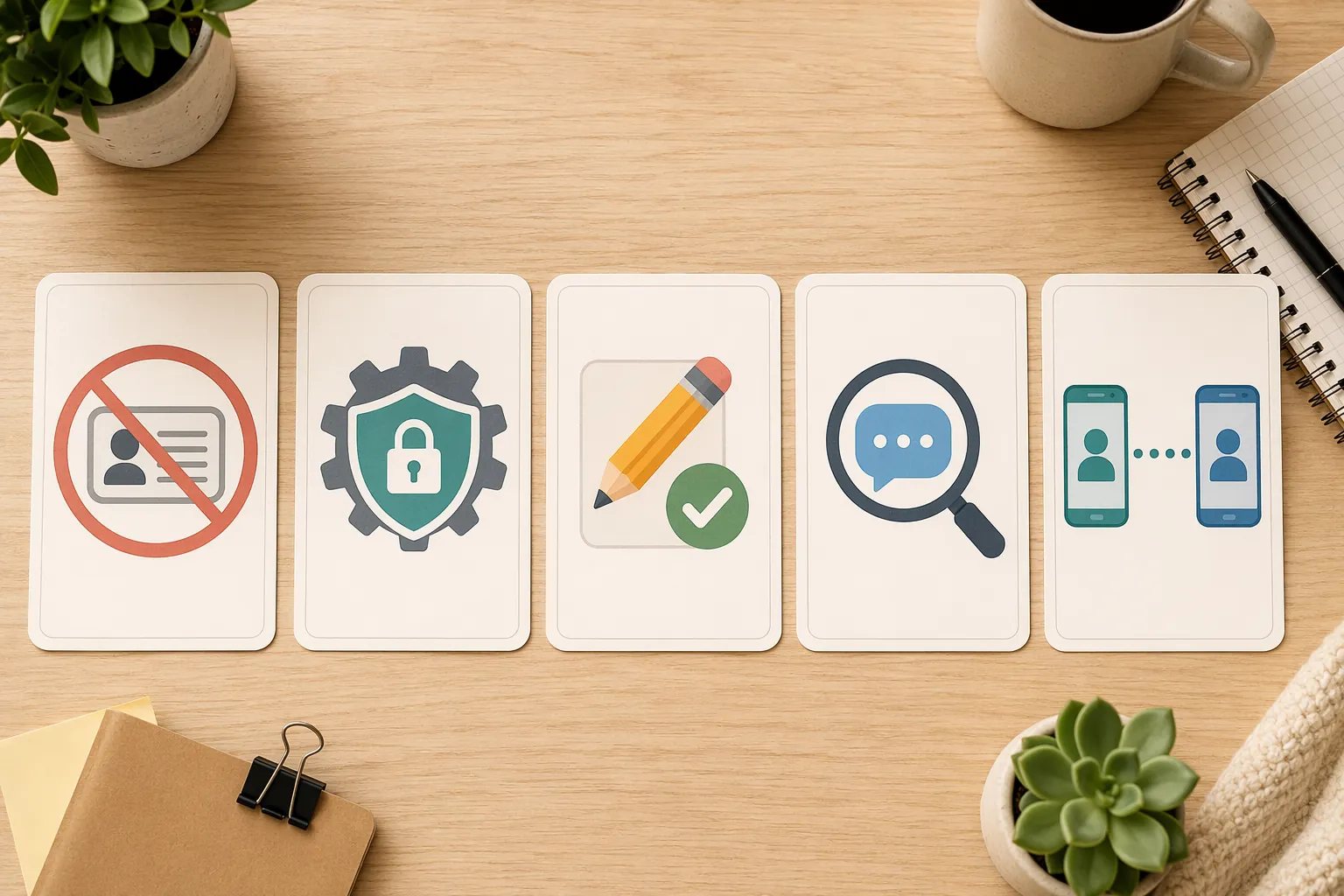
- Do not share personal identifiers. Keep Social Security numbers, Medicare numbers, bank details, passwords, full addresses, account numbers, insurance IDs, medical records, and legal papers out of ChatGPT.
- Reduce what the tool can remember or store. Use accountless access when available, turn off Memory if you have an account, opt out of training-data use where settings allow, and use Temporary Chat for sensitive-but-not-identifying questions.
- Treat every answer as a draft. Let ChatGPT rewrite, summarize, organize, or suggest questions, but verify medical, legal, financial, tax, insurance, and benefits information with a qualified person.
- Use it as a second pair of eyes for scams. Paste only the nonpersonal wording of a suspicious message and ask what warning signs it sees.
- Make a family verification rule. Use a spoken code word, call back on a known number, and never send money or account access because of a surprising call, text, email, or chat message.
If you remember nothing else, remember this: ChatGPT may help you think, but it should not receive the keys to your identity, your money, your benefits, or your health records.
Why These Habits Matter Now
Older adults are not standing outside this technology. OpenAI, summarizing AARP data, reported that AI use among adults 50 and older reached 30% in 2025, up from 9% in 2023.[1] That is a large enough change that families should talk about safe use before a problem arrives, not afterward.
The fraud background is just as important. The FBI’s Internet Crime Complaint Center reported $4.885 billion in elder fraud losses in 2024, a 43% increase from the prior year, with 147,127 complaints from victims age 60 and older; the FBI also notes that most cases go unreported.[2] Those numbers are not about ChatGPT specifically. They are the wider weather system around every suspicious message, fake support call, romance scam, investment pitch, and emergency request.
AI adds polish to that weather. A Think Global Health article on AI scams affecting older adults cites research that 82% of phishing emails now use AI to bypass traditional spam filters, and it describes McAfee findings that 1 in 4 adults had encountered AI voice scams; among people who received a voice clone message, 77% reported losing money in the $500 to $15,000 range.[3] These figures come from fast-moving security reporting, so they should be read as a warning about direction and capability, not as a permanent measure of every household’s risk.
There is also a plain human reason to use rules instead of shame. The same Think Global Health article cites Stanford research finding that older adults show a higher “truth bias,” meaning they may be less likely to be suspicious of AI-generated content.[3] That does not mean older people are careless. It means a convincing message, delivered at the wrong moment, can take advantage of ordinary trust.
What Never Belongs in ChatGPT
The most common unsafe moment is not dramatic. It is someone copying a real message into ChatGPT and saying, “Can you explain this?” That can be a fine use if the private parts are removed first. It becomes risky when the pasted message includes identifiers that connect directly to a person, account, claim, prescription, or payment.
| Do not paste | Safer way to ask |
|---|---|
| Social Security number, Medicare number, driver’s license number, passport number | “What does this type of notice usually mean? I removed my personal numbers.” |
| Bank, credit card, retirement, or investment account numbers | “This message claims my bank account is locked. What are the warning signs of a scam?” |
| Passwords, one-time codes, security questions, recovery links | Do not ask ChatGPT to handle these. Go directly to the official website or call the institution on a known number. |
| Full medical records, test results with identifiers, prescription labels, insurance cards | “Help me write questions to ask my doctor about a lab result. I will not include my name, date of birth, or record number.” |
| Legal papers, benefit notices, tax documents, estate documents | “Help me make a list of terms I should ask a lawyer, tax preparer, or benefits counselor to explain.” |
| Full address, date of birth, phone number, email address, names of relatives | Use placeholders such as [my city], [my daughter], [the company], or [the appointment date]. |
A good habit is to replace private details before pasting. “Dear Maria Gomez” becomes “Dear [my name].” “Your Medicare claim ending in 4421” becomes “your Medicare claim.” “Click here within 24 hours or your account will close” can stay, because that wording may help ChatGPT point out pressure tactics.
The line is simple: if you would not read it aloud to a stranger in a waiting room, do not paste it into ChatGPT.
Privacy Settings Reduce Exposure, But They Do Not Make the Chat Private
Privacy settings are worth using, but they are not a permission slip to share personal records. Stanford HAI reported that six major AI companies—OpenAI, Google, Meta, Microsoft, Amazon, and Anthropic—train on user conversations by default, which is why users should be careful about what they tell chatbots.[4]
Mozilla Foundation’s privacy guidance recommends using accountless mode when possible and turning off Memory in ChatGPT to limit data collection.[5] Those are practical steps, especially for someone who only wants occasional help rewriting a letter or understanding a message.
- Use ChatGPT without signing in when that option is available and the task is simple.
- If signed in, turn off Memory so the tool does not try to remember personal details across chats.
- Look for data controls that let you opt out of having your chats used to improve or train models.
- Use Temporary Chat for one-time questions you do not want attached to ordinary chat history.
- Recheck settings occasionally, because apps change menus, names, and defaults.
For caregivers helping a parent or older relative, this is a good place to sit together at the actual device. Do not just say, “Be careful.” Open the app, find the settings, and write down where the privacy controls are today. A printed note taped inside a desk drawer is often more useful than a long explanation of artificial intelligence.
Use ChatGPT for Drafts, Not Final Answers
ChatGPT is strongest when the job is language: make this clearer, make this shorter, turn this into questions, compare these two versions, help me sound firm but polite. Those are excellent uses for an older adult who wants more independence with letters, emails, complaint notes, appointment preparation, or confusing notices.
It is a different matter when the answer could change health care, money, benefits, housing, taxes, insurance, legal rights, or family safety. In those cases, ChatGPT can help prepare the conversation, but a person or official source must confirm the answer.
| Useful ChatGPT task | Who should verify before action |
|---|---|
| Rewrite a complaint letter to a utility company | You can review it yourself, then send it through the company’s official channel. |
| Summarize a Medicare, Social Security, insurance, or pension notice after removing identifiers | Call the agency, plan, benefits counselor, or trusted helper using a known number. |
| Make questions for a doctor visit | Ask the doctor, pharmacist, nurse, or clinic staff. |
| Explain general financial terms | Check with a fiduciary adviser, bank representative, tax professional, or trusted financial helper. |
| Explain legal wording in plain language | Ask a licensed attorney or legal aid office before signing or responding. |
A safe request sounds like this: “I removed my personal information. Please summarize this notice in plain English and list questions I should ask the agency before I do anything.” That keeps ChatGPT in the role of organizer, not decision-maker.
This article is for technology safety and general education. It is not medical, legal, financial, tax, or benefits advice. Use ChatGPT to prepare better questions, then take those questions to the right human being.
Let ChatGPT Help You Inspect a Suspicious Message
In September 2025, OpenAI and AARP announced a partnership that included a free scam-detection video teaching older adults to use ChatGPT as a “second pair of eyes” for suspicious messages.[1] That phrase is useful because it sets the right limit. A second pair of eyes can notice warning signs. It does not become the judge, bank, police department, or grandson.
Before pasting a suspicious message, remove names, phone numbers, addresses, account numbers, links that include personal codes, and anything that identifies you. Then ask ChatGPT to look for scam patterns.
I removed my personal information from this message. Please look for signs that it may be a scam. Tell me what seems suspicious, what I should verify, and what I should avoid clicking or sharing.The answer may point out urgency, threats, odd payment requests, unfamiliar links, spelling or formatting clues, emotional pressure, or instructions to keep the matter secret. Those are useful observations. The next step is still outside the chat: call the bank, agency, clinic, delivery company, or family member using a phone number you already trust.
Do not click a link from the suspicious message to “check.” Do not call the number inside the message to “make sure.” Scams often provide the fake doorway and then praise you for walking through it.
Voice Cloning Needs a Family Rule, Not Panic
The most unsettling AI scam is the voice that sounds like someone you love. A caller may claim to be a grandchild, adult child, friend, lawyer, police officer, or hospital worker. The story usually creates urgency: an accident, arrest, lost phone, frozen account, travel emergency, or medical bill.
This is where families need an agreement made in advance. Trying to invent a calm verification plan during a frightening call is asking too much of anyone.
- Choose a family code word or phrase that is easy to say and hard for outsiders to guess.
- Agree that any urgent money, gift card, wire transfer, cryptocurrency, account-login, or secrecy request requires a callback.
- Call back using a number already saved in your contacts, not the number that called or texted.
- If the person says they lost their phone, call another family member or trusted contact before doing anything.
- Write the rule down and keep it near the phone, computer, and tablet.
A spoken script helps: “I’m going to hang up and call you back on the number I have for you.” A real family member may be annoyed for a minute. A scammer may push harder. Either way, the rule holds.
Caregivers: Make the Agreement Before the Emergency
Adult children sometimes wait until after a close call to talk about scams and new technology. That conversation is much easier before embarrassment enters the room. If your family is already thinking about care planning, treat ChatGPT safety like any other preparedness habit: decide the rule while everyone is calm. CareWise Guide’s article on starting care conversations before a crisis follows the same practical idea.
The tone matters. “Let’s make sure you don’t get fooled” sounds insulting, even when it is meant kindly. “Let’s make one family rule so none of us has to decide under pressure” is better. It puts the burden on the scammer’s tactics, not on the older adult’s judgment.
A short printed checklist can be shared with visiting relatives, too. Families that already prepare the home for older guests may find it natural to add a technology-safety note alongside other routines; the same practical spirit appears in CareWise Guide’s guide to hosting an elderly guest safely.
A Safe Routine for Everyday Use
Here is a simple routine for the ordinary moments: a strange text, a confusing bill, a medical note, a bank alert, or an email that feels urgent.
- Pause before copying anything.
- Remove names, numbers, addresses, account details, links with personal codes, and medical or legal identifiers.
- Ask ChatGPT to summarize, rewrite, list questions, or identify warning signs.
- Do not act on high-stakes information until a real person or official source confirms it.
- For urgent money, account, or family emergency requests, use the family code word and call back on a known number.
That routine leaves room for curiosity. It lets an older adult use ChatGPT to write more clearly, prepare more confidently, and inspect suspicious messages without handing over private information or treating a fluent answer as proof.
The Family Verification Protocol
Write this down where it will be seen:
- Our family code word is: __________.
- If anyone asks for money, account access, gift cards, wire transfers, cryptocurrency, passwords, one-time codes, or secrecy, we stop.
- We hang up or stop replying.
- We call back using a number already saved in our contacts.
- We do not handle urgent money or account requests inside ChatGPT, through a surprising call, or from an unexpected text or email.
References
- OpenAI and AARP launch national initiative to help older adults spot scams with AI, OpenAI, September 2025.
- FBI Highlights Growing Number of Reported Elder Fraud Cases Ahead of World Elder Abuse Awareness Day, FBI.
- Helping Older Adults Navigate AI Scams, Think Global Health.
- Be Careful What You Tell Your AI Chatbot, Stanford HAI.
- How to Protect Your Privacy From ChatGPT and Other AI Chatbots, Mozilla Foundation.
Browse more in the Glossary.