
Caregiver decision guide
Plan for Cell Phone Outages Before Your Senior Travels
Learn how to prepare your aging parent for a cell phone outage before they travel. This guide covers backup devices, offline resources, and a communication plan so a carrier failure doesn't become a crisis.
In January 2026, a Verizon outage reportedly left millions of customers without service across multiple cities for more than 10 hours.[1] That is the kind of detail that changes a family travel plan. Not because every trip is likely to include a major carrier failure, but because it proves a basic point: “I’ll just call Mom” is not a plan if the phone network, phone battery, phone settings, or phone itself becomes unavailable.
For an older adult traveling alone, a cell phone outage rarely stays a neat technical problem. It becomes a missed pickup, a medication question, a rideshare that cannot be summoned, a hotel address nobody wrote down, or an adult child calling every relative who might know where the itinerary went. The work is not to survive the outage while everyone is already upset. The work is to make the trip harder to break before the suitcase closes.
There is a preparedness gap here. In a 2023 AARP survey of adults 50 and older, 60% said they felt prepared for a natural disaster, yet almost half did not have emergency phone chargers and only 12% followed local authorities on social media.[2] That survey was about disaster readiness, not senior travel specifically. Still, it matches what many caregivers discover the hard way: people often feel prepared until the backup has to be used.

Start With the Failure Points, Not the Gadget
A useful outage plan for senior travel begins with one question: if the primary phone stops working, what exact chain of backups keeps this person safe, reachable, and able to navigate?
That chain should be written around the actual trip, not around a list of devices. A parent flying to visit a sister in Chicago needs a different plan than a parent driving through rural areas, joining a cruise excursion, attending a medical appointment out of state, or traveling internationally with a tour group. The weak point might be cellular coverage, but it might also be eyesight, hearing, anxiety under pressure, a dead battery, a forgotten passcode, a medical device that depends on a network, or a hotel clerk who has no idea whom to call.
| Failure point | Pre-trip backup to prepare |
|---|---|
| Carrier outage or no signal | Wi-Fi calling enabled, alternate carrier option, local support contact, emergency-only tools |
| Dead phone battery | Charged battery bank, charging cable, wall plug, charging habit built into itinerary |
| Lost or locked phone | Printed contact packet, hotel and transportation details, backup copy with caregiver |
| Confusion under stress | Plain-language instruction card, one practiced call sequence, local person who has the same plan |
| Remote driving route | Stay-with-vehicle instruction, paper map or printed route, check-in windows |
| Medical dependency | Travel-compatible medical alert option, medication list, device power plan |
The order matters. Paper and people come first because they do not care which carrier is down. Power and phone settings come next because they keep the familiar device useful. Alternate networks, satellite features, hotspots, and medical alert devices can be valuable, but they belong inside the plan rather than replacing it.
Build the Paper Plan Your Parent Can Actually Use
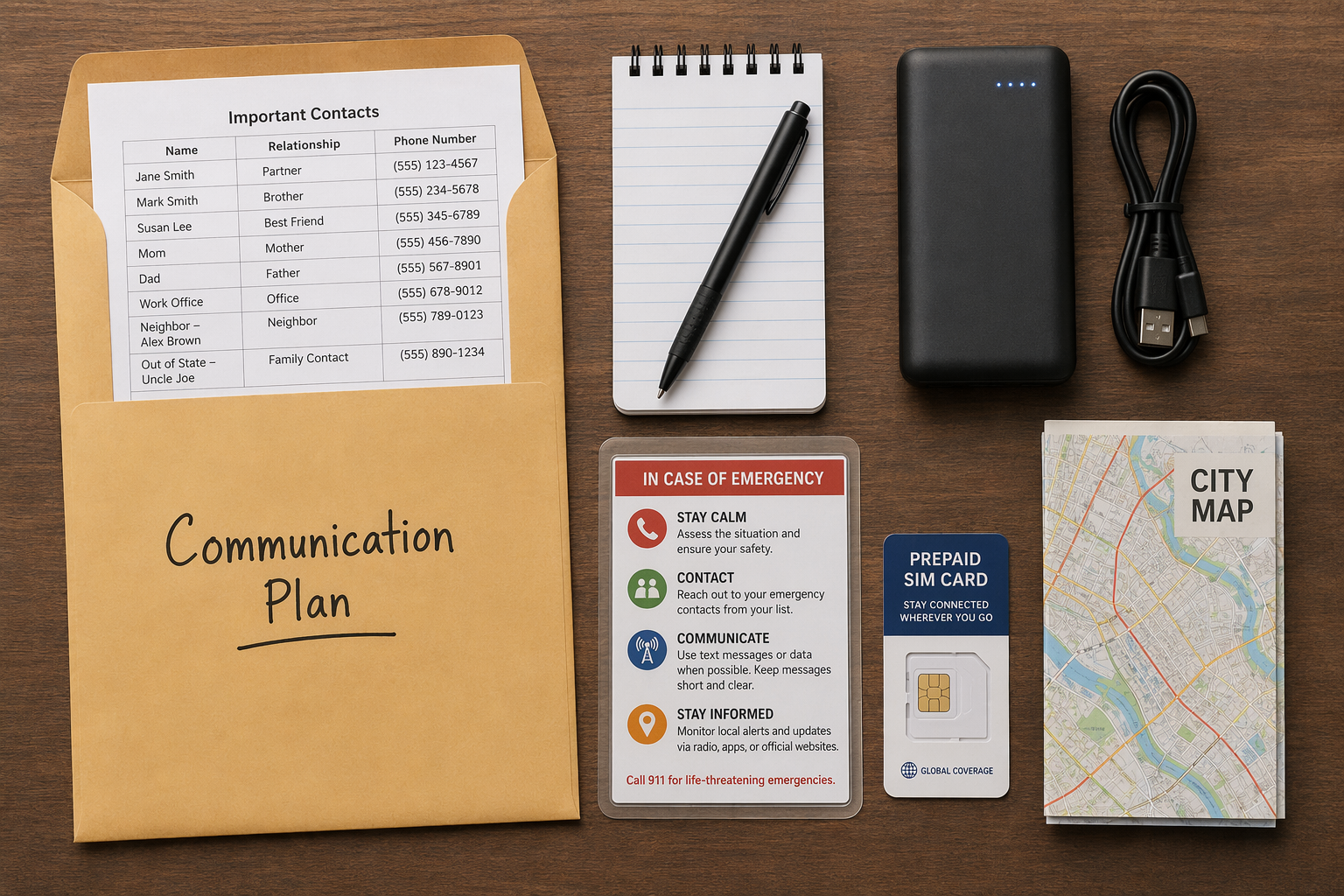
The physical backup packet is the least glamorous part of this plan and the one most likely to save the afternoon. It should live in the carry-on, not in checked luggage and not only in an email attachment. If your parent becomes embarrassed or flustered by instructions, make it look like ordinary travel paperwork rather than an emergency dossier.
- One-page emergency contact sheet with the caregiver, a second family contact, doctor or clinic, pharmacy, hotel, airline, tour leader, and local host.
- Printed itinerary with flight numbers, confirmation numbers, hotel address, transportation details, and check-in times.
- Medication list with drug names, doses, allergies, and key diagnoses written plainly enough for an urgent care desk.
- Short instruction card titled something like “If my phone does not work,” with three actions in order.
- A small amount of local cash if appropriate, a pen, and any important membership or insurance information needed during travel.
Do not make the first instruction “troubleshoot the phone.” Under stress, that is how an older traveler ends up changing settings they did not mean to change. A better first card is simple: “1. Go to the hotel desk, airline counter, tour leader, or police/fire station. 2. Ask them to call these two numbers. 3. Stay in this location until you reach one of us.”
For families already maintaining an emergency contact binder, this travel packet can be a trimmed version of that binder. The binder stays home with the caregiver; the travel packet carries only what a stranger or local helper would need in the first few minutes.
Prepare the Phone Before the Trip
The phone still matters. Most parents will reach for it first, and that is fine as long as the useful settings are already enabled. The mistake is assuming a setting can be found and turned on while standing at a curb with luggage.
Turn On Wi-Fi Calling
Wi-Fi calling can allow calls and texts over a Wi-Fi network even when there is no cellular signal, but it must be enabled in advance on iPhone or Android.[3] Do this at home, then test it somewhere predictable: connect to Wi-Fi, turn on airplane mode, re-enable Wi-Fi if needed, and place a call. The goal is not a perfect lab test. The goal is to make sure the parent has seen it work once before travel.
Write down where Wi-Fi is expected to be available: home airport, destination airport, hotel lobby, relative’s house, cruise terminal, senior center, or tour meeting point. If the hotel requires a room number or last name to join Wi-Fi, put that in the packet only if it is safe and appropriate to do so.
Explain “SOS” Without Making It Sound Like Full Service
If a phone displays “SOS” or “SOS Only,” it may still be able to make emergency calls even though regular carrier service is unavailable.[4] That is useful, but it is not the same as being reachable by family, opening a rideshare app, or receiving routine texts. Put the distinction in plain language: “SOS means call 911 if you are in danger. It does not mean your phone is working normally.”
Check Old Phones and Medical Devices for Network Dependence
If your parent uses an older phone, vehicle device, or medical alert device, confirm which network it uses before travel. This is especially important as older cellular networks are retired. If a device depends on outdated network technology, it may not fail politely; it may simply stop connecting. Caregivers facing that issue should treat it as a separate equipment problem, not merely a travel inconvenience.
Add Power Before Adding More Technology
A cell outage plan that ignores battery life is unfinished. AARP has recommended a portable battery bank of at least 10,000 mAh, noting that a unit around that size can recharge a smartphone two to three times and may cost about $40.[5] Prices change, and capacity claims vary by device, but the practical standard is simple: buy one your parent can lift, plug in, and recognize.
- Charge the battery bank fully the night before departure.
- Pack the correct cable in the same pouch, not in a different bag.
- Label the battery bank and cable if your parent will be around other travelers.
- Practice plugging the phone into the battery bank while seated, not during boarding.
- Add a charging stop to the itinerary for long airport waits or driving days.
If your parent travels with medical equipment, the power plan needs a second look. A phone battery bank does not solve oxygen, CPAP, refrigeration, scooter, or hearing aid charging problems. That is where a broader power outage preparedness plan belongs alongside the travel communication plan.
Match Backup Channels to the Route
This is where generic advice usually goes soft. “Have a backup” is not enough. The backup has to fit where the older adult will be, what they can use without coaching, and who will respond on the other end.
City, Hotel, and Family-Visit Trips
For a trip built around airports, hotels, relatives, and urban transportation, the strongest backups are often ordinary: Wi-Fi calling, printed addresses, a hotel desk that has the caregiver’s number, and a local relative who knows the arrival window. If your parent can comfortably connect to Wi-Fi, that may matter more than buying another device.
A backup SIM or eSIM on a different carrier can reduce dependence on one network. One example cited in consumer tech coverage was a low-cost prepaid Red Pocket option using AT&T’s network when the primary phone was on Verizon, at about $30 per year at the time of reporting.[6] That kind of setup can be useful, but only if the caregiver confirms compatibility, installs it before the trip, labels which line to use, and verifies current pricing.
Rural Drives and Remote Areas
For driving routes with long gaps in coverage, printed directions and check-in windows become more important. AAA advises that when someone is stranded without cell service in a vehicle, the safest option is usually to stay with the vehicle because it provides shelter and is easier for rescuers to locate than a person on foot.[7] That sentence belongs on the instruction card if your parent is driving through rural areas.
A hand-crank or solar NOAA weather radio can also make sense for road trips, camping, or areas where storms may disrupt power and cellular service. AARP has discussed hand-crank and solar radio options as tools that work independently of cellular networks.[5] This is not a must-pack item for every airport weekend, but it is reasonable for trips where weather and isolation overlap.
International Travel
International trips need more advance work because roaming, Wi-Fi access, emergency numbers, and satellite feature availability vary by country. Do not assume a feature that works at home will work the same way abroad. Put the local emergency number, hotel address in the local language if appropriate, embassy or consulate information when relevant, and the tour operator’s local contact in the paper packet.
For international trips where safety advisories are part of the planning, the cell outage plan should sit beside the broader senior travel safety plan rather than trying to carry every risk by itself.
Use Satellite Tools Carefully, Not Magically
Satellite emergency features are worth knowing about, especially for remote travel, but they are easy to overestimate. Apple’s Emergency SOS via satellite is available on iPhone 14 or newer models and is designed to contact emergency services when cellular and Wi-Fi coverage are unavailable.[8] Apple says users need a clear view of the sky and horizon; messages may send in about 15 seconds under ideal conditions, but can take more than a minute under light foliage.[8]
That means it is not a casual replacement for calling your daughter from baggage claim. It is an emergency tool with conditions: compatible phone, supported location, charged battery, clear sky, and a traveler who can follow on-screen instructions. If your parent has an iPhone 14 or newer, review the satellite SOS demo before departure. Do not wait for a real emergency to discover that the feature requires pointing the phone toward a satellite.
Android satellite options also exist, including satellite SOS on Google Pixel 9 devices, but availability and documentation vary by device and market. T-Mobile’s T-Satellite, using SpaceX Starlink, has also been reported as a standalone satellite messaging option at $15 per month, independent of the customer’s primary carrier.[4] That may be useful for some travelers, but the same rule applies: verify current availability, test what can be tested before the trip, and write down when to use it.
Portable hotspots can fill a different gap. Consumer tech reporting has cited options such as Solis Lite with a device cost around $100 and included lifetime data, and a Starlink Mini emergency-only plan reported around $5 per month.[9] Those details are price-sensitive and should be checked before purchase. More importantly, a hotspot does not help if the traveler does not know when it is charged, how to turn it on, or which Wi-Fi name to choose.
Decide Whether a Medical Alert Device Belongs in the Plan
Some older adults travel with medical alert devices, and some systems use cellular connections rather than a home landline. That can matter because nearly 75% of U.S. adults live in wireless-only households, according to federal survey data cited in medical alert system coverage.[10] A cellular medical alert device may travel better than a home-based landline system, but caregivers should confirm the device’s service area, battery life, charging routine, fall detection assumptions, and what happens if the cellular network is unavailable.
Avoid treating the device as a private rescue team in the suitcase. It is one channel. The call center still needs current contacts. The traveler still needs to wear or carry the device. The caregiver still needs to know whether the device works at the destination. If the parent will be on a cruise ship, in another country, or in a rural area, call the provider before the trip and ask specific coverage questions.
Give Local Humans the Same Plan
A communication plan is much stronger when someone near the traveler has a copy. That person may be a relative, neighbor, hotel front desk manager, tour leader, cruise staff member, church group coordinator, or transportation contact. They do not need the whole family medical history. They need to know whom to call and what counts as unusual.
- For a hotel stay, ask whether the front desk can note the caregiver’s name and phone number on the reservation.
- For a family visit, give the local relative the same itinerary and missed-check-in rules.
- For a group trip, identify the tour leader or organizer who should be contacted first.
- For a driving trip, choose check-in points tied to locations, not just clock times.
- For a medical trip, make sure the clinic has the caregiver’s contact and permission details where appropriate.
This is also where families should define the waiting period. If Dad usually forgets to text after landing, a missed message should not trigger panic in 10 minutes. But if he has not reached the hotel two hours after the scheduled arrival and the front desk says he has not checked in, that is different. Write the threshold down so nobody has to invent it while anxious.
Rehearse the Plan Without Turning It Into a Lecture
The rehearsal should be short enough that your parent will actually tolerate it. Sit at the kitchen table or in the car and walk through one realistic scenario: “Your phone says no service when you land. What do you do first?” Then let them use the paper card. If they skip a step, fix the card instead of scolding the person.
The point is not to make your parent memorize a technical sequence. The point is to make the next action obvious when stress has already narrowed their attention. A parent who can say, “I go to the desk and ask them to call this number,” is better prepared than one who owns three backup devices but has never opened the pouch.
- Have them find the contact packet in the carry-on.
- Have them identify the first and second person to call.
- Have them plug the phone into the battery bank.
- Have them make one Wi-Fi call if Wi-Fi calling is part of the plan.
- Have them explain when they should ask a local person for help.
The Pre-Departure Check
Do this final check close enough to departure that it reflects the real trip, but not so late that every missing cable becomes a midnight errand.
- Printed packet is in the carry-on, with a second copy held by the caregiver.
- Wi-Fi calling is enabled and tested on the travel phone.
- Battery bank, wall charger, and correct cable are charged, packed, and labeled.
- Local support person, hotel desk, tour leader, or relative has the caregiver’s number and the basic plan.
- Backup channel is chosen for the route: alternate SIM, hotspot, satellite SOS, medical alert device, NOAA radio, or none if paper and local support are enough.
- Parent has practiced the first three actions and can follow the instruction card without coaching.
If the trip has bigger risks, add the right neighboring plan: a general senior travel safety guide for the itinerary, an emergency contact binder for documents, a long-distance first-hour response plan in case prevention fails, a 2G shutdown check for older devices, or a power outage plan for medical equipment. The safest setup is not the fanciest device. It is a redundant communication system made before the trip, while everyone can still think clearly.
References
- Verizon Outage Affects Millions Across Multiple Cities — Techlicious, January 2026.
- AARP 2023 Disaster Preparedness Survey of Adults 50+ — AARP, 2023.
- Wi-Fi Calling Setup Guidance — Techlicious; WhistleOut.
- SOS Only and T-Mobile T-Satellite Coverage — WhistleOut, October 2025.
- Emergency Preparedness Tech for Older Adults — AARP, January 2025.
- How I Prepared for the Next Major Cell Phone Outage — How-To Geek, January 2026.
- What to Do If You Are Stranded Without Cell Service — AAA Club Alliance, June 2025.
- Use Emergency SOS via Satellite on Your iPhone — Apple Support.
- Starlink Mini Emergency-Only Plan and Solis Lite Hotspot Coverage — How-To Geek, July 2025.
- Medical Alert Systems and Wireless-Only Household Data — SeniorLiving.org, April 2026; CDC/NCHS.
Questions to bring to a clinician or OT
This is not medical, legal, or a family's final decision — only a framework. Bring these questions to a clinician, occupational therapist, or your local Area Agency on Aging.
Find Local HelpRelated reading
Noticed something outdated or inaccurate on this page? Flag a correction. We review every report against CDC, NIA, and AARP HomeFit guidance before updating a page.