
Caregiver decision guide
Should you get your parent a smartwatch or a medical alert watch?
A comparison guide to help caregivers decide between a dedicated medical alert watch and a conventional smartwatch for an older adult, covering fall detection accuracy, cost, battery life, and ease of use based on the senior's specific needs.
You may be searching for the best smartwatch for seniors 2025 comparison, but the first decision is whether your parent needs a smartwatch at all.
That sounds like a small distinction until the device is expected to work on the worst day: a parent is on the floor, rattled, maybe embarrassed, maybe not fully able to explain what happened. A conventional smartwatch and a medical alert watch can both sit on a wrist and both can advertise safety features. They do not behave like the same kind of tool.
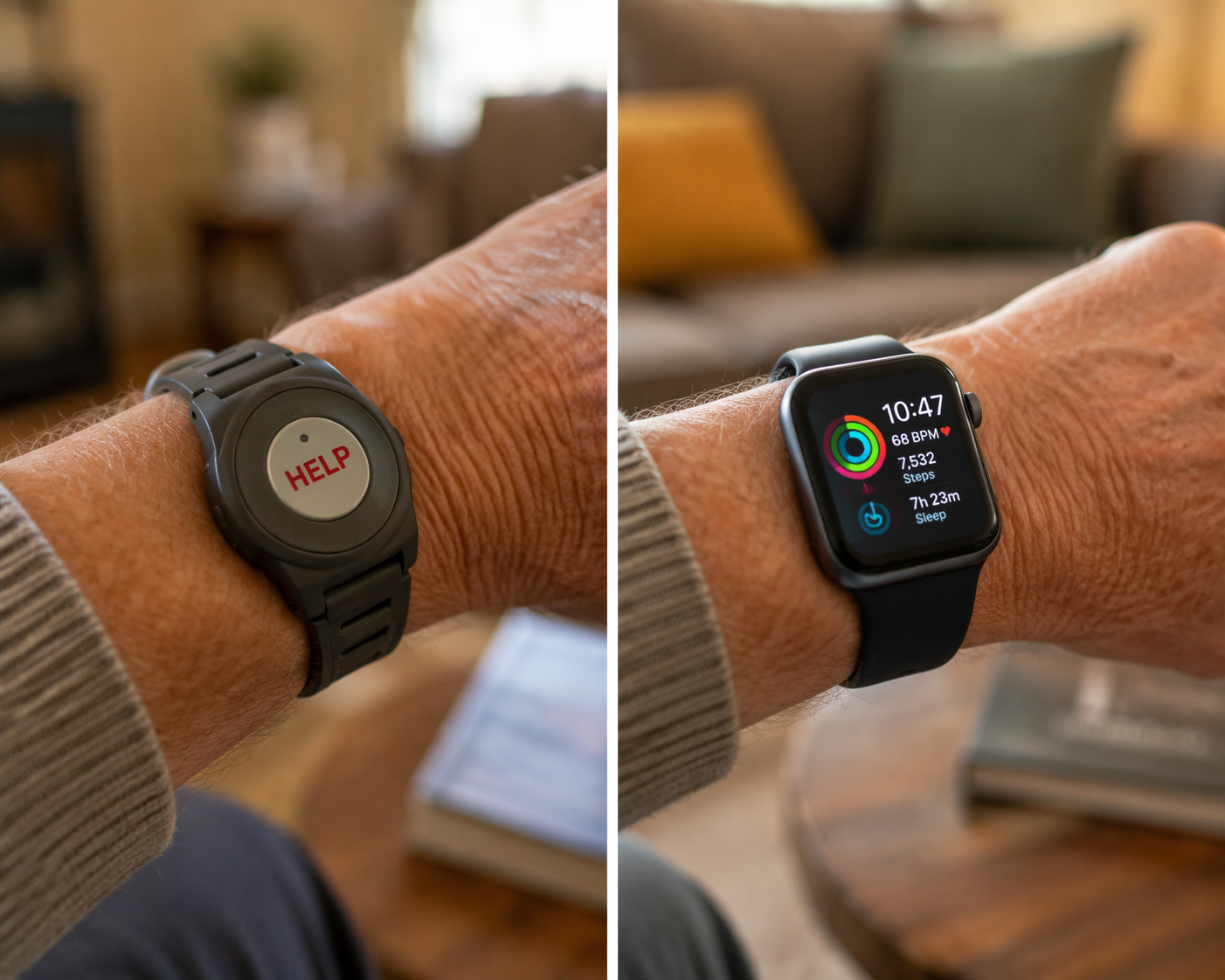
A medical alert watch is built around emergency response: a help button, fall detection options, GPS location features, and a monitoring center that can talk through what is happening. A conventional smartwatch is built around a broader technology ecosystem: health tracking, phone integration, apps, notifications, and emergency calling that usually routes directly to 911 rather than to a monitoring-center operator.
That category choice matters more than the annual model year. A 2025 buying search can still be answered with 2026 testing because the durable issue is not whether one watch face looks cleaner than another. It is whether your parent can wear, charge, understand, and use the device when something goes wrong.
Start With Your Parent, Not the Watch
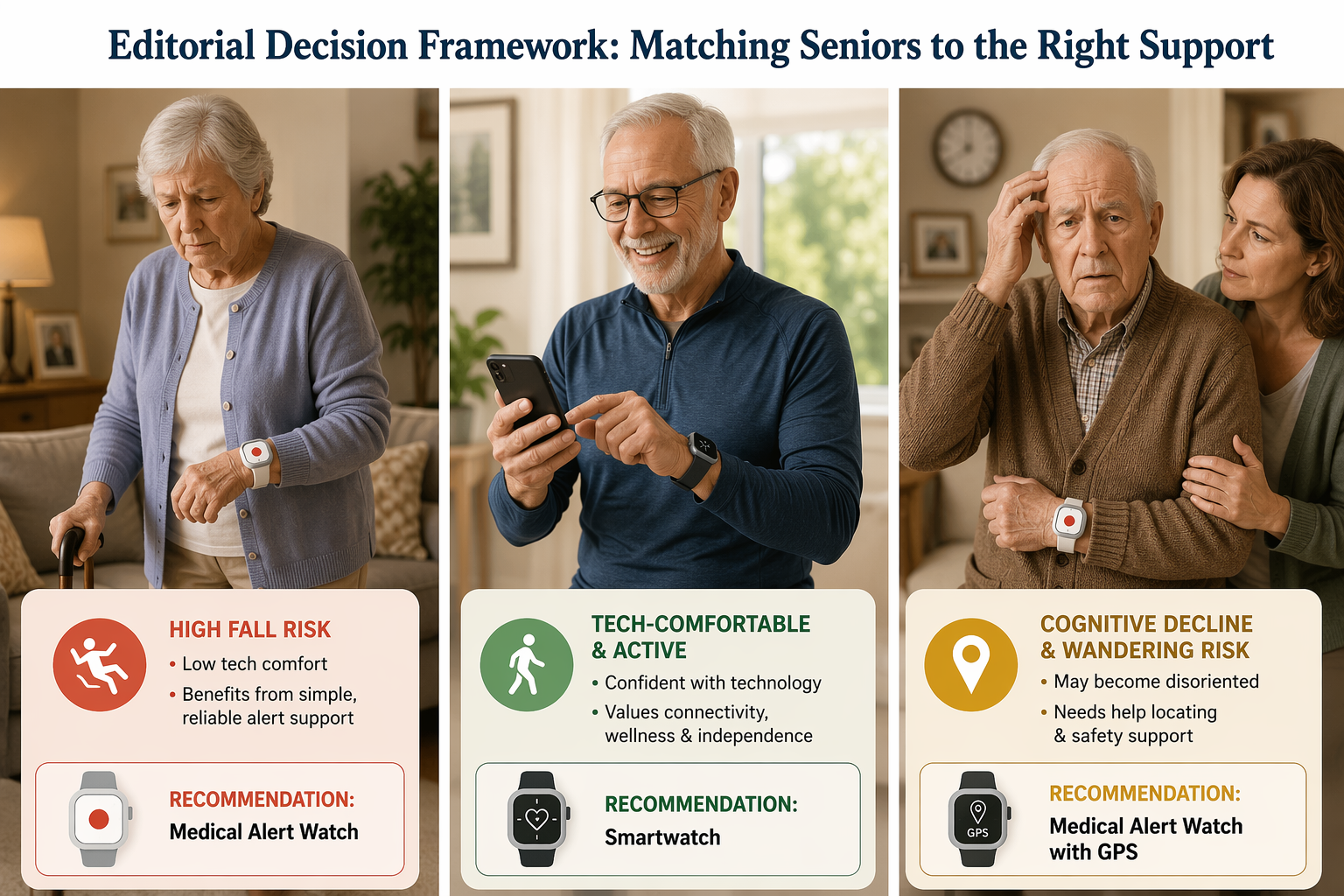
The quickest way to narrow the decision is to place your parent into one of three practical profiles. Real people are messier than categories, but this frame keeps the family from buying a beautiful device for the wrong problem.
| Parent profile | Better starting category | Why it usually fits |
|---|---|---|
| Tech-averse, high fall risk | Medical alert watch | The main job is fast emergency help with the fewest steps for the older adult. |
| Tech-comfortable, active smartphone user | Conventional smartwatch | The parent may actually use broader health features, notifications, and phone-connected tools. |
| Cognitive decline or wandering risk | Medical alert watch with GPS or geofencing features | Location support and caregiver visibility may matter more than fitness metrics or apps. |
If your parent recently fell and you are still sorting out what changed, it may help to separate the immediate recovery work from the device decision. A wearable is not a substitute for checking injuries, medication changes, mobility, hydration, or the conditions that made the fall more likely. For that first urgent window, see what to do in the first 24 hours after an elderly parent falls.
Once the immediate crisis is stable, the watch decision becomes more honest. You are not buying reassurance in the abstract. You are choosing who responds, how much your parent has to do, how much the family can monitor, and what trade-offs everyone can tolerate every day.
The Fall Detection Question Is Not Just Accuracy
Fall detection is the feature families tend to ask about first, and rightly so. It is also the feature most likely to be misunderstood. A watch does not detect every fall. It tries to identify motion patterns that look like a fall, and those patterns are easier to recognize when the fall is hard, sudden, and close to what the device was trained or tested to catch.
In SafeHome.org's 2026 testing, each device was tested against 10 simulated falls. Medical Guardian MGMove detected 9 of the 10 simulated falls, and Bay Alarm SOS detected 8. Apple Watch detected 6, and Samsung Galaxy Watch 7 also detected 6.[1]
Those results are useful, but they should not be treated like a promise about your parent's living room. Simulated falls are not the same as a real fall by an older adult who may slide from a chair, crumple slowly, brace against furniture, or faint without a dramatic impact. NCOA specifically cautions that smartwatch fall detection may miss softer fall patterns, which may not work well for people at higher risk of falls.[2]
That is why the decision cannot stop at the detection number. The next question is what happens after the device thinks a fall occurred.
Monitoring Center vs. Direct 911 Calling
A medical alert watch generally connects the user to a monitoring center. The operator can speak with your parent, assess whether emergency services are needed, contact family or neighbors according to the response plan, and provide context when help is dispatched. NCOA reports average response times of 29 seconds for MGMove and 22 seconds for Bay Alarm.[2]
A conventional smartwatch emergency workflow is different. SeniorLiving.org describes smartwatch fall detection as triggering a 30-second countdown before calling 911 directly; there is no monitoring-center triage layer in that model.[3]
Direct 911 calling can be exactly what an active, tech-comfortable parent wants. It is simple in another way: emergency services are contacted. But for a parent who may panic, forget why the watch is talking, accidentally cancel an alert, or need a family contact looped in before an ambulance is sent, the absence of a human triage layer is not a minor feature difference.
This is where the high-fall-risk profile usually points toward a medical alert watch. Not because fall detection is perfect. It is not. The reason is that the whole device is organized around the emergency moment, including the part after the sensor fires.
Daily Usability Decides Whether the Device Exists in Real Life
A watch that is too confusing, too fussy, or too easy to leave uncharged is not a safety device. It is a family argument with a screen.
This is the part that gets underplayed in many product comparisons. A caregiver can compare fall detection, ECG, oxygen saturation, step counts, app stores, and display brightness for hours. Then the parent tries to close the band with stiff fingers, misses the tiny charger puck at bedtime, or dismisses an alert because the screen changed too quickly.
The adoption context matters. A 2024 article in Global Cardiology Science & Practice reported that only about 3% of wearable device users are 65 or older. The same source cited a 2020 survey of 600 seniors in which 75% self-reported low experience with smartwatches; that survey is older by 2026, so it should be read as directional rather than a fresh measurement of current comfort.[4]
The point is not that older adults cannot use smartwatches. Many can, and some prefer them. The point is that technology familiarity has to be treated as a safety variable, not a personality flaw. If your parent already uses a smartphone, manages Bluetooth headphones, understands notifications, and likes checking health data, a conventional smartwatch may fit naturally. If your parent avoids updating their phone, struggles to answer calls, or gets upset when an interface changes, a simpler medical alert watch starts to look less basic and more appropriate.
For families already seeing this friction with phones, tablets, or logins, the watch decision belongs inside a larger technology-support plan. The goal is not to force confidence by buying another device. It is to reduce the number of moments where your parent has to interpret a screen under stress. See helping an older adult use technology for the broader caregiver side of that problem.
Battery Life Is a Care Routine, Not a Spec
Battery life is another place where the safer-looking product can fail quietly. NCOA reports medical alert watch battery life in the 6-to-24-hour range. Conventional smartwatch battery life varies widely, from about 18 hours for Apple Watch to up to 14 days for Amazfit GTR 4. NCOA recommends at least 24 hours so users do not have to worry about the device dying during the day.[2]
A watch with a short battery may still work if the charging routine is realistic. That means somebody knows when it charges, where the charger sits, what happens during showering or sleep, and whether the older adult can reattach it without help. If the watch spends two hours a day on a charger and your parent's highest-risk time is walking to the bathroom alone, the family needs to notice that gap before calling the device a solution.
The Band Can Be the Dealbreaker
Bands and clasps look like comfort details until arthritis enters the room. SafeHome.org and NCOA testers reported struggles with metal-pin clasps on MGMove, Bay Alarm SOS, and Samsung Galaxy Watch 6. Fitbit Versa 4's rubber stop band and Apple Watch's magnetic band were rated easier.[1][2]
That does not make one category automatically better on band design. It means the family should test fastening and removal with the actual older adult, preferably at the time of day when hands are stiff or tremor is worse. A medical alert watch with better emergency response still fails if your parent cannot put it back on after charging.
What Each Parent Profile Really Needs
Tech-Averse and High Fall Risk
This is the parent who makes the smartwatch idea emotionally tempting and practically risky. Maybe they fell once already. Maybe they live alone. Maybe they carry a phone inconsistently. Maybe they insist they are fine but move through the house by touching furniture.
For this profile, a dedicated medical alert watch is usually the safer starting category. The watch should be judged on fall detection availability, monitoring-center response, GPS location, battery routine, button clarity, water resistance if shower risk is part of the concern, and how easily the older adult can put it on and take it off.
The family should also decide what counts as success. If success means professional triage after a fall, a conventional smartwatch without monitoring is not providing the same service. If success means your parent can press one obvious button without opening an app, a feature-rich smartwatch may be asking too much at the exact wrong moment.
Tech-Comfortable, Active, and Already Using a Smartphone
A conventional smartwatch can make sense for an older adult who already lives comfortably with phone-based technology. This parent may want workout tracking, heart-related features, medication reminders, messages, maps, and phone integration. They may be willing to charge daily and may prefer a device that does not label them as frail.
For this profile, the key question is whether the safety workflow is acceptable. If the watch detects a fall, the parent must tolerate the countdown and understand what happens next. If they use cellular features, the family needs to confirm the monthly line cost and coverage. If the phone is required for certain functions, the parent has to keep the phone charged and nearby when needed.
This is the profile where broader health features have more value. They are not just decorative metrics if the older adult will actually look at them, discuss them with clinicians when appropriate, and keep the watch on because it feels useful beyond emergencies.
Cognitive Decline or Wandering Risk
When memory loss, confusion, or wandering is part of the picture, the watch decision changes again. The family is no longer only asking, "Can Mom call for help?" They are asking whether someone can locate her, whether alerts can reach caregivers, and whether the device can work when she does not understand that she needs help.
A medical alert watch with GPS or geofencing features is usually the better starting point for this profile. AARP's guidance on medical alert and monitoring systems includes GPS location features among the options families may evaluate, especially when monitoring needs extend beyond a button press.[5]
This is also where privacy and consent cannot be treated as fine print. If your parent can still participate in the decision, explain what location sharing does, who can see it, when alerts happen, and how the device will be used. If cognitive decline limits consent, the family should involve the legally appropriate decision-maker and use the least intrusive monitoring that still addresses the real safety risk.
Cost: What the Family Is Actually Paying For
Medical alert watches and conventional smartwatches have different cost structures, which is why simple price comparisons can mislead. Medical alert watches commonly cost $29.95 to $84.95 per month, with fall detection adding about $10 per month. Conventional smartwatches commonly cost $250 to $799 upfront, with $0 to $15 per month for cellular service, but they do not include a monitoring center.[1][2][3]
| Cost question | Medical alert watch | Conventional smartwatch |
|---|---|---|
| Main payment pattern | Recurring monthly monitoring fee | Higher upfront device cost |
| Fall detection cost | Often an added monthly charge | Usually part of the watch feature set when supported |
| Emergency response | Monitoring center triage | Direct emergency calling, often 911 |
| Broader health and app features | Limited compared with smartwatches | Stronger phone, app, and health ecosystem |
The recurring fee is frustrating if all you see is the hardware. It makes more sense when you name what it buys: a staffed response workflow. If your parent needs that workflow, the monthly fee is not just a subscription; it is part of the safety model. If your parent does not need it and mainly wants health tracking plus emergency calling, a conventional smartwatch may be the better value.
The opposite mistake is also common: buying the smartwatch because it has no monitoring fee, then discovering the family expected someone to interpret emergencies, call relatives, and provide context. A direct 911 call is not the same purchase as professional triage.
A Watch Is Only One Layer of Home Safety
Wearables get attention because they are visible and personal. They are still only one layer. A parent who falls because of poor lighting, loose rugs, unstable bathroom transfers, medication side effects, or rushing to the toilet at night may need changes that no wrist device can make.
If the family is building a broader safety plan, compare the wearable with other monitoring and home-safety options rather than letting it carry the whole burden. The larger category map in technology that supports aging in place can help separate emergency alerts, passive monitoring, communication tools, and caregiver-support systems. For physical products beyond wearables, see how to evaluate home safety products for seniors.
How to Make the Decision Without Turning It Into a Brand Tournament
Device-review sites can be useful for testing notes, response times, costs, and usability observations. They can also carry affiliate relationships and product-ranking incentives. Use their measurements; do not let their "best overall" label make the family decision for you.
A caregiver-ready comparison should move in this order:
- Choose the category first: medical alert watch or conventional smartwatch.
- Match the category to fall risk, tech comfort, cognitive status, and whether your parent lives alone.
- Check the response model: monitoring-center triage or direct emergency calling.
- Test the daily routine: charging, fastening the band, reading the screen, pressing the button, and understanding alerts.
- Price the full year, including monitoring fees, fall detection add-ons, cellular service, replacement bands, and warranty needs.
- Set privacy and consent rules before enabling GPS, geofencing, caregiver dashboards, or location sharing.
For a tech-averse parent with high fall risk, the medical alert watch is usually the safer fit. For a tech-comfortable, active older adult who already uses a smartphone and wants broader health features, a conventional smartwatch can make sense. For cognitive decline with wandering risk, the decision usually moves back toward a medical alert watch with GPS or geofencing, handled with explicit attention to consent and caregiver access.
Some families will not get everything they want in one wearable. The device that is best for professional emergency response may not be the best health-tracking watch. The watch with the richest health ecosystem may not provide the response workflow a frailer parent needs. Naming that gap is better than pretending a sleek wrist device can cover every monitoring, safety, and health-management need.
References
- Best Medical Alert Watches of 2026: Expert Tested, SafeHome.org
- The Best Medical Alert Watches of 2026: Expert Reviewed, NCOA
- The Best Smartwatches for Seniors, SeniorLiving.org
- Wearable health monitoring: wave of the future or waste of time?, Global Cardiology Science & Practice
- How to Choose a Medical Alert or Monitoring System, AARP
Questions to bring to a clinician or OT
This is not medical, legal, or a family's final decision — only a framework. Bring these questions to a clinician, occupational therapist, or your local Area Agency on Aging.
Find Local HelpRelated reading
Noticed something outdated or inaccurate on this page? Flag a correction. We review every report against CDC, NIA, and AARP HomeFit guidance before updating a page.