Remote Monitoring for Long-Distance Caregivers: How to Keep Your Parent Safe from Afar
Learn about the six types of remote monitoring tools that help long-distance caregivers keep aging parents safe at home. This guide explains how to choose the right tools based on your parent's specific risks and acceptance level, and what monthly costs to expect.
By Editorial Team
new caregiver
experienced caregiver
long-distance caregiving
spousal caregiver
working caregiver
daily routines
medication management
personal hygiene
care coordination
first steps
ADLs
IADLs
Remote monitoring for long distance caregivers starts to sound urgent the first time a parent says, “I’m fine,” and you realize that answer tells you almost nothing. Did they take morning medication? Are they eating? Did they get up today? If they fell in the hallway, would anyone know before tomorrow?
The first useful correction is this: remote monitoring is not one device, and it is not the same thing as putting cameras in your parent’s home. It is a set of tools that can notice different kinds of trouble from a distance. Some tools require your parent to wear or press something. Some sit quietly in the home. Some only help if a person on the other end actually responds.
That distinction matters because the buying question is usually framed wrong. The question is not, “What is the best monitoring device?” It is, “What risk are we trying to catch, and what kind of monitoring will my parent actually accept?”
You are not unusual if you are trying to make that decision from another city. AARP describes the challenges of caregiving from an hour or more away, and the AARP/NAC Caregiving in the US 2025 report counted 63 million family caregivers in the United States, with more than 10% living at least that far from the person they support. That same report found caregiver use of remote monitoring rose from 13% in 2020 to 25% in 2025.[1][2]
Those numbers explain why more families are shopping for help. They do not tell you what to buy. For many families, the highest-return starting point is still plain: a medical alert system with fall detection. A fall is urgent, common enough to plan for, and one of the clearest situations where a remote alert can change what happens next.
The Six Tool Categories Are a Decision Map, Not a Shopping List
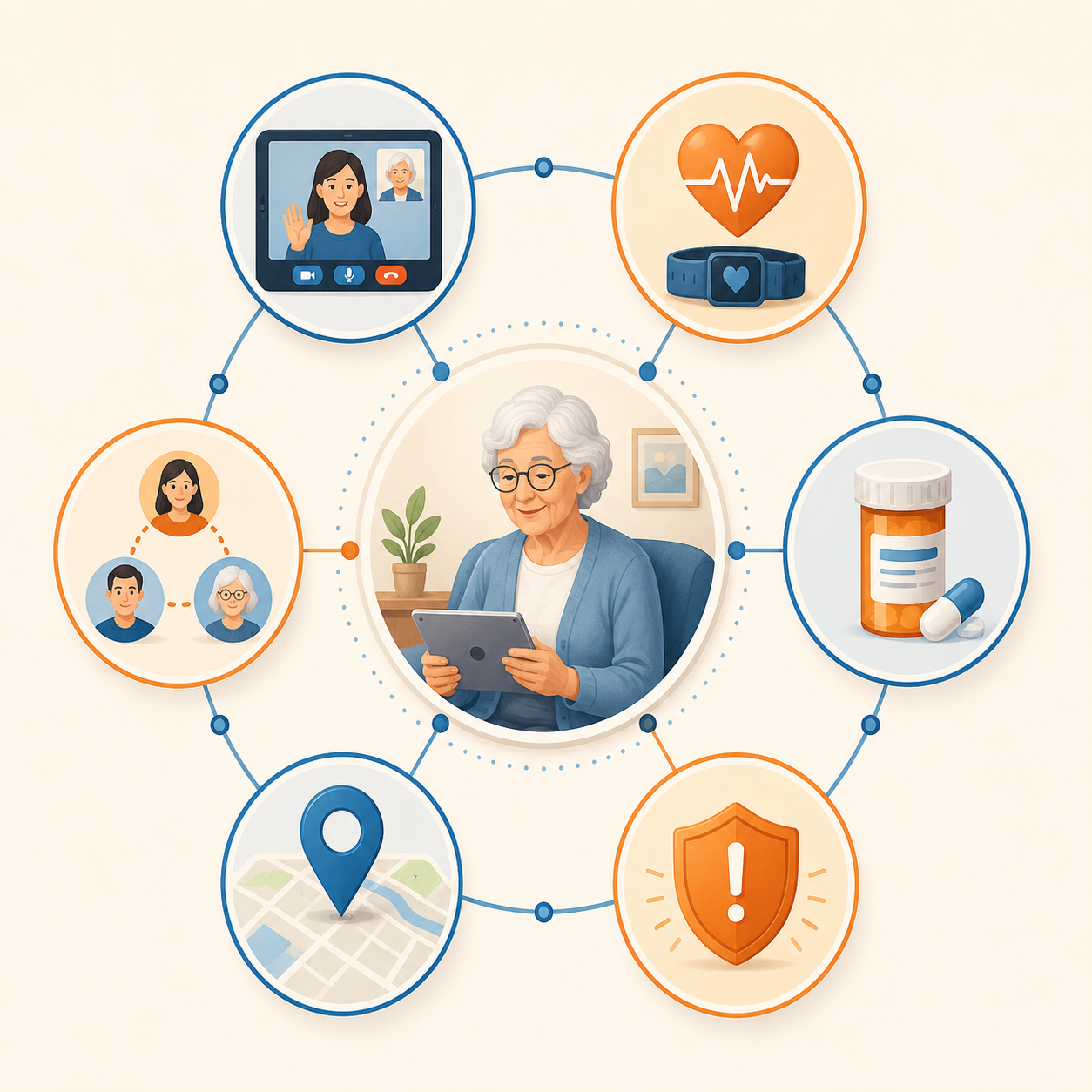
A useful 2026 framework separates remote monitoring into six broad categories: video communication, health monitoring devices, medication management tools, medical alert systems with fall detection, GPS tracking, and care coordination platforms.[3] The categories overlap in real products, but they help families stop comparing devices that solve different problems.
Tool category
Main problem it catches
Main acceptance issue
Video communication
Lack of visual check-ins and social contact
Parent may dislike scheduled calls or feel inspected
Health monitoring devices
Changes in readings such as blood pressure, weight, oxygen, or glucose when clinically relevant
Parent must measure correctly and consistently
Medication management
Missed, doubled, or late doses
Parent may resist locked dispensers or reminders
Medical alerts with fall detection
Falls and urgent help needs
Parent must wear the device or accept sensors
GPS tracking
Wandering, getting lost, or unsafe travel
Parent may see it as surveillance
Care coordination platforms
Family confusion about tasks, visits, notes, and alerts
Everyone has to use the same system
The table is not a recommendation to buy all six. It is a way to ask a cleaner question at the kitchen table: which failure point would hurt your parent first if nobody noticed?
Video Communication
Video calls are often the least dramatic form of monitoring, which is part of their value. A regular video check-in lets you see whether your parent looks weaker, confused, unwashed, unusually tired, or reluctant to move around the room. It also gives the parent something many devices cannot provide: a familiar human being.
Video does not solve emergencies by itself. If your parent falls after the call ends, the tablet on the counter will not help. If they stop answering, you still need a response plan: call a neighbor, request a welfare check, contact a local sibling, or drive over. Video is best when the main problem is too little contact, mild isolation, or uncertainty about how your parent looks and sounds day to day.
The acceptance barrier is emotional more than technical. Some parents enjoy a standing evening call. Others experience it as being checked up on. A scheduled call framed as family contact usually lands better than a surprise “show me the kitchen” inspection.
Health Monitoring Devices
Health monitoring devices include connected blood pressure cuffs, scales, pulse oximeters, glucose devices, and similar tools. They make sense when a clinician has already told the family that a number matters and that someone will review it. Without that second half, the device can become a drawer full of anxiety.
For a long-distance caregiver, the practical question is not whether the device can transmit a reading. It is who looks at the reading, how often, and what happens when it changes. A daughter seeing a high blood pressure value at midnight is not the same thing as a nurse-run monitoring program with clinical protocols.
This category fits best when your parent can take readings reliably or has local help. It fits poorly when the parent forgets steps, changes technique each time, or becomes frightened by every number. Remote health data can be useful, but it is not automatically medical oversight.
Medication Management
Medication tools range from reminder apps to locked automatic dispensers. This category becomes important when the real risk is not a fall but a pillbox that tells a different story every time someone visits: missed doses, extra doses, pills mixed together, or refills that run out unnoticed.
A good medication setup reduces the number of decisions your parent has to make. The strongest versions dispense the right dose at the right time and can notify a caregiver if the dose is not taken. That notification still needs a response rule. One missed vitamin may not require a phone tree. A missed heart medication or insulin-related step may.
The acceptance issue is control. A parent who has managed their own prescriptions for decades may hear “locked dispenser” as “you don’t trust me.” If the medication history is messy but not yet dangerous, starting with pharmacy blister packs, a simple dispenser, or a weekly local fill may preserve dignity while giving the family better visibility.
Medical Alerts With Fall Detection
Medical alert systems deserve extra weight because they answer the most time-sensitive question: if something happens and your parent cannot get to a phone, who knows? A basic system may include a pendant or wrist button. More advanced versions add automatic fall detection, cellular service, GPS, or in-home base stations.
Fall detection is not perfect, and no family should pretend it is. Devices can miss some falls or send false alerts. Still, for many long-distance caregivers, this is the first layer worth paying for because the event is serious and the response path can be defined: monitoring center calls, parent answers or does not, emergency contact is notified, help is dispatched if needed.
The weak point is wearability. The best pendant in the world is useless on the nightstand during a bathroom fall. Before buying, ask the unglamorous questions: Will your parent wear it in the shower? Will they charge it? Will they tolerate it at church or the grocery store? Who notices if it has not been worn for days?
If the answer is clearly no, that does not mean you give up. It means you may need passive in-home sensors, a wall button in high-risk areas, or a system that relies less on the parent remembering to cooperate in the moment.
GPS Tracking
GPS tracking is not for every older adult. It belongs in the conversation when wandering, getting lost, unsafe driving, or leaving home at unusual times has become a realistic risk. For a parent with dementia symptoms, this can move from “too much” to “necessary” faster than the family expects.
The tool may be a watch, pendant, phone app, shoe insert, or location-enabled alert device. The purpose is narrow: help someone find your parent when location becomes the emergency. It does not tell you whether they ate breakfast, took medication, or fell inside the house unless the product also includes those features.
This is one of the categories where consent and restraint matter most. A parent with full decision-making capacity deserves a direct conversation about why location sharing is being proposed, when it will be checked, and who can see it. If cognitive decline changes the consent picture, families may need medical, legal, or care-management guidance rather than treating GPS as a quiet workaround.
Care Coordination Platforms
Care coordination tools do not monitor the body or the house. They monitor the family system. Shared calendars, task lists, visit notes, medication logs, document storage, and alert routing can prevent the familiar sibling argument where everyone thought someone else had called the pharmacy.
This category is most useful when more than one person is involved: siblings, paid aides, neighbors, geriatric care managers, or rotating visitors. It is less useful if one caregiver is doing everything and already has a workable system. The risk here is not buying too much technology; it is adding one more app that nobody updates.
Passive Sensors Solve a Real Refusal Problem
Passive in-home sensors deserve their own pause because they often work for parents who reject pendants, cameras, and complicated screens. These systems may use motion sensors, door sensors, bed sensors, appliance activity, or room-level patterns to notice unusual inactivity or changes in routine. Vitalis-PhA and envoyatHome both describe passive monitoring as a strong option for seniors who resist more visible technology because there is no wearable to remember and no camera watching the room.[4][5]
The benefit is quietness. If your parent normally opens the bedroom door by midmorning and moves through the kitchen, a passive system may flag that the pattern did not happen. That can be enough to trigger a call or a neighbor check before the day slips away.
The limitation is interpretation. A motion sensor does not know whether your parent is safely sleeping late, visiting a friend, sitting still with a book, or lying on the floor. Passive monitoring is best when the family has a response plan and a local person who can check when the pattern looks wrong.
Match the Tools to the Risk, Then to the Parent
A clean starter stack usually comes from two questions asked in order. First: what is the most likely serious event we need to catch? Second: what will my parent accept every day, not just during the family meeting?
If the main risk is
Start with
Add if needed
A fall or urgent help need
Medical alert system with fall detection
Passive sensors if the parent will not wear the device reliably
Missed or doubled medication
Medication dispenser or pharmacy packaging with caregiver alerts
Video check-ins or local refill support
Wandering or getting lost
GPS-enabled wearable or location device
Door sensors and a written emergency contact plan
Unusual inactivity at home
Passive motion or activity sensors
Medical alert system if falls are also a concern
Isolation or unclear daily condition
Scheduled video calls
Passive sensors or care coordination if calls are missed
Family handoff failures
Care coordination platform
Shared alert rules for medical, medication, and sensor notifications
For a parent who is steady, socially connected, and mostly independent but lives alone, the first stack may be simple: medical alert with fall detection plus scheduled video calls. That gives you emergency coverage and human contact without turning the house into a control room.
For a parent who forgets medication and is beginning to sound confused on the phone, the stack changes: medication management, video check-ins, and possibly passive sensors. A fall pendant may still belong in the plan, but the medication failure is the signal that needs the most immediate structure.
For a parent with dementia symptoms who has left home unexpectedly or become lost, a fuller stack may be justified sooner: GPS tracking, door or motion sensors, medical alert coverage, and a family response protocol. “Start simple” is good advice until the risk is no longer simple.
Acceptance can override the neat plan. If your parent refuses a pendant but will tolerate small sensors, begin there. If they hate sensors but love a daily video call, use that relationship while you keep negotiating the safety layer. If they accept a medication dispenser because it helps them stay independent, do not describe it as surveillance. The language you use can decide whether the system survives the first week.
The Response Plan Is Part of the Monitoring System
An alert is not care. It is a doorbell. Someone still has to answer it.
Before adding devices, write down what happens after each kind of notification. A fall alert may go to a monitoring center first, then to you, then to emergency services. A missed medication alert may go to a sibling during the day but to a paid aide if it happens repeatedly. A passive sensor alert may mean calling the parent, then calling the neighbor with a key.
Name the first responder for each alert type.
Name the backup responder when the first person is unavailable.
Decide which alerts require emergency services and which require a family call.
Make sure someone local has safe access to the home.
Assign battery checks, charging, subscription reviews, and device testing.
This is the part families skip because it is less satisfying than buying the device. It is also the part that determines whether remote monitoring lowers risk or merely produces more notifications on your phone.
What Remote Monitoring Costs in 2026
Monthly cost depends on hardware, monitoring center service, cellular connection, medication features, GPS, installation, and whether devices overlap. Early-2026 market guides place basic setups around $20–25 per month and fuller stacks much higher, with comprehensive combinations around $130–150 per month and full safety stacks around $240–275 per month.[3][4][6]
Approximate 2026 tier
Typical contents
Estimated monthly cost
Essential
Basic medical alert pendant or simple motion sensor
$20–25
Comprehensive
Medical alert plus medication dispenser plus video doorbell or basic health monitor
$130–150
Full safety stack
Multi-sensor passive monitoring plus fall detection plus GPS plus medication management plus video check-in
$240–275
Treat those as planning ranges, not quotes. Prices shift when vendors change device models, cellular plans, monitoring features, or installation options. Categories also blur. A medical alert device may include GPS. A passive sensor system may include activity alerts. A medication dispenser may include caregiver notifications. Pay for the failure point you need covered, not for a bundle because it sounds complete.
The cheapest setup is not always the most economical if it fails to catch the real risk. The most expensive setup is not automatically safer if your parent refuses to use it or nobody responds to alerts. The practical middle is usually a two- or three-tool stack that covers the most likely serious problem and one secondary problem.
Do Not Borrow Clinical Claims for Consumer Devices
Some remote monitoring research reports reductions in hospitalization, but the details matter. A 2025 scoping review of remote monitoring systems for older adults at risk for complications discussed hospitalization reductions in clinical telemonitoring contexts, including programs with nurse oversight.[7] That is not the same as buying a consumer fall pendant, motion sensor, or connected scale for a parent’s home.
Consumer tools can still be valuable. They can shorten the time between trouble and response. They can give a distant caregiver enough information to stop guessing. They can make a parent safer at home when the tool matches the risk and the family knows what to do with the alert. Just do not let a vendor’s broad healthcare promise substitute for your own response plan.
A Small Starter Stack That Usually Makes Sense
If you are starting from zero and there is no urgent dementia wandering or medication crisis, begin with the clearest safety event: falls. A medical alert system with fall detection gives your parent a route to help when they cannot reach the phone. Add scheduled video contact if loneliness or visible decline is part of the concern. Add passive sensors if they will not wear the device consistently or if unusual inactivity is the signal you most need to catch.
If medication errors are already happening, move medication management into the first layer instead of treating it as an upgrade. If wandering has happened even once, GPS and door-related alerts may need to come earlier. If siblings are involved and tasks are falling through, add coordination before the family burns out arguing over who knew what.
Most families do not need the full stack on day one. Start with the most likely serious risk, usually fall detection through a medical alert system, then add only the monitoring layers that match your parent’s risks and consent level. Revisit the setup when the pattern changes: a fall, a missed medication stretch, a new diagnosis, a wandering incident, or a parent who stops answering the phone.


Comments
Join the discussion with an anonymous comment.