
Caregiver decision guide
Why the Social Security Tax Savings Email Misleads Seniors
A confusing Social Security email about tax savings for seniors has many families wondering what's real. This guide explains the actual tax changes, identifies the email's inaccuracies, and shows how to protect against scams.
If your parent forwarded you a Social Security email saying taxes on benefits have been eliminated, separate three issues before anyone clicks anything: the July 3, 2025 Social Security Administration email was a real agency email; its central tax-savings message was misleading; and similar-looking messages may be scams, so every link, attachment, sign-in prompt, and reply request should be treated as unverified until you check it through official channels.
The confusing part is that “real” and “safe to rely on” are not the same thing. The SSA email told recipients that the One Big Beautiful Bill meant “nearly 90% of beneficiaries will no longer pay federal income taxes on benefits,” language that was widely reported after the agency sent the message to beneficiaries in July 2025.[1] That is not what the current tax provision says.
What the law actually changed
As of Q3 2026, the federal tax change for seniors is a temporary senior deduction. The IRS describes it as a deduction of up to $6,000 for an eligible individual, or up to $12,000 for a married couple when both spouses qualify, for tax years 2025 through 2028.[2] It is not a repeal of federal income tax on Social Security benefits.
| What the SSA email made many people hear | What the IRS-described provision actually does |
|---|---|
| Social Security benefits are no longer federally taxable for nearly everyone. | A temporary senior deduction may reduce taxable income for eligible taxpayers. |
| The tax change applies broadly to Social Security beneficiaries. | Eligibility depends on age and income, and the deduction phases out at higher incomes. |
| This is a permanent tax elimination. | The deduction applies to tax years 2025 through 2028 unless Congress changes the law. |
| A beneficiary can assume their Social Security tax problem is solved. | A beneficiary still needs to check their own return, income, filing status, and IRS guidance. |
The age and income limits matter. The IRS fact sheet says the deduction is for eligible seniors age 65 and older. It begins phasing out when modified adjusted gross income is above $75,000 for an individual or $150,000 for a married couple filing jointly, and it phases down to zero at $175,000 for an individual or $250,000 for a married couple filing jointly.[2]
That means a plain-English explanation for a parent is: “Some seniors may get an extra temporary deduction on their tax return, but Social Security benefits were not simply made tax-free.” It is short enough to repeat, and it does not require pretending that every household’s return will come out the same way.
This distinction is not tax nitpicking. If an older adult believes the tax has disappeared, they may change withholding, ignore IRS notices, underestimate tax due, or dismiss a legitimate tax preparer’s warning as outdated. For family caregivers, the problem often shows up later: a parent says, “But Social Security emailed me that I don’t owe this anymore.”
Why an official email can still be a problem
Official agencies are supposed to lower the temperature in a household, not raise it. A Social Security message carries a kind of borrowed authority: the logo, the formal wording, the assumption that someone reviewed it before millions of people saw it. That is why the July 2025 email bothered many caregivers beyond the politics of the bill.
Commissioner Frank Bisignano later acknowledged that the email was discussed with the White House and that it was not reviewed by the SSA Office of General Counsel before it was sent, according to Empire Justice’s account of a July 23, 2025 meeting with Senator Elizabeth Warren.[3] For a family trying to sort out real messages from fake ones, that admission matters because legal review is one of the safeguards families reasonably expect from an agency email about taxes and benefits.
There is a careful line to keep here. The evidence supports saying that the SSA email was real and misleading. It does not support treating every later fake Social Security email as caused by that one message. Scammers were already impersonating government agencies. But a confusing official message can make the next decision harder: if the real email sounded overstated, how is an older recipient supposed to judge the fake one that sounds polished?
The scam risk is no longer theoretical
On February 20, 2026, the SSA Office of the Inspector General warned the public about a “significant increase” in fraudulent emails claiming to be about Social Security statements.[4] That warning is the kind of thing families should take literally. A fake statement email does not need to be sloppy. It can look routine, timed to a normal financial task, and written in the same calm administrative voice people have been trained to obey.
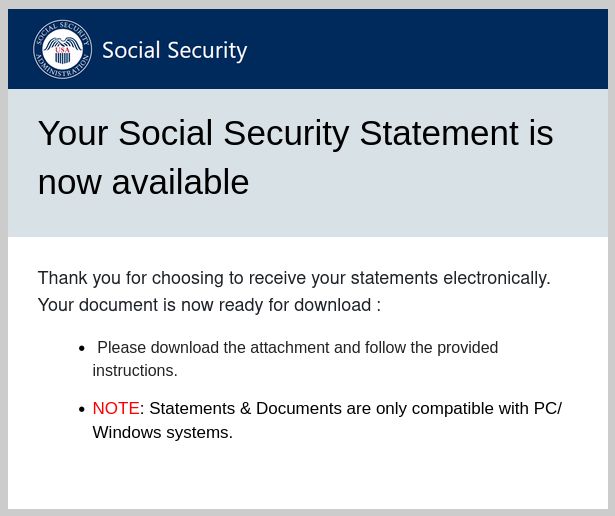
A Malwarebytes report from April 30, 2025 showed one concrete version of the trap: fake “Your Social Security Statement Is Ready” emails used embedded images and a button leading recipients toward ScreenConnect remote-access malware.[5] Once remote-access software is installed, the scam is no longer just an email problem. The attacker may be able to see the screen, guide the victim through steps, and steal banking credentials.[5]
That is the part I would emphasize at the kitchen table. The first dangerous click may not ask for money. It may ask someone to view a statement, confirm an account, download a tool, or sign in “securely.” The consequence comes after the older adult has already crossed from reading an email into giving a stranger access.
Former SSA official Kathleen Romig warned that the misleading July 2025 email “undermines trust” and “makes people more vulnerable to scams,” as quoted by the Los Angeles Times.[6] That is a practical warning, not just a communications critique. Trust is one of the few tools families have when we say, “Don’t click that; let’s check it another way.”
The wider fraud numbers are not comforting. The National Council on Aging, citing Federal Trade Commission data, says people lost $126 million to government imposter scams in 2023 and that reports rose 40% in 2025.[7] Those figures do not prove that Social Security tax emails caused the increase. They do show that government impersonation is a large, active category of fraud at the same time seniors are receiving confusing benefit and tax messages.
How to check the email without clicking through it
The safest habit is to stop using the email as the doorway. Do not click the button, do not open attachments, do not reply, and do not call a phone number printed inside the message until you have verified it somewhere else. This applies even when the email looks professional and even when it mentions a real law.
- Go directly to ssa.gov by typing the address into the browser, not by following the email link.
- Use the parent’s existing my Social Security account only through the official site, with a password manager or saved bookmark if the family already uses one safely.
- Check tax claims against IRS guidance, not an email headline.
- If the message asks for a Social Security number, bank login, remote-access download, gift card, wire transfer, cryptocurrency payment, or urgent secrecy, treat it as suspicious.
- If someone already clicked or downloaded something, stop using the device for banking until it has been checked.
SSA’s own scam page warns people to watch for threats of arrest or legal action, demands for immediate payment, requests for gift cards or cryptocurrency, pressure to keep the matter secret, and messages that try to create panic.[8] Not every scam uses all of those signals. Some use the opposite approach: a calm message about a routine statement or a tax update. That is why the verification route matters more than the look of the email.
If the email was the July 2025 tax-savings message
If the message is the SSA’s July 2025 tax-savings email, the immediate danger is probably not a malicious link in that specific message; the larger problem is misunderstanding the tax change. Save it if you need a record, but do not use its tax language as the basis for a return, withholding decision, or estimate.
For an individual return, the next step is IRS guidance or a qualified tax professional. The deduction interacts with income, filing status, and other tax facts. A family member can explain the general rule, but should not promise that a parent will owe nothing unless the actual return supports that conclusion.
If the email says a statement is ready
A “statement ready” email deserves extra caution because it matches the pattern the SSA OIG warned about in 2026 and the kind of fake message documented by Malwarebytes.[4][5] Do not click “View Your Statement” from the email. Instead, type the SSA web address yourself and check the account from there.
If the parent cannot sign in safely, it is better to slow down than to improvise through a link in the message. Sit with them, use the official site, and avoid letting a caller or email sender “help” by installing software. Remote-access tools can be legitimate in the right hands, but they are dangerous when a stranger directs the installation.
If money, banking, or device access is involved
Move from tax clarification to damage control. Disconnect from the conversation. Contact the bank using the number on the bank card or official website. Change passwords from a clean device. Report the suspicious message to the appropriate government fraud channels and to SSA OIG if it impersonates Social Security. If remote-access software was installed, assume the device needs professional review before it is used for financial accounts again.
What to tell a parent in one calm sentence
The sentence I would use is: “That Social Security tax email was based on a real law, but it overstated what changed; some seniors may get a temporary deduction from 2025 through 2028, and we should check your account and tax information only through SSA.gov and IRS.gov.”
That wording does two jobs. It does not shame the parent for believing an official-looking message, and it does not leave them with the false comfort that all Social Security tax problems disappeared. It also gives you a reason to move the conversation away from the email itself and toward a safe sign-in and a real tax source.
Last reviewed: July 23, 2026. The senior deduction described here is currently temporary and scheduled for tax years 2025 through 2028 under IRS guidance available as of this review date.[2]
References
- Social Security Administration sends misleading email lauding Trump's new tax law, NBC News
- One Big Beautiful Bill Act: Tax deductions for working Americans and seniors, Internal Revenue Service, July 14, 2025
- SSA Admits to Innaccuracies in Mass Email About Recent Legislation, Empire Justice Center
- SSA Office of the Inspector General Warns Public of Surge in Fraudulent Social Security Statement Emails, Social Security Administration Office of the Inspector General, February 20, 2026
- Fake Social Security statement emails trick users into installing remote tool, Malwarebytes, April 30, 2025
- Social Security sends millions of Americans a misleading and blatantly political message, Los Angeles Times, July 9, 2025
- What Are Common Social Security Scams? A Guide for Older Adults, National Council on Aging
- Social Security-related scams, Social Security Administration
Questions to bring to a clinician or OT
This is not medical, legal, or a family's final decision — only a framework. Bring these questions to a clinician, occupational therapist, or your local Area Agency on Aging.
Find Local HelpRelated reading
Noticed something outdated or inaccurate on this page? Flag a correction. We review every report against CDC, NIA, and AARP HomeFit guidance before updating a page.