How to Choose a Medical Alert System with Fall Detection That Fits Your Parent's Needs
For: adult childReviewed: 2026-07-05
How to Choose a Medical Alert System with Fall Detection That Fits Your Parent's Needs
Learn how to match a fall detection system to your parent's specific fall risk profile — considering fall history, mobility, cognition, and bathroom habits — rather than relying on brand rankings or price alone.
By Editorial Team
new caregiver
experienced caregiver
long-distance caregiving
spousal caregiver
working caregiver
daily routines
medication management
personal hygiene
care coordination
first steps
ADLs
IADLs
If you are trying to figure out how to choose a medical alert system with fall detection for a parent, start somewhere quieter than the brand rankings: Where would your parent most likely fall, and would the device actually be on their body at that moment?
That sounds almost too practical, but it is the question many buying guides skip. A fall detector sitting on a charger at 10 p.m. is not protection. A waterproof pendant that stays on in the shower may matter more than a longer feature list. A mobile device with GPS may be essential for a parent who walks alone outside, and unnecessary for someone whose real risk is getting from bed to bathroom at night.
The adoption numbers make this uncomfortable in a useful way. In The Senior List’s 2026 survey of 2,695 U.S. adults 65 and older, only 9% used a medical alert system, unchanged since 2023. Among users, only 18% said they wore the device at all times, and 64% removed it for showers, even though bathrooms are exactly where many families most want protection.[1]
Start with the fall-risk profile, not the device
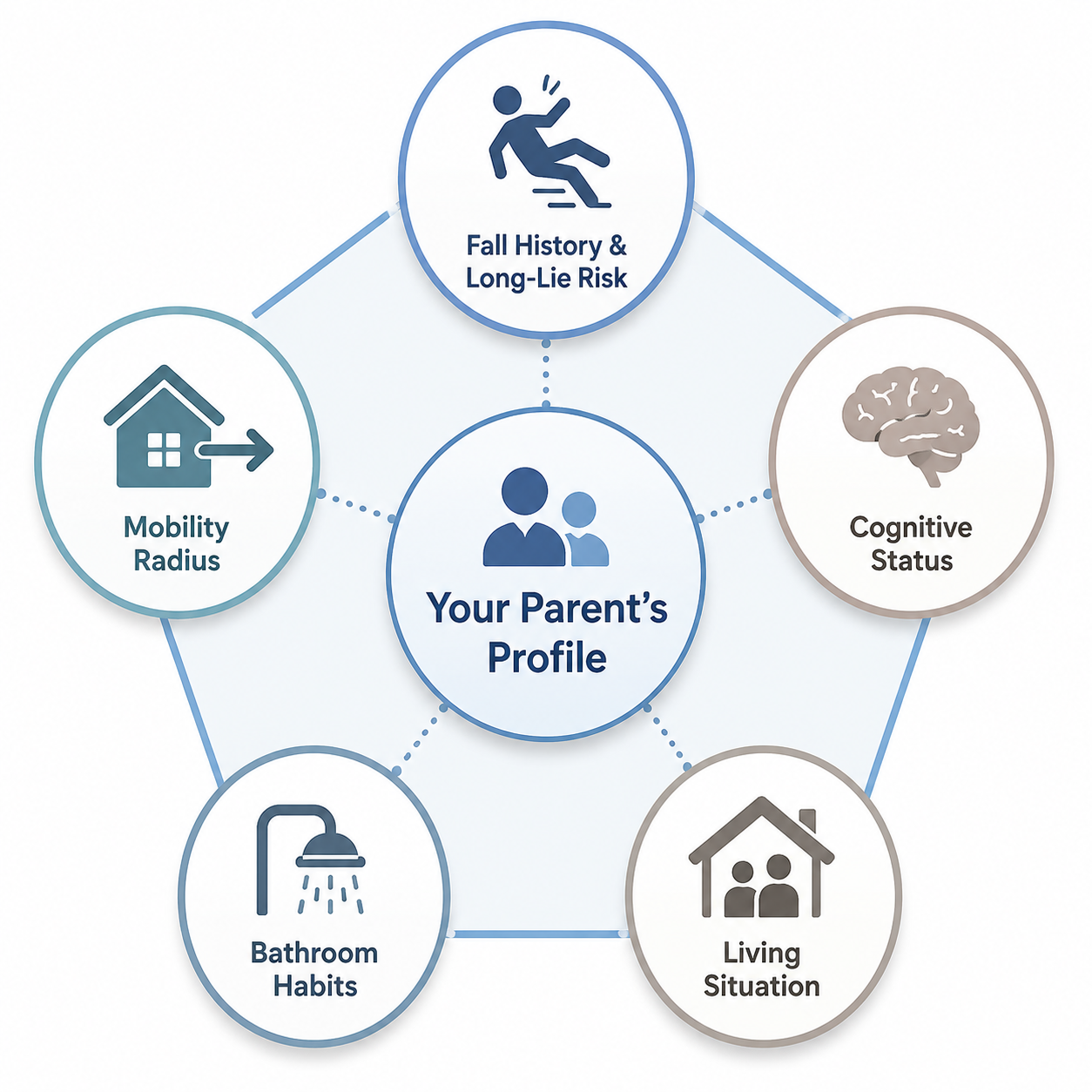
A useful medical alert decision usually comes down to five dimensions: fall history and long-lie risk, mobility radius, cognitive status, bathroom habits, and living situation. AARP’s consumer guidance also pushes families to ask practical questions about lifestyle, health, home setup, and who will respond before comparing systems.[2]
Risk dimension
What to ask
What it changes in the system choice
Fall history and long-lie risk
Has your parent fallen before, been unable to get up, or waited for someone to find them?
Raises the priority of automatic fall detection, reliable monitoring, and a device worn during high-risk routines.
Mobility radius
Are most risks inside the home, or does your parent walk, shop, drive, garden, or visit neighbors alone?
Separates home-based systems from mobile systems with cellular connection and location support.
Cognitive status
Will your parent remember to wear, charge, and use the device?
May favor simpler wearables, caregiver charging routines, or non-wearable monitoring in selected situations.
Bathroom habits
Do they bathe alone, and will they keep the device on in the shower?
Makes water resistance, pendant comfort, and shower compliance more important than many premium features.
Living situation
Who is nearby, who has keys, and who can respond at night?
Changes whether family-only alerts are enough or professional monitoring is needed.
This framework is not a way to delay a decision forever. It is a way to avoid buying the most polished-looking system and later discovering it protects the wrong moment.
Fall history and long-lie risk
A parent who has already fallen is in a different category from a parent who is generally steady but newly living alone. The key detail is not only whether a fall happened. It is whether they could reach a phone, call out, crawl, press a button, or get up without help.
The frightening scenario families are trying to prevent is the long lie: being on the floor for an extended period after a fall. A scoping review describes “long lie” as a term used for remaining on the floor after a fall, often defined around one hour or more.[3] The broader long-lie evidence is stark: falls are the leading cause of injury-related death among adults 65 and older, and half of those who experience a long lie of one hour or more die within six months, independent of injury severity.
That does not mean every older adult needs the most expensive fall detection package. It does mean that if your parent has already spent time on the floor, automatic detection deserves serious consideration. A button-only system assumes the person is conscious, oriented, able to move an arm, and willing to press for help. Those assumptions are not always fair after a hard fall.
Mobility radius
Medical alert systems are often described as “home” or “mobile,” but the better question is where your parent is unobserved. Someone who rarely leaves the house alone may be well served by a home base station and wearable button or pendant. Someone who walks the dog, takes out trash to a distant bin, drives to appointments, or gardens out of range may need a mobile device with cellular service and location capability.
Location support is not a decorative feature for an active parent. If a fall happens away from home and your parent cannot explain where they are, the response center or caregiver needs more than “Mom pressed the button.” For a parent whose real risk is inside a small apartment, the same feature may add cost and charging burden without solving the main problem.
Cognitive status
Cognition changes the whole decision. A parent with mild memory problems may agree to a device in the afternoon and leave it on the bathroom counter at night. A parent who forgets to charge a mobile unit may have excellent coverage in theory and none on Tuesday. A parent with more advanced impairment may press buttons repeatedly, ignore low-battery warnings, or remove anything that feels unfamiliar.
This is where “best device” language becomes especially thin. The right system may be the one with the fewest choices, the clearest charging routine, and the least intrusive form factor. In some homes, a wearable alert device is still the right layer. In others, families may need broader monitoring categories, such as motion-based home monitoring or radar-based fall detection, alongside or instead of a wearable. The comparison should stay grounded in what the parent can consistently tolerate and what they have meaningfully agreed to use.
Bathroom habits
The shower is where many families discover the difference between owning a device and being protected by it. A medical alert pendant may be marketed as water resistant, but that does not mean your parent will wear it while bathing. The Senior List’s 2026 usage report found that 64% of medical alert users remove their device for showers.[1]
That single behavior can outweigh several feature comparisons. If your parent bathes alone, ask the question directly: “Would you wear this in the shower every time?” If the honest answer is no, do not pretend the bathroom is covered. You may need a different wearable style, a shower-specific habit cue, a wall button within reach, a bathroom check-in routine, or a non-wearable monitoring option designed for that environment.
This is also where dignity matters. Some parents refuse pendants because they look like a public label of frailty. Others dislike wrist devices because they feel like being tracked. The practical issue is not whether that reaction is “reasonable.” The practical issue is that a device your parent resents is easier to remove.
Living situation
A parent who lives alone overnight has a different risk profile from a parent who lives with a spouse who can hear a fall. But “not alone” is not the same as “covered.” A spouse may have their own mobility problems. A neighbor may be nearby but not have a key. An adult child may receive an alert but live forty minutes away. The response chain matters as much as the sensor.
Before choosing between professional monitoring and family-only alerts, write down who is actually available at 2 a.m., who can enter the home, who can lift or assess safely, and when emergency services should be called. A system that reaches a monitoring center may be worth the monthly fee when the family response chain has gaps. A family-alert system may be enough when nearby helpers are reliable and the parent’s risk is lower.
Treat fall detection accuracy as useful, not absolute
Automatic fall detection can help, especially when the parent cannot press a button. But accuracy claims need careful reading. NCOA summarizes fall detection accuracy as varying by device type and wear location, with reported ranges from 73% to 98%; chest or trunk-worn pendants tend to perform better than wrist-worn devices, which are more affected by ordinary arm movement.[4]
Those numbers should not be read as a guarantee that a specific device will catch your parent’s specific fall. FallDetection.com’s 2026 guide notes a major research limitation: one systematic review found that only 7.1% of wearable fall detection studies tested devices in real-world elderly settings, while most used simulated falls, often by younger volunteers.[5] That matters because a staged fall in a lab is not the same as a dizzy slide against a bathroom wall, a slow collapse near a bed, or a stumble cushioned by furniture.
False alarms are part of the tradeoff. FallDetection.com also describes a four-month home test from Skubic and Missouri researchers in which 83 of 84 alarms were false alarms.[5] That example should not make families dismiss fall detection. It should make them ask what happens after an alert: how quickly the operator connects, whether the parent can cancel a false alarm, whether repeated false alarms will make them stop wearing the device, and whether caregivers will begin ignoring notifications.
Independent lab-style testing is still useful when interpreted modestly. NCOA reported that Medical Guardian, Bay Alarm Medical, and MobileHelp detected 3 of 3 test falls, while LifeFone detected 2 of 3 in its testing.[4] Those results can help you form questions, but they should not replace your parent’s risk profile. NCOA, SafeHome.org, and similar review sites may publish helpful testing details while also having commercial relationships with brands, so the testing method is more useful than the ranking badge.
Match the device category to the parent, then choose features
Once the risk profile is clear, the feature list gets shorter. You are no longer asking, “Which system has everything?” You are asking, “Which system covers the highest-risk moments my parent will actually accept coverage for?”
Parent profile
Likely system direction
Feature priorities
Mostly home, lives alone, prior fall or long-lie scare
Home-based system with wearable fall detection
Comfortable pendant, water resistance, strong in-home range, professional monitoring.
Simplified wearable, caregiver-managed charging, or non-wearable supplemental monitoring
Low maintenance, caregiver alerts, fewer user steps, clear consent and expectations.
Lives with someone who cannot reliably respond
Professionally monitored system
Fast operator connection, escalation plan, lockbox or access plan.
Wear location deserves its own judgment. A chest or trunk-worn pendant may detect certain falls more reliably than a wrist-worn device, but only if your parent will wear it. A wrist device may be less accurate in some testing contexts, yet more acceptable to a parent who already wears a watch. The better choice is not always the technically strongest sensor. It is the strongest sensor your parent will keep in the risk zone.
Cost and response time matter after fit
Price should not be ignored; it just should not lead the decision. The typical fall detection add-on costs about $5 to $11 per month on top of base monitoring, which is commonly about $20 to $35 per month, and equipment fees may range from $0 to $200 upfront.[4] For a parent who will reliably wear the device in high-risk moments, that monthly cost may be reasonable. For a parent who removes it whenever they feel watched, the same fee buys less protection than it appears to.
Response time is another expectation-setting detail. NCOA and SafeHome.org report average response times from fall detection to operator connection in roughly the 48- to 62-second range in their testing and reviews.[4][6] That is not the same as the time until help arrives. After the operator connects, someone still has to assess the situation, contact emergency services or caregivers, and get access to the home.
The access plan is easy to forget during shopping. If emergency responders arrive and the door is locked, the family may face delay, property damage, or both. A lockbox, trusted neighbor, building staff protocol, or clearly documented key plan can be as important as another app feature.
Pressure-test the decision against real wearing behavior
Before ordering, walk through one ordinary day with your parent. Not an idealized day. A real one.
Morning: Will they put the device on before moving around, or only after dressing?
Shower: Will it stay on, and is it comfortable when wet?
Errands: Does the device work outside the home if they leave alone?
Evening: Where does the device go while watching TV, changing clothes, or getting ready for bed?
Night: Is it reachable or worn during bathroom trips?
Charging: Who notices when the battery is low, and what happens if your parent forgets?
This is also the moment to separate reassurance from coverage. The Senior List found that 49% of older adults who did not use medical alert devices said they had “no health concerns,” and 32% said they did not “feel old enough.” Only 26% of adult children had talked with their parents about medical alert devices.[1] Those are not minor objections. They tell you that acceptance is part of the safety system.
If your parent resists, the next move is not to overwhelm them with mortality statistics. It is to narrow the ask: “I am not trying to make you feel old. I am trying to make sure that if you fall in the bathroom or outside, you are not waiting on the floor until someone happens to call.” Families who need help with that conversation should treat it as a separate decision step, not as an afterthought.
A practical way to choose
Use the following order when comparing systems:
Identify the highest-risk fall scenario: bathroom, nighttime, stairs, outdoor walks, transfers, or long periods alone.
Choose the coverage category: home-only, mobile, wearable, non-wearable, professionally monitored, or family-alert based.
Choose the wear location only after asking what your parent will actually wear during that risk scenario.
Check fall detection evidence with caution, especially whether testing used older adults in real homes or simulated falls.
Confirm response logistics: operator connection, caregiver escalation, emergency access, and false-alarm handling.
Compare total cost last, including fall detection add-ons, equipment fees, cancellation terms, and cellular or monitoring charges.
For readers who are still deciding between broader monitoring categories, a general elderly monitoring system framework can help before choosing a wearable device. If the immediate issue is a recent fall, the first 72 hours after the fall may also require medical follow-up, home safety review, and medication or mobility assessment. Fall detection is one layer, not the whole fall-prevention plan.
The most protective system is usually the least intrusive one your parent will reliably use in the moments that matter most. Choose for the fall that is most likely to happen, the place your parent is most likely to be alone, and the device they will still be wearing when no one is watching.

Comments
Join the discussion with an anonymous comment.