
STEADI: intervene
How Seniors Can Monitor Hurricane Updates Safely
Learn how a stationary monitoring station — a single chair or bedside spot stocked with a battery-powered NOAA Weather Radio, flashlight, walking aid, and emergency supplies — lets seniors stay informed during hurricane power outages without moving through dark, obstacle-filled spaces, dramatically reducing fall risk.
The unsafe part of hurricane monitoring often starts after the power goes out. The house goes dark, the hallway looks different, the television is off, and the latest warning is suddenly somewhere else: the kitchen counter, the bedroom charger, the weather radio on a shelf. An older adult stands up to check it, reaches for furniture, steps around a cord or rug edge, and the storm has created a fall risk before the wind has done any damage inside the home.
That is why the safest answer to how seniors can monitor hurricane updates safely is usually not "check more sources." It is "stop making them move to get the information." A stationary monitoring station brings the radio, phone, light, walking aid, water, medication, glasses, and caregiver contact plan to one safe chair or bedside spot before the storm arrives.
Power outages are not a side issue in hurricane planning. PowerOutage.us warns that an outage "multiplies the risk of falling in every room of the house" because darkness reduces depth perception and peripheral vision. The same source reports that Hurricane Ian left 2.78 million Florida customers without power in 2022, while Hurricane Helene cut power to 4.79 million customers in 2024.[1]
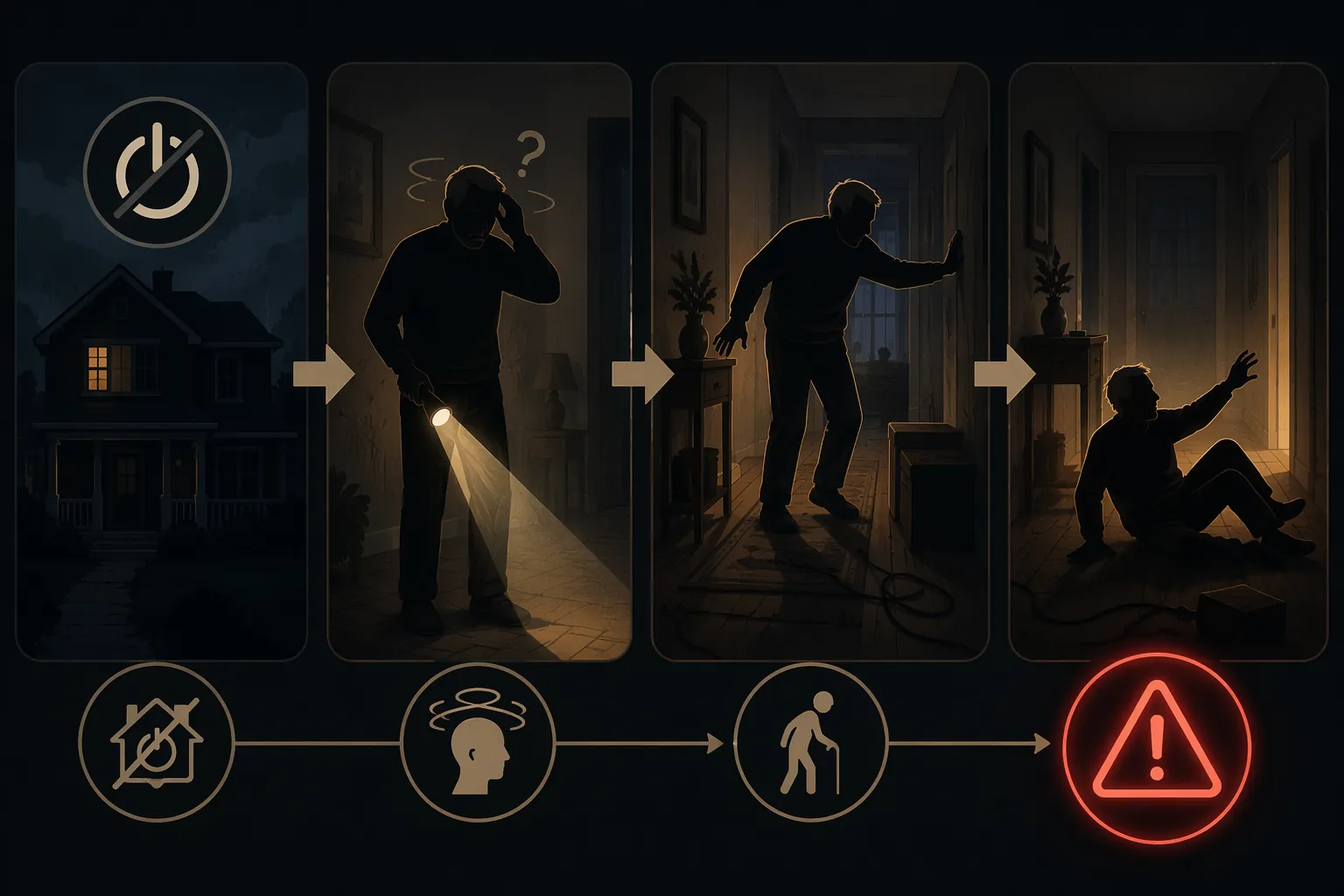
This setup is for shelter-in-place situations. It does not replace an evacuation order, a medical decision, or instructions from local emergency officials. If the order is to leave, the monitoring station becomes the last checkpoint before leaving, not an argument for staying.
Start With One Safe Spot
Pick the place before the storm has a name in the forecast, not after the lights flicker. The best spot is usually a sturdy recliner, armchair, or bedside position near an interior wall and away from windows. It should be a place the person already uses comfortably, because in a stressful night people go where habit takes them.
Do not scatter supplies around the home in the name of being prepared. A flashlight in the kitchen drawer is not helpful if the senior is in the bedroom. A charged phone on the dresser is not helpful if the person is in the recliner. A walker folded by the front door is not helpful if the first step is across a dark living room.
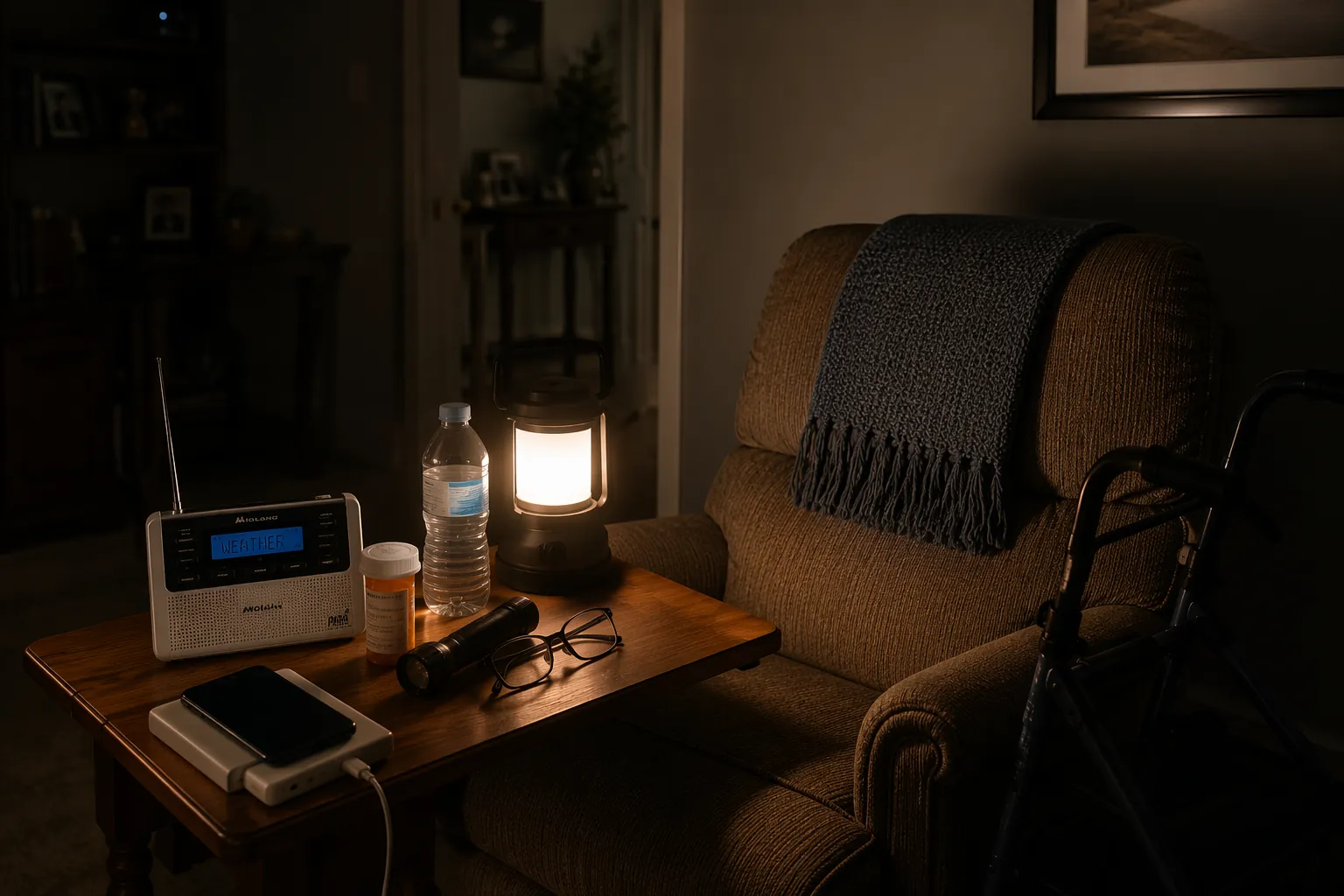
The station should let the person sit, receive warnings, make or answer a call, drink water, take needed medication, see the floor immediately around them, and reach their walking aid without twisting or standing first. If an item requires standing, it is not part of the station yet. It is still somewhere else.
| Station item | Why it belongs within arm's reach |
|---|---|
| Battery-powered NOAA Weather Radio with backup batteries | Provides official weather alerts when television, internet, or household power may be unavailable. |
| Phone and pre-charged power bank | Keeps caregiver calls, Wireless Emergency Alerts, and emergency contact options available longer. |
| Flashlight or battery lantern with extra batteries | Lets the senior see the immediate floor area without walking through the house to find light. |
| Walker or cane | Keeps the actual mobility aid beside the chair or bed, not across the room. |
| Water, non-perishable snack, and emergency medications | Reduces trips to the kitchen or bathroom cabinet during the outage. |
| Glasses, hearing aid batteries, and hearing supplies | Protects two things the person needs most during an emergency: seeing instructions and noticing alerts. |
Make the Weather Radio Useful, Not Just Present
A weather radio sitting in the house is not the same as a weather radio that can be heard, understood, and trusted from the safe spot. FEMA says a properly programmed NOAA Weather Radio may provide up to 8 minutes of warning, which is useful only if the radio is already on, programmed, powered, and close enough to notice.[2]
Program the radio for the correct county using SAME coding when the model supports it. The point is not to make the device fancy; it is to reduce the number of irrelevant alerts. The National Weather Service lists weather radio resources for people with special needs, including receivers and accessories that support visual or tactile alerts.[3]
Alert fatigue is real in a storm. If the radio sounds for too many watches, statements, or neighboring counties, some people will turn it down, unplug it, or ignore it. A caregiver should decide ahead of time which alerts matter most for the senior's location and tolerance. Hurricane warnings, tornado warnings, flash flood warnings, evacuation messages, and local emergency instructions deserve a different level of attention than a long list of routine statements.
Hearing Loss Changes the Setup
Many older adults will not reliably hear a standard alert tone, a knock at the door, or a shouted instruction during heavy rain and wind. The National Institutes of Health reports that 22% of adults ages 65 to 74 and 55% of adults 75 and older have disabling hearing loss.[4] That makes visual and tactile alerting part of ordinary hurricane planning, not a niche accessory.
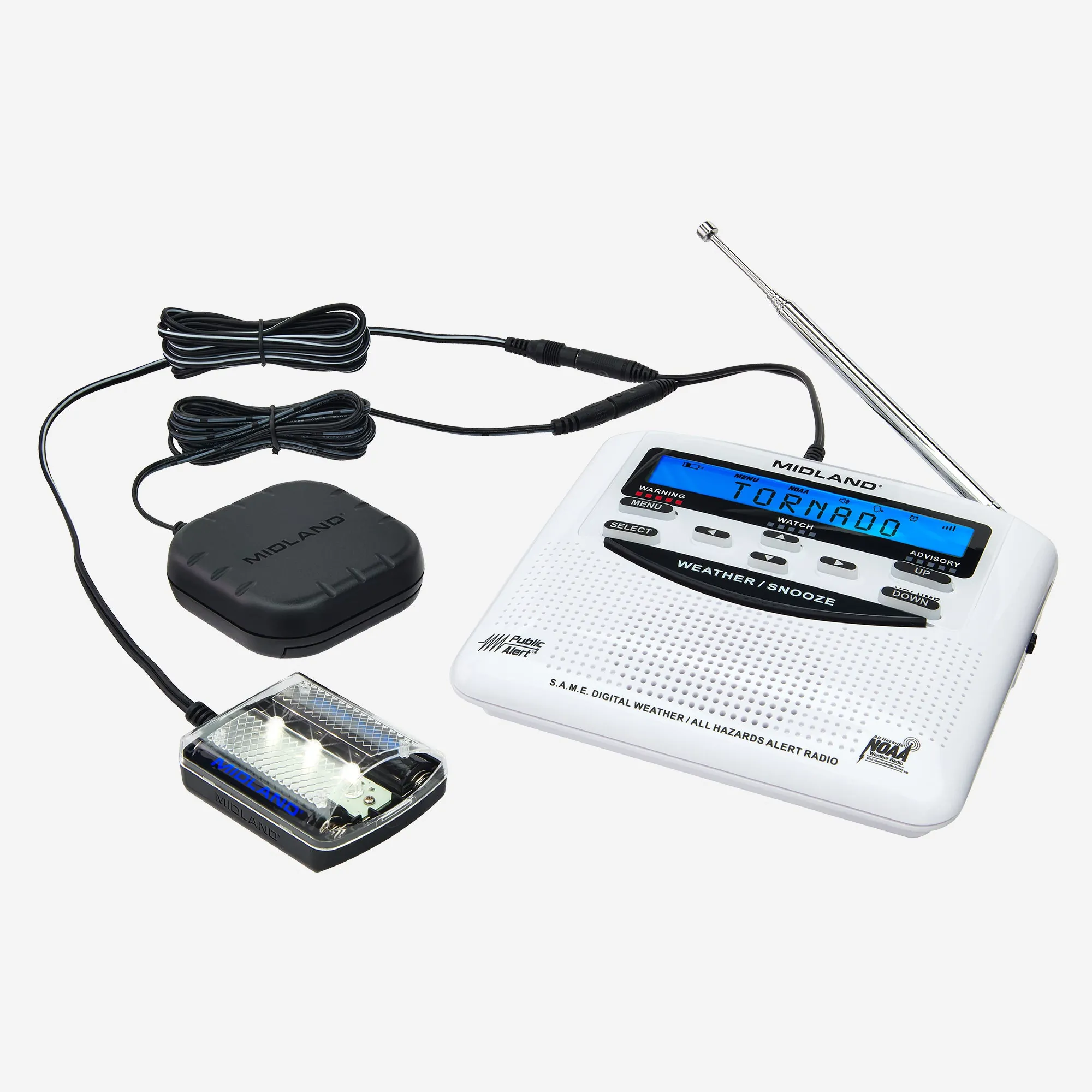
For someone with hearing loss, consider a weather radio setup that can connect to a strobe light, bed shaker, or other accessible alert device. The specific model matters less than the outcome: the senior can notice the alert from the chair or bed without walking to investigate a sound.
For someone with Alzheimer's disease or another dementia, repeated voice alerts may cause agitation instead of useful action. In some homes, a display-only or visual alert mode is calmer: the device signals that something has changed, and the caregiver or neighbor protocol handles interpretation. That is not withholding information. It is removing a trigger that the person may no longer be able to process safely.
Use the Phone as a Backup, Not the Whole Plan
Wireless Emergency Alerts are helpful because they do not depend on the senior opening an app at the right time. The FCC says these alerts are sent to compatible phones through participating wireless carriers, can override silent mode, and have been used nearly 96,000 times since 2012.[5]
Still, a phone is a weak single point of failure. It can be in another room, low on battery, muted in a way the person does not understand, or too small to read without glasses. Keep it plugged into a pre-charged power bank at the station, with the charging cable long enough that the phone can be answered from the chair. Tape a short contact card to the table or power bank if memory or stress is an issue.
- Turn on Wireless Emergency Alerts in the phone's notification settings before storm season.
- Increase text size and screen brightness enough for the senior to read alerts without searching for glasses.
- Add key contacts as favorites so calls from caregivers are easier to identify.
- Keep the phone, power bank, and cable together at the station, not split between rooms.
- Write down the backup plan for when the phone stops working, because eventually a storm may test it.
Clear the Path Even If the Plan Is to Stay Seated
A stationary setup does not mean the person will never need to stand. They may need the bathroom, a different medication, or an evacuation route if instructions change. That means the area around the station has to be boringly clear: no throw rug edge, no pet bed, no magazine basket, no extension cord stretched across the walking line.
The walking aid should be parked where the hand naturally reaches when standing. If the walker is behind the chair, folded, or across the room, it will be skipped. If the cane is leaning on a wall where it can slide down, it will not be there when needed. Put the aid in the path of use, not the path of tidiness.
Caregivers who already use home fall-risk screening or home modification checklists can treat this as the storm version of the same work: clear the route, add light, reduce reaching, and keep the right mobility equipment at the point where the person actually moves.
Do the Pre-Storm Check While the House Still Works
The station is not ready because the supplies are bought. It is ready when someone has sat in the chair and tested the whole sequence. Can the radio receive clearly from that exact spot? Can the senior reach the flashlight without standing? Does the power bank actually charge the phone? Are the hearing aid batteries where the person can find them by touch?
- Radio: turn it on at the station, confirm reception, check the county programming, and install fresh backup batteries.
- Phone: charge it fully, connect the power bank, test caregiver calls, and confirm alerts are enabled.
- Lighting: place a flashlight or lantern within reach, then test it in a dark room rather than assuming it is bright enough.
- Mobility: park the walker or cane beside the chair or bed and clear the first several steps of the path.
- Supplies: put water, snacks, glasses, hearing supplies, and time-sensitive medications in a container the senior can open.
- Exit: keep the route out of the home clear in case officials instruct evacuation or a medical problem changes the plan.
If the caregiver lives out of town, ask a local relative, neighbor, aide, or building staff member to perform the physical check. A video call can help, but it cannot prove everything. Someone needs to see whether the cord crosses the walkway, whether the walker fits where it is parked, and whether the radio can be heard from the chair.
Build the Human Check-In Around the Chair
Do not make the older adult responsible for remembering when to call everyone. Set the call schedule from the caregiver side: for example, one call before expected conditions worsen, one at a planned evening time, and one after the main hazard has passed if phone service allows. The exact times should follow the local forecast and the person's sleep, medication, and anxiety patterns.
The call script should be short. Ask whether they are still at the station, whether the power is on, whether the radio or phone has issued any alert, whether they have water and medication within reach, and whether they have stood up since the last call. That last question matters. It tells you whether the plan is being used or whether the house is pulling them back into old habits.
The American Red Cross Emergency app includes an "I'm Safe" feature that can notify loved ones, which may be useful for a senior who can manage a simple phone action or for a caregiver helping set up a fast post-storm status message.[6] FEMA's app also allows users to receive weather alerts for multiple locations, so an adult child can monitor the parent's county even from another state.[7]
There still needs to be a failure rule. If the senior misses two scheduled calls, if the line is dead for a set period, or if an alert affects the immediate neighborhood, a designated neighbor or local contact should check in by phone, from the doorway, or through another agreed method that does not put that helper in danger. The neighbor should know the senior's safe spot before the storm, not discover it during one.
After the Wind Passes, the Fall Risk Is Not Over
The urge to get up and inspect the house can be strong once the worst noise stops. That is a dangerous moment. The American Red Cross identifies heart attacks caused by physical exertion, including rushing to prepare or evacuate, as a leading cause of deaths after a hurricane.[8] For an older adult, the safer default is to stay seated, wait for official instructions, and let a caregiver or designated local contact decide what must be checked and when.
Post-storm conditions also turn familiar spaces into different spaces. Downed power lines, wet surfaces, and debris after a hurricane increase fall risks for seniors.[9] A porch step may be slick, a branch may block the usual handhold, and an extension cord for a generator may be lying where no cord has ever been before.
The monitoring station should therefore remain in use after the storm until the home and immediate route have been checked in daylight or by someone able to do it safely. Keep the radio on. Keep the phone charging if possible. Keep the walker by the chair. Do not send the person to look for damage, reset breakers, move branches, or step outside to "just see" what happened.
Seniors monitor hurricane updates most safely when information, light, mobility support, medication, and caregiver contact are brought to one prepared spot. That limited setup does not answer every hurricane problem, and it never overrides evacuation orders or medical needs. It does remove one preventable hazard: the dark walk through the house just to find out what is happening.
References
- The Dangers of Power Outages and How to Prepare, PowerOutage.us.
- NOAA Weather Radio, FEMA.
- NWR Special Needs, National Weather Service.
- Age-Related Hearing Loss, National Institute on Deafness and Other Communication Disorders, NIH.
- Wireless Emergency Alerts, Federal Communications Commission.
- Emergency App, American Red Cross.
- FEMA App, FEMA.
- Hurricane Safety, American Red Cross.
- Senior Safety During Hurricanes: Protecting Your Loved Ones, Happier at Home, 2024-2025.
Related reading
Noticed something outdated or inaccurate on this page? Flag a correction. We review every report against CDC, NIA, and AARP HomeFit guidance before updating a page.
Part of the Fall Prevention section.