
Caregiver decision guide
How Seniors Can Check If Their Cell Service Is Out
This guide walks older adults through a simple sequence of checks to determine if their cell service is down due to a network outage, a building signal issue, or a device glitch — no technical knowledge required.
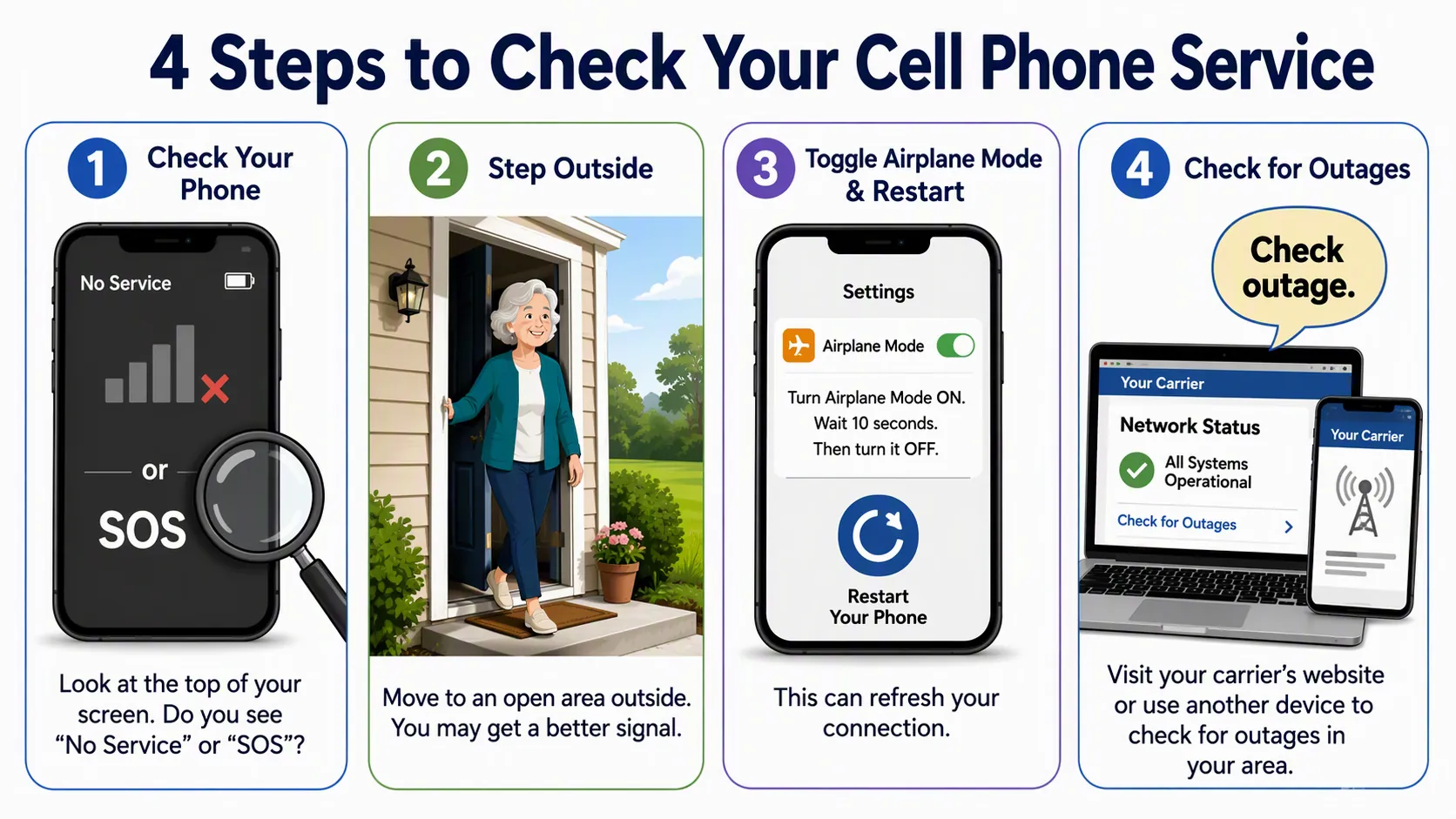
If a phone suddenly says “No Service,” “SOS,” or shows bars but will not place a call, do not assume the phone is broken. The quickest way to check whether cell service is out for an older parent — or for yourself — is to sort the problem into one of three buckets: the building is blocking the signal, the phone needs a reset, or the carrier is having an outage.

Use this order. It keeps the first checks simple, and it does not require you to remember a password before you know what is wrong.
| Step | What to do | What it helps decide |
|---|---|---|
| 1 | Look at the status message: No Service, SOS, weak bars, or failed calls. | Whether the phone is disconnected, partly connected, or just struggling. |
| 2 | Step outside or near a clear window if it is safe. | Whether the house or building is blocking the signal. |
| 3 | Turn Airplane Mode on, wait at least 15 seconds, turn it off, then restart the phone. | Whether the phone had a temporary connection glitch. |
| 4 | Check the carrier outage page, call carrier support, ask a neighbor, or use Downdetector from Wi-Fi or another device. | Whether other people on the same carrier are affected. |
| 5 | Choose the next action based on what changed. | Wait for the carrier, use Wi-Fi Calling or another phone, or get help with that one device. |
First, read the exact message on the phone
The words at the top of the screen matter more than the number of settings menus you can open. Start there.
On an iPhone, “SOS” or “SOS Only” means the phone may still be able to reach emergency services, but normal calls, texts, and cellular data are not working through your carrier at that moment. CNET explains that the phone is not connected to its regular cellular network when it is stuck in SOS mode, even though emergency calling may still be available through another network where supported.[1]
“No Service” is simpler: the phone is not getting usable service from the carrier where it is sitting. That can happen because of a carrier problem, but it can also happen in a basement, elevator, interior room, rural road, or a house with signal-blocking materials. T-Mobile’s no-service troubleshooting guidance treats location, signal conditions, device settings, and account or network issues as separate things to check rather than assuming one cause.[2]
Weak bars are not a promise. A phone can show one bar and still fail to complete a call, especially indoors. A failed call with one bar is different from a failed call with full bars, so notice both: the message and the bars.
- If it says SOS: treat regular calling and texting as unavailable for now, but try 911 by voice in a true emergency.
- If it says No Service: the phone is not connected to a usable cellular signal where it is.
- If it shows one bar: the signal may be too weak or unstable for calls.
- If it shows normal bars but calls still fail: keep going through the reset and outage checks.
The outdoor test is the cleanest nontechnical test
If it is safe, take the phone outside. Do not walk down the block. Do not troubleshoot the whole house. Just step onto the porch, patio, driveway, or yard and wait a minute.
If service comes back outside, the phone and carrier are probably not the main problem. The building is likely weakening or blocking the signal. T-Mobile’s troubleshooting asks users to check whether the signal issue happens in one location or everywhere, which is exactly what this outdoor test is doing.[2]
For an older adult, this is a useful dividing line. A phone that works in the yard but not in the kitchen is not “broken” in the usual sense. The next practical move may be to place calls near a window, use Wi-Fi Calling if it is already set up, or talk to the carrier about poor indoor coverage. It is not worth spending an hour changing settings before you know whether the phone works outside.
If stepping outside is not safe — bad weather, icy steps, poor balance, or nighttime — skip the outdoor test. Try a window, another room, or ask someone else to take the phone outside. The point is to compare locations, not to create a fall risk.
Do one controlled reset before assuming an outage
Phones sometimes lose their connection to the cellular network and need a nudge. The reset should be simple and limited. This is not the time to erase settings, remove SIM cards, or change passwords.
- Open the quick settings or control center.
- Turn Airplane Mode on.
- Wait at least 15 seconds.
- Turn Airplane Mode off.
- Wait another minute and watch the status bar.
- If service does not return, restart the phone once.
AT&T recommends turning Airplane Mode on, waiting 15 seconds, and turning it off as one of the ways to reconnect during network trouble; T-Mobile also includes restart and signal-reset steps in its no-service troubleshooting.[3][2]
If the phone works after this, call it a temporary phone connection glitch and stop. You do not need to prove anything else. If the same message returns within minutes, continue to the outage checks.
Now verify whether other people are affected
Only after the phone message, location test, and one reset should outage tools move to the front. They are useful, but they are not always senior-friendly in the moment. Some carrier pages ask you to sign in. Live outage maps can be hard to use on a small screen. And if the phone has no service, the outage page may not load unless home Wi-Fi is working.
If you have home Wi-Fi, connect the phone to Wi-Fi and check your carrier’s outage or network-status page. Verizon’s outage FAQ describes network outage notifications and ways to check network status, while AT&T’s guidance explains how customers can stay connected and check for network problems.[4][3]
If the page asks for a username or password and you do not have it, do not turn that into a second crisis. Call the carrier’s support number from another phone, ask an adult child to check from their device, or ask a nearby neighbor with the same carrier whether their phone is also down.
Downdetector can also help, especially for the adult child who is checking from another location. Its methodology page says it collects and analyzes user-submitted problem reports in real time, processes report data every 4 minutes, and monitors more than 35,000 services, including major wireless carriers.[5]
Use Downdetector as a confirmation tool, not as a first-aid kit. If many people are reporting trouble with the same carrier at the same time, that supports the outage explanation. If the site is hard to load, or the map does not behave on the phone, stop poking at it. This is why it is better bookmarked or practiced before anyone is stressed.
Good ways to confirm an outage
- Use home Wi-Fi to open the carrier’s outage or network-status page.
- Call the carrier’s support number from a landline, neighbor’s phone, or caregiver’s phone.
- Ask a neighbor on the same carrier whether their phone has service.
- Ask an adult child to check Downdetector or the carrier status page for you.
- If you live in senior housing, ask the front desk or building manager whether other residents are reporting the same carrier problem.
What the answer means
Once you have done the checks, the result usually points to the next move.
| What happened | Most likely bucket | Next action |
|---|---|---|
| Service returns outside but fails indoors. | Indoor signal problem. | Use the phone near a better signal spot, use Wi-Fi Calling if already set up, or ask the carrier about indoor coverage options. |
| Service returns after Airplane Mode or a restart. | Temporary phone connection glitch. | Keep using the phone. If it keeps happening, ask the carrier or a trusted helper to check the device. |
| Neighbor phones on the same carrier are also down, or outage tools show many reports. | Likely carrier outage. | Wait for the carrier. Use Wi-Fi Calling, another phone, or another safe way to contact family. |
| Only one phone stays on No Service or SOS after the checks. | Possible account, SIM, device, or settings problem. | Contact the carrier from another phone or bring the device to a trusted support person. |
| The phone has Wi-Fi but no cellular service. | Cellular problem, not necessarily an internet problem. | Use Wi-Fi-based tools and calling options while you confirm the carrier issue. |
If you need to call or text during the outage
Wi-Fi Calling can let calls and texts work over home internet when cellular service is weak or unavailable. AT&T and Verizon both describe Wi-Fi Calling as a way to stay connected when cellular coverage is limited, and United Medicare Advisors also frames it as a practical backup for older adults who have home internet.[3][4][6]
The catch is setup. The wording varies by phone, but the general path is usually something like Settings, then Cellular or Network, then Wi-Fi Calling. It is much easier to turn on and test before an outage than to figure it out while the phone is already failing.
For emergencies, try a voice call to 911 first. If an iPhone shows SOS, emergency calling may still be available even when normal service is not.[1] Text-to-911 should be treated as a backup only if you already know your local area accepts it. It is not something to rely on blindly during a crisis.
A plain corded landline can still be a useful backup in some homes. The FCC notes that traditional corded landline phones may work during a power outage if the telephone company’s central office is supplying power, while some newer phone services, including fiber-based services, may depend on power equipment in the home.[7]
Set up the boring backups before the next outage
The best outage plan is not fancy. It is a small set of things that can still be used when someone is flustered.
- Turn on Wi-Fi Calling and test it on an ordinary day.
- Write the carrier’s support number on paper and keep it near the phone charger.
- Bookmark the carrier outage page and Downdetector on a home computer or tablet, not only on the phone.
- Choose one neighbor, relative, or building staff member who can be asked, “Is your phone down too?”
- If a landline makes sense for the home, confirm what kind it is and whether it works during a power outage.
That is enough. If service comes back outside, think indoor signal. If Airplane Mode or a restart fixes it, think phone glitch. If neighbors and outage tools show the same carrier problem, wait for the carrier and use another calling path. If only one phone stays dead after the checks, get help with that device.
References
- iPhone Stuck in SOS Mode? Here's How to Fix It — CNET
- Signal issues / no service troubleshooting — T-Mobile
- Network Outages: How to Stay Connected | AT&T Wireless — AT&T
- Verizon wireless outage & network notifications FAQs — Verizon
- Methodology — Downdetector
- Using Wi-Fi Calling to Stay Connected — United Medicare Advisors
- Understanding Wireless Telephone Coverage Areas — FCC
Questions to bring to a clinician or OT
This is not medical, legal, or a family's final decision — only a framework. Bring these questions to a clinician, occupational therapist, or your local Area Agency on Aging.
Find Local HelpRelated reading
Noticed something outdated or inaccurate on this page? Flag a correction. We review every report against CDC, NIA, and AARP HomeFit guidance before updating a page.