
Help for Elderly and Disabled Adults: A Step-by-Step Roadmap Using Your Local Area Agency on Aging
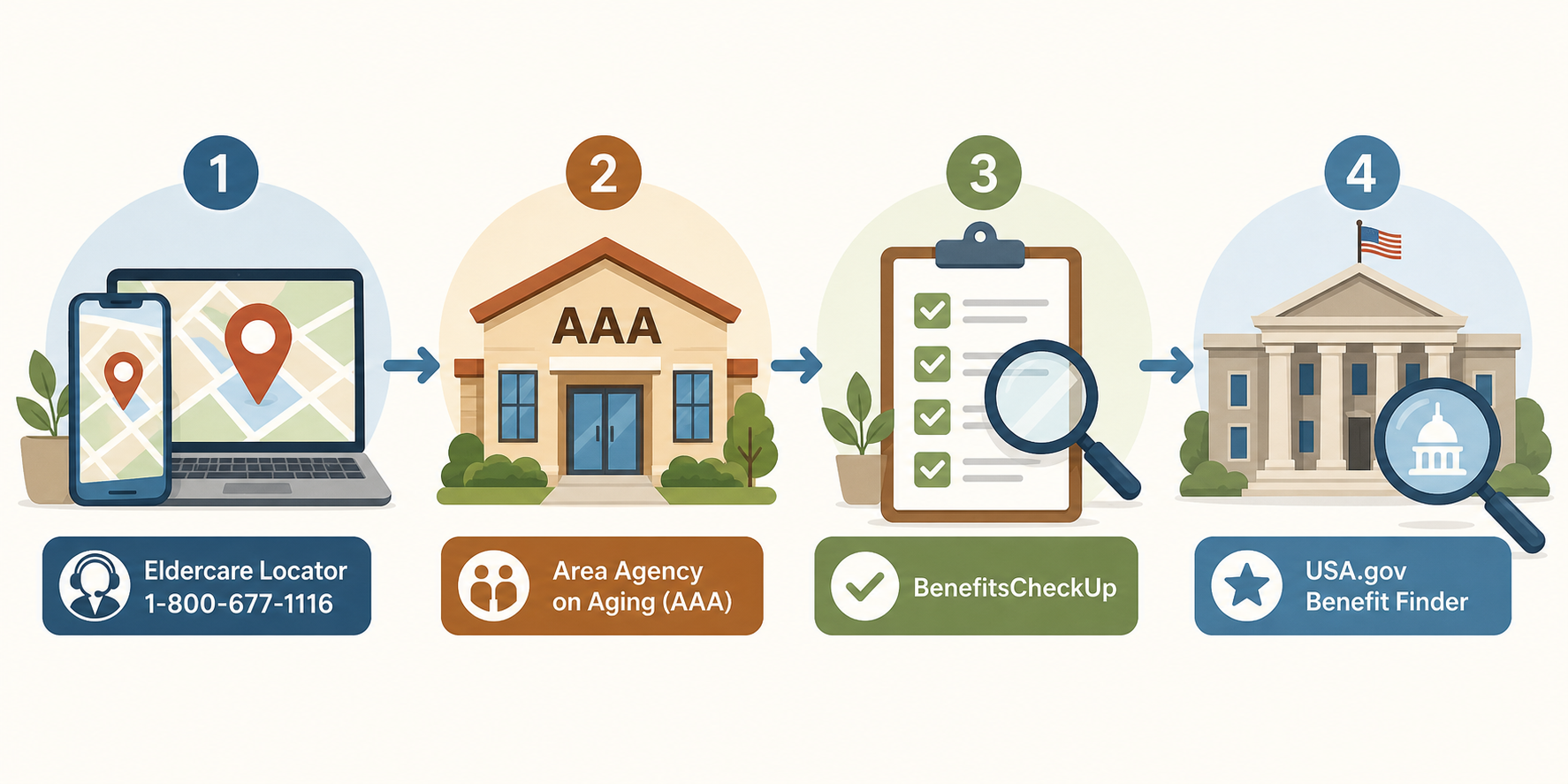
This guide provides a clear, sequential roadmap for family caregivers who feel lost navigating the fragmented system of federal, state, and local benefits. It centers on contacting your local Area Agency on Aging (AAA) as the single most effective first step, then walks through a tool-based workflow using the Eldercare Locator, BenefitsCheckUp, and USA.gov Benefit Finder to systematically identify and access all available help.

Why Navigating Benefits Alone Is Overwhelming (and Where to Start Instead)
If you have recently taken on the role of caring for an aging parent or a disabled loved one, you have likely discovered that the system of benefits and services in the United States is not a single, well-marked highway. It is a patchwork of federal programs, state-administered waivers, local nonprofit services, and eligibility rules that shift depending on income, age, disability status, and even ZIP code. The result is that millions of older adults who qualify for help never receive it.
The National Council on Aging (NCOA) estimates that eligible older adults leave roughly $58 billion in benefits unclaimed every year. To put that in human terms: only 38% of eligible adults aged 65 and older participate in the Supplemental Nutrition Assistance Program (SNAP), meaning 9.1 million seniors who could use food assistance are not getting it. Only 49% of those eligible for a Medicare Savings Program (MSP) are enrolled — 6.6 million people are missing out on help with premiums and cost-sharing. And only 40% of eligible older adults are enrolled in Supplemental Security Income (SSI), leaving an estimated 3.6 million people without that cash support.
The core problem is not a lack of programs. It is a lack of a clear entry point. Most caregivers start by searching online for individual programs — "Medicare Savings Program application" or "SNAP for seniors" — and quickly get lost in eligibility tables, conflicting state rules, and application forms that assume prior knowledge. The better approach is to start with a single, human-powered gateway that was built for exactly this purpose: your local Area Agency on Aging.
Step 1: Find Your Local Area Agency on Aging (AAA) or ADRC
Area Agencies on Aging were established under the Older Americans Act in 1973. Today, there are more than 600 AAAs across the United States, forming a national infrastructure designed to be the single point of entry into the aging services network. Many states also operate Aging and Disability Resource Centers (ADRCs), which serve the same function but also coordinate services for younger adults with disabilities.
Finding your local AAA is straightforward. Use the Eldercare Locator, a public service of the Administration for Community Living. You can call 1-800-677-1116 (Monday through Friday, 9 a.m. to 8 p.m. Eastern) or visit eldercare.acl.gov. You will need the older adult's ZIP code or city and state. The locator will give you the phone number and address of the AAA or ADRC that serves that area.
What Your Area Agency on Aging Actually Does for You
Many caregivers assume AAAs are only for people who need home-delivered meals or transportation. In reality, AAAs provide a much wider range of free services, and they are available to anyone aged 60 and older — and to family caregivers regardless of the care recipient's age.
Here is what you can expect from your local AAA:
- Benefits counseling: Trained counselors help you understand and apply for Medicare, Medicaid, Medicare Savings Programs, SNAP, SSI, and other federal and state programs. This is free and personalized.
- In-home support: Help with bathing, dressing, light housekeeping, and other daily tasks through Older Americans Act homemaker services.
- Transportation: Rides to medical appointments, grocery stores, pharmacies, and community activities.
- Nutrition services: Home-delivered meals (often called Meals on Wheels) and congregate meal sites where seniors can eat together.
- Caregiver support: Respite care, caregiver training and education, support groups, and information and referral services.
- Legal aid referrals: Connections to free or low-cost legal assistance for issues like advance directives, guardianship, and consumer protection.
- Health and wellness programs: Evidence-based programs for chronic disease self-management, fall prevention, and physical activity.
For a deeper look at how AAAs coordinate care across multiple providers, see our guide on Senior Health Services Coordination: How Area Agencies on Aging Help Families Navigate Care.
Step 2: Use BenefitsCheckUp to Screen for Every Program You Qualify For
After you have made contact with your AAA, the next step is to get a comprehensive picture of every program your loved one might qualify for. The most efficient tool for this is BenefitsCheckUp, a free online screening service run by the National Council on Aging.
You enter the older adult's ZIP code, age, income, and a few other basic details. The tool then generates a personalized list of federal, state, and local programs they may be eligible for — often dozens of options you would never have thought to search for individually. The list includes estimated benefit amounts, application instructions, and contact information for the agency that administers each program.
BenefitsCheckUp also connects users to local Benefits Enrollment Centers (BECs). These are community-based organizations that provide free, one-on-one application assistance. You do not need to be tech-savvy or comfortable with online forms — a BEC counselor can walk you through the entire application process for each program.
Step 3: Use the USA.gov Benefit Finder for a Customized Federal Benefits List
The USA.gov Benefit Finder serves as a complementary tool to BenefitsCheckUp. While BenefitsCheckUp is especially strong at surfacing state and local programs, the Benefit Finder focuses on federal benefits. You answer a short set of questions about the person's age, income, veteran status, and disability status, and the tool returns a list of federal programs they may be eligible for.
The Benefit Finder covers categories including health insurance, food assistance, housing and utilities, veterans benefits, and cash assistance. It is maintained by the U.S. General Services Administration and is updated regularly to reflect program changes.
Think of these two tools as a double-check system. Run both. If a program appears on one list but not the other, investigate it. The combination of AAA counseling, BenefitsCheckUp, and the Benefit Finder gives you the most complete picture of what is available.
Step 4: Prioritize by Urgency — Healthcare First, Then Food, Housing, and Utilities
Once you have a list of potential benefits, the next challenge is deciding where to start. Not all programs are equally urgent, and applying for everything at once can be overwhelming. A simple priority framework helps:
| Priority Level | Program Category | Why It Comes First |
|---|---|---|
| 1 — Immediate | Healthcare coverage (MSP, Medicaid, Medicare Part D Extra Help) | Medical debt and lack of coverage create cascading crises. MSPs alone can save $2,434.80/year on Part B premiums (2026 rate) and reduce out-of-pocket costs. |
| 2 — Essential | Food assistance (SNAP, CSFP, congregate meals) | SNAP provides an average of $188/month for an older adult living alone. Food insecurity worsens chronic conditions. |
| 3 — Stability | Housing and utilities (LIHEAP, Section 202, WAP, Lifeline) | Utility shutoffs and housing instability are high-stress events. LIHEAP helps with heating/cooling costs; WAP provides up to $8,000 in free home energy upgrades. |
| 4 — Support | In-home care, transportation, respite | These services improve quality of life and reduce caregiver burden. Often easier to access once healthcare and food are stable. |
For a more detailed framework on layering multiple types of support — from free community services to skilled nursing — see our guide on Building Your Parent's Services Stack: A Step-by-Step Guide to Layering Home Care.
How to Prepare for a Benefits Counseling Appointment
When you schedule an appointment with your AAA's benefits counselor — or with a Benefits Enrollment Center — you will get the most out of the session if you come prepared. Here is what to gather beforehand:
- Income documentation: Social Security award letter, pension statements, any employment income, and investment or retirement account statements.
- Medical records: Medicare card, Medicaid card (if applicable), a list of current medications, and recent doctor visit summaries.
- Identification: State-issued ID or driver's license, Social Security card, and birth certificate (or certified copy).
- Housing information: Rent or mortgage statements, property tax bills, and utility bills from the past year.
- Current expenses: A simple list of monthly out-of-pocket costs for medical care, prescriptions, food, transportation, and home care.
Key questions to ask the counselor:
- "Based on this income and these expenses, which programs should we apply for first?"
- "Can you help me fill out the applications, or do I need to go to a Benefits Enrollment Center for that?"
- "Are there any state-specific programs I should know about that the federal screening tools might miss?"
- "How long does the application process typically take for each program?"
- "What documents will I need to provide for each application?"
If you are a new caregiver still building your understanding of the overall caregiving landscape, our guide A Compass for Caregiving: Your Guide to Help for Elderly and Disabled Adults is a companion resource that covers the broader picture of roles, responsibilities, and decision-making.
What If the AAA Can't Help? Next-Level Resources
AAAs are remarkably comprehensive, but they cannot solve every problem. If your AAA cannot fully address a specific need — for example, a complex Medicare appeal, a legal issue, or a benefit that is administered by a different agency — here are the next-level resources to turn to:
- NCOA Benefits Helpline: 1-800-794-6559. Staffed by benefits specialists who can answer questions about Medicare, SNAP, SSI, and other federal programs. They can also help you find a local Benefits Enrollment Center.
- State Health Insurance Assistance Program (SHIP): Every state has a SHIP program that provides free, unbiased counseling on Medicare. SHIP counselors can help with plan comparisons, appeals, and Medicare Savings Program applications. Find your state SHIP at shiphelp.org.
- Legal Services Corporation (LSC): For legal issues related to benefits denials, advance directives, guardianship, or consumer protection, LSC-funded legal aid programs provide free civil legal assistance to low-income individuals. Find your local program at lsc.gov.
- Benefits.gov: An alternative federal screening tool maintained by the U.S. Department of Labor. It covers a broader range of benefits including veterans, disability, and education programs.
For readers who need to navigate state-specific complexities that AAAs may not fully cover — such as Medicaid waiver variations or state pharmaceutical assistance programs — see our State-by-State Benefits Fragmentation Navigator, which provides a structured method for cutting through state-level confusion.
Real-World Impact: How One Benefits Enrollment Center Visit Saved $7,175 Per Year
To see what this workflow looks like in practice, consider the case of Harry, a 68-year-old man documented by NCOA. Harry suffered a brain injury and lost his Medicare Part B coverage. He and his spouse were struggling financially and did not know where to turn.
Through Legal Services for the Elderly — a Benefits Enrollment Center in Maine — Harry was connected to a Medicare Savings Program called the Qualified Medicare Beneficiary (QMB) program. QMB reinstated his Part B coverage and automatically qualified him for Part D Extra Help, which covers most prescription drug costs. The BEC also helped him apply for SNAP.
The combined annual savings: $7,175. That is the Part B premium ($2,434.80 in 2026) plus the Part D Extra Help value plus SNAP benefits ($2,256/year at the average $188/month for an older adult living alone). All from a single visit to a Benefits Enrollment Center that Harry did not know existed until someone told him about it.
Your 8-Step Printable Benefits Navigation Checklist
Use this checklist as your quick-reference guide. Print it, keep it with your caregiving binder, and check off each step as you complete it.
- Call the Eldercare Locator at 1-800-677-1116 or visit eldercare.acl.gov to find your local Area Agency on Aging or ADRC.
- Contact your AAA and schedule a free benefits counseling appointment. Ask what documents you need to bring.
- Run BenefitsCheckUp at benefitscheckup.org to get a personalized list of federal, state, and local programs.
- Run the USA.gov Benefit Finder at usa.gov/benefit-finder to check for federal programs the first tool may have missed.
- Prioritize the list: healthcare coverage first, then food assistance, then housing and utilities, then support services.
- Gather all required documents: income statements, medical records, ID, housing info, and a list of current expenses.
- Attend your benefits counseling appointment or visit a Benefits Enrollment Center. Apply for the highest-priority programs first.
- If the AAA cannot resolve a specific need, call the NCOA Benefits Helpline (1-800-794-6559) or contact your state SHIP program for Medicare issues.
Related reading
Noticed something outdated or inaccurate on this page? Flag a correction. We review every report against CDC, NIA, and AARP HomeFit guidance before updating a page.
Part of the Fall Prevention section.