Elderly Monitoring Systems: A Guide to Medical Alert, Activity Sensors, and Remote Patient Monitoring
This guide helps family caregivers understand the three distinct categories of elderly monitoring systems — medical alert, activity sensors, and remote patient monitoring — so you can match the right technology to your parent's or spouse's specific needs without getting distracted by brand comparisons.
Features Covered in This Explainer
fall detection, battery life, response time, connectivity, privacy
Over 14 million older Americans — one in four — report falling each year. About 37% of those falls cause an injury that requires medical treatment or restricts activity for at least a day. Falls are the leading cause of injury-related death among people 65 and older, and the age-adjusted death rate climbed 21% between 2018 and 2024.
These are CDC numbers. They are not ambiguous.
At the same time, 75% of Americans 50 and older say they plan to age in place, according to AARP’s 2024 Home and Community Preferences survey. The combination — an aging population determined to stay home, with a non-trivial risk of falling and injuring themselves — creates a structural demand for monitoring technology. But what kind?
Most articles on this topic skip straight to brand lists. Which pendant has the longest battery life. Which base station has the best range. That is not where the first decision lives.
Three Categories, Three Different Jobs
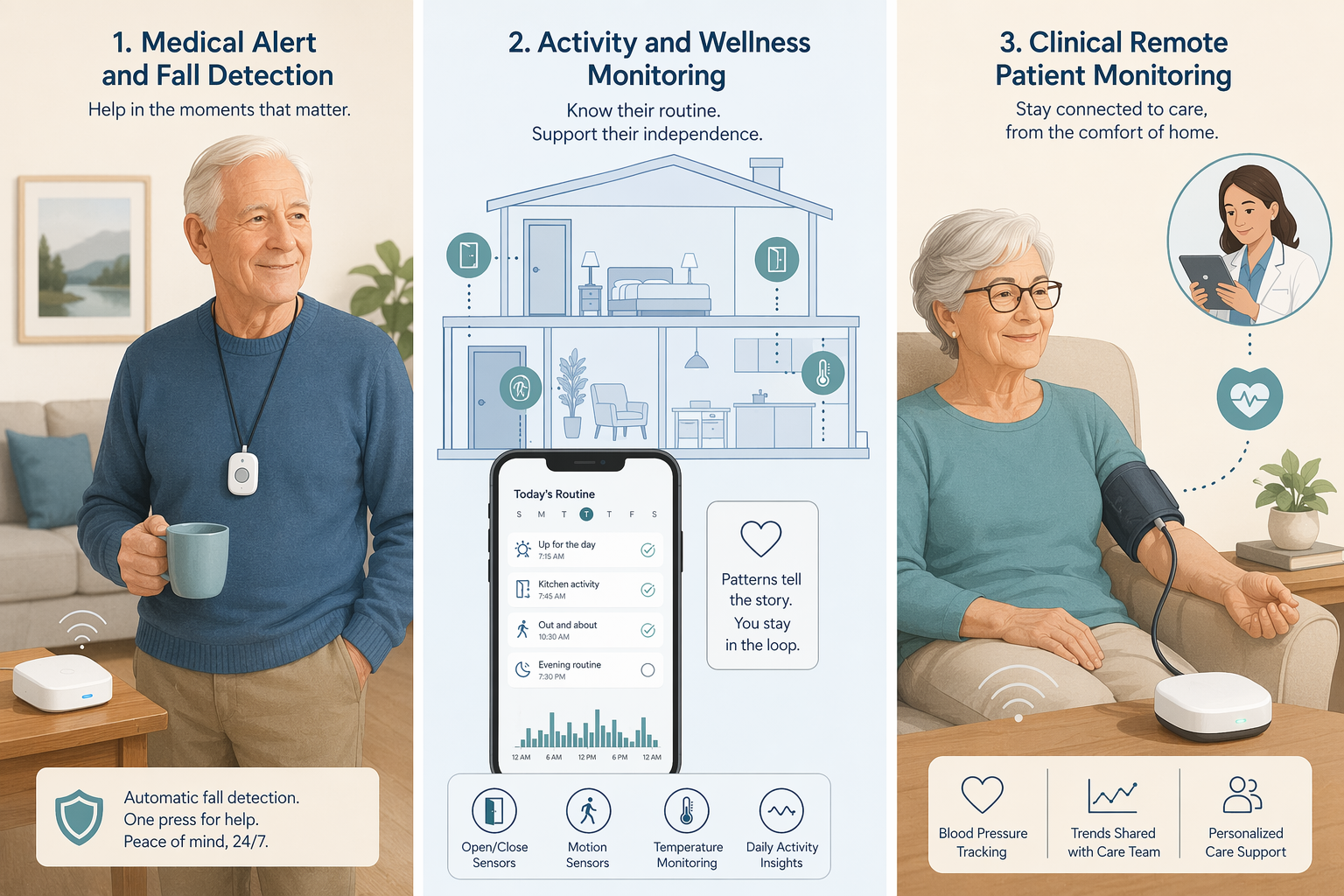
There is a useful framework from 1bios Health that splits the market into three distinct categories:
Medical alert systems — for emergency response after a fall or accident.
Activity and wellness monitoring — for tracking routine patterns and detecting gradual decline or wandering.
Clinical Remote Patient Monitoring (RPM) — for managing chronic conditions through biometric data shared with a provider.
These three categories serve fundamentally different jobs. A medical alert pendant does not track whether your mother got out of bed this morning. An activity sensor does not call 911 when your father falls in the bathroom. An RPM hub does neither of those things but can tell his cardiologist that his blood pressure has been climbing for three days.
Mixing them up wastes money and leaves the real need unmet. The single most important decision a caregiver makes is choosing the right category.
Medical Alert Systems: The Emergency Button — But Only If It’s Worn
Medical alert systems — also called PERS (personal emergency response systems) — are the oldest and best-known category. A base station connects to a pendant or wristband with a help button and, often, automatic fall detection. Press the button or the device detects a fall, and a call center dispatches help.
The National Council on Aging (NCOA) runs an in-house lab that tests these devices — 35 of them, across 16 scenarios. Their data is the most comprehensive available. They report that chest-worn fall detection achieves 98% accuracy. Wrist-worn devices are less accurate because arm movements trigger false alarms. Average response times from the call center: between 48 and 62 seconds across top brands. Battery life ranges from 24 hours to 10 days. Monthly cost runs $20 to $34, plus about $10 for fall detection, plus equipment and activation fees that can total a few hundred dollars.
That is the main limitation of this category. It solves the problem of “I need help right now after a fall” — but only if the person is wearing the device at the time. It does not detect a slow decline, a series of near-misses, or a urinary tract infection that is causing confusion. For those, you need a different category.
Activity Monitoring: Seeing the Patterns, Not the Person
Activity and wellness monitoring uses passive sensors — motion detectors on walls, door sensors, bed presence pads, stove shut-off devices — to build a picture of daily routines without cameras or wearables. The system learns when someone normally gets up, opens the refrigerator, or goes to bed. When the pattern breaks, it sends an alert.
AARP has covered this category and notes a strong preference for camera-free systems: families want to avoid a “1984” surveillance feel. The movement sensors are enough. They also report pricing from 2020 — around $299 for a starter kit plus $49 per month, or $40 to $60 per month for a wrist-based device with GPS. That pricing is illustrative; the market has shifted, but the categorical advice — choose sensors over cameras — still holds.
This category is especially relevant for dementia care. The Alzheimer’s Association reports that six in ten people with dementia will wander at least once, and most are found within 1.5 miles of where they disappeared. A combination of door sensors and a GPS wearable can alert a caregiver before the person gets far.
One important distinction: some activity monitoring systems claim to be passive but still require the user to wear a wristband or carry a pendant. That reintroduces the same compliance problem as medical alert systems. Truly passive systems use wall-mounted sensors that require nothing of the person being monitored. If the person has memory issues or resists wearing devices, that difference matters.
This category is for early detection of decline, not emergencies. It can tell you that your mother hasn’t opened the refrigerator in 18 hours, but it cannot send an ambulance.
Remote Patient Monitoring: Requires a Care Team
Remote Patient Monitoring (RPM) is a clinical service, not a consumer product. A healthcare provider prescribes a set of biometric devices — blood pressure cuff, glucose meter, pulse oximeter, scale — that transmit data to a care management team. The team reviews the numbers and intervenes when trends shift.
The numbers from individual health systems are striking: Dialog Health reports a 40% decrease in hospital admissions among elderly RPM patients, and an 85% reduction in readmissions. UPMC saw a 76% reduction. Deaconess Health reported a 50% drop in 30-day readmissions, generating $500,000 in savings.
Those are impressive, but they come from health systems with dedicated care management workflows, integrated IT, and motivated populations. They are not a guarantee for a typical program. A more conservative benchmark comes from a survey of 25 organizations cited by Dialog Health: across these programs, admissions for chronic care complications dropped by 19% to 41%. That range is probably closer to what most caregivers should expect.
RPM is reimbursed by Medicare. A single beneficiary can generate over $1,000 in annual reimbursement for 20 minutes of monitoring per month. As of December 2024, 42 states had adopted Medicaid coverage for RPM. But the critical point is that RPM requires a provider to start and manage it. You cannot buy an RPM system off the shelf and expect the same outcomes. The device is just a data collector; the care team is what makes the difference.
Cellular-enabled RPM devices, as noted by 1bios Health, avoid the Wi-Fi setup barrier that can prevent many seniors from using connected health devices consistently. That matters for older adults who do not have reliable home internet or cannot manage a router login.
Blurred Lines and What to Ignore
The three-category framework is clean, but real products do not always stay in their lane. Some medical alert pendants now include step counting. Some RPM hubs include motion sensors. Some activity monitoring wristbands have fall detection.
Do not let the bonus features distract you. The primary job the system needs to do should drive the decision. If your father has heart failure and needs daily weight and blood pressure checks, an RPM program is the core need. The fact that his pendant also counts steps is irrelevant. If your mother has early dementia and wanders at night, door sensors and a GPS tracker are the core need. Whether the system also sends medication reminders is secondary.
Privacy and consent is not a sidebar. If the person being monitored has cognitive impairment, the question is not just which sensor works but whether they can meaningfully consent to being tracked. Treat this as a decision criterion, not a footnote.
Matching a System to Your Parent’s Actual Situation
The table below maps common caregiving situations to the category that best fits the primary need. Start here, then evaluate products within that category.
Match your parent's situation to the primary need, then to the best category.
Situation
Primary need
Best category
Parent lives alone, has high fall risk
Immediate help after a fall
Medical alert system with automatic fall detection
Parent has dementia and wanders
Alerts when they leave home, ability to locate
Activity monitoring with door sensors and GPS tracker
Clinical Remote Patient Monitoring (through a provider)
Parent wears a device inconsistently
Non-wearable solution
Truly passive activity monitoring (no pendant, no wristband)
Long-distance caregiver, worried about falls
Peace of mind, quick notification
Medical alert system + activity monitoring (dual category need)
For dementia-specific monitoring needs, see our guide to dementia monitoring systems for a deeper look at wandering detection, nighttime agitation, and routine changes.
What Else Matters
Once you have chosen the category, these criteria help you pick a specific system:
Ease of use. Can the person actually operate it? If it requires charging every night, pressing buttons, or logging into an app, it will fail for many older adults.
Battery life. Ranges from 24 hours to 10 days for wearable devices. Longer is better, especially if the person forgets to charge.
Connectivity. Does it rely on Wi-Fi, a cellular network, or a landline? Cellular avoids setup barriers but may cost more. Wi-Fi-dependent devices are useless if the internet goes down.
Privacy model. Does the system use cameras or only sensors? Who has access to the data? Is the data shared with third parties? These questions matter especially for dementia caregivers.
Monitoring type. Professional call center (monthly fee) vs. self-monitoring with family alerts. Professional monitoring adds cost but provides a safety net when family is unavailable.
Bias in reviews. NCOA, for example, receives affiliate commissions from medical alert system purchases. Their testing methodology is transparent and rigorous, but the affiliate model is disclosed. Treat pricing as illustrative — it changes.
For individualized recommendations:An occupational therapist or your primary care provider can assess your specific situation and recommend the monitoring category and feature set that best fits the person's functional level, living environment, and caregiver availability. This explainer provides educational context, not a personalized recommendation.

Comments
Join the discussion with an anonymous comment.