
Caregiver decision guide
When the Pendant Isn't Enough: A Caregiver's Guide to Passive vs. Active Monitoring Technology
This guide helps long-distance caregivers evaluate monitoring technology options for aging parents living independently at home. It provides a product-neutral comparison of wearable, camera-based, and passive sensor systems, along with a decision framework based on your parent's cognitive and physical health profile.

Why 'Press the Button' Fails for Many Older Adults
The classic medical alert pendant — the "I've fallen and I can't get up" device — has been a staple of aging-in-place safety for decades. Its premise is simple: press the button, help arrives. But for a significant portion of older adults, that button never gets pressed.
The reasons are varied and deeply human. A parent may forget to put the pendant on after a shower. They may leave it on the nightstand because it's uncomfortable to sleep in. They may feel it marks them as "old" and choose not to wear it when company visits. Or, as the envoyatHome guide notes, they may simply think they'll be fine for a quick trip to the bathroom — a decision that emergency rooms see the consequences of every day.
This is not a failure of the technology itself. It is a failure of the assumption that an older adult will reliably wear, charge, and remember to use a device every moment of every day. For caregivers evaluating monitoring options, the first question should not be "Which pendant has the best battery life?" but rather "Will my parent actually use this?"
The Three Categories of Monitoring Technology: An Overview
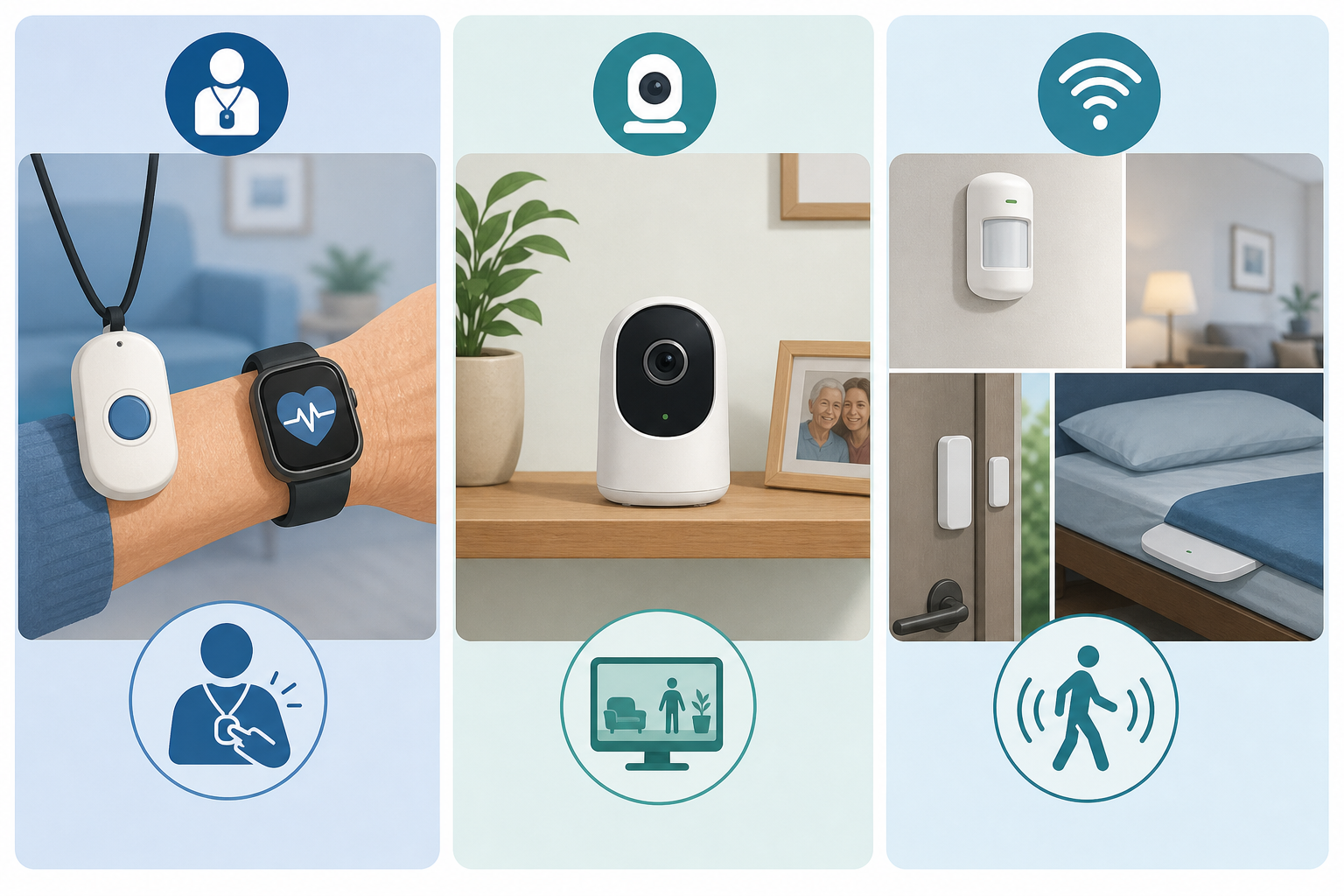
Modern monitoring technology for aging adults falls into three broad categories. Each operates on a fundamentally different principle, and each has distinct strengths and limitations. Understanding these categories is the first step toward matching a system to your parent's specific needs.
- Active / Wearable Systems: These are the traditional medical alert pendants, smartwatches with fall detection, and wrist-worn devices. They require the user to wear the device and, in most cases, to actively press a button to summon help. Some modern wearables include automatic fall detection, but the user must still keep the device on their person.
- Camera-Based Systems: Indoor cameras, video doorbells, and smart home cameras allow a caregiver to visually check in on a parent. These systems provide real-time visual verification of what is happening, but they raise significant privacy concerns — both for the older adult and for anyone else who enters the home.
- Passive Sensor Systems: Motion sensors placed in key rooms, door sensors on the front door and refrigerator, bed sensors that track sleep patterns, and stove monitors. These systems require zero action from the user. They learn daily routines and alert caregivers when something is off — a missed morning kitchen visit, an unusually long bathroom trip, or a door opened in the middle of the night.
The fundamental difference between these categories is the burden they place on the older adult. Active systems demand consistent user behavior. Camera systems trade privacy for visibility. Passive systems ask nothing of the user but provide less direct communication. There is no universally "best" category — only the right fit for a specific person and situation.
How Each Technology Works: Pros, Cons, and Key Tradeoffs
Choosing between these categories requires understanding not just how they work, but where they break down in real-world use. The table below summarizes the key tradeoffs across the most important dimensions for caregivers.
| Dimension | Active / Wearable | Camera-Based | Passive Sensor |
|---|---|---|---|
| User action required | Must wear device; may need to press button | None (caregiver initiates viewing) | None — zero user action required |
| Fall detection | Automatic on some models; manual on others | Only if caregiver is watching live | Detects fall via unusual inactivity pattern |
| Privacy model | Moderate — device worn on person | Low — camera sees all activity | High — no video or audio; motion data only |
| Behavioral insight | None — emergency-only | High — caregiver can see what's happening | High — detects changes in daily routines |
| Compliance challenge | High — must remember to wear and charge | Low — no user burden | Low — no user burden |
| Two-way communication | Yes — built-in speaker/mic | Yes — via camera speaker | No — alerts only |
| Typical monthly cost | $20–$80/month | $10–$30/month (plus equipment) | $30–$99/month (plus equipment) |
Active / Wearable: The strength of wearable systems is direct communication. When a button is pressed, the user speaks to a monitoring center or a family member. Modern wearables like the UnaliWear Kanega watch (approximately $300 plus $80/month per Wirecutter) include automatic fall detection and GPS. But the compliance burden is real. A device left on the nightstand is no device at all.
Camera-Based: Cameras offer the most complete picture — you can see exactly what is happening. This is invaluable for long-distance caregivers who worry about a parent's mobility or confusion. However, the AARP data on privacy is sobering: only 10% of seniors using smart home assistants feel "very confident" their privacy is protected. A camera in the living room may feel like surveillance, not support, to the person being watched.
Passive Sensor: Systems like those from Caregiver Smart Solutions (Peace of Mind sensors at $299 plus $49/month per AARP's 2020 article) and envoyatHome ($99/month plus $399 equipment) use motion detectors, door sensors, and bed sensors to track daily patterns without any video or audio. As the Caregiver Smart Solutions founder told AARP, "People don't want anybody watching them... They don't like that 1984 stuff." The tradeoff is that passive systems cannot provide direct communication — they alert you to a potential problem, but you must call your parent to check in.
Evaluation Dimensions: What to Look For in Any System
Regardless of which category you lean toward, every monitoring system should be evaluated on the same core dimensions. These criteria help you compare systems on an apples-to-apples basis, even when the underlying technology is completely different.
| Evaluation Dimension | What to Ask | Why It Matters |
|---|---|---|
| Fall detection capability | Does the system detect falls automatically, or does the user need to press a button? | Automatic detection is critical if your parent is at high fall risk or may be unable to press a button after a fall. |
| 24/7 coverage | Does the system work during a power outage? Does it have cellular backup? | A system that fails when the Wi-Fi goes down leaves your parent unprotected during the most vulnerable moments. |
| Privacy model | Does the system use video, audio, or motion data only? Who has access to the data? | Privacy concerns are the #1 reason older adults reject monitoring. A system that respects privacy is more likely to be accepted. |
| Compliance burden | Does the user need to wear, charge, or interact with the device? | The best system in the world is useless if your parent won't use it. Passive systems eliminate this risk entirely. |
| Behavioral insight vs. emergency-only | Does the system only alert on emergencies, or does it track daily patterns? | Behavioral insight can catch problems early — a missed meal, a sleepless night — before they become emergencies. |
| Monthly cost | What is the subscription fee? Are there equipment costs? Installation fees? | Costs range from $20/month for basic monitoring to $99+/month for comprehensive passive systems. Factor in long-term affordability. |
| Setup complexity | Can you install it yourself, or does a technician need to visit? | Simple plug-and-play systems are easier to deploy, especially for long-distance caregivers who cannot be on-site for installation. |
Our Elderly Monitoring Systems: A 5-Dimension Evaluation Framework provides a more detailed breakdown of these criteria, including how to weight each dimension based on your parent's specific health profile and living situation.
Privacy and Consent: Having the Conversation
Privacy is the single most common reason older adults resist monitoring technology — and it is also the dimension where caregivers and their parents most often disagree. A 2024 AARP survey, compiled by California Mobility, found that only 10% of seniors using smart home assistants feel "very confident" their privacy is protected. Yet the same survey found that 66% of seniors are comfortable sharing health data via wearable devices, and 40% would agree to use technology to track their health.
Having a respectful conversation about monitoring requires framing it around shared goals — safety, independence, and peace of mind — rather than around surveillance or control. Here are practical steps for that conversation:
- Start with the goal, not the device. "I worry about you living alone and want to make sure help can reach you quickly if something happens. Can we talk about ways to do that?"
- Offer choices. Present the three categories and explain the tradeoffs. Let your parent express which approach feels most comfortable. Many older adults prefer passive sensors precisely because they do not involve cameras.
- Address privacy directly. If your parent is concerned about privacy, explain exactly what data the system collects and who has access to it. For passive sensors, emphasize that there is no video or audio — only motion and door events.
- Propose a trial period. Many monitoring services offer month-to-month subscriptions. Suggest trying a system for 30 days with the understanding that it can be stopped if it feels intrusive. Experience often reduces resistance.
- Involve your parent in the setup. When a parent helps place sensors and configure alerts, they retain a sense of control over the system rather than feeling like it is being imposed on them.
For cognitively impaired individuals, the consent conversation is more complex. In cases of dementia or Alzheimer's, the older adult may not be able to fully understand or agree to monitoring. In these situations, consult with the person's primary care physician or a geriatric care manager about the ethical considerations. The goal should always be to maximize safety while preserving as much dignity and autonomy as possible.
A Decision Framework Based on Your Parent's Profile
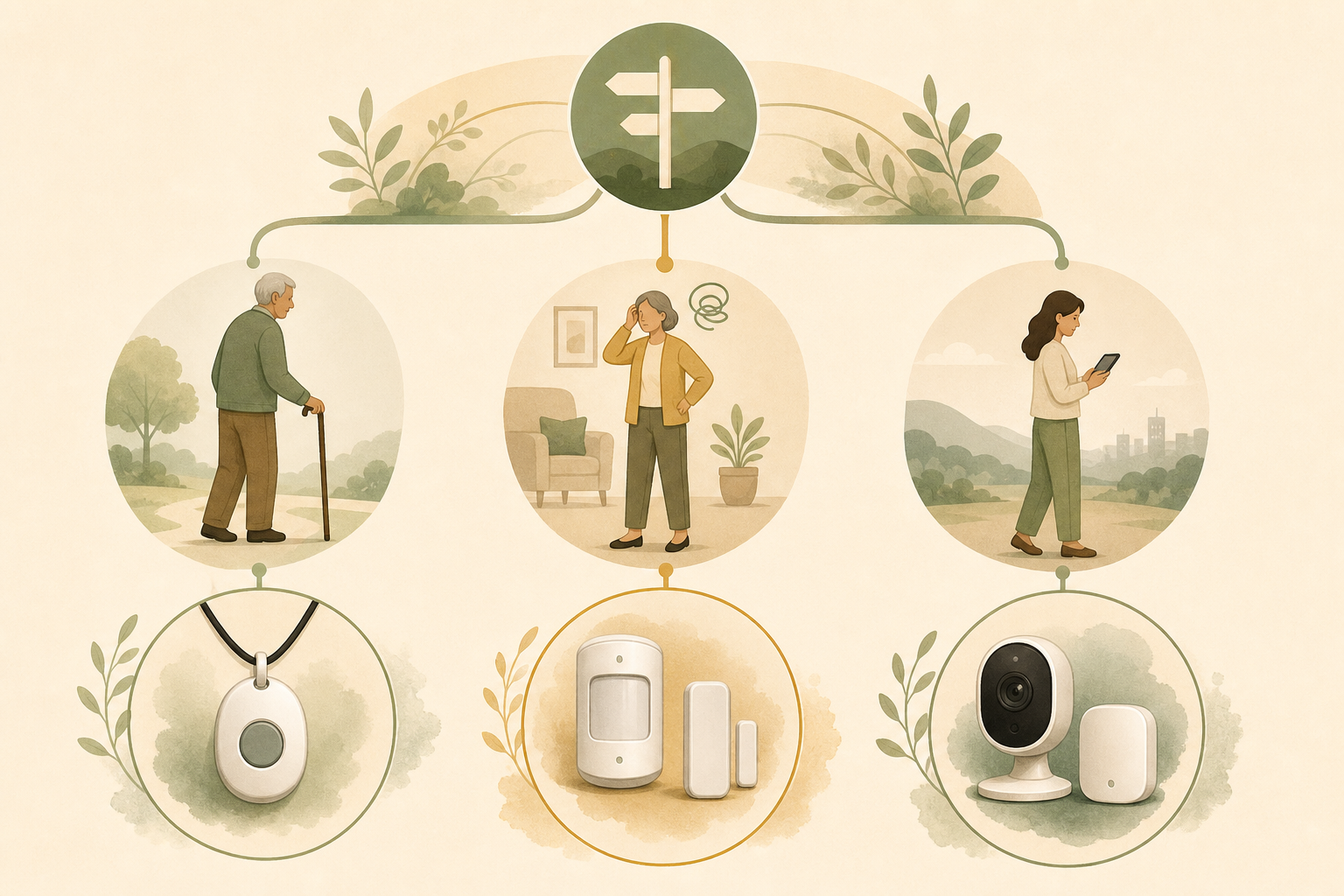
The right monitoring system depends less on the technology itself and more on your parent's cognitive status, physical health, and willingness to participate. The following framework matches common caregiver scenarios to the most appropriate technology category.
| Parent Profile | Recommended Category | Why This Fits |
|---|---|---|
| Cognitively intact, physically frail, lives alone | Active / Wearable PERS | A parent who is mentally sharp and understands the device will likely wear it consistently. Automatic fall detection and two-way communication provide direct help when needed. |
| Early cognitive decline, forgetful, lives alone | Passive Sensor System | Forgetfulness makes wearable compliance unreliable. Passive sensors detect missed routines and unusual patterns without requiring the parent to remember anything. |
| Long-distance caregiver, parent lives alone | Camera + Sensor Hybrid | When you cannot visit regularly, a camera provides visual confirmation of well-being. Pair it with passive sensors for overnight monitoring and fall detection. |
| Moderate dementia, lives with spouse or caregiver | Passive Sensor + Door Alarms | Wandering is a primary concern. Door sensors alert the caregiver when the exterior door opens. Motion sensors in hallways and bedrooms track nighttime activity. |
| Parent refuses all monitoring | Lowest-Burden Passive Sensor | If your parent rejects wearables and cameras, a minimal passive sensor system (motion sensors in the kitchen and bathroom only) may be acceptable because it is invisible. |
Our detailed comparison of passive monitoring vs. wearable PERS explores the two most common categories in greater depth, including specific scenarios where one clearly outperforms the other.
For dementia-specific monitoring needs, our guide on elderly monitoring systems for dementia and wandering addresses the unique challenges of wearable compliance and acceptance when cognitive decline is a factor.
Cost Comparison: What to Expect Monthly and Upfront
Monitoring technology costs vary widely based on the category, the number of sensors or devices, and whether professional monitoring is included. The table below summarizes typical cost ranges based on data from Wirecutter's 2026 guide and the envoyatHome and AARP articles.
| Category | Typical Equipment Cost | Typical Monthly Fee | What's Included |
|---|---|---|---|
| Basic wearable PERS | $50–$150 | $20–$40/month | Pendant or wristband, base station, cellular backup, monitoring center |
| Advanced wearable (smartwatch-style) | $200–$450 | $50–$80/month | GPS, automatic fall detection, two-way talk, longer battery life |
| Camera-based system | $50–$200 per camera | $10–$30/month | Indoor cameras, cloud storage, app access, optional AI alerts |
| Passive sensor system (basic) | $200–$300 | $30–$50/month | 3–5 motion sensors, door sensor, hub, app alerts |
| Passive sensor system (comprehensive) | $300–$500 | $50–$99/month | Multiple sensors, bed sensor, stove monitor, professional monitoring, cellular backup |
For example, the Ring Alarm Pro offers professional monitoring for $20/month (per Wirecutter), while a comprehensive passive sensor system like envoyatHome costs $99/month with a $399 one-time equipment fee. The Caregiver Smart Solutions Peace of Mind kit was priced at $299 plus $49/month in AARP's 2020 coverage — though pricing may have changed since then.
Our cost-benefit analysis of how monitoring technology can reduce in-home senior care costs provides a broader perspective on how these monthly fees compare to the cost of assisted living, home health aides, or emergency room visits.
Bottom-Line Recommendations for Caregivers
There is no single "best" monitoring system. The right choice depends entirely on your parent's cognitive status, physical health, living situation, and — most importantly — their willingness to accept the technology. A system your parent refuses to use is not a safety solution; it is an expensive paperweight.
Start with the conversation, not the purchase. Before researching devices, talk to your parent about the goal: keeping them safe and independent at home. Gauge their comfort level with different types of monitoring. If they are open to a wearable, start there. If they resist, passive sensors may be the path of least resistance.
Trial before you commit. Most monitoring services offer month-to-month subscriptions. Use the first 30 days as a trial period. If the system is not being used — the pendant is on the nightstand, the camera is unplugged — it is not the right system, regardless of its features.
Consider a hybrid approach. Many caregivers find that a combination works best: passive sensors for overnight monitoring and routine tracking, plus a wearable or camera for daytime check-ins. This layered approach provides both behavioral insight and emergency response capability.
Revisit the decision as needs change. A system that works for a cognitively intact parent today may be inadequate if cognitive decline progresses. The AARP report finding that 75% of Americans aged 50 and older plan to age in place means the monitoring journey is often a multi-year one. What works at the start may need to evolve.
Questions to bring to a clinician or OT
This is not medical, legal, or a family's final decision — only a framework. Bring these questions to a clinician, occupational therapist, or your local Area Agency on Aging.
Find Local HelpRelated reading
Noticed something outdated or inaccurate on this page? Flag a correction. We review every report against CDC, NIA, and AARP HomeFit guidance before updating a page.