
Caregiver decision guide
How Monitoring Technology Can Reduce In-Home Senior Care Costs: A Cost-Benefit Framework for Families
For adult children managing caregiving from a distance or stretching a limited budget, this article explains how passive motion sensors, fall detection, and remote health monitoring can reduce paid care hours by 15–40%, potentially lowering monthly costs by hundreds or thousands of dollars while extending independent living.
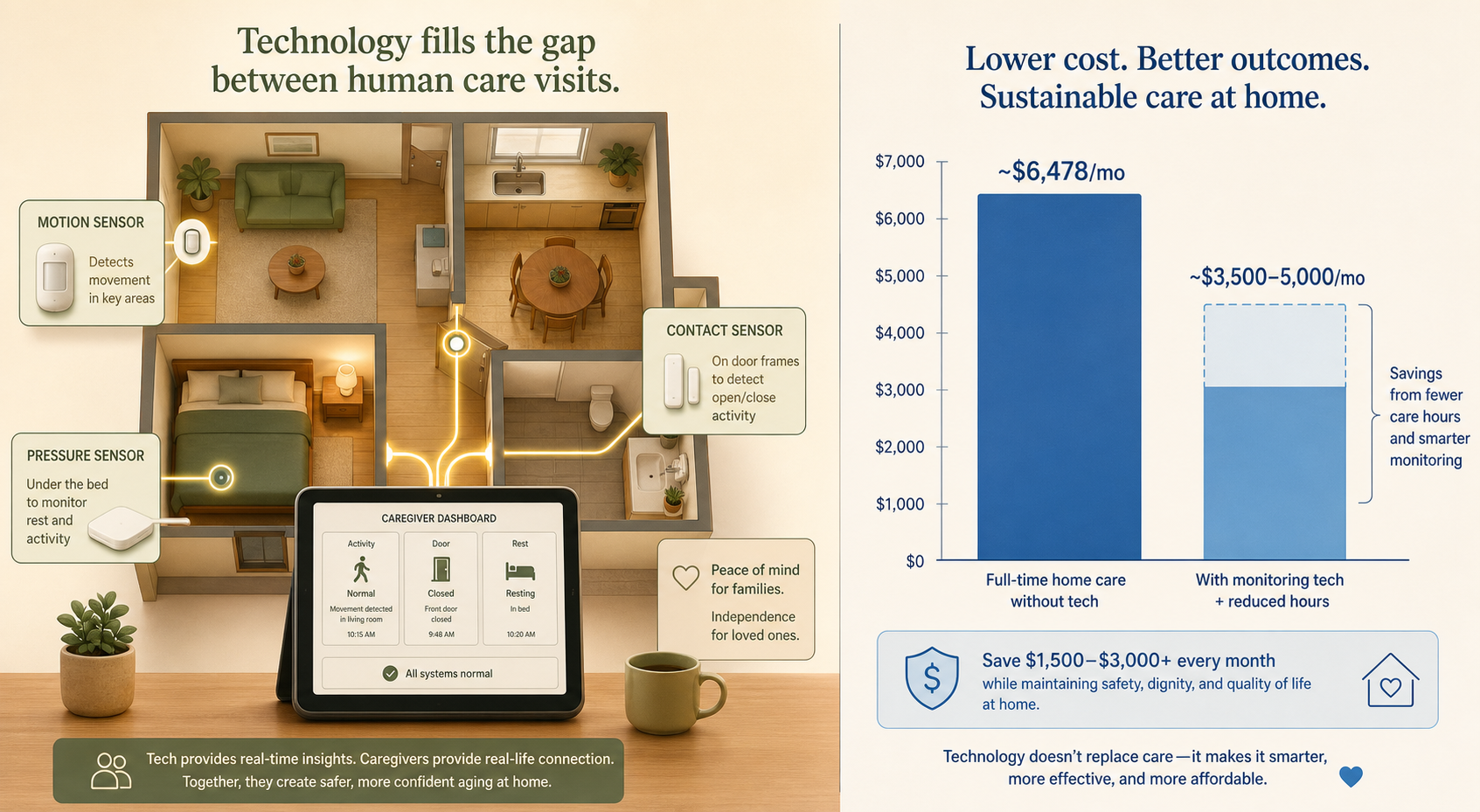
The $6,478 Monthly Baseline: Why Families Need a Smarter Approach
For families arranging in-home care for an aging parent, the first number they encounter is often the most daunting. According to A Place for Mom's 2026 Costs of Long-Term Care and Senior Living Report, the national median cost of home care is $34 per hour. At 44 hours per week — a common full-time schedule — that translates to $6,478 per month. Data from CareScout, published by SeniorLiving.org in February 2026, puts the median slightly higher at $35 per hour, reflecting a roughly 5% increase from 2023 to 2024. The difference between these two figures is small — about $190 per month at 44 hours — but it underscores a critical point: the cost of human care is rising, and it is already out of reach for many middle-income families.
The reality is that most families do not need or use 44 hours of paid care per week. Many operate in the 7-to-30-hour range, spending between $1,031 and $4,416 per month at the national median rate. Even at these lower levels, the financial strain is significant. The question becomes: can technology fill the gaps between human visits, allowing families to buy fewer hours of care without sacrificing safety or quality of life?
What Monitoring Technology Can Do: Filling the Gaps Between Care Visits
The core insight behind using monitoring technology to reduce care costs is straightforward: when a paid caregiver is not in the home, the older adult is essentially on their own. Research from Sensi.AI's Care Intelligence Research found that nearly 80% of urgent calls for help go unanswered when older adults are alone. The same research reported that 77% of falls happen without anyone present to assist, and six out of ten cardiac-related events go unnoticed. These are not edge cases — they are the norm for seniors living independently or with only part-time care.
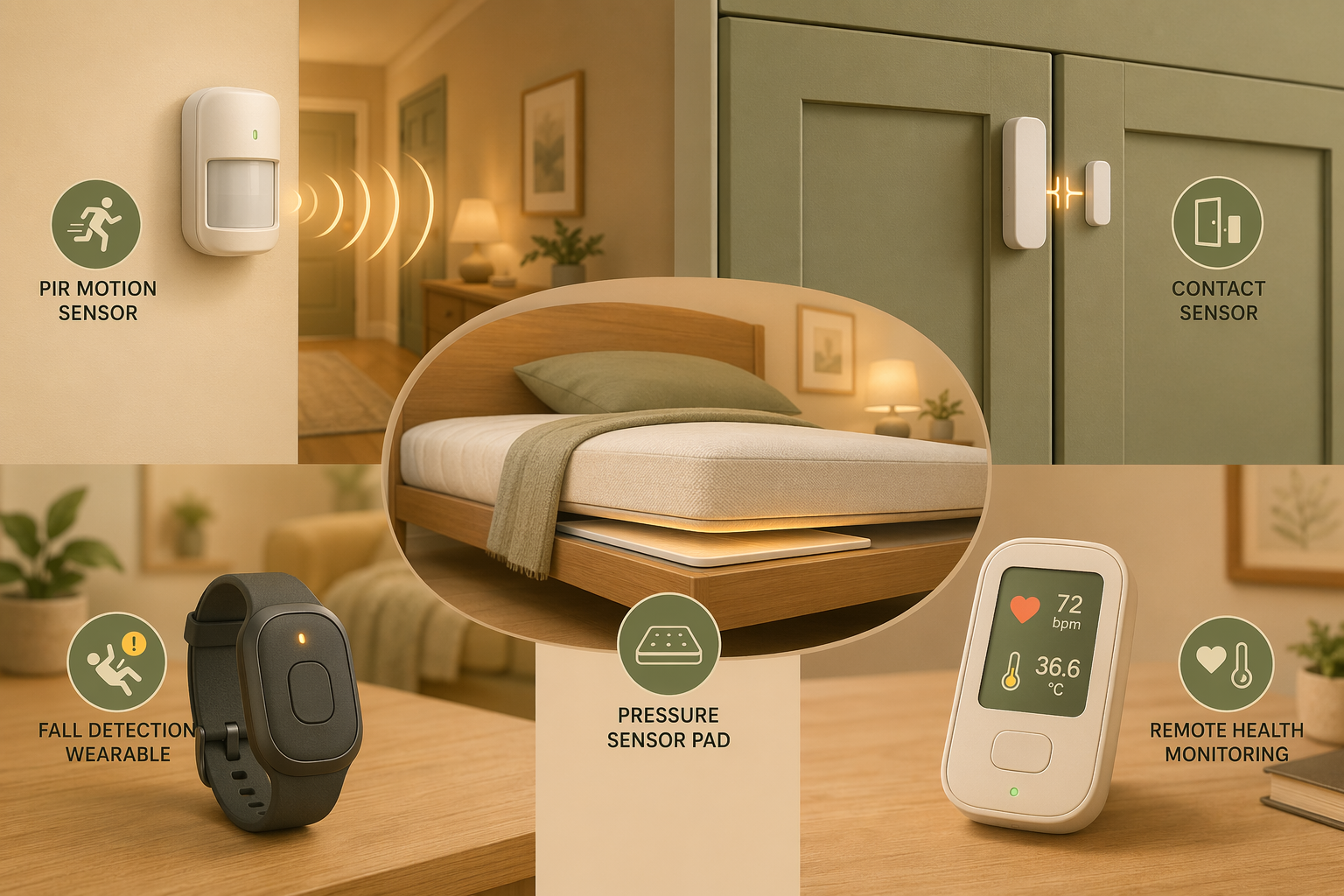
Monitoring technology addresses this vulnerability by creating a continuous safety net. Passive motion sensors, contact sensors on doors and cabinets, pressure mats on beds and chairs, and automatic fall detection devices can all detect when something is wrong — a missed morning routine, an unusual lack of movement, a fall — and alert a family member, a remote monitoring service, or an emergency response center. This means families can schedule fewer, shorter, and more targeted human care visits because the technology handles the constant watchfulness that would otherwise require a paid caregiver to be present.
This is not about replacing human care. It is about deploying human care more efficiently. Instead of paying for a caregiver to sit in the home for four hours to ensure safety, a family might pay for a one-hour visit to assist with bathing and meal preparation, while the technology monitors the remaining three hours. The savings accumulate month after month.
Sensor Categories and Their Cost Impact: A Practical Overview
An NIH scoping review published in 2022 examined 30 studies on in-home monitoring technology and identified 16 distinct sensor types. The most common were passive infrared (PIR) motion sensors, found in 21 of the 30 studies, and contact sensors, found in 19 studies. These sensors fall into several functional categories, each with a different mechanism for reducing care costs.
| Sensor Category | What It Monitors | How It Reduces Costs | Typical Monthly Cost |
|---|---|---|---|
| PIR motion sensors | Movement patterns, room occupancy, daily routines | Detects changes in activity that may signal illness or fall risk, enabling early intervention and reducing emergency visits | $30–$50 (part of basic system) |
| Contact sensors (doors, cabinets, refrigerator) | Door open/close events, medication cabinet access, meal preparation | Confirms the senior is eating, taking medications, and not wandering outside; reduces need for check-in visits | $30–$50 (part of basic system) |
| Pressure sensors (bed, chair) | Time in bed, sleep quality, time spent sitting | Detects prolonged bed rest or chair confinement that may indicate a fall or illness; reduces need for overnight supervision | $30–$50 (part of basic system) |
| Automatic fall detection (wearable or ambient) | Sudden impact, change in posture, lack of movement | Reduces emergency response time, preventing costly hospitalizations and extended recovery | $25–$45 (add-on subscription) |
| Remote health monitoring (blood pressure, glucose, pulse oximetry) | Vital signs, medication adherence | Catches health deterioration early, reducing hospital readmissions and urgent care visits | $20–$50 (device + subscription) |
A basic monitoring system — typically a hub plus a few motion and contact sensors — costs between $30 and $50 per month. Adding fall detection or remote health monitoring increases the monthly cost by $20 to $50. Compare that to even a single four-hour care visit at $34 per hour ($136 per visit), and the math becomes compelling: a full month of monitoring can cost less than a single day of paid care.
For a deeper comparison of passive versus wearable systems, see our Wearable vs. Passive Elderly Monitoring Systems decision framework. For detailed guidance on specific sensor types and installation, read our Passive Home Monitoring Sensors guide.
Case Study: The Fractional Care Model in Action
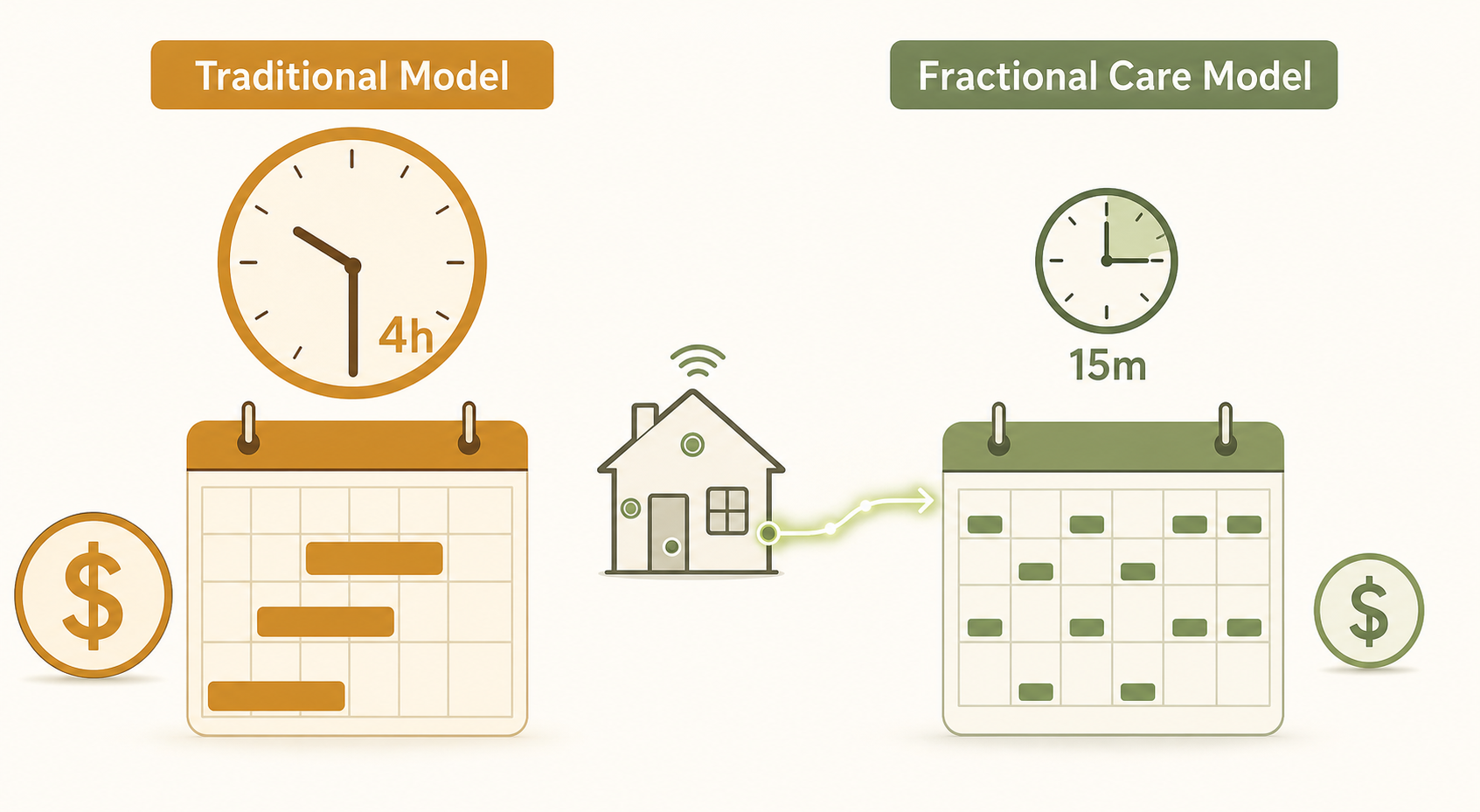
One of the most concrete examples of technology reducing in-home care costs comes from Cypress Home Care Solutions, a home care provider that adopted Sensi.AI's audio-based monitoring technology. According to a February 2025 report in Home Health Care News, Cypress used the technology to offer care visits in 15-minute increments instead of the traditional four-hour minimum. This "fractional, on-demand care" model allows families to pay only for the exact minutes of human assistance needed, rather than buying a full block of time.
Consider the difference: a traditional four-hour visit at $34 per hour costs $136. A 15-minute visit at the same hourly rate costs $8.50. If a family needs three 15-minute visits per day — one to help with morning medication, one to prepare lunch, and one to assist with evening hygiene — the daily cost is $25.50, or $765 per month. That same level of support under the traditional model would require at least two four-hour blocks per day, costing $272 per day or $8,160 per month. The technology enables the care to be precisely targeted to the moments when human help is actually needed.
Cost-Benefit Tradeoffs: Device and Subscription Costs vs. Reduced Care Hours
For families evaluating whether monitoring technology makes financial sense, the calculation is straightforward: compare the monthly cost of the technology against the savings from reduced paid care hours. The following table provides a simplified framework using the national median rate of $34 per hour.
| Scenario | Weekly Care Hours | Monthly Care Cost (at $34/hr) | Monthly Tech Cost (est.) | Total Monthly Cost | Monthly Savings vs. Baseline |
|---|---|---|---|---|---|
| No technology (baseline) | 30 hours | $4,416 | $0 | $4,416 | — |
| With monitoring (15% reduction) | 25.5 hours | $3,754 | $50 | $3,804 | $612 |
| With monitoring (25% reduction) | 22.5 hours | $3,312 | $50 | $3,362 | $1,054 |
| With monitoring (40% reduction) | 18 hours | $2,650 | $50 | $2,700 | $1,716 |
The savings range of 15% to 40% is based on emerging evidence from the Cypress/Sensi.AI case study and the University of Miami's IDSC research on smart home technology, which suggests that such systems can lower healthcare costs and reduce strain on facilities by enabling preventative care. These are directional figures, not guaranteed outcomes. A family currently paying for 15 hours per week ($2,208/month) might see a smaller absolute savings than a family paying for 30 hours, but the proportional impact can still be significant.
For a detailed breakdown of upfront fees, monthly subscriptions, and hidden charges across different monitoring systems, see our complete cost breakdown of elderly monitoring systems.
Privacy, Consent, and Technology Acceptance: What Families Need to Discuss
Before installing any monitoring technology, families must have an honest conversation with the older adult about what the technology does, why it is being used, and what data it collects. This is not a one-time discussion — it should be revisited as the senior's cognitive or physical condition changes.
The NIH scoping review noted that non-wearable ambient sensors — those installed on walls, doors, and furniture — are generally preferred for older adults with cognitive impairment because they do not require the user to wear or charge a device. This is an important distinction:
- Passive ambient sensors (motion, contact, pressure) are invisible in daily life. They do not require the senior to remember to wear a pendant or charge a battery. They are ideal for dementia care because they work regardless of the user's cognitive state.
- Wearable devices (fall detection pendants, GPS trackers, health monitors) require active participation. They are more suitable for seniors who are cognitively intact but physically at risk, and who are willing to wear the device consistently.
- Audio-based monitoring (like the Sensi.AI system used by Cypress Home Care) raises additional privacy concerns. Families should understand exactly what is recorded, who has access to the audio data, and how long it is stored.
The key framing for the consent conversation is independence, not surveillance. The technology is a tool that allows the senior to remain at home longer, with fewer strangers coming into the house. When presented as a way to avoid moving to a facility or to reduce the number of paid caregivers entering the home, acceptance rates tend to be higher.
When Technology Is Not Enough: The Limits of Monitoring
It is essential to be clear about what monitoring technology cannot do. No sensor, camera, or AI system can bathe a person, dress them, prepare a meal, help them use the toilet, or provide the human connection that many older adults need. These are activities of daily living (ADLs) that require hands-on human assistance.
Monitoring technology is most effective for:
- Safety monitoring — detecting falls, wandering, or environmental hazards (stove left on, door left open)
- Health trend detection — identifying changes in activity patterns, sleep quality, or vital signs that may signal an impending health crisis
- Medication adherence confirmation — knowing whether the senior has opened the medication cabinet at the right time
- Peace of mind for long-distance caregivers — reducing the need for frequent check-in calls or visits
For hands-on care needs — bathing, dressing, toileting, feeding, transferring — a human caregiver is required. Technology can reduce the number of hours that caregiver needs to be present, but it cannot eliminate the need entirely for seniors with significant functional limitations. Families should assess the senior's ADL status honestly before deciding how much care can be replaced by technology.
Building Your Own Cost-Reduction Plan: A Step-by-Step Framework
No authoritative, product-neutral cost-calculator tool currently exists for this specific analysis. The following framework provides a do-it-yourself methodology that families can use to estimate their potential savings.
- Calculate your current or planned care hours and costs. Start with the number of hours per week you expect to need paid care. Multiply by the hourly rate in your area (use the state-by-state guide for local rates). This is your baseline.
- Identify which monitoring technology categories fit the senior's needs. Consider: Is the primary risk falls, wandering, medication non-adherence, or health deterioration? Does the senior have cognitive impairment that rules out wearables? Is the home suitable for passive sensor installation?
- Estimate technology costs. A basic passive sensor system runs $30–$50 per month. Adding fall detection or health monitoring adds $20–$50 per month. Include any upfront equipment costs (typically $100–$300 for a starter kit).
- Estimate potential hours saved. Start conservatively — assume a 15% reduction in paid care hours. If the technology proves effective, the savings may increase over time. Multiply the hours saved by your hourly rate.
- Compare total costs. Add the technology cost to the reduced care cost. Compare this total to your baseline. If the total with technology is lower, the investment makes financial sense.
| Step | Your Input | Example Calculation |
|---|---|---|
| 1. Baseline care cost | Hours/week × hourly rate × 4.33 weeks | 30 hrs × $34/hr × 4.33 = $4,416/mo |
| 2. Technology cost | Monthly subscription + equipment amortization | $50/mo subscription + $200 equipment / 24 months = $58/mo |
| 3. Estimated hours saved | Baseline hours × estimated reduction % | 30 hrs × 20% = 6 hrs saved per week |
| 4. New care cost | (Baseline hours − saved hours) × hourly rate × 4.33 | 24 hrs × $34/hr × 4.33 = $3,533/mo |
| 5. Total with technology | New care cost + technology cost | $3,533 + $58 = $3,591/mo |
| 6. Monthly savings | Baseline − total with technology | $4,416 − $3,591 = $825/mo |
After completing this analysis, the next step is to consult an occupational therapist for personalized technology matching. An OT can assess the senior's functional abilities, home environment, and specific risks, then recommend the most appropriate technology categories. This professional guidance ensures that the technology investment is targeted and effective, maximizing the potential for cost reduction.
Questions to bring to a clinician or OT
This is not medical, legal, or a family's final decision — only a framework. Bring these questions to a clinician, occupational therapist, or your local Area Agency on Aging.
Find Local HelpRelated reading
- Why Wearable Help Buttons Fail and What Actually Works: A Caregiver's Guide to Passive Monitoring
- Monitoring Elderly Parents Without Cameras: A Guide to Privacy-Preserving Passive Systems
- The Privacy Trade-Off in Elderly Monitoring: Camera-Free Systems, Data Security, and Gaining Your Parent's Acceptance
Noticed something outdated or inaccurate on this page? Flag a correction. We review every report against CDC, NIA, and AARP HomeFit guidance before updating a page.