
Caregiver decision guide
How to Choose an Elderly Monitoring System: A Decision Guide for Family Caregivers
Overwhelmed by monitoring options? This guide helps adult children choose the right system by starting with a five-question readiness assessment — evaluating fall risk, chronic conditions, cognitive status, living situation, and tech comfort — before comparing features, costs, and privacy considerations.
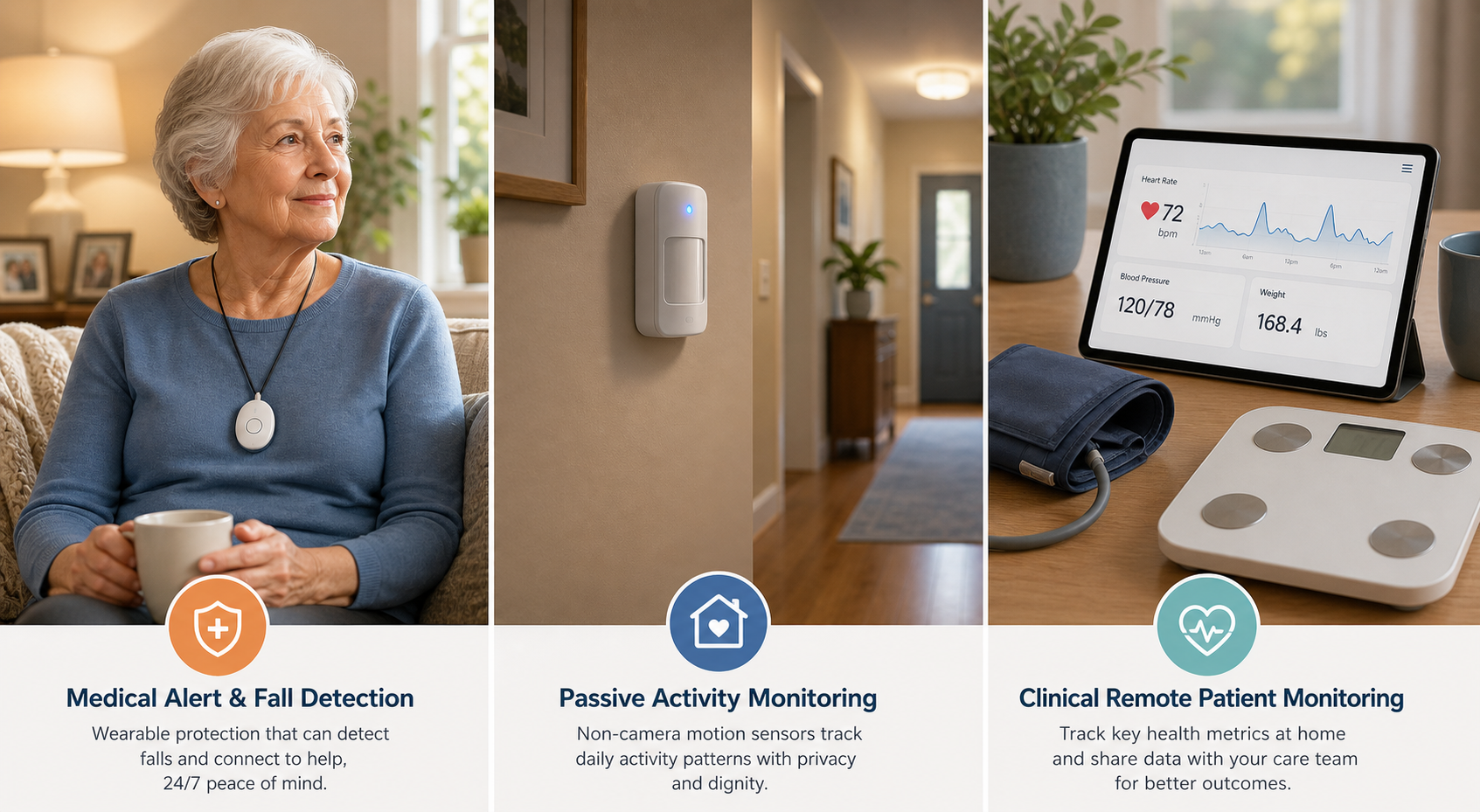
Why Most Families Choose the Wrong Monitoring System (and How to Avoid It)
When an older adult falls, the family's response is often the same: buy a medical alert system. It is a natural, well-intentioned reaction. But according to a February 2025 survey by the National Council on Aging (NCOA) of more than 1,000 medical alert system users and caregivers, nearly 75% of respondents said they decided to purchase a device only after a fall or medical emergency. That reactive approach means the decision is driven by urgency, not by a careful evaluation of what the older adult actually needs.
The problem is that a single product category cannot address every risk. An older adult with uncontrolled hypertension needs a different kind of monitoring than one who lives alone and is at risk of wandering due to dementia. A system that works well for a tech-comfortable senior in a single-story home may be a poor fit for someone who refuses to wear a pendant and lives in a multi-story house.
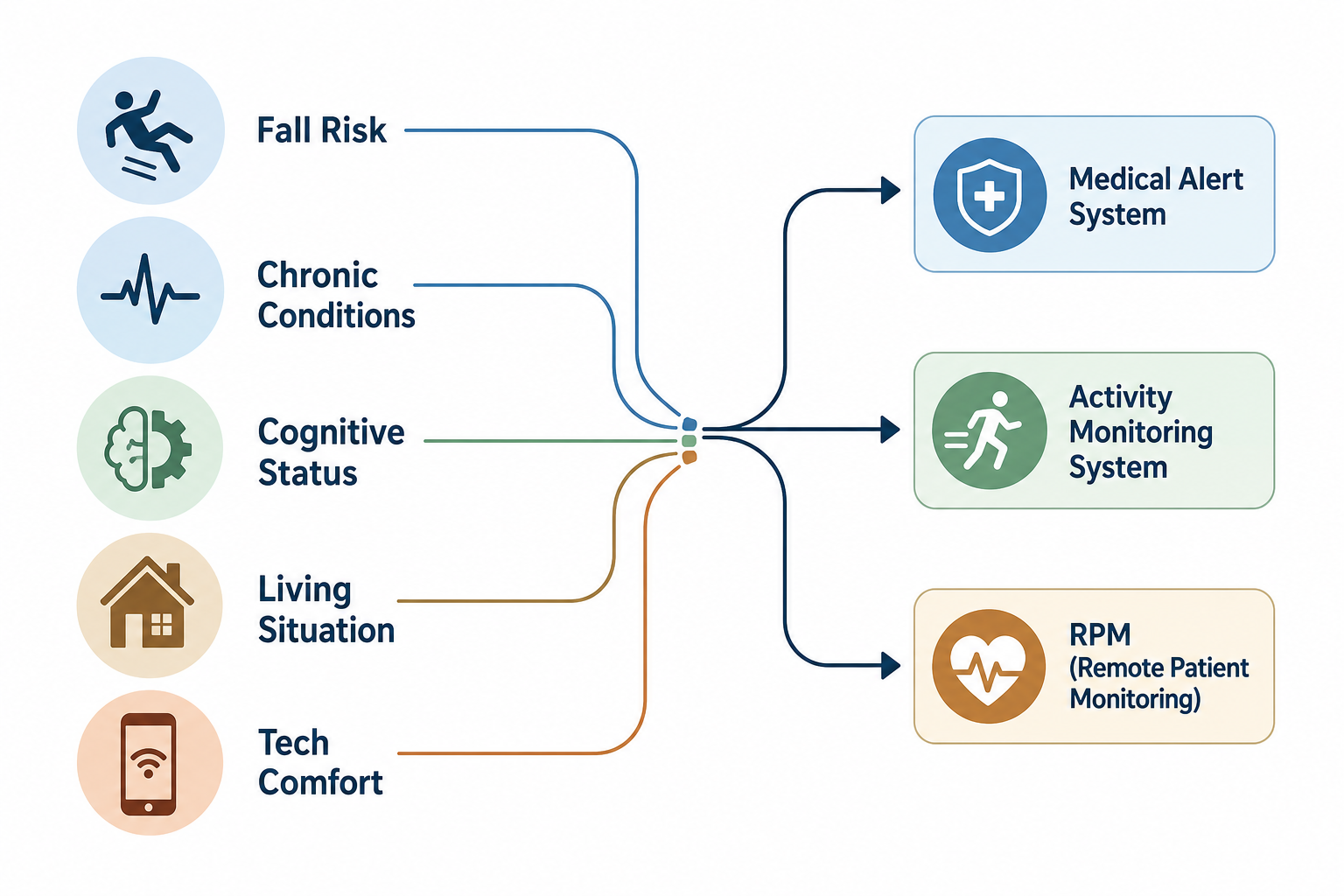
This guide takes a different approach. Instead of starting with product features or brand comparisons, it starts with a five-question readiness assessment that evaluates the senior's primary risks, living situation, and comfort with technology. Only after that assessment does it map the results to the right monitoring category. The goal is to help you make an informed, proactive decision — not a panicked, reactive one.
The Five-Question Readiness Assessment
Before you open a single browser tab to compare systems, take 15 minutes to answer these five questions. Each one targets a specific dimension of risk or readiness. The answers will point you toward the monitoring category that fits your parent's actual situation, not the one that happens to have the most commercials.
1. Fall Risk: History, Mobility, and Balance
Has your parent fallen in the past 12 months? Do they use a cane, walker, or other mobility aid? Do they feel unsteady when standing or walking, especially on stairs or uneven surfaces? A history of falls is the single strongest predictor of future falls. If the answer to any of these is yes, fall detection should be a core requirement of whatever system you choose.
If you are reading this shortly after a fall, the 30-minute family safety walkthrough is a practical next step to address immediate hazards before you decide on a monitoring system.
2. Chronic Condition Burden: Hypertension, Diabetes, Heart Failure, COPD
Does your parent have one or more chronic conditions that require regular monitoring — blood pressure, blood sugar, weight, or oxygen levels? Are these conditions well-controlled, or do they fluctuate? For seniors with significant chronic disease burden, a standard medical alert system that only detects falls and calls for help may not be enough. They may benefit from Remote Patient Monitoring (RPM), which tracks vital signs and shares data with healthcare providers.
3. Cognitive Status: Memory Concerns, Wandering Risk, Sundowning
Has your parent been diagnosed with Alzheimer's disease or another form of dementia? Do they show signs of confusion, forgetfulness, or disorientation? Have they ever wandered or gotten lost? For seniors with cognitive decline, a wearable pendant may be useless — they may forget to wear it, remove it, or fail to press the button in an emergency. Passive sensor-based activity monitoring, which tracks movement patterns without requiring any action from the senior, is often a better fit.
4. Living Situation: Alone vs. With Others, Single-Story vs. Multi-Story
Does your parent live alone? If so, how often do you or another family member visit? Is the home a single-story layout or multi-story with stairs? A senior living alone has a much higher risk of a long lie after a fall — lying on the floor for an hour or more after a fall is associated with worse outcomes. For those living alone, a system with automatic fall detection and a long in-home range (ideally 1,000 feet or more) is critical. For multi-story homes, consider whether the system's base unit can be placed centrally or if you need a system with a portable range extender.
5. Tech Comfort: Willingness to Wear a Device, Use a Smartphone, Manage Wi-Fi
Will your parent reliably wear a pendant or wristband every day? Are they comfortable using a smartphone or tablet? Do they have reliable Wi-Fi, or would a cellular-connected device be simpler? Tech comfort is often the most overlooked factor in system selection. A 2024 AARP survey found that 75% of adults aged 50 and older wish to remain in their current homes as they age, but many have not considered the technology required to do so safely. If your parent is not tech-savvy, a cellular-enabled device that requires no app management, Wi-Fi setup, or Bluetooth pairing will have much higher long-term adherence.
Matching Assessment Results to the Right Monitoring Category
Once you have completed the five-question assessment, the next step is to map the results to the monitoring category that best addresses the dominant risk. The table below shows which assessment profiles lead to which system type.
| Dominant Risk Profile | Recommended Category | Primary Function | Best For |
|---|---|---|---|
| High fall risk, good cognitive function, moderate-to-high tech comfort | Medical Alert System (PERS) | Emergency response with fall detection and two-way voice communication | Seniors who are active, mobile, and willing to wear a pendant or wristband |
| Cognitive decline, wandering risk, isolation concern, low tech comfort | Activity and Wellness Monitoring (Passive Sensors) | Non-wearable motion, door, and bed sensors that track routines and alert caregivers to anomalies | Seniors with dementia who may not remember to wear a device or press a button |
| Chronic condition burden (hypertension, diabetes, heart failure, COPD) | Remote Patient Monitoring (RPM) | Clinical-grade vital sign tracking (blood pressure, weight, glucose, oxygen) shared with providers | Seniors with one or more chronic conditions that require regular monitoring and medication adjustment |
| Multiple moderate risks (e.g., some fall risk, some cognitive concern, lives alone) | Combination Approach | A medical alert system with fall detection plus passive sensors for activity monitoring | Seniors who have overlapping risks that no single category fully addresses |
For a deeper dive into how passive sensor systems work and why they are often a better fit for seniors with cognitive decline, see our guide on passive ambient monitoring. For a detailed explanation of RPM, including CMS reimbursement and how it integrates with a senior's healthcare team, read our Remote Patient Monitoring guide.
Key Features to Evaluate (Before You Compare Brands)
Once you know which category of system you need, the next step is to evaluate specific features. These evaluation dimensions apply across all categories, but their importance will vary based on your assessment results.
Fall Detection Accuracy and Placement
If fall detection is a priority, placement matters. A 2023 study published in MDPI Sensors found that fall detection devices worn on the chest or trunk achieved a 98% accuracy rate. A separate 2021 review in BMC Public Health confirmed that the most effective sensors were placed on the body's trunk, foot, or leg. In contrast, wrist-worn devices are significantly less reliable because arm movements during daily activities — waving, cooking, reaching — can trigger false alarms. The NCOA notes that wrist-based fall detection is not as accurate as neck or belt placement, citing a 2016 MDPI Sensors study.
When evaluating systems, ask specifically about the sensor placement and whether the fall detection algorithm is designed for that placement. A pendant worn on the chest is generally the most reliable form factor for automatic fall detection.
Battery Life, Range, and Connectivity
These three specifications determine whether the system will actually work when it is needed. The table below summarizes typical ranges based on NCOA's testing of over 35 devices.
| Feature | Typical Range | Why It Matters |
|---|---|---|
| Battery life (wearable pendant) | 2 to 10 days | Shorter battery life means more frequent charging, which increases the risk of the device being left uncharged and unavailable |
| In-home range | 600 to 1,400 feet | A longer range ensures the pendant works in the backyard, garage, or basement — not just in the living room near the base unit |
| Connectivity type | Cellular, Wi-Fi, or Landline | Cellular eliminates Wi-Fi setup and app management barriers, leading to higher long-term adherence in less tech-comfortable seniors |
For a detailed comparison of wearable and passive systems across these and other dimensions, see our wearable vs. passive decision framework.
Response Time Benchmarks
When a fall is detected, how quickly does the monitoring center respond? NCOA's testing recorded average response times across major brands ranging from 22 seconds (LifeFone) to 62 seconds (LifeStation). For fall detection specifically, response times ranged from 48 seconds (Bay Alarm Medical) to 62 seconds (MobileHelp). While a difference of 40 seconds may not seem significant, in an emergency — particularly a fall where the senior may be injured or unable to move — every second counts.
When comparing systems, ask for the average response time for both manual button presses and automatic fall detection. Some systems prioritize fall detection calls differently than manual calls, which can affect response time.
Caregiver App Capabilities
For long-distance caregivers, the caregiver app is often the most important feature. Look for apps that provide: real-time activity summaries (not just alerts), battery level notifications for the wearable device, location tracking for GPS-enabled systems, and the ability to add emergency contacts and update response preferences. Some systems also allow caregivers to receive notifications when the senior leaves a designated safe zone (geofencing) or when there is unusual inactivity.
Privacy Model: Camera vs. Non-Camera
Privacy is not a secondary concern — it is a foundational element of successful adoption. If a senior feels surveilled, they will resist the system, remove devices, or disable features. Camera-based monitoring offers the most detailed view of a senior's activities, but it is also the most intrusive and can feel like a violation of dignity, especially for cognitively intact individuals.
Non-camera alternatives include passive infrared motion sensors, door sensors, bed occupancy sensors, and stove monitors. These systems detect activity patterns without capturing images or audio, preserving privacy while still alerting caregivers to anomalies. For a deeper exploration of these options, see our guide on passive, sensor-based monitoring.
What Monitoring Systems Actually Cost (and Where Hidden Fees Hide)
The price you see advertised is rarely the price you pay. Monitoring systems come with a layered cost structure that can catch families off guard. Understanding these layers before you commit to a contract is essential.
| Cost Component | Typical Range | Notes |
|---|---|---|
| Monthly subscription | $20 to $60 per month | Varies by features (cellular vs. landline, GPS, caregiver app); annual payment plans often reduce monthly cost by 10–20% |
| Activation fee | $75 to $200 | Some brands waive this during promotions; always ask before signing up |
| Equipment fee | $0 to $350 | Some systems charge upfront for the base unit and pendant; others include it in the monthly fee |
| Fall detection add-on | $5 to $12 per month | Often an optional add-on; $10/month is the most common price point (NCOA 2026 data) |
A few real-world examples from NCOA's testing: LifeFone's At-Home Landline plan starts at $24.95 per month with no equipment fees and fall detection at $5 per month. MobileHelp's Classic Cellular plan starts at $25.95 per month with no equipment fees. Bay Alarm Medical's SOS Home Landline starts at $19.95 per month with no upfront fee, but fall detection adds $11 per month.
Regarding insurance coverage: Original Medicare (Part A and Part B) does not cover medical alert systems. Some Medicare Advantage (Part C) plans offer coverage or discounts for monitoring devices, but this varies by plan and by year. Flexible Spending Accounts (FSAs) and Health Savings Accounts (HSAs) can be used to pay for eligible monitoring devices with a Letter of Medical Necessity from a physician. For the most current information on Medicare coverage, see our FAQ on Medicare and medical alert systems.
For a more detailed breakdown of costs across all monitoring categories — including passive sensors and RPM — see our complete cost breakdown article.
The Consent Conversation: Getting Your Parent on Board
Introducing a monitoring system can be one of the most sensitive conversations you have with your parent. It touches on independence, privacy, and the acknowledgment that they may need help. How you approach this conversation often determines whether the system is adopted or rejected.
Here are several strategies that can help frame the conversation constructively:
- Frame it as a tool for independence, not surveillance. Emphasize that the system allows them to stay at home longer and gives you peace of mind so you worry less — not that you are checking up on them.
- Start with the least intrusive option. If a non-camera passive sensor system can meet the need, propose that first. Camera-based systems can be introduced later if the situation changes, but starting with cameras often creates immediate resistance.
- Involve them in the decision. Show them the options and ask for their input on which pendant style or sensor placement they would prefer. People are far more likely to use a system they helped choose.
- Acknowledge their feelings. It is normal for a senior to feel that a monitoring system signals a loss of independence. Validate that feeling rather than dismissing it. You might say, "I understand this feels like a big change. For me, it is about making sure you can stay here safely for as long as possible."
- Set clear boundaries about data access. Explain exactly what the system tracks, who will see the data, and how it will be used. For camera systems, this is especially important — be explicit about when cameras are on, who can view the feed, and how recordings are stored.
For a more detailed framework on having this conversation — including specific scripts and strategies for different personality types — see our guide on helping elderly parents accept technology.
When a Monitoring System Is Not Enough: Red Flags to Watch For
Monitoring technology is a powerful tool, but it has limits. There are situations where no amount of sensors, pendants, or cameras can replace the need for human presence and hands-on care. Recognizing these red flags early can prevent a crisis.
- Frequent falls despite a monitoring system in place. If your parent is falling repeatedly even with a medical alert system, the system is not preventing the falls — it is only documenting them. This is a sign that the home environment needs modification, the senior needs mobility assistance, or both.
- Rapid cognitive decline that makes the system unusable. A senior who no longer remembers to wear a pendant, cannot follow instructions during a two-way voice call, or becomes agitated by the presence of sensors may need a higher level of care than monitoring can provide.
- Inability to respond to alerts. If the senior falls and cannot press the button, and the automatic fall detection triggers a call, but they cannot communicate with the response center — or they are confused by the voice on the speaker — the system's value is severely limited.
- Unsafe home environment that monitoring cannot address. Cluttered walkways, poor lighting, lack of grab bars in the bathroom, and other fall hazards will not be fixed by a monitoring system. These require physical modifications.
- Caregiver burnout. If you are the primary caregiver and you are experiencing signs of burnout — exhaustion, irritability, declining health — a monitoring system cannot replace the need for respite care or additional support.
If any of these red flags are present, it is time to escalate to a higher level of support. This may mean in-home care (a home health aide or personal care assistant for several hours a day), adult day programs that provide structured activities and supervision, or a transition to an assisted living or memory care facility. Monitoring technology is a complement to these services, not a replacement for them.
Final Checklist: Questions to Ask Before You Buy
Use this checklist when you are comparing specific systems. It is designed to be printed or saved and taken with you as you evaluate options. Not every question will apply to every situation, but the ones that do will help you separate a good fit from a costly mistake.
- Fall detection: Is it automatic? Where is the sensor worn (chest, wrist, belt)? What is the stated accuracy rate for that placement? Is fall detection included in the base price or an add-on?
- Battery life: How long does the wearable device battery last? Is there a low-battery alert sent to the caregiver app? How long does the base unit battery last during a power outage?
- Range: What is the in-home range (in feet)? Will it cover the backyard, garage, and basement? Is there a range extender available for larger homes?
- Connectivity: Is the system cellular, Wi-Fi, or landline? If cellular, which carrier does it use? Is there cellular coverage in the senior's home area?
- Response time: What is the average response time for manual calls? For automatic fall detection calls? Is there a difference?
- Caregiver app: Does the app provide activity summaries, battery alerts, and location tracking? Is it available for both iOS and Android? Can multiple family members access it?
- Privacy model: Does the system use cameras or non-camera sensors? If cameras, can they be disabled when not needed? Who has access to the video feed? How long are recordings stored?
- Contract terms: Is there a minimum contract length? What is the cancellation policy? Is there a trial period? What happens to the equipment if you cancel?
- Total cost: What is the total monthly cost including all add-ons? Are there activation fees or equipment fees? Are there any annual price increases?
Questions to bring to a clinician or OT
This is not medical, legal, or a family's final decision — only a framework. Bring these questions to a clinician, occupational therapist, or your local Area Agency on Aging.
Find Local HelpRelated reading
Noticed something outdated or inaccurate on this page? Flag a correction. We review every report against CDC, NIA, and AARP HomeFit guidance before updating a page.