Monitoring an Aging Parent Without Violating Their Privacy or Dignity
Learn how to balance safety and privacy when choosing an elderly monitoring system. This guide explains the four privacy dimensions that matter most to older adults and helps you select technology your parent will actually accept.
By Editorial Team
PERS
medical alert system
fall detection
GPS tracker
passive sensors
motion monitoring
wearable monitor
telehealth
smart home
privacy and consent
Medicare coverage
battery life
two-way communication
automatic fall detection
The hard part usually starts before anyone buys anything. An adult child notices that something has changed: a parent is slower getting up from a chair, forgets whether the evening pills were taken, stops answering the phone at the usual time, or says “I’m fine” in the clipped way that means the subject is closed. The adult child starts looking at elderly monitoring systems. The parent hears something else: watched, tracked, managed, no longer trusted.
That difference matters more than most product pages admit. A monitoring system is not just a device in a hallway or an app on a phone. It changes the feeling of the home. It can make help arrive faster, but it can also make breakfast feel like an event being supervised from a distance.
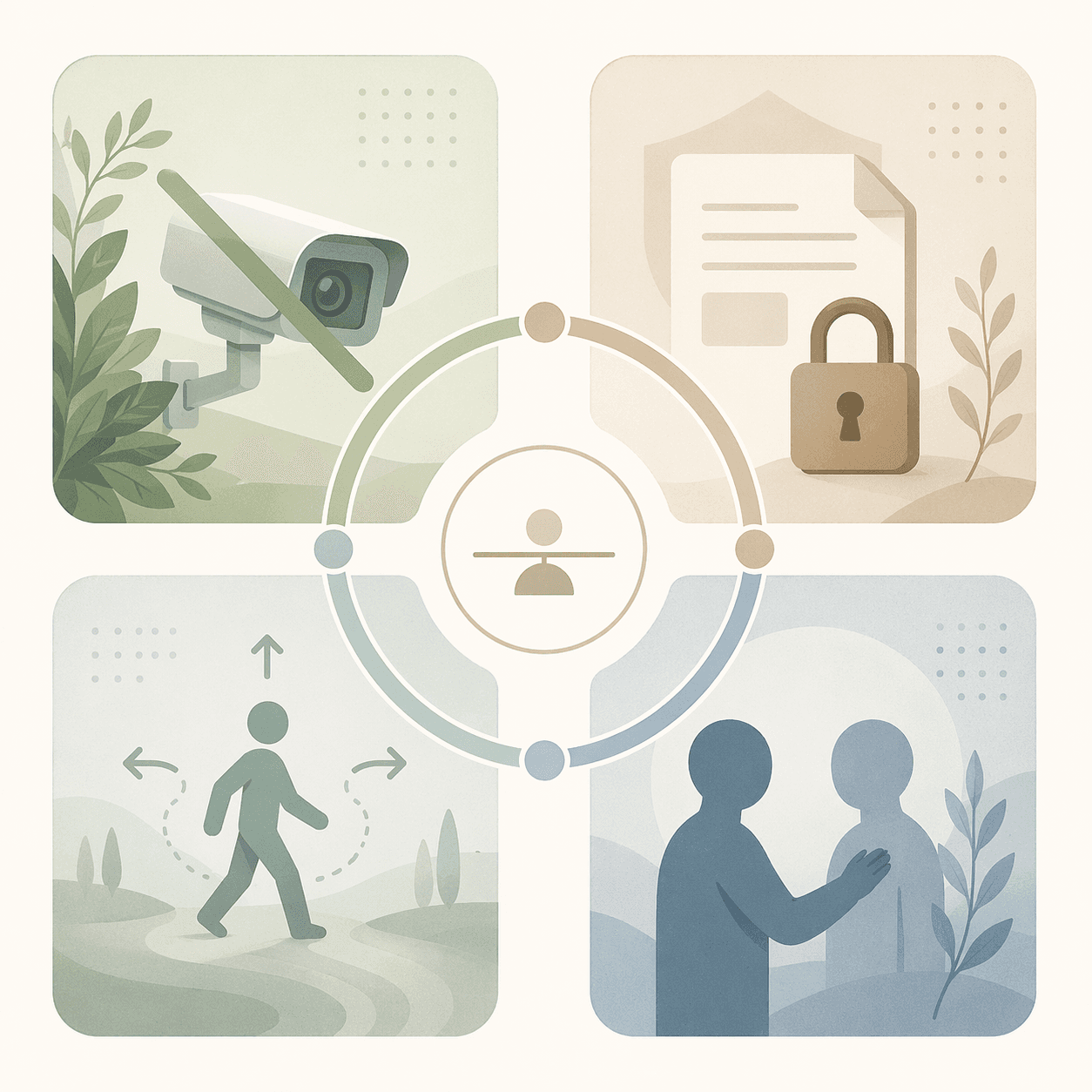
So the first decision is not camera versus wearable versus sensor. The first decision is which kind of privacy your parent is most afraid of losing. Older adults’ perceptions of privacy, ease of use, and affordability are significantly related to their attitudes toward smart home products and their intention to use them, according to a scoping review of in-home monitoring technology for aging in place.[1] That is not a soft concern next to the “real” safety issue. It is one of the conditions that determines whether the system will be used at all.
Start with the privacy fear, not the device category
Families often lump every objection into one sentence: “Mom doesn’t want to be monitored.” But resistance can mean several different things. One person may object to being seen. Another may not mind motion sensors but may hate the idea of health data moving through an app. Someone else may dislike any system that lets adult children correct daily behavior from afar. Another may feel humiliated by a visible pendant that announces frailty to neighbors, friends, or a grandchild who drops by.
Those are not the same problem. Treating them as the same problem leads families to negotiate badly. If the real fear is visual exposure, offering a “better” camera does not solve it. If the real fear is social embarrassment, explaining fall detection specifications may miss the point. If the real fear is losing authority at home, a quiet passive system may feel either mercifully unobtrusive or sneakier than a camera, depending on how it is introduced.
Privacy dimension
What the parent may be protecting
Why it changes the technology choice
Visual privacy
Not being seen during ordinary private moments
Makes cameras and video door-style monitoring harder to accept inside the home
Data privacy
Control over health, medication, and activity information
Makes app policies, data sharing, and account access as important as device features
Autonomy privacy
The right to make daily choices without being corrected remotely
Makes alert thresholds, caregiver notifications, and check-in habits central to acceptance
Social privacy
Not appearing dependent, impaired, or old in front of others
Makes visible pendants, wall sensors, and stigma part of the decision
Visual privacy: a camera may show more and work less
Indoor cameras are emotionally different from most other elderly monitoring systems because they do not just report that something happened. They may show where a person sat, how they moved, whether they changed clothes, who visited, what the kitchen looked like, or how long they stood at the counter. For an anxious daughter or son, that can feel reassuring. For the person living there, it can feel like the house has acquired an audience.
AARP reported a telling caregiving example from CES: some older adults covered cameras with dish towels, making sensor-based passive monitoring a more acceptable alternative for families trying to reduce visual intrusion.[2] The point is not that every parent will disable a camera. The point is that a parent does not need to win an argument about privacy in order to defeat the system. They can unplug it, cover it, turn it toward the wall, stop entering the room, or quietly resent the person who installed it.
This is where families sometimes confuse capability with suitability. A camera can capture richer information than a motion sensor. It may help a caregiver understand a fall, a wandering episode, or a concerning visitor. But more captured information can mean less lived acceptance. A system that produces a perfect view and a daily privacy injury is not automatically safer than a less revealing system the parent will tolerate.
Visual privacy also varies by room. Some parents may accept an exterior camera, a doorbell camera, or a camera pointed only at an entryway while refusing one in the living room or kitchen. Others may accept short-term camera use after surgery but not ongoing video monitoring. The useful question is not “Are cameras good or bad?” It is “Where would being seen change how you live in your own home?”
Data privacy: the app may know more than the family realizes
Data privacy is easier to minimize because it is less visible. A camera on the counter announces itself. A health app, medication reminder, wearable dashboard, or remote caregiver portal can feel clean and helpful while quietly collecting information about routines, symptoms, missed doses, sleep, location, or activity patterns.
Care.com’s discussion of remote monitoring includes an important warning from expert interviews: health and wellness apps that do not claim to be HIPAA-compliant often are not compliant, and research in the British Medical Journal has found that some may profit from user data.[3] Families should not assume that anything with a medical tone is protected like a hospital record. HIPAA protection depends on who is handling the information and under what role, not on whether the data feels health-related.
Medication information deserves special care because it can reveal a great deal about a person’s conditions, memory, mood, and independence. UCLA Health cites CDC data showing that nearly 35% of adults ages 60 to 79 take five or more prescription drugs.[4] For some families, medication management is exactly why monitoring becomes necessary. For the parent, it may also be the most intimate part of the arrangement.
Before choosing an app-based system, slow down over ordinary account questions. Who can see missed-dose alerts? Can multiple siblings access the dashboard? Does the company share or sell data? Is location tracked continuously or only during an alert? Can the parent see the same information the adult child sees? What happens if the subscription ends? These questions can feel tedious, but they are where dignity often hides.
If medication needs are driving the search, a focused tool may be better than a broad monitoring platform. A parent who accepts a pill dispenser or reminder may not be agreeing to full activity tracking. For a deeper category discussion, see Medication Management Technology for Family Caregivers.
Autonomy privacy: being safe is not the same as being managed
Autonomy privacy is the right to remain the person who decides how the day goes. It is threatened less by the sensor itself than by what the sensor allows other people to do. A motion alert can become a loving check-in. It can also become a daughter calling at 9:07 p.m. to ask why the refrigerator opened again.
The NIH scoping review documents why even non-camera devices can feel intrusive. Contact sensors placed between a door and a door frame were described as “readily noticeable” and bothersome to some residents, while PIR motion sensors installed high in a wall corner could make older adults feel “as if someone is observing them.”[1] These are not objections to complicated technology. They are objections to what the home starts to mean when ordinary movements become reportable.
Passive ambient systems can help when a parent refuses wearables, forgets buttons, or does not want cameras. They can notice patterns without requiring the older adult to do anything. That is their appeal. It is also the reason they must be introduced carefully. “You won’t even notice it” can sound comforting to one parent and deceptive to another.
This is especially relevant when comparing passive sensors with traditional personal emergency response systems. Passive ambient sensor systems address a major weakness of button-dependent PERS devices because they require no action from the older adult, which matters when cognitive decline, panic, injury, or refusal makes pressing a button or wearing a pendant unreliable.[3] But that advantage does not erase the autonomy question. It shifts it from “Will Dad press the button?” to “What will we do with information Dad did not actively send?”
One practical boundary is to agree in advance which events deserve a response. A possible arrangement might be: no one comments on late-night snacks, irregular TV hours, or a skipped afternoon walk; the family responds only to no motion by a certain time, repeated door openings at night, a fall alert, or a missed medication pattern. That kind of boundary keeps monitoring from becoming remote parenting.
Social privacy: stigma is not vanity
Some older adults object less to data or cameras than to being seen as someone who now needs equipment. A pendant can feel like a public label. A wall sensor can make the house look clinical. A large medication device on the counter can turn a private diagnosis into a visible fact for every visitor.
The NIH scoping review notes that some older adults view monitoring devices as a “stigma or a symbol of dependence.”[1] Families often answer that with reassurance: nobody will notice, nobody cares, it is just for safety. Sometimes that is true. Sometimes it is the adult child trying to talk a parent out of a feeling that has a real social cost.
Design matters here, but discretion is not only aesthetic. A wearable that looks less medical may be worn more consistently. A sensor placed where visitors will not immediately see it may cause less embarrassment. A parent may prefer a smart speaker check-in over a pendant, or the reverse, because of what each one says about them when someone else is in the room.
Social privacy also explains why a parent may agree in a family meeting and then leave the device on the nightstand. Agreement in front of worried children is not the same as acceptance during a normal Tuesday. If the system makes the parent feel marked as dependent, daily use will be fragile.
Match the system to the privacy concern
Once the privacy fear is named, the device category becomes easier to discuss. This is not a full category guide to elderly monitoring systems; if you need that first pass, start with Elderly Monitoring Systems: A Family Caregiver's Guide to Choosing the Right Type. The privacy-first version of the decision looks different from a feature checklist.
If the main concern is...
Usually consider first
Be careful about
Being visually watched
Passive motion sensors, contact sensors, medical alert systems without indoor video
Pretending sensors have no privacy cost just because they do not show images
Health or medication data exposure
Focused medication tools, systems with clear privacy policies, limited caregiver access
Assuming wellness apps are HIPAA-protected or that every sibling needs dashboard access
Feeling controlled
Systems with narrow alerts, agreed response rules, parent-visible settings
Turning routine deviations into family interventions
Appearing dependent
Discreet wearables, less visible sensors, tools that fit existing habits
Choosing equipment that is technically strong but socially unacceptable to the parent
Cameras belong in the conversation when the risk being addressed genuinely requires visual information and the parent can accept the placement. They may be easier to justify at entrances, driveways, or specific high-risk spots than in intimate living areas. Even then, consent should include exactly who can view footage and when.
Wearables and medical alert systems fit families who need rapid emergency access and whose parent will actually wear the device. NCOA’s 2025–2026 testing reported average response times ranging from 22 to 51 seconds across top medical alert systems, and noted that 75% of buyers purchase only after a fall or emergency.[5] Those numbers are useful context, especially for families waiting too long. They are not a license to turn a frightened parent’s first fall into a rushed purchase they resent.
Passive sensors fit a different gap: they can notice changes without requiring a button press, a charged wearable, or a camera view. They may be particularly useful when the family is watching for patterns rather than live video: no morning movement, unusual nighttime door activity, repeated bathroom trips, or a change in kitchen activity. The tradeoff is that sensors infer; they do not always explain. A motion pattern may suggest a problem without showing what happened.
Medication tools sit partly outside the usual monitoring debate because the risk can be concrete and daily. Missed doses, duplicate doses, and complex schedules may require intervention even when a parent dislikes broader monitoring. But the data boundary should still be explicit: a medication device is not automatic permission to track every health behavior.
Resistance is information, not a defect to overcome
A parent’s refusal may be impractical, frightening, or influenced by cognitive changes. It may also be the most accurate feedback you get. The first answer to resistance should not be a better explanation of the device. It should be a better question about what the device represents.
If your parent says, “I don’t want cameras,” ask where being seen would feel invasive and whether any non-video option would feel different.
If they say, “I don’t want everyone knowing my business,” ask who should receive alerts and who should not.
If they say, “You’re treating me like a child,” ask which decisions they are afraid of losing.
If they say, “I’m not wearing that,” ask whether the problem is comfort, appearance, stigma, charging, forgetfulness, or the meaning of the device.
Those questions do not guarantee agreement. They do change the tone from persuasion to design. If the relationship is already tense, the conversation itself may need more care than the equipment choice. For that part, How to Talk to Your Parent About Monitoring Technology Without Pushing Them Away is the better starting point.
There are also situations where the neat language of consent becomes harder. Cognitive decline, repeated falls, unsafe medication use, or a long-distance caregiver’s limited ability to respond can make “only what Dad likes” too simple. Safety sometimes requires choosing an imperfect option. Even then, the goal should be the least intrusive system that can reasonably address the risk, not the most comprehensive system the family can afford.
Set the rules before the alerts start
Monitoring becomes more dignified when everyone knows what will happen after an alert. Without rules, every notification invites interpretation, anxiety, and overreaction. A kitchen sensor does not need to become a family discussion about diet. A late bedtime does not need a phone call. A missed movement window might.
A workable agreement can be plain. Name the risk. Name the device. Name who receives alerts. Name when someone may call, text, visit, or contact emergency services. Name what the family agrees not to monitor. If the parent is able to participate, let them choose at least some of the boundaries: rooms without devices, quiet hours, which child receives alerts, or whether a neighbor is contacted before emergency services for non-urgent concerns.
Also plan for review. A system chosen after surgery may be too much three months later. A minimal system that once felt respectful may become inadequate after a second fall or a new diagnosis. Some older adults forget sensors are present after an adjustment period; others remain irritated by them. The same device can become more acceptable, or less acceptable, as health and trust change.
The review conversation should include the parent whenever possible, but it should not be staged as a trial where the adult child presents evidence and the parent performs gratitude. Ask what has felt helpful, what has felt embarrassing, what alerts have been unnecessary, and what safety worry still keeps the family awake. That is where the system gets tuned to real life instead of to a product brochure.
The system your parent will live with
The most protective elderly monitoring system is not always the one that sees the most, measures the most, or alerts the fastest. It is the one that addresses the actual risk while leaving your parent enough control to keep living in the home as their own.
That may mean no indoor cameras. It may mean a pendant after a fall scare. It may mean passive sensors with strict alert rules. It may mean a medication tool and nothing else for now. The right answer depends on the risk, the parent’s capacity, the family’s distance, and the kind of privacy that would hurt most if it were taken casually.
A home can be made safer without making the person inside it feel like a patient under observation. That is the balance worth designing for: enough protection for the family to respond, and enough dignity that the parent does not have to cover the system with a dish towel to feel at home.
For individualized recommendations:An occupational therapist or your primary care provider can assess your specific situation and recommend the monitoring category and feature set that best fits the person's functional level, living environment, and caregiver availability. This explainer provides educational context, not a personalized recommendation.

Comments
Join the discussion with an anonymous comment.