
A Food Recall Safety Checklist for Seniors
This checklist helps caregivers build a redundant alert system so seniors never eat recalled food. It covers government alerts, smartphone apps, grocery store notifications, and a weekly pantry check — all linked to fall prevention through the risk of dehydration and dizziness.
The part that still surprises families is not that food gets recalled. It is that a recalled package can sit in an older adult’s refrigerator without anyone in the household being directly notified. FDA and USDA recall systems rely on public postings and company announcements; no federal rule requires a personal alert to the shopper who bought the food, the adult child who orders groceries, or the older adult who may eat it for lunch tomorrow.[1][2]
That makes a food recall safety checklist for seniors less like a nice organizing project and more like a household safety system. If a parent eats recalled food, foodborne illness can bring vomiting or diarrhea, dehydration, weakness, and dizziness. For an older adult, that can turn a short walk to the bathroom or a late-night trip to the kitchen into a fall risk.
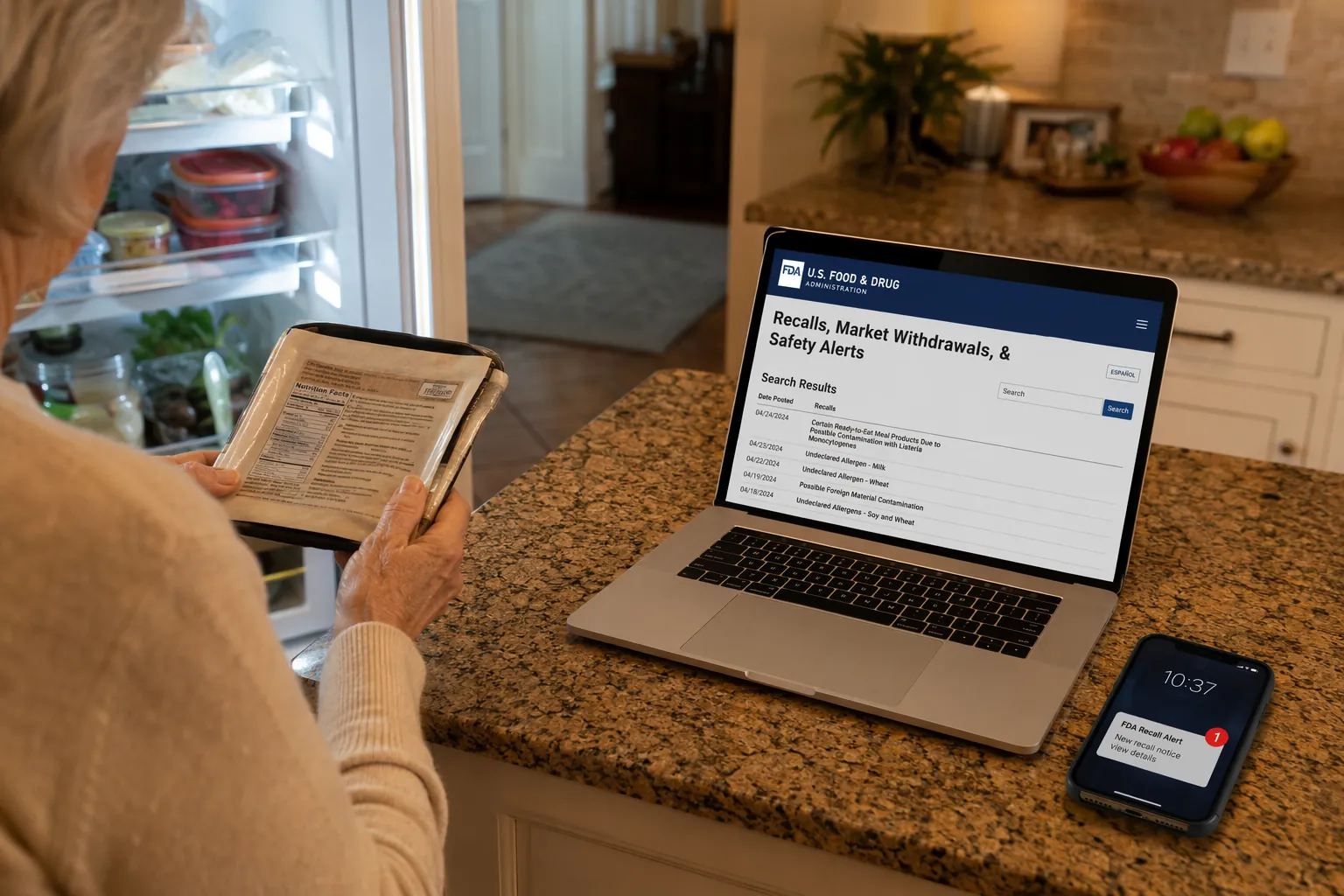
The numbers justify the extra fuss. As of the most recent comprehensive annual data available, PIRG reported that recalled food was tied to 1,392 illnesses in 2024; hospitalizations rose from 230 in 2023 to 487 in 2024, and deaths rose from 8 to 19. PIRG also found that 98% of those illnesses came from 13 outbreaks involving Listeria, Salmonella, or E. coli.[1]
Older adults are not just another audience for that warning. USDA FSIS says adults 65 and older are four times more likely than other age groups to get Listeria infections, and CDC says nearly half of people 65 and older with lab-confirmed Salmonella, Campylobacter, Listeria, or E. coli infections are hospitalized.[3][4]
Why One Alert Is Not Enough
A single alert assumes a very neat life: the right person sees the message, understands that it applies to a food already in the home, checks the date and package code, tells the person who might eat it, and removes the food before the next meal. That is not how most family food systems work.
One person may buy groceries in the store. Another may place the delivery order. A parent may transfer deli meat into a different container. Someone may toss the receipt. The product may be in the freezer, not the refrigerator. The alert may arrive by email, while the person at actual risk does not use email at all.
PIRG has estimated that FDA and USDA together post about six recalls per week.[2] That is too frequent to leave to memory and too irregular to check only when a story makes the evening news. The safer answer is overlap: government alerts, app notifications, store notices, bookmark backups, and a weekly physical check of the foods most likely to matter.
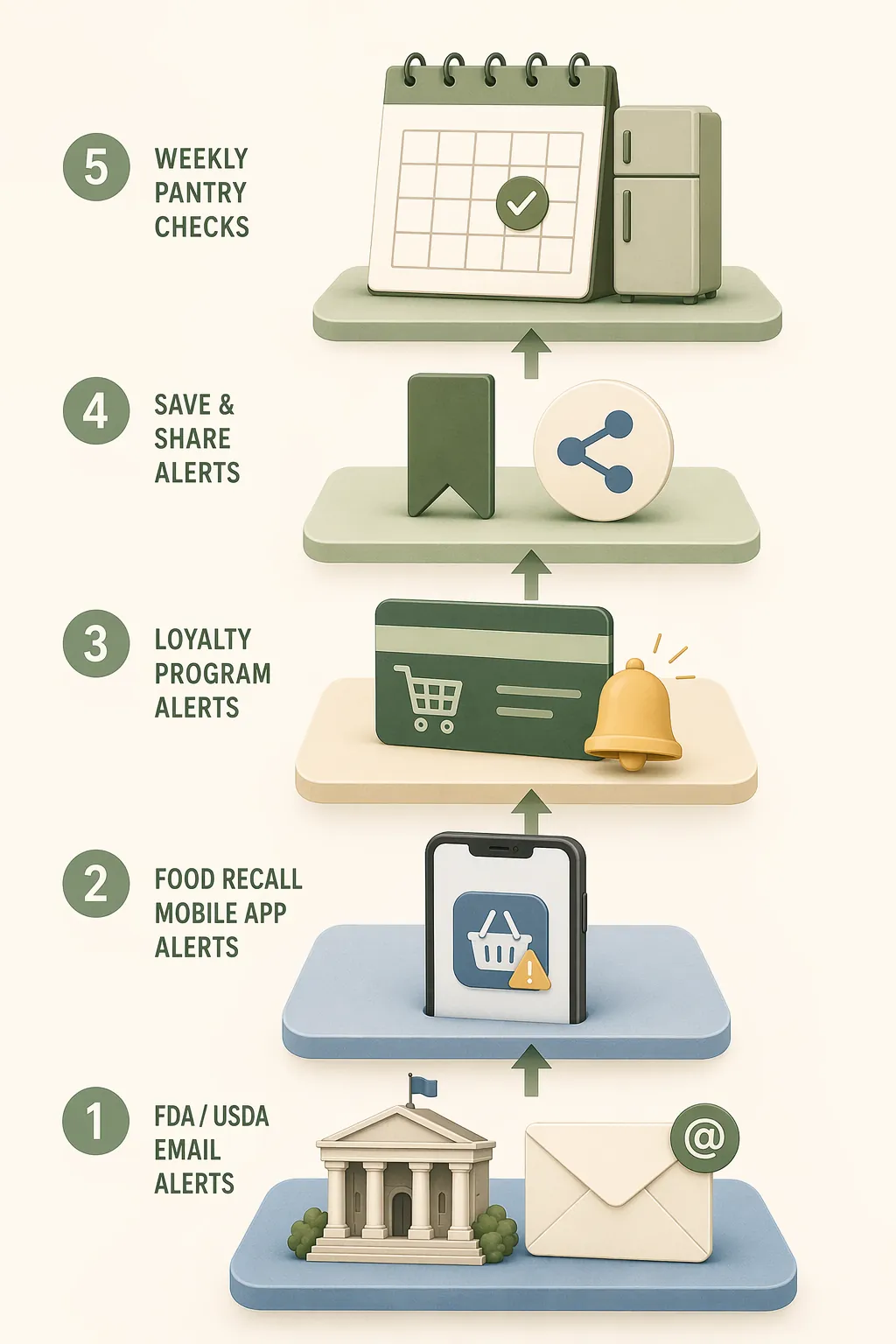
The Five-Layer Recall Alert System
The goal is not to turn a caregiver into a surveillance desk. The goal is to build enough redundancy that one missed email, one ignored app notification, or one store that does not call does not become a contaminated sandwich.
| Layer | What to Set Up | Who Should Own It |
|---|---|---|
| 1. Government email alerts | FDA recall emails and USDA FSIS recall notices | Caregiver or the most reliable email user |
| 2. Recall app | Food Recalls & Alerts app push notifications | Caregiver; optionally the senior if they use a smartphone |
| 3. Grocery loyalty notifications | Store accounts, loyalty cards, delivery accounts, and current phone/email | Whoever shops or orders groceries |
| 4. Social/bookmark backup | FDA/USDA social accounts and FoodSafety.gov recall page bookmark | Caregiver or backup family member |
| 5. Weekly pantry and fridge check | A short inspection of high-risk foods and recent purchases | The person who visits, calls, or manages groceries weekly |
Layer 1: Government Recall Emails
Start with the official sources. FoodSafety.gov points consumers to FDA and USDA recall information, including FDA recall alerts and USDA FSIS recalls for meat, poultry, and egg products.[5] Sign up using the email address that someone actually checks. If your parent does not reliably use email, do not make their inbox the only landing place.
- Use one caregiver email address for FDA recall alerts.
- Use the same or a second reliable email address for USDA FSIS recall alerts.
- Create an email rule or label for “food recall” so alerts do not disappear under pharmacy reminders, newsletters, and shipping notices.
- If siblings share care, forward recall alerts automatically to the person who handles groceries that week.
This is the backbone, not the whole system. An email alert still depends on someone opening it in time, matching it to the food in the home, and acting before the next meal.
Layer 2: A Recall App, With a Clear Caveat
PIRG recommends the Food Recalls & Alerts app, a free iOS and Android app from SmartAddress, Inc., that sends push notifications for recalls including Listeria, Salmonella, E. coli, and pet food.[2] It can be useful because push alerts are harder to bury than email.
Still, it is a third-party app, not an FDA or USDA app. I would use it as a second layer, not as the family’s official source of truth. When an alert looks relevant, open the government recall notice or the company notice and verify the product details before deciding what to throw away.
- Install the app on the caregiver’s phone first.
- Turn on push notifications; do not rely on opening the app manually.
- If the older adult uses a smartphone comfortably, install it there too, but do not assume they will interpret every alert correctly.
- When an alert appears, compare it with the actual package before calling it a match.
Layer 3: Grocery Store and Loyalty-Program Notices
Some grocery systems can connect a purchase to a recall better than a public website can. Consumer Reports has reported that some major retailers, including Costco, Wegmans, and Whole Foods, have contacted shoppers proactively and, in some cases, before FDA or USDA announcements were posted.[6]
That is helpful, but it is not a promise that every store, every location, or every account will behave the same way now. Check your specific store. The practical question is simple: if a product I bought through this account is recalled, how will you notify me?
- Update the phone number and email address on every loyalty account used for the senior’s groceries.
- Link delivery accounts to the caregiver’s email or phone if the caregiver is the one who will act on the alert.
- Ask the customer service desk whether recall notices are sent by phone, email, app, postal mail, or account message.
- Keep receipts or digital order histories long enough to match recent purchases against recall notices.
Layer 4: Bookmarks and Social Backups
This layer is for the days when email fails, an app notification is swiped away, or a family member hears “there was some kind of lettuce recall” and needs to check fast. Bookmark the FoodSafety.gov recalls page, and if you use X/Twitter, follow @FDArecalls and @USDAFoodSafety.[5]
A bookmark also helps during family handoffs. If one sibling is traveling or the usual grocery person is sick, the backup person should not have to search from scratch while a parent is making lunch.
Layer 5: The Weekly Pantry and Fridge Check
The weekly check is the least glamorous layer and the one I trust most, because it happens where the risk is: in the refrigerator, freezer, pantry, and fruit bowl. CDC and FoodSafety.gov identify older adults as a higher-risk group and advise safer choices around foods such as deli meats, soft cheeses, sprouts, unpasteurized products, and other foods more likely to carry germs.[7][8]
For recall watching, the weekly check should focus on foods that show up often enough, spoil quietly enough, or are easy to forget once repackaged.
- Leafy greens and salad kits
- Deli meats and ready-to-eat meats
- Soft cheeses and refrigerated spreads
- Ground beef, poultry, and frozen meat products
- Onions, melons, and cut fruit
- Flour and baking mixes
This check does not need to be a production. Choose one weekly anchor: after the grocery delivery, before trash night, during the Sunday call, or at the start of a regular visit. Open the refrigerator, look for high-risk categories, and match anything suspicious against current recall listings.
When an Alert Matches Food in the Home
The first job is verification, not panic. A recall notice may apply only to certain package sizes, dates, lots, plants, or establishment numbers. FoodSafety.gov advises checking the product name, brand, container codes, dates, and other identifying details in the notice.[5]
- Read the recall notice all the way through before throwing out similar-looking food.
- Match the brand and product name exactly.
- Check the use-by, best-by, sell-by, freeze-by, lot, or package date listed in the notice.
- For meat, poultry, or egg products, look for the establishment number if the notice includes one.
- If the package was discarded but the food may match, use the purchase history, receipt, store notice, or delivery order to narrow it down.
If the food matches the recall, stop using it. Do not taste it to decide whether it is safe. Follow the recall instructions for returning or discarding it, and make sure the older adult knows not to retrieve it from the trash or freezer later because it “looked fine.”
Then clean the places the food touched. USDA guidance for sanitizing food-contact surfaces includes using a solution of 1 tablespoon unscented liquid chlorine bleach per gallon of water and letting surfaces air-dry.[9] That applies to cutting boards, refrigerator shelves, drawers, counters, and containers that held the recalled food.
Symptoms do not always arrive on the same schedule. FDA and AARP materials list onset windows that vary by organism: Salmonella symptoms may begin 6 hours to 6 days after exposure, Listeria symptoms often begin within 1 to 4 weeks, E. coli symptoms commonly begin within 1 to 10 days, and Campylobacter symptoms often begin 2 to 5 days after exposure.[10][11]
For a senior, the fall-prevention part starts as soon as symptoms appear. Diarrhea, vomiting, fever, poor intake, and weakness can change standing balance quickly. If your parent has already eaten a recalled food, crisis-mode guidance may help you decide what to watch for next, including what to do after recalled eggs and Salmonella warning signs after an egg recall.
A Weekly Caregiver Workflow That Actually Fits Real Life
A recall system fails when it depends on a heroic burst of attention. It works better when it has a small rhythm and a named owner. The person who orders groceries may not be the same person who visits on Sundays, so the workflow should say who checks what.
| When | Action | Why It Matters |
|---|---|---|
| Daily or as alerts arrive | Glance at FDA, USDA, app, or store recall notices. | Catches urgent matches before the next meal. |
| After each grocery trip or delivery | Keep the receipt or digital order history. | Makes package matching possible if the food is later recalled. |
| Once a week | Check high-risk foods in the refrigerator, freezer, pantry, and fruit bowl. | Finds recalled food that no alert reached or that someone forgot to remove. |
| During family handoff | Tell the backup caregiver which stores, apps, and email accounts are used. | Prevents the system from living in one person’s head. |
| After a confirmed match | Remove food, sanitize surfaces, and monitor for symptoms. | Reduces exposure and watches for illness that can increase fall risk. |
If the parent lives alone, add one low-friction habit: ask about specific foods, not “Is everything okay?” A useful check-in sounds more like, “Do you still have any deli turkey, salad kits, onions, melon, or ground beef from last week?” Specific categories jog memory better than a general safety question.
If the parent resists feeling monitored, keep the system mostly on the caregiver side. They do not need to receive every alert if that creates anxiety or confusion. What they need is clear household action: which foods are paused, which foods are safe, and whom to call before eating something in question.
What to Put on the Refrigerator
The refrigerator card is the handoff. It should be plain enough for the senior, the visiting sibling, the neighbor who helps with groceries, or the home aide who opens the fridge while making lunch.
| Refrigerator Card Field | What to Write |
|---|---|
| Recall alert person | Name, phone, and email of the person who receives FDA, USDA, app, and store alerts. |
| Stores used | Main grocery stores, delivery accounts, warehouse clubs, and pharmacies that sell food. |
| Loyalty accounts linked | Which card, phone number, or account is used at checkout. |
| Foods checked weekly | Leafy greens, deli meats, soft cheeses, ground beef, poultry, onions, melons, flour, and any foods the senior eats often. |
| Do not eat if unsure | A short instruction: “If a food may be recalled, do not eat it. Call first.” |
| Health contact | Clinician, nurse line, urgent care, or other number the family uses if vomiting, diarrhea, fever, weakness, or dizziness appears. |
| Emergency note | If severe weakness, confusion, fainting, signs of dehydration, or a fall occurs, seek urgent help. |
Tape the card where it will be seen before food is prepared, not under a stack of appointment reminders. If the parent has low vision, use large print. If more than one person shops, list the stores by name; “grocery account” is not specific enough when someone is trying to match a recall notice quickly.
This same refrigerator card can point to the household’s fall-prevention plan. Food recalls belong there because a stomach illness can quickly become a mobility problem. If you want the broader connection, the preventive logic is similar to the one in why egg recalls belong in a fall-prevention plan and how Cyclospora illness can raise fall risk for older adults.
The Finished Checklist
- Sign up for FDA recall emails and USDA FSIS recall notices using an email account someone actually checks.
- Install a recall app as a backup push-alert layer, remembering that third-party apps are not government sources.
- Update grocery loyalty, warehouse club, and delivery accounts with the caregiver’s current contact information.
- Bookmark FoodSafety.gov recalls and, if useful, follow FDA and USDA food-safety accounts on social media.
- Check high-risk refrigerator, freezer, pantry, and produce items once a week.
- When a recall appears, match brand, product name, dates, lot codes, and establishment number before deciding whether the food is involved.
- If there is a match, stop use, discard or return as instructed, clean and sanitize food-contact surfaces, and watch for symptoms.
- Post a refrigerator card showing who gets alerts, which stores are linked, what foods are checked weekly, and what number to call if symptoms appear.
Families cannot make the national recall system notify an older adult directly. They can build a small household system with enough overlap that one missed notice does not become a contaminated meal. For seniors, that is food safety and fall prevention in the same ordinary routine: fewer missed recalls, fewer sudden illnesses, fewer dehydration-and-dizziness episodes that start with lunch and end on the floor.
References
- Food for Thought 2025, U.S. PIRG Education Fund.
- How to find out about food recalls, U.S. PIRG Education Fund.
- Adults 65 and Older: At-Risk Population — Why?, USDA Food Safety and Inspection Service.
- People With a Higher Risk of Food Poisoning, Centers for Disease Control and Prevention.
- Recalls and Outbreaks, FoodSafety.gov.
- Risky Recalled Foods You Should Know About, Consumer Reports, 2023.
- Safer Food Choices for Adults 65 and Older, Centers for Disease Control and Prevention.
- Older Adults, FoodSafety.gov.
- Cleaning and Sanitizing, USDA Food Safety and Inspection Service.
- Foodborne Pathogens, U.S. Food and Drug Administration.
- Food Poisoning Symptoms and Prevention, AARP.
Related reading
Noticed something outdated or inaccurate on this page? Flag a correction. We review every report against CDC, NIA, and AARP HomeFit guidance before updating a page.
Part of the Fall Prevention section.