
How to Choose the Right Walker for Seniors: A Feature-by-Feature Guide to Sizes, Wheels, Brakes, and Accessories
Choosing a walker is about matching specific features to how it will actually be used. This guide helps adult children caregivers evaluate wheel size, brake type, seat design, storage, and portability — and tells you which features are fundamental and which can be added later.
- Device / Aid Type
- walker, rollator
- Functional Need Addressed
- balance support, fatigue management, indoor and outdoor mobility
- Professional Assessment
- An occupational therapist or physical therapist is recommended for individual device selection and fitting.
- Last Reviewed
- 2026-06-13
- walker
- rollator
- assistive devices
- mobility aid features
- caregiver decision guide
Why Walker Features Aren't One-Size-Fits-All
When you start comparing walker models online, the feature lists blur together. Every rollator has wheels, brakes, and a seat. Every standard walker folds. The temptation is to pick the one with the most features for the price, or the one that looks sturdiest. But that approach often leads to a device that feels wrong on the first real outing — too heavy to lift into the car, wheels that catch on every sidewalk crack, or a seat that goes unused because the user never sits mid-walk.
The right feature set depends on three usage questions: Will the walker be used mostly indoors, outdoors, or both? Are outings short trips to the kitchen or all-day excursions? Is the primary need balance support, fatigue management, or both? The answers shift every feature decision — wheel size, brake type, seat design, storage, and portability — from a preference into a functional requirement.
This guide walks through each feature category with the trade-offs that matter, so you can evaluate models on how they match actual use rather than how they look on a product page.
The Three Non-Negotiable Features: Fit, Weight Capacity, and Frame Stability
Before evaluating wheels, brakes, or seats, three fundamentals must be right. If any of these are wrong, no accessory or upgrade will fix the experience.
Proper Height Adjustment
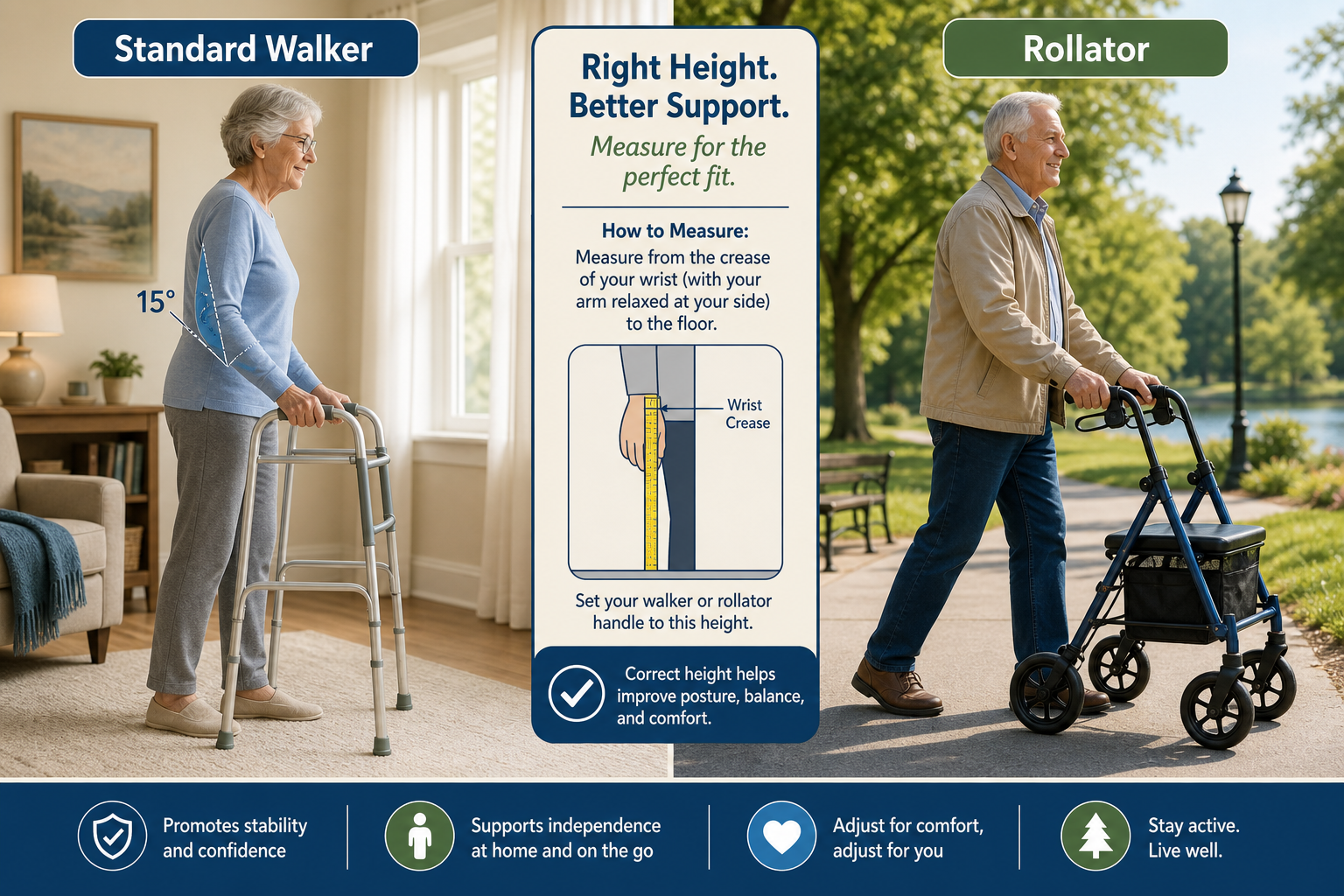
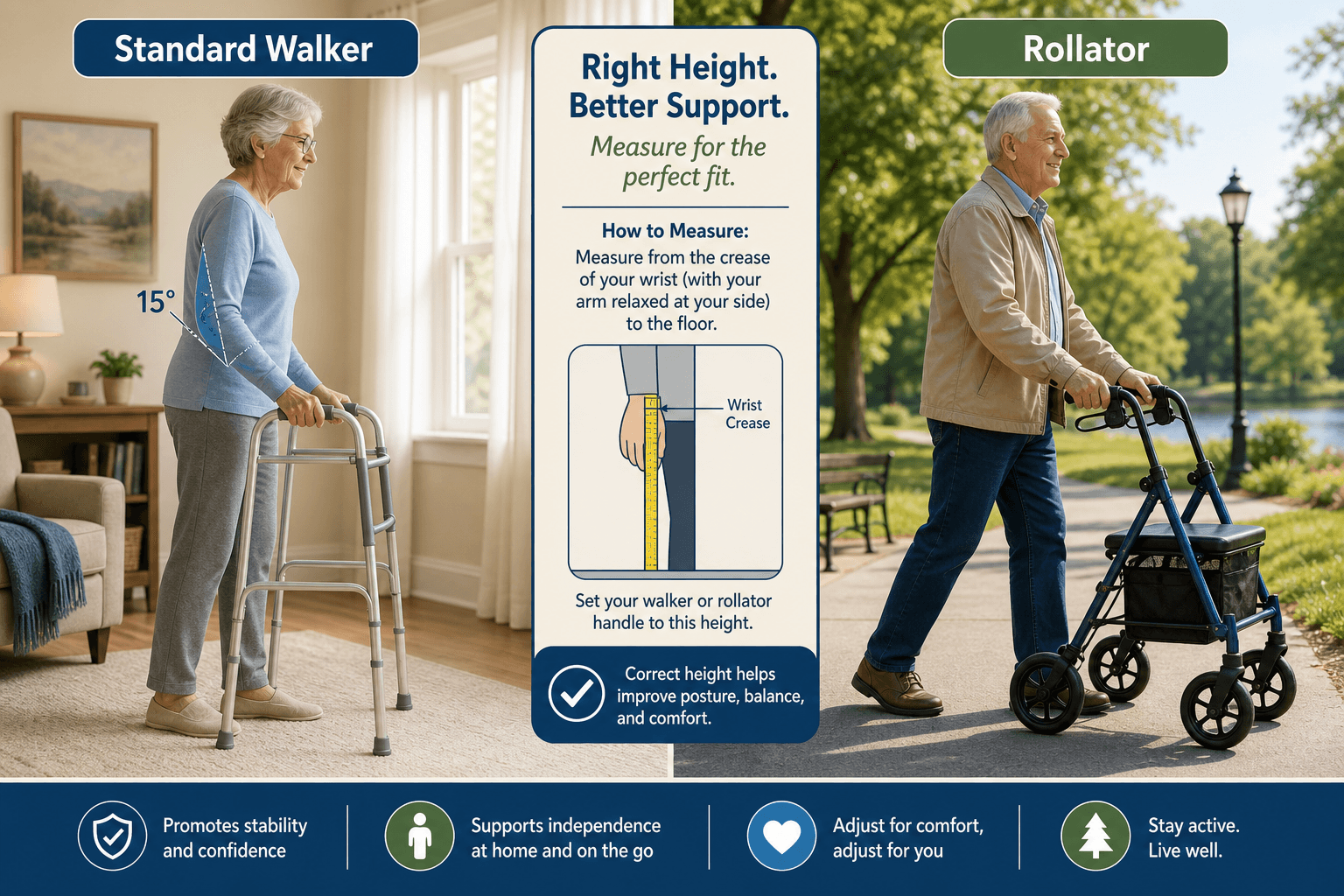
The Mayo Clinic advises that when the user stands with arms relaxed at their sides, the walker's hand grips should align with the wrist crease. When gripping the handles, the elbows should bend at about 15 degrees. A walker set too high forces the user to hunch; one set too low encourages a stooped, unstable posture. Most walkers offer adjustable height ranges, but the range itself varies by model size.
| Walker Size | User Height Range | Typical Frame Width |
|---|---|---|
| Junior | 4'8" – 5'2" | 16" – 18" |
| Standard | 5'3" – 5'11" | 18" – 22" |
| Tall / Extra Tall | 5'11" – 6'4" | 20" – 24" |
Weight Capacity
Standard walkers and rollators typically support 250–300 lbs. Bariatric models are available with capacities from 300 lbs up to 700 lbs, according to Equip2Adapt. Choosing a walker with a capacity too close to the user's weight leaves no safety margin and can accelerate wear on wheels and frame joints. Always select a model rated at least 20–30 lbs above the user's weight.
Frame Stability
Before buying, test the frame for lateral wobble. A stable walker should not twist or flex when you apply pressure to one side. Standard walkers with four non-skid legs offer the most stability because they have no moving joints in the base. Rollators, with their hinged frames and wheels, are inherently less rigid — but a well-built rollator should still feel solid when you lean on it. If the frame creaks or flexes noticeably in the store, it will only get worse with use.
Wheel Size and Terrain: Matching Wheels to Where the Walker Will Go
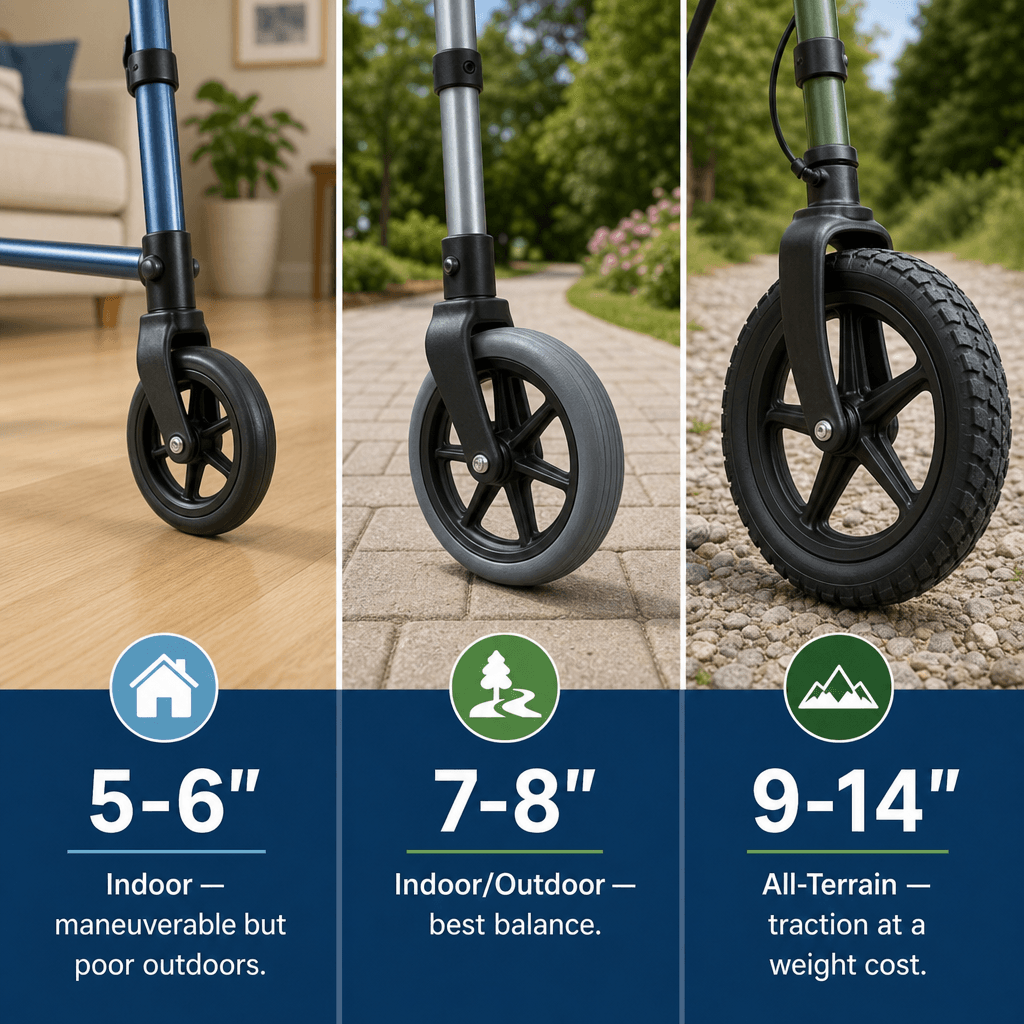
Wheel size is the single most consequential feature decision because it determines where the walker can go safely. The trade-off is straightforward: smaller wheels maneuver better indoors; larger wheels handle uneven terrain but add weight and reduce tight-space agility.
| Wheel Size | Best Terrain | Key Trade-Offs |
|---|---|---|
| 5" – 6" | Indoor: tight corners, doorways, carpet | Excellent maneuverability; poor on sidewalks, gravel, or grass |
| 7" – 8" | Mixed: paved sidewalks, smooth outdoor paths | Good balance of indoor and outdoor use; most common rollator wheel size |
| 9" – 14" | All-terrain: gravel, grass, uneven pavement | Best traction outdoors; heavier, less maneuverable indoors |
Davies Home Healthcare advises that indoor wheels of 5 inches work well for tight corners, while outdoor wheels of 7–10 inches provide traction on sidewalks, gravel, and grass. If the user will navigate both environments daily, an 8-inch wheel is the most versatile compromise. All-terrain wheels (9–14 inches) are worth the weight penalty only if the user regularly crosses grass, gravel driveways, or uneven pavement.
Brake Types Compared: Loop-Lock, Push-Down, and Hand Squeeze
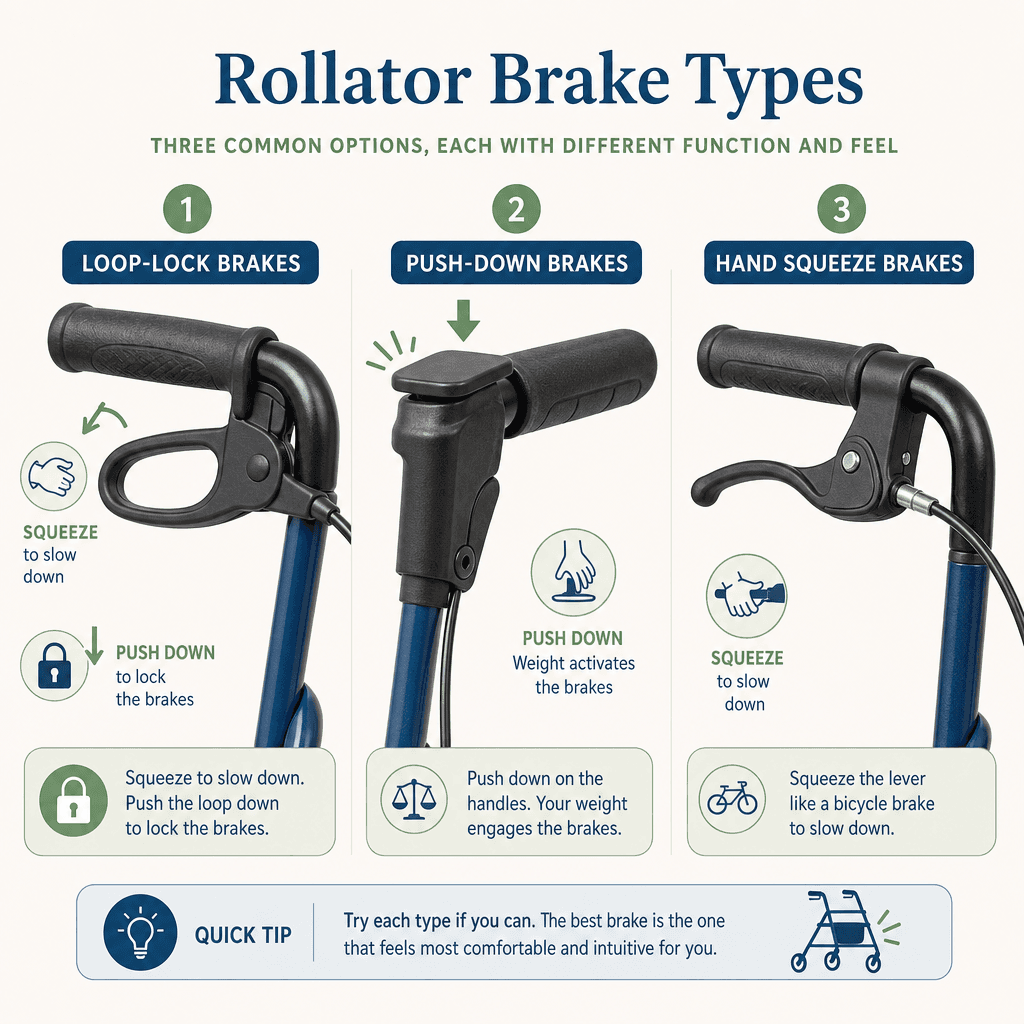
Brakes are not a minor detail — they are a safety-critical interface that the user will operate dozens of times per outing. The three main brake types differ in hand strength required, locking mechanism, and risk of unintended movement.
| Brake Type | How It Works | Best For | Key Risk |
|---|---|---|---|
| Loop-Lock | Squeeze lever to slow; push lever down to lock | Users with moderate hand strength; most common rollator brake | Requires coordinated squeeze-and-push motion |
| Push-Down | Weight on handles activates brake; release to roll | Users with weak grip or arthritis | Walker can roll away if user leans heavily without engaging lock |
| Hand Squeeze (Bicycle-Style) | Squeeze lever to slow; separate lock mechanism | Users familiar with bicycle brakes | Less common; replacement parts harder to find |
Loop-lock brakes are the most common rollator brake type, according to Wirecutter. The user squeezes the lever to slow down and pushes the lever downward to lock the brakes in place. This design works well for users with moderate hand strength but can be difficult for those with arthritis or weak grip.
Push-down brakes (also called weight-activated brakes) require less hand strength because braking is triggered by leaning weight onto the handles. However, Davies HH notes that a rollator can roll away if the user leans heavily without engaging the parking lock. This is a genuine safety concern for users who tend to put significant weight on the walker.
Seat Considerations: When a Seat Is Essential vs. Unnecessary Weight
A built-in seat adds 3–5 lbs to a rollator's weight. That may not sound like much, but on a device that already weighs 11–20 lbs, every extra pound matters when lifting it into a car trunk or up a curb.
A seat is essential for users who fatigue easily, have cardiac or respiratory conditions, or plan outings longer than 30 minutes. For these users, the ability to sit and rest mid-walk is not a luxury — it is what makes the outing possible. For users who need the walker primarily for balance support and never sit during walks, the seat is dead weight that makes the device heavier and bulkier for no benefit.
- Seat width is typically 12 inches — adequate for most users but narrow for larger body types.
- Backrest support varies significantly between models. Some rollators have a padded backrest that provides real support; others have a thin strap that offers little more than a place to lean.
- Seat height should match the user's hip height when standing. If the seat is too low, the user will struggle to stand back up.
- Wirecutter recommends testing the seat in person before buying, as comfort and support vary widely even among models with similar specifications.
Storage Options: Baskets, Pouches, and Trays
Storage is the feature category where caregivers most often over-invest. The good news: almost all storage options are retrofittable, so they should not drive the walker purchase decision.
- Under-seat baskets: Best for larger items like a purse or small shopping bag. The downside is that they can swing when the walker is in motion, especially on uneven ground.
- Front pouches: Lightweight and accessible while walking. Good for a phone, keys, or wallet. They do not swing but have limited capacity.
- Trays: Designed for carrying a meal tray or drink. Useful for users who eat in their chair or need to transport food from kitchen to table. Trays are typically the least versatile storage option.
Carex notes that most walker accessories — baskets, pouches, cane holders — are affordable and can be added after purchase. If a walker model checks all the other boxes but lacks storage, do not reject it. Add a pouch or basket later.
Accessories That Transform a Basic Walker: Glides, Cup Holders, Cane Holders, and Platform Attachments
A few low-cost accessories can dramatically change how a walker feels and functions. The most impactful is the walker glide — also called a ski glide.
Carex describes walker glides as an affordable upgrade that transforms a standard walker from lift-and-place to glide-and-step. Standard walkers have rubber tips that require the user to lift the walker with each step, which is fatiguing and can destabilize users with weak upper body strength. Glides replace the rear rubber tips with smooth plastic skis that slide across the floor, allowing the user to push the walker forward rather than lift it. This reduces fatigue significantly and makes the walker feel much lighter.
- Walker glides / skis: Low-cost upgrade that reduces lifting fatigue. Best for standard walkers used indoors.
- Cup holder: Clips onto the frame. Inexpensive and easy to add.
- Cane holder: Allows the user to carry a cane on the walker for situations where the walker is not needed (e.g., sitting at a restaurant).
- Platform attachment: Replaces one or both hand grips with a flat forearm platform. Useful for users who cannot grip handles due to arthritis, stroke, or hand weakness.
Portability: Folding Mechanisms and Device Weight
If the walker will be transported in a car, weight and folding mechanism are critical. Wirecutter reports that basic walkers weigh approximately 7–10 lbs, while rollators weigh 11–20 lbs. The difference of 5–10 lbs matters a great deal to a caregiver who will lift the device in and out of a trunk multiple times per week.
| Device Type | Typical Weight | Folding Mechanism |
|---|---|---|
| Standard walker (no wheels) | 7 – 10 lbs | Trigger-release or button-release; folds flat |
| Two-wheel walker | 8 – 12 lbs | Trigger-release or button-release; folds flat |
| Rollator (4-wheel, with seat) | 11 – 20 lbs | Trigger-release or button-release; folds with seat attached |
| Bariatric rollator | 18 – 30 lbs | Heavy-duty trigger-release; may not fold as compactly |
Folding mechanisms also matter. Equip2Adapt notes that lever-style (trigger-release) folding mechanisms are easier for users with hand weakness, while button-release mechanisms require more finger strength. If the user or caregiver has arthritis or reduced hand strength, a trigger-release model is the better choice.
Features You Cannot Add Later vs. What Can Be Retrofitted
This distinction is the most practical takeaway from the entire guide. When comparing models, focus your budget and decision energy on the features that are fundamental — because those cannot be changed after purchase.
| Feature Category | Fundamental (Cannot Add Later) | Retrofittable (Can Add Later) |
|---|---|---|
| Wheels | Wheel size and type (indoor vs. outdoor vs. all-terrain) | None — wheels are integral to the frame |
| Brakes | Brake type (loop-lock, push-down, hand squeeze) | None — brake system is integral to the frame |
| Frame | Frame width, weight capacity, and folding mechanism | None — frame is the base of the device |
| Seat | Seat design, width, and backrest support | Seat cushion or pad |
| Storage | None — all storage is retrofittable | Baskets, pouches, trays, cane holders |
| Grips | Grip type (foam, plastic, gel) | Grip covers or replacement grips |
| Glides / Skis | None — glides attach to existing legs | Walker glides and auto-glides |
| Platform attachment | None — attaches to existing frame | Forearm platform attachments |
A Note on Insurance and Medicare Coverage
Medicare Part B covers walkers — including rollators — as Durable Medical Equipment (DME) if they are prescribed by a Medicare-enrolled provider for use in the home. After the Part B deductible is met, the beneficiary pays 20% of the Medicare-approved amount, provided the supplier accepts assignment.
The key requirement is that the walker must be medically necessary for use in the home. This means the prescribing provider must document that the patient needs the walker for mobility within their residence. Coverage for outdoor use is not guaranteed, though in practice most prescribed walkers are approved regardless of where they are used.
Related Guides
- Walker vs. Rollator: A Clinical Decision Guide for Seniors and Caregivers
Choosing the right mobility aid—walker or rollator—depends on three clinical factors: weight-bearing need, balance control, and grip strength. This guide helps adult children and caregivers match the device to the senior's mobility profile to prevent falls and support independence.
- Walker vs. Rollator: A Caregiver's Guide to Choosing the Right Mobility Aid for Your Parent
Choosing between a standard walker and a rollator is a clinical decision — not a lifestyle preference — and picking the wrong device can increase your parent's fall risk rather than reduce it. This guide gives adult-child caregivers a structured, five-variable framework to evaluate which mobility aid fits their parent's specific needs, along with practical strategies for managing resistance and understanding Medicare coverage.
- Transfer Aids and Techniques for Senior Caregivers: Matching Equipment to Mobility Level
A practical guide for family caregivers on selecting the right transfer aid for a senior's actual weight-bearing capacity and applying safe, step-by-step techniques for the most common home transfer scenarios — from bed to wheelchair to car — including special considerations for seniors with dementia.
Comments
Join the discussion with an anonymous comment.