
Caregiver decision guide
Helping an Older Adult Accept Monitoring Technology: An Empathy-First Caregiver Guide
This guide helps adult children understand why their aging parent resists safety devices like medical alerts and fall sensors, and provides a research-backed, empathy-first approach to overcome privacy, autonomy, and fear-based objections—without pressure or guilt.
You Have the Pendant. She Won't Wear It.
You have done the research. You picked a medical alert system with automatic fall detection, a thirty-day battery, and a waterproof pendant she can wear in the shower. You showed her the sleek design. You explained how it works. She looked at it, then at you, and said, “I don’t need that. Put it back in the box.”
If that moment left you frustrated, you’re in good company. Most adult children in their forties and fifties interpret a parent’s refusal of monitoring technology as stubbornness or plain fear of anything new. And most parenting-of-aging-parents advice reinforces that impression: “be patient,” “keep trying,” “explain the benefits again.” But the real reason your parent rejected the pendant is almost certainly not what you think.
A growing body of research suggests that older adults’ resistance to monitoring technology—whether it is a PERS pendant, a fall sensor, or a smart home camera—is rooted in well-founded concerns about privacy, autonomy, and vulnerability, not in technophobia. And the standard caregiver approach (lead with safety statistics, push features, assume acceptance is the only good outcome) actually makes those concerns worse.
This guide is for the moment after the “no.” It walks through what the research actually says about why older adults resist monitoring devices, and provides a concrete, empathy-first framework for having a different kind of conversation—one that treats your parent’s concerns as legitimate, not as obstacles to be overcome.
The 'No' Is Rational
Let’s start with the number that should change how you think about this conversation. In a 2022 study of eighty older adults published in Frontiers in Computer Science, the most commonly endorsed concern among non-users of smart technologies was privacy—plainly, the feeling that the device is watching them. This finding echoes a broader 2026 scoping review in JMIR Aging that analyzed twenty-two studies and identified privacy and distrust of digital platforms as one of seven primary barriers to digital literacy for older adults.
A different finding from the same Frontiers study may surprise you even more: older adults who already used smart technologies held generally positive attitudes toward them. That means the problem is not that your parent hates technology. It is that your parent does not yet see how a monitoring device fits into their life without giving up something they value—privacy, independence, or dignity.
What's Really Going On: Privacy, Autonomy, and Scam Anxiety
Once you accept that the “no” is rational, you can start to untangle which specific concern is driving it. The JMIR scoping review organizes the barriers into several categories. The ones most relevant to monitoring technology are privacy (the feeling of being watched), internalized ageism (“I’m too old to learn this”), fear of dependence on family for tech support, and unfamiliarity with what the device actually does. The same Frontiers study found that among current users, the top barriers were ignorance of the device’s features and perceived cost—not rejection of the concept.
The type of monitoring device matters, too. A wearable PERS pendant can feel stigmatizing—like you are admitting you are frail. A camera feels intrusive. A passive motion sensor is almost invisible but can still feel mysterious. A decision not to wear the pendant or to unplug the sensor is almost never a decision against all monitoring. It is a decision against that device, that feature.
- Privacy: The worry that someone is watching, recording, or tracking—especially relevant for cameras and audio-enabled devices.
- Autonomy: The fear that accepting help means losing control over daily decisions. Monitoring technology can feel like a step toward a nursing home, even when its purpose is to keep someone at home.
- Scam anxiety: A legitimate concern. Researchers at Ohio State Wexner Medical Center found that patients with frontotemporal dementia are at the highest risk of being scammed via technology. But even without cognitive decline, older adults are frequent targets of tech fraud. Saying “I don’t trust it” is an entirely sensible position.
How to Talk About It: Five Steps
The most common caregiver instinct is to lead with persuasion. You have the safety statistics, the fall data, the stories of people who were found in time. You think: if I just explain it well enough, they will see this is a good idea.
But when you start with “this will keep you safe,” you have already lost the argument because you framed the problem as your parent’s weakness. They hear: “you are unsafe, you are failing, and I have the solution.” No one accepts a solution to a problem they do not believe they have.
The alternative is a five-step framework built around empathy, not persuasion. It comes from clinical communication research and from the practical experience of organizations that work directly with older adults on technology adoption. The steps are: listen, validate, demonstrate value, start small, offer control.
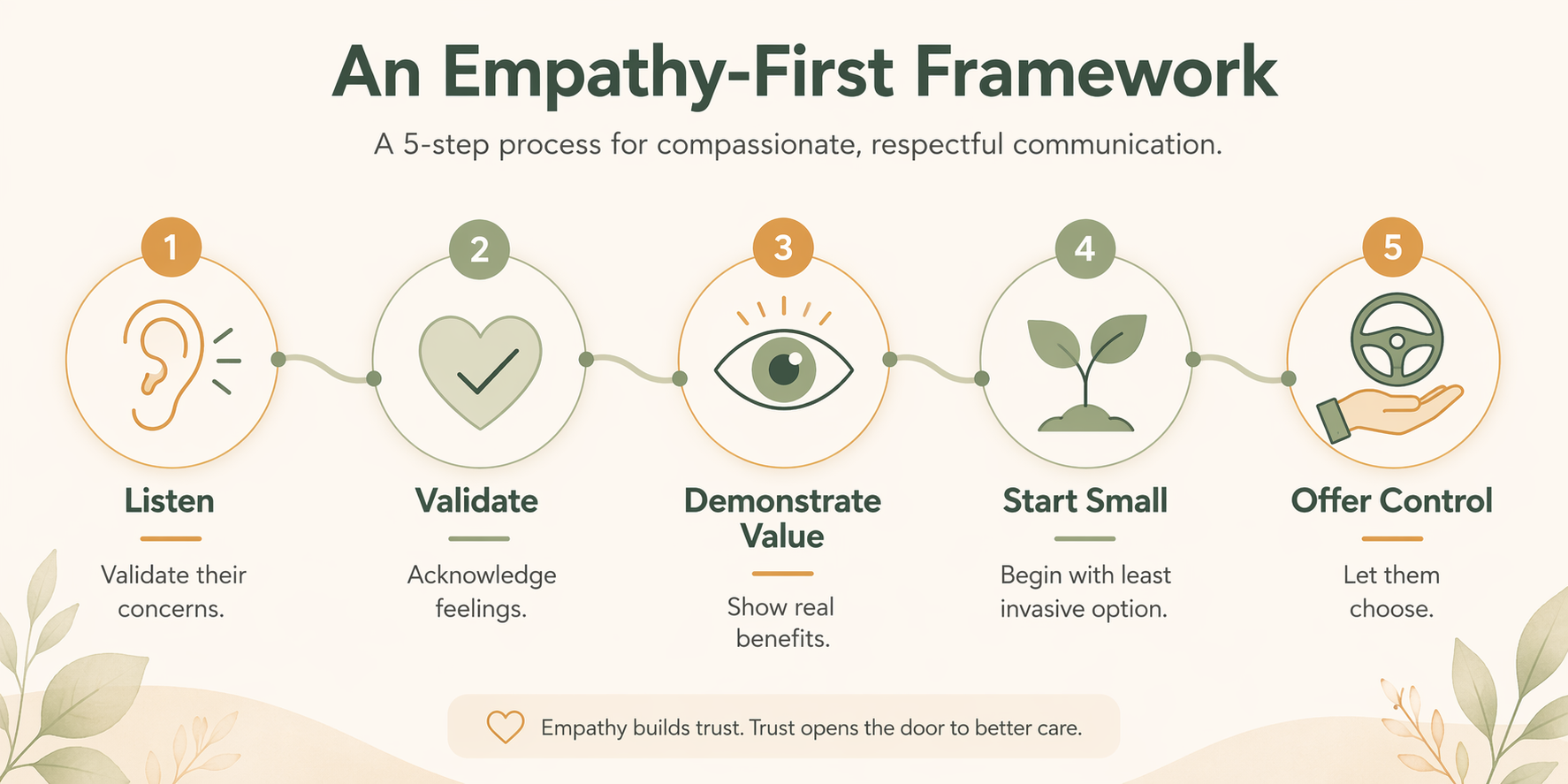
Here is what each step looks like in a real conversation.
- Listen. Sit down without the device in your hand. Ask open-ended questions: “What worries you about having something like this at home?” Let your parent talk. Do not interrupt. The goal is to surface their actual concern, not to prepare your rebuttal.
- Validate. Say: “You are right to be careful about who might have access to information from a device like this.” Or: “I understand why a camera in the living room would feel uncomfortable.” Validation is not agreement; it is acknowledgment. It lowers the temperature.
- Demonstrate Value. Show, don’t tell. If privacy is the concern, pull up a non-video fall sensor (like a radar-based system from Iowa State research that achieves 98.74% accuracy) and say: “This one doesn’t record video—it just knows if someone falls. No images, no audio.” Tie the feature directly to their expressed concern.
- Start Small. Suggest a trial, not a permanent change. “Can we try the pendant for one week, just when you are home alone? If it bothers you, we return it.” A low-stakes experiment is easier to agree to than a lifetime commitment.
- Offer Control. Give your parent decisions to make. “Which color do you prefer?” “Should we put the sensor in the kitchen or the hallway?” “Do you want to wear it around your neck or as a wristband?” When the user has control over how the device fits into their life, the device becomes theirs, not yours.
Note the logical bridge: nearly 80% of adults over age 50 want to age in place (AARP, cited in the Frontiers study). That is your parent’s goal, not yours. Monitoring technology is a tool for their goal. When you frame it that way, you shift from “I want you to wear this” to “This could help you stay at home longer, and you decide how it works.”
What to Say When They Push Back
You can have the best framework in the world and still freeze when your parent says, “It’s spying on me.” Here are three real objections and responses that use the framework in action.
"It's spying on me."
Validate first: “You are absolutely right to be careful about being watched, and I would feel the same way.” Then show a privacy-protecting option: “That is why I looked for devices that do not record video or audio. There is a fall sensor made by several companies—it uses radar, like a motion light, and it only sends an alert if someone falls. No one sees anything inside the house.” Explain that a millimeter-wave radar system tested at Iowa State detected falls with 98.74% accuracy. That is safety without surveillance.
"I can't afford it."
This is often a polite way of saying “I don’t think it’s worth it.” But cost is a real barrier. Instead of dismissing it, say: “I understand. Some of these can be expensive. Let me check if your insurance or Medicare might cover part of it—I found a guide that lays out all the options.” Then refer to the PERS cost and coverage guide on this site. If cost is genuinely the issue, showing you have looked into funding (VA grants, Medicaid waivers, basic models) turns the obstacle into a logistics problem.
"I'll break it. I'm not good with technology."
This is internalized ageism in action—the belief that one is “too old to learn.” The JMIR review flags this as a documented barrier. Your response should validate the feeling while reframing the device’s simplicity: “These things are designed to be as simple as possible. You just press one button—or you don’t have to press anything at all, because it automatically detects falls. Let me show you how it works, and we can practice once. If it feels complicated, we can look for something else.” Then start with the simplest possible device: a pendant with a single button.
Devices That Don't Feel Like Spying
The strongest argument you can make for monitoring technology is a device that physically removes the privacy objection. Showing your parent a camera-free fall sensor or an audio-only monitoring system is far more persuasive than any statistic. It demonstrates that you heard their concern.
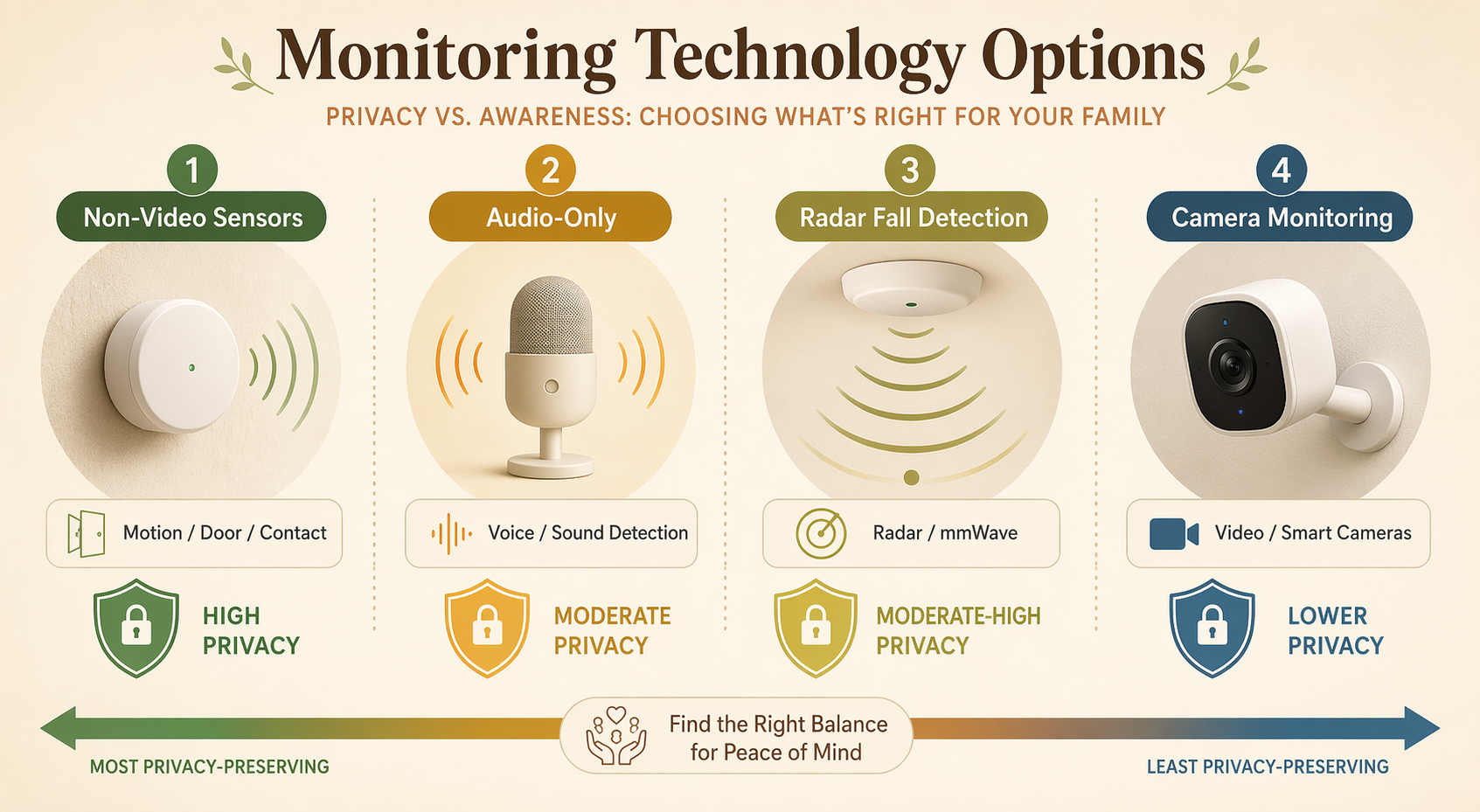
The Iowa State scoping review of thirty in-home monitoring studies found that the most common sensor types are passive infrared motion sensors and contact sensors—neither of which records images or sounds. A radar-based fall detection system achieved 98.74% accuracy, and a WiFi-based passive detection system reached 95% accuracy in both line-of-sight and non-line-of-sight conditions. A wearable medical bracelet tested at the University of Florida detected 80% of falls with no false alarms.
Here is a quick comparison of monitoring approaches along the dimension that matters most for the privacy conversation:
| Device Type | Privacy Level | What It Detects | Example Use Case |
|---|---|---|---|
| Passive infrared motion sensor | Highest (no image, no audio) | Motion patterns, activity levels | Check if your parent woke up and moved around the house |
| Contact sensor (door/window) | Highest (only open/close status) | Door openings | Know if the front door opens during the night |
| Radar fall detection | High (no image, no audio; emits radio waves) | Falls, position changes | Automatically alert if a fall is detected in the living room |
| Audio-only monitor | Moderate (sound only) | Sounds of a fall or call for help | Listen for distress calls without video |
| Wearable medical alert (pendant or bracelet) | Moderate (location and button press) | Falls (automatic or manual), location | Wear during the day; press for help |
| Smart camera | Low (video recording) | Visual activity, falls, visitors | See what is happening in real time; more intrusive |
When you present these options, you are effectively saying: “I hear you about the camera. How about a sensor that only knows whether you moved? No images. No recordings. Just motion.” That is a different conversation than “please just wear this pendant.”
Sometimes You're Not the Best Messenger
Sometimes the dynamic between you and your parent makes a productive conversation nearly impossible. You are the child. They are the parent. Any suggestion from you can feel like a challenge to their authority. In those cases, a neutral third party can carry the message more effectively.
Free, trusted organizations like Senior Planet (from AARP) and Cyber-Seniors offer one-on-one tech coaching over the phone or online. The coaches are patient, non-judgmental, and specifically trained to work with older adults. Your parent may be more willing to ask “dumb” questions of a stranger than of their own child—and more willing to trust a neutral source who has no stake in the adoption decision. The JMIR review notes that dependence on family for tech help can backfire if past interactions felt frustrating or condescending. A fresh voice can reset that dynamic.
Accepting a No Is Not Failure
You have validated. You have demonstrated. You have offered control and started small. And your parent still says no—clearly, calmly, with reasons you can understand. That is not a failure. It is the whole point of the empathy-first approach: to treat your parent as a capable adult who gets to make their own decisions about their body, their home, and their privacy.
Your job is not to persuade. Your job is to offer information and control. If your parent understands what the device does, understands the privacy protections, and still chooses not to use it, that decision deserves respect. Pressuring them would damage the very trust that makes monitoring technology effective when it is actually needed.
If you have walked through this framework and hit a respectful “no,” consider using an Aging in Place Readiness Audit to identify other ways to improve home safety without monitoring devices. Or read The Preparedness Gap: How to Start Caring for Aging Parents Before a Crisis Hits to build more structure into your long-term care planning. The relationship matters more than any device.
When to Stop and Check for Something Else
Most resistance is rational. But sometimes the way your parent handles technology changes in ways that signal something more serious. Researchers at Ohio State Wexner Medical Center note that struggles with familiar technology can be an early sign of cognitive decline—a problem that patients and families often misinterpret as a device problem. If your parent suddenly cannot remember how to use a remote control they have used for years, or becomes confused by a simple step in a process they once handled easily, that is different from a considered “no” to a new device.
This article was last reviewed on June 23, 2026. Technology categories and device features change rapidly; check the review date on each resource you reference.
Questions to bring to a clinician or OT
This is not medical, legal, or a family's final decision — only a framework. Bring these questions to a clinician, occupational therapist, or your local Area Agency on Aging.
Find Local HelpRelated reading
Noticed something outdated or inaccurate on this page? Flag a correction. We review every report against CDC, NIA, and AARP HomeFit guidance before updating a page.