
Caregiver decision guide
Choosing the Right Monitoring Technology for an Aging Parent: A Caregiver's Decision Framework
A product-neutral guide for family caregivers who feel overwhelmed by monitoring options. Learn the three distinct categories of monitoring technology — emergency response, activity tracking, and clinical monitoring — and how to match each to your parent's primary risk to avoid privacy friction and unmet needs.
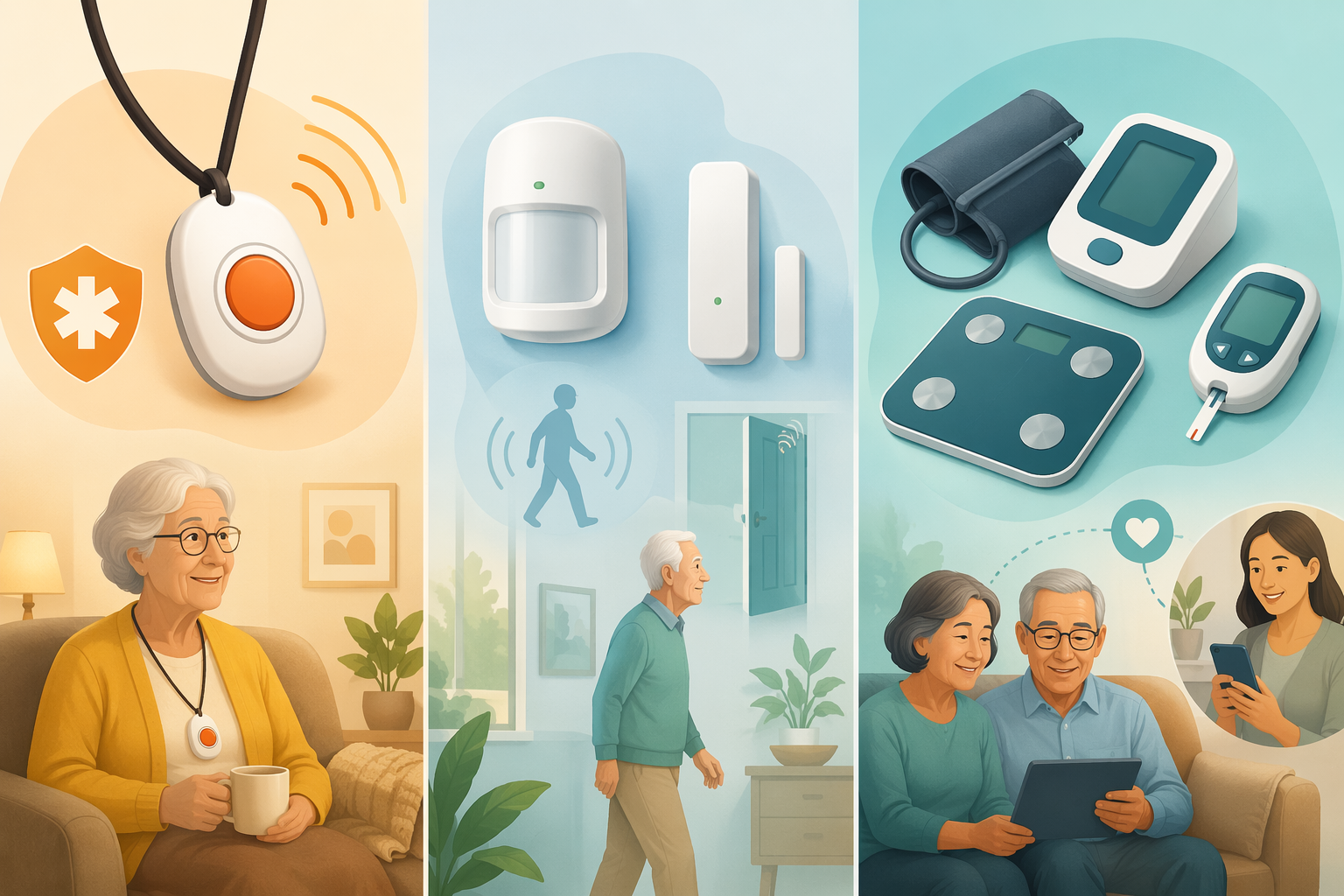
The Three Categories of Monitoring Technology (And Why Choosing the Wrong One Is the Most Common Mistake)
When a parent lives alone, the impulse is to find a single device that solves everything — a pendant, a camera, a smart speaker — and be done with it. But monitoring technology for older adults is not a single product category. It is three fundamentally different categories, each designed for a different purpose, and each with its own privacy profile, cost structure, and success criteria.
The most common mistake families make is choosing a device from the wrong category. A camera system won't help with medication adherence. A medical alert pendant won't detect a gradual decline in mobility. And a clinical remote patient monitoring (RPM) program won't help if the parent's primary risk is wandering. Understanding the three categories is the first step toward a decision that actually works.
| Category | Primary Purpose | Typical Tools | Best-Fit Scenario |
|---|---|---|---|
| Medical Alert Systems (PERS) | Emergency response — the user presses a button or the device detects a fall and summons help. | Wearable pendants, wristbands, wall-mounted help buttons, base stations with two-way speakerphone. | A parent who is generally healthy but lives alone and is at risk for a fall or sudden medical event. |
| Activity & Wellness Monitoring | Behavioral tracking — sensors detect changes in daily routines (movement, door openings, meal preparation) and alert caregivers to potential problems. | Motion sensors, door sensors, bed sensors, stove monitors, GPS trackers, smart home plugs. | A parent with early-stage cognitive decline, wandering risk, or a pattern of missed meals and forgotten medications. |
| Clinical Remote Patient Monitoring (RPM) | Clinical data collection — devices measure vital signs and transmit them to a healthcare provider for ongoing management. | Blood pressure cuffs, weight scales, pulse oximeters, glucometers, connected inhalers. | A parent managing one or more chronic conditions (hypertension, diabetes, heart failure, COPD) where daily vitals inform treatment decisions. |
The market reflects this diversity. The RPM market alone reached $2.45 billion in 2023, the broader telehealth market was valued at $97.7 billion in 2024, and the number of connected seniors (65+) using IoT devices in the U.S. reached 8.2 million in 2023. These are not niche products — they are rapidly becoming standard tools for aging in place. But without a framework to match the category to the need, families end up with expensive, unused equipment and a parent who feels surveilled rather than supported.
The Privacy Paradox: Older Adults Will Accept Monitoring — On Their Terms
A common assumption among family caregivers is that any monitoring will be rejected as an invasion of privacy. The research tells a more nuanced story. A systematic review of 83 studies found that older adults are willing to sacrifice some privacy in exchange for safety benefits — but only when they retain control over data sharing and consent.
This is the privacy paradox: the same person who rejects a live-feed camera in their bedroom may willingly wear a fall-detection pendant or allow motion sensors in their hallway. The difference is not about privacy versus safety — it is about control. When the older adult decides what data is collected, who sees it, and under what circumstances, acceptance rates rise sharply.
| Monitoring Feature | Typical Older Adult Response | Why |
|---|---|---|
| Live 24/7 video access for caregiver | Rejected | Feels like surveillance; loss of autonomy and dignity. |
| Motion sensors in common areas (kitchen, hallway, living room) | Accepted | No camera; detects activity patterns without recording personal moments. |
| Trend-based alerts (e.g., "no movement detected in 6 hours") | Welcomed | Provides safety without constant observation; alerts only when something is wrong. |
| Wearable fall-detection pendant or wristband | Conditionally accepted | Accepted when the benefit is clear and the device is comfortable; rejected if it feels stigmatizing or burdensome. |
| Bathroom or bedroom camera | Strongly rejected | Perceived as a violation of the most private spaces; rarely accepted even with clear safety justification. |
This finding has direct implications for choosing a monitoring category. If you select a category that collects more data than the parent is comfortable sharing — or that shares data in a way the parent cannot control — the system will fail regardless of its technical capabilities. The right category is the one that collects the minimum data necessary to address the primary risk, and that gives the parent meaningful control over who sees that data.
Mapping Your Parent's Primary Risk to the Right Monitoring Category
The decision framework starts with a single question: What is the primary risk your parent faces when they are alone? The answer determines which monitoring category is most likely to succeed — and which categories are likely to create unnecessary friction.
| Primary Risk | Recommended Category | Why This Category Fits | Categories to Avoid |
|---|---|---|---|
| Fall risk (unsteady gait, history of falls, dizziness) | Medical Alert System (PERS) with automatic fall detection | The device is worn and can summon help immediately after a fall, even if the parent cannot press a button. | Activity sensors alone (they detect patterns, not emergencies); RPM (it tracks vitals, not falls). |
| Wandering or getting lost (dementia, Alzheimer's, confusion) | Activity & Wellness Monitoring (GPS tracker, door sensors, motion sensors) | Door sensors alert caregivers when the parent leaves; GPS trackers help locate them if they wander. | Medical alert pendant (does not track location); RPM (irrelevant to wandering). |
| Chronic condition management (hypertension, diabetes, heart failure, COPD) | Clinical Remote Patient Monitoring (RPM) | Daily vitals are transmitted to a provider who can adjust treatment before a crisis occurs. | Medical alert pendant (does not track clinical data); basic activity sensors (do not measure vitals). |
| Living alone with general frailty (risk of missed meals, inactivity, isolation) | Activity & Wellness Monitoring (motion sensors, bed sensors, stove monitors) | Sensors detect changes in routine — missed meals, prolonged inactivity, stove left on — and alert caregivers. | Medical alert pendant (only helps if the parent can press it); RPM (overkill if no chronic condition). |
| Multiple risks (e.g., fall risk + chronic condition + living alone) | Combination: Medical Alert System + RPM (or Activity Monitoring + RPM) | A layered approach addresses different risks with different tools. Start with the highest-risk category and add others as needed. | Avoid a single "all-in-one" device that tries to do everything poorly. Choose best-in-category for each risk. |
For parents with cognitive decline, the decision becomes more complex. The inability to manage medications is a common reason for moving from independent to assisted living, and mild cognitive impairment affects 22% of older adults. For these families, activity and wellness monitoring — combined with a GPS tracker — is often the most appropriate starting point. The goal is not to track every movement, but to detect deviations from the parent's normal routine that signal a problem.
How to Introduce Monitoring to a Resistant Parent
Even with the right category selected, the conversation about monitoring can be the hardest part. Many older adults hear "monitoring" and think "surveillance" — a loss of independence, a sign that their family thinks they can't manage on their own. The way you frame the conversation determines whether the device ends up in a drawer or in daily use.
The most effective framing is "peace of mind for both of us." The goal is not to watch your parent — it is to reduce your own worry so you can stop calling every day to check in, and to give your parent a way to stay independent longer without you hovering. When the conversation is framed as a mutual benefit, resistance drops significantly.
- Start with the least intrusive option that meets the need. If motion sensors can address the risk, don't start with a camera. If a wearable pendant is rejected, consider a wall-mounted help button or a smart speaker with emergency calling.
- Give your parent control over data sharing. Let them decide who gets alerts and under what circumstances. Research shows that older adults accept monitoring when they retain control over data sharing and consent.
- Use concrete examples, not abstract warnings. Instead of "I'm worried you'll fall," say "If you fall and can't reach the phone, this pendant lets you call for help without getting up."
- Acknowledge their autonomy explicitly. "This is not about me watching you. This is about making sure you can keep living here on your own terms, and I can stop worrying so much."
- Offer a trial period. Most monitoring services offer month-to-month plans. Propose a 30-day trial with the agreement that if it doesn't work for them, you'll cancel it. Knowing they can opt out reduces the feeling of being trapped.
- Involve them in the selection. Show them two or three options in the chosen category and ask for their preference. A parent who chooses their own device is far more likely to use it consistently.
The Role of Remote Patient Monitoring in Proactive Care
Clinical Remote Patient Monitoring (RPM) is the category most likely to be overlooked by family caregivers, yet it is the one with the strongest evidence for improving health outcomes. Unlike medical alert systems (which respond to emergencies) or activity sensors (which detect behavioral changes), RPM tracks specific clinical data — blood pressure, weight, blood glucose, oxygen saturation — and transmits it directly to a healthcare provider.
The difference is fundamental: RPM is not about alerting a caregiver when something goes wrong. It is about giving a clinician the data they need to adjust treatment before something goes wrong. A systematic review found that RPM programs reduced hospital readmissions by up to 25%.
For a parent managing hypertension, diabetes, heart failure, or COPD, RPM can mean fewer emergency room visits, fewer hospitalizations, and better quality of life. The devices are typically simple to use — step on a scale, wrap a cuff around your arm, and the data is sent automatically via cellular or Bluetooth connection. No smartphone or Wi-Fi is required for most RPM systems.
RPM is also the category most likely to be covered by Medicare. Medicare reimburses for RPM services under specific conditions: the patient must have one or more chronic conditions, the devices must be prescribed by a treating physician, and the data must be reviewed by a qualified healthcare professional. This changes the cost calculus significantly — what might cost hundreds of dollars per month out of pocket for a consumer medical alert system may be fully covered when prescribed as part of an RPM program.
Cost and Coverage: What Medicare Pays For vs. What You Pay Out of Pocket
Cost is a major factor in monitoring decisions, and the cost structure varies dramatically by category. Understanding what Medicare covers — and what it does not — can save families thousands of dollars and prevent the frustration of buying an expensive system that doesn't address the actual need.
| Category | Typical Monthly Cost | Medicare Coverage | Out-of-Pocket Reality |
|---|---|---|---|
| Medical Alert System (PERS) | $20–$50 per month (plus equipment fee of $50–$200) | Not covered by Original Medicare. Some Medicare Advantage plans may offer discounts or partial coverage. | Almost entirely out-of-pocket. Annual cost: $240–$600 plus equipment. |
| Activity & Wellness Monitoring (sensors, GPS) | $30–$100 per month (varies by number of sensors and monitoring service) | Not covered by Medicare. Considered convenience or safety devices, not medical equipment. | Entirely out-of-pocket. Annual cost: $360–$1,200 plus equipment. |
| Clinical Remote Patient Monitoring (RPM) | $50–$150 per month (often billed to Medicare by the provider) | Covered by Medicare Part B when prescribed by a physician for a chronic condition. Patient may owe 20% coinsurance after deductible. | Significantly reduced out-of-pocket cost. Many patients pay $0–$30 per month after Medicare coverage. |
For families considering a combination approach — for example, RPM for a parent with heart failure plus a medical alert pendant for fall risk — the total monthly cost can range from $70 to $200. While this is not trivial, it is often far less than the cost of a single emergency room visit or a short nursing home stay. For a deeper analysis of how monitoring technology compares to other care costs, see our Cost-Benefit Framework for Families.
A Checklist for Evaluating Any Monitoring Product
Once you have identified the right category for your parent's primary risk, the next step is evaluating specific products within that category. The following checklist is designed to be product-neutral — it applies to any device or service, regardless of brand, and helps you compare options on the dimensions that actually matter for long-term success.
- Ease of use for the older adult. Can your parent set it up, charge it, and use it without your help? Does it require a smartphone app, or does it work independently? Devices that require daily interaction (charging, wearing, pressing buttons) should be tested for a week before committing to a long-term contract.
- Connectivity reliability. Does the device use cellular (built-in SIM) or Wi-Fi? Cellular is recommended for older adults because it works even if the Wi-Fi goes down or the parent forgets the password. If the device relies on Wi-Fi, ensure the parent's internet connection is stable and they know how to reconnect if it drops.
- Clinical relevance. Does the device measure something that actually matters for your parent's health? A step counter is not the same as a blood pressure monitor. Choose devices that track data your parent's healthcare provider can act on.
- Caregiver notification model. How and when does the system alert you? Does it send a push notification for every minor event (which leads to alert fatigue), or only for significant deviations from the norm? Trend-based alerts are more effective than real-time notifications.
- Privacy model. What data is collected? Who has access to it? Can your parent control who sees what? Does the company sell or share data with third parties? Read the privacy policy before purchasing. If the privacy model is unclear, choose a different product.
- Battery life and maintenance. How often does the device need to be charged? A wearable that needs daily charging is unlikely to be used consistently. Look for devices with battery life measured in weeks or months, or devices that use replaceable batteries.
- Trial period and cancellation policy. Can you try the device for 30 days and return it if it doesn't work? Is the contract month-to-month or annual? Avoid long-term contracts for a first monitoring device — the parent may reject it, and you need the flexibility to switch categories.
- Patient willingness (the #1 predictor). Before purchasing, ask your parent: "Would you be willing to use this every day?" If the answer is no, find out why and address the objection before buying. A device that sits in a drawer provides zero value.
The decision framework outlined here — identify the primary risk, match it to the right category, introduce the technology collaboratively, and evaluate products against the checklist — is designed to reduce the overwhelm that families feel when facing a wall of product claims and privacy concerns. The right monitoring system, chosen thoughtfully and introduced respectfully, can extend the time a parent lives safely at home and reduce the anxiety that comes with long-distance caregiving.
If you are caring for a parent from a distance, our Long-Distance Caregiving Guide offers additional strategies for coordinating care, managing emergencies, and staying connected when you can't be there in person.
Questions to bring to a clinician or OT
This is not medical, legal, or a family's final decision — only a framework. Bring these questions to a clinician, occupational therapist, or your local Area Agency on Aging.
Find Local HelpRelated reading
Noticed something outdated or inaccurate on this page? Flag a correction. We review every report against CDC, NIA, and AARP HomeFit guidance before updating a page.