
Caregiver decision guide
Passive vs. Active Elderly Monitoring Systems: What the Research Says About Real-World Adoption
For caregivers whose parent resists wearables, passive monitoring (motion sensors, door sensors) seems like the ideal solution. But peer-reviewed research reveals a critical gap between the promise of 'invisible' monitoring and how older adults actually experience it — including a 98% refusal rate, behavior modification, and false alerts that can increase family stress. This article compares passive and active systems through the lens of real-world adoption barriers, not just feature lists.
The Appeal of 'Invisible' Monitoring — and Why It's Not That Simple
If you are a long-distance caregiver whose parent refuses to wear a medical alert pendant or carry a smartphone, passive monitoring sounds like the perfect workaround. No cameras. No wearable. No daily charging. Just a handful of small sensors placed around the home that learn your parent's daily patterns and alert you when something seems off — a missed morning kitchen visit, an unusually long bathroom stay, a front door that did not open all day.
The technology is real, and it is improving. But the gap between what passive monitoring promises and how older adults actually experience it is wider than most product descriptions suggest. Peer-reviewed research, including an NIH-funded study of over 1,000 older adults, reveals a startling reality: nearly 98% of residents declined the passive monitoring system offered to them, and more than 20% of those who initially accepted it discontinued within the first year. The reasons had little to do with technological difficulty and everything to do with how the system disrupted daily life, created anxiety about false alerts, and even caused some residents to change their behavior in ways that paradoxically increased fall risk.
How Passive Monitoring Works: Sensors, Algorithms, and Baseline Learning
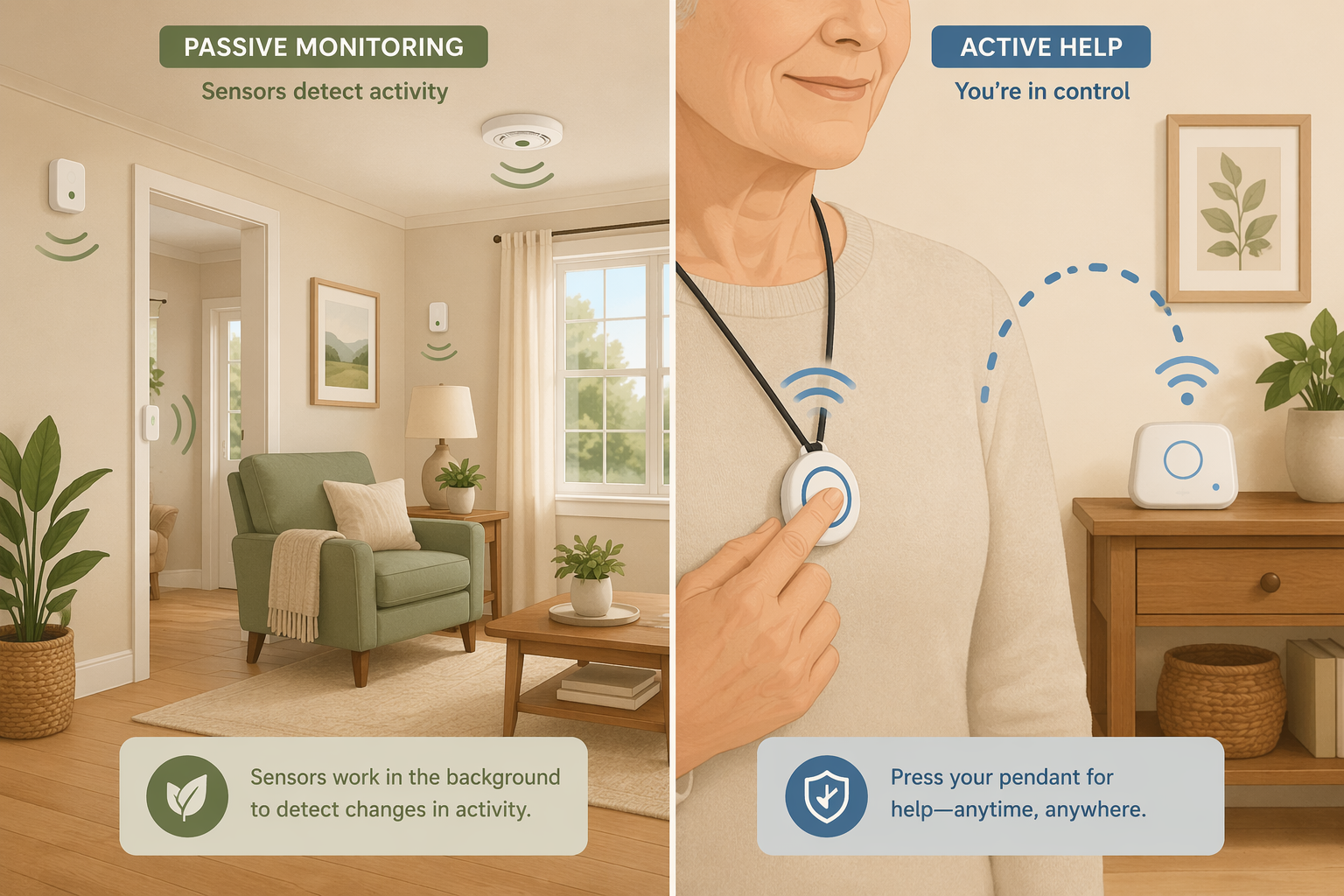
Passive monitoring systems use a network of wireless sensors placed in key locations around the home — typically motion detectors in hallways and common rooms, magnetic contact sensors on doors and cabinets, pressure mats on beds or chairs, and sometimes temperature or humidity sensors in the kitchen and bathroom. These sensors communicate with a central hub that transmits data to a cloud platform via a cellular or WiFi connection.
The critical difference from active systems is that the user does nothing. There is no button to press, no device to wear, no charging routine. The sensors collect data continuously and the system's algorithms learn what is normal for that specific household — typical wake time, meal preparation patterns, bathroom frequency, and daily outings. When a sensor reading falls outside the learned baseline, the system sends an alert to designated family members or a monitoring center.
- Motion sensors: Detect movement in specific zones (kitchen, hallway, bathroom). A missed morning kitchen visit might trigger an alert.
- Door sensors: Magnetic contacts on exterior doors and key cabinets (medicine, refrigerator). Track when doors are opened and closed.
- Bed and chair pressure mats: Detect when someone gets in or out of bed, or how long they have been sitting. Useful for monitoring sleep quality and fall risk during transfers.
- Temperature and humidity sensors: Often placed in the kitchen (stove safety) and bathroom (mold risk, prolonged shower duration).
- Baseline learning algorithms: The system typically takes 7–14 days to establish a personalized routine pattern before sending meaningful alerts.
A typical passive sensor kit covers five to seven rooms. The Caregiver Smart Solutions Deluxe+ Monitoring Kit, for example, includes sensors in five rooms plus temperature, humidity, and door sensors for a one-time equipment cost of $299 and a $49 monthly subscription. More comprehensive kits like the Core Kit run $899 upfront with a $59 monthly fee and include 14 sensors covering movement, medicine cabinet, refrigerator, and emergency buttons.
Because the system does not use cameras, it preserves visual privacy — a key advantage for older adults who are uncomfortable with being watched. AARP's 2020 CES coverage noted that companies are moving toward sensor-based monitoring specifically because older adults resist cameras, with one user's father reportedly covering a camera with a dish towel.
How Active Monitoring Works: Wearables, Push-Buttons, and Fall Detection
Active monitoring systems — commonly known as personal emergency response systems (PERS) or medical alert systems — require deliberate user action. The classic model is a wearable pendant or wristband with a button that, when pressed, connects the user to a trained operator via a base station speakerphone. The operator can assess the situation, contact emergency services, or call a family member.
Modern active systems have evolved significantly. Many now include automatic fall detection using accelerometers and gyroscopes built into the wearable. When a fall is detected, the system initiates a call automatically — even if the user cannot press the button. This is the key safety net for situations where the user is unconscious or disoriented.
- Wearable pendant or wristband: Must be worn consistently to provide protection. Water-resistant models allow shower use, a high-risk fall location.
- Base station: A speakerphone unit that connects to the monitoring center via landline or cellular. Range varies from 300 to 1,000 feet from the base.
- Automatic fall detection: Uses motion sensors to distinguish a fall from normal movement. Adds $8–$12 per month to the subscription.
- GPS and mobile options: Cellular-based pendants work outside the home, providing location tracking and roadside assistance for active seniors.
NCOA's 2026 testing of 35+ medical alert systems found response times ranging from 22 to 51 seconds across top-rated brands, with monthly subscription fees between $24.95 and $36.95. Battery life on wearables ranged from 1 to 10 days depending on the device and features enabled. A February 2025 survey cited by NCOA found that nearly 75% of medical alert buyers purchased after a fall or medical emergency, suggesting that proactive adoption — buying before an incident — remains relatively rare.
Passive vs. Active: A Head-to-Head Comparison
The following table compares passive and active monitoring across the dimensions that matter most for real-world adoption — not just feature specs, but the factors that determine whether a system actually gets used and trusted.
| Dimension | Passive Monitoring (Sensors) | Active Monitoring (Wearables/PERS) |
|---|---|---|
| User action required | None — sensors collect data automatically | Must wear device and press button (or rely on auto fall detection) |
| Privacy model | No cameras; motion and door data only; preserves visual privacy | No cameras; location data from GPS models; audio during calls only |
| Fall detection reliability | Indirect — detects absence of movement after a fall; no direct fall sensor | Direct — accelerometer-based auto fall detection in wearable |
| False alert risk | High — alerts triggered by sleeping in, long bathroom visits, irregular schedules | Moderate — accidental button presses; auto fall detection false positives vary by device |
| User burden | Very low — no wearing, charging, or interaction required | Moderate — must wear device daily, charge battery every 1–10 days, remember to press button |
| Upfront cost | $299–$899 (sensor kit) | $0–$200 (equipment fee, often waived with annual contract) |
| Monthly cost | $49–$59 | $25–$47 (plus $8–$12 for fall detection) |
| Best suited for | Seniors who resist wearables; long-distance caregivers wanting daily routine visibility | Seniors willing to wear a device; high fall risk; need for immediate emergency response |
| Primary limitation | High refusal rate; behavior modification; false alerts can increase family stress | Requires consistent wear; limited to home range (unless GPS model); proactive adoption is rare |
What the Research Actually Found: The Berridge Study on Passive Monitoring Adoption
The most rigorous qualitative evidence on passive monitoring adoption comes from a 2017 NIH-funded study by Clara Berridge and colleagues, published in The Gerontologist. The study examined the deployment of the QuietCare passive monitoring system across 1,075 residents in low-income independent-living residences. The findings are sobering for anyone who assumes that removing the wearable barrier solves the adoption problem.
- 98% refusal rate: Of the 1,075 residents offered the system, approximately 98% declined to participate. The system was presented as a free service with no cost to residents.
- High discontinuation: Among the small group who initially accepted, over 20% discontinued within 12 months.
- Disruption of routine was the primary reason: Alerts were triggered by sleeping in, long bathroom visits, and irregular schedules — normal variations in daily life that the system flagged as anomalies.
- Fear of burdening family: Residents worried that false alerts would cause unnecessary worry and stress for their adult children, leading them to discontinue the system.
- Behavior modification: Some residents changed their routines to avoid triggering alerts — for example, avoiding daytime naps or rushing through bathroom visits. Researchers noted this could paradoxically increase fall risk.
- Creative misuse: One resident triggered 45 of 53 alerts by raising the temperature threshold because she wanted telecare operators to call and chat — revealing an unmet need for social connection that the monitoring system was not designed to address.
Some residents modified their behavior to avoid triggering alerts, e.g., avoiding naps or rushing bathroom time, which researchers noted could paradoxically increase fall risk.
The study also documented that the system was sometimes used in ways the designers never intended. One resident deliberately triggered alerts to initiate conversations with telecare operators, revealing that for some older adults, the desire for social contact outweighed privacy concerns. This finding underscores a critical limitation of passive monitoring: it can detect deviations from routine, but it cannot distinguish between a medical emergency and a lonely person wanting to talk.
Why Seniors Refuse Passive Monitoring: Beyond 'They Just Don't Want to Learn'
It is tempting to attribute a parent's refusal of monitoring technology to stubbornness, technophobia, or a simple unwillingness to learn. The Berridge study suggests otherwise. The reasons for refusal and discontinuation were rational, well-articulated, and rooted in real concerns about how the system would affect daily life and family relationships.
- Disruption of routine: Passive systems learn a baseline of normal activity, but normal is not always predictable. A late night, a long phone call, or a lazy Sunday morning can all trigger alerts. Residents who valued their autonomy found themselves constrained by a system that penalized irregularity.
- Fear of burdening family: Many older adults are acutely aware of the stress their adult children already carry. The prospect of generating false alerts — a middle-of-the-night notification because they slept in — was enough to make them reject the system entirely.
- Behavior modification: The most troubling finding was that some residents changed their behavior to avoid triggering alerts. Rushing through a bathroom visit to avoid a prolonged-stay alert increases the risk of a fall. Skipping a nap to avoid a daytime inactivity alert undermines the rest that supports overall health.
- Unmet social needs: The resident who triggered 45 alerts to talk to telecare operators highlights a fundamental mismatch between what monitoring technology provides (safety surveillance) and what some older adults actually need (social connection).
These findings align with broader research on senior technology adoption. For a deeper look at the general barriers that prevent older adults from adopting assistive technologies — including perceived irrelevance, privacy concerns, and lack of support — see our article on the 6 real barriers to senior tech adoption and how to overcome each one.
A Practical Checklist for Introducing Passive Monitoring to a Resistant Parent
If you believe passive monitoring is the right fit for your parent's situation — and you have considered the adoption barriers above — the way you introduce the system matters as much as the system itself. The following steps are drawn from the research on what works and what does not.
- Frame it as a tool for your peace of mind, not for their surveillance. Say: "This helps me stop worrying when I can't be there. It lets me know you're okay without me calling and interrupting your day."
- Involve them in the decision. Show them the sensors. Explain what each one does. Let them choose where to place the motion sensors. Control reduces resistance.
- Start with a trial period. Agree on a 30-day trial with a clear conversation scheduled at the end to discuss how it feels. Knowing they can opt out reduces the pressure of a permanent decision.
- Set expectations about false alerts. Explain that the system will sometimes flag normal behavior — a late morning, a long shower — and that you will not panic or call every time. Agree on what constitutes a real concern.
- Adjust alert thresholds together. Many systems allow you to customize sensitivity, time windows, and notification rules. Work with your parent to find a balance that catches genuine risks without creating constant noise.
- Address the social isolation gap explicitly. If your parent is lonely, a monitoring system will not help. Consider pairing the technology with regular phone calls, video chats, or in-person visits. The system should supplement human connection, not replace it.
For caregivers whose parent has dementia or is at risk of wandering, passive monitoring can be particularly valuable — but the acceptance challenges are even more complex. See our guide on elderly monitoring systems for dementia and wandering for condition-specific strategies, and our overview of dementia monitoring systems for wandering, nighttime agitation, and daily routine changes for a deeper look at how motion sensors and door sensors can be configured for cognitive decline.

Signs That Passive Monitoring May Be Causing More Stress Than Safety
Passive monitoring is not a set-it-and-forget-it solution. It requires ongoing calibration and honest assessment of whether it is actually improving safety or creating new problems. Watch for these warning signs in the weeks and months after installation.
- Your parent expresses anxiety about the sensors. Comments like "I feel like I'm being watched" or "I have to be careful about what I do" suggest the system is creating stress rather than security.
- You notice behavior changes. If your parent is skipping naps, rushing through bathroom visits, or avoiding activities they used to enjoy because they do not want to trigger an alert, the system is working against its purpose.
- False alerts are causing family tension. If you or other family members are receiving multiple alerts per week that turn out to be false, the system may be eroding trust and increasing caregiver stress rather than reducing it.
- Your parent feels surveilled rather than supported. The distinction matters. A system that feels like a safety net is helpful. A system that feels like a monitoring device is alienating.
- The system is being used as a substitute for human contact. If the alerts are the primary way you check in on your parent, and phone calls or visits have decreased as a result, the technology may be deepening social isolation.
If you observe any of these signs, it does not necessarily mean you should abandon passive monitoring. It does mean you should pause, have an honest conversation with your parent, and consider adjustments: reducing alert sensitivity, changing notification rules, or switching to a hybrid approach that combines passive sensors with a wearable fall detection device for higher-risk situations.
Questions to bring to a clinician or OT
This is not medical, legal, or a family's final decision — only a framework. Bring these questions to a clinician, occupational therapist, or your local Area Agency on Aging.
Find Local HelpRelated reading
- Beyond the Panic Button: Why Passive, Sensor-Based Monitoring Is Replacing Wearables for Elderly Safety
- The Monitoring Conversation: How to Talk to an Aging Parent About Safety Technology Without Damaging Trust or Autonomy
- How to Choose an Elderly Monitoring System Without Wasting Money: Start with Your Parent's Real Risk
Noticed something outdated or inaccurate on this page? Flag a correction. We review every report against CDC, NIA, and AARP HomeFit guidance before updating a page.