
Caregiver decision guide
Beyond 'They Just Don't Want to Learn': The 6 Real Barriers to Senior Tech Adoption and How to Overcome Each One
For family caregivers frustrated by an older parent's technology resistance, this guide provides a diagnostic framework to identify which of six distinct barriers — from cost and privacy fears to physical limitations and digital literacy gaps — is at play, then maps each barrier to a specific, actionable solution.
Why 'Just Be Patient' Isn't a Strategy
If you've ever watched your parent push a tablet away in frustration, or heard the words "I'm just not a tech person" for the hundredth time, you know that the standard advice — be patient, go slow, repeat yourself — doesn't move the needle. The problem isn't that you're not patient enough. The problem is that you're treating all resistance as the same thing.
The data makes this clear. A 2021 AARP survey of 2,807 adults found that cost is the number one barrier to technology adoption among people 50 and older, cited by 38% of respondents. Privacy concerns came in second at 34%, and lack of knowledge ranked third at 37%. Meanwhile, a separate 2023 analysis found that 40% of people aged 65 and older reported at least one usability or accessibility barrier when trying to use the internet.
These aren't the same problem. A parent who can't afford a tablet and a parent who is terrified of data collection need completely different kinds of help. A parent whose hands shake when trying to tap a small button needs a different solution than a parent who simply doesn't know what an app is. The single strategy of "patience" fails because it doesn't distinguish between these situations.
This article expands on the four-category framework introduced in our earlier piece, The Hidden Barriers to Senior Tech Adoption, by identifying six distinct barrier categories and, more importantly, providing a diagnostic decision framework that maps each barrier to a specific intervention. The core thesis is simple: once you correctly identify which barrier is at play, the right solution becomes obvious. Until you do, you're guessing.
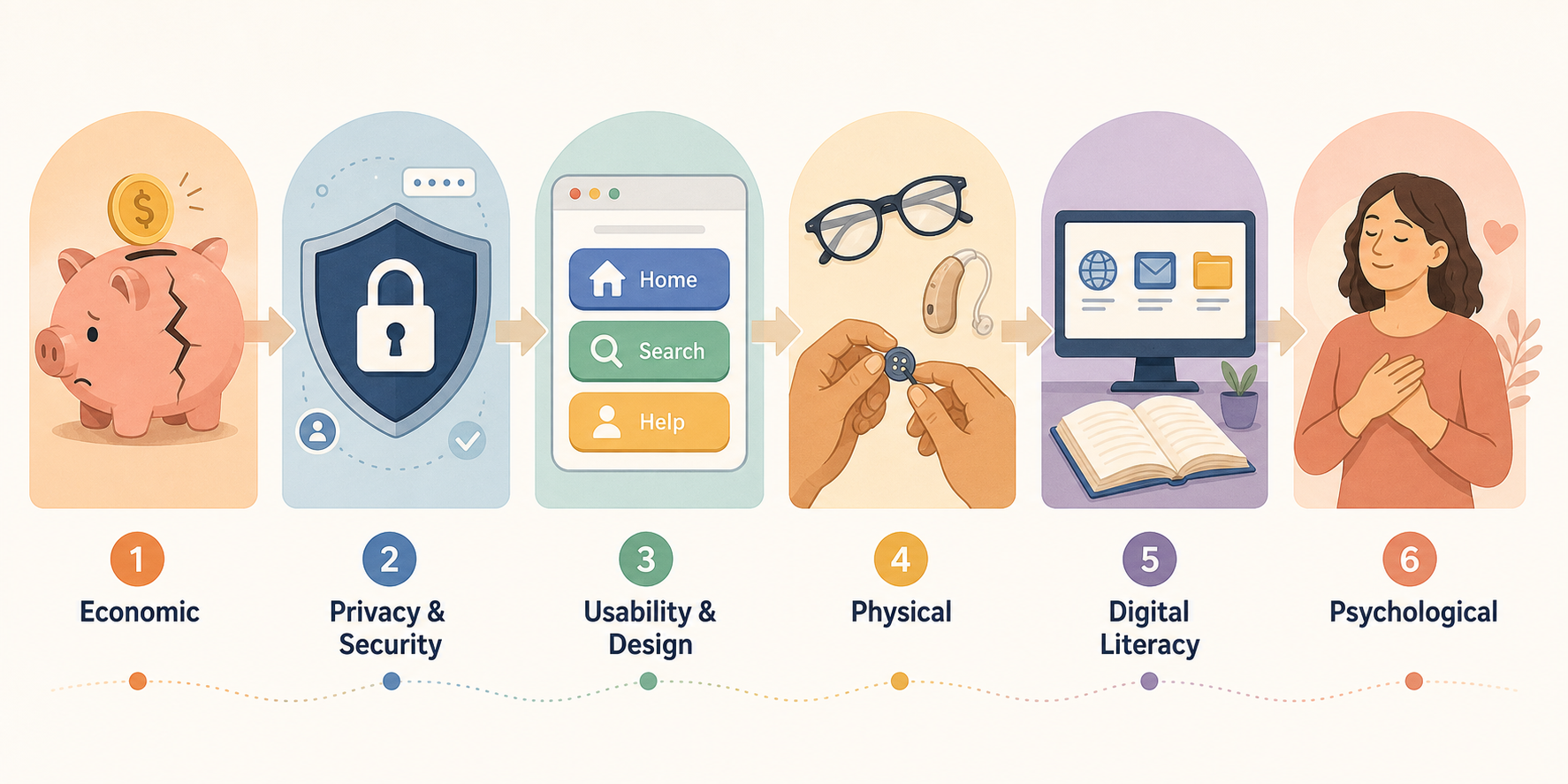
The 6-Barrier Spectrum: What Actually Stops Older Adults from Adopting Technology
Before you can solve a barrier, you need to name it. The following six categories represent the full spectrum of obstacles that prevent older adults from adopting and using technology. Each one has distinct characteristics, supporting data, and — critically — a different solution path.
| Barrier Category | Key Statistic | What It Looks Like in Practice |
|---|---|---|
| Economic | 38% of 50+ adults cite cost as the top barrier (AARP 2021); 4.1% of 65+ have only a phone without internet (FCC 2023) | Parent says "I can't afford another bill" or "That device costs too much." They may have a basic phone but no broadband or smartphone. |
| Privacy & Security | 34% of 50+ cite privacy as a top barrier (AARP 2021); 40% of older adults are 'privacy fundamentalists' (UC San Diego 2019) | Parent worries about "them" tracking their data, refuses to enter personal information online, or fears scams and identity theft. |
| Usability & Design | 40% of 65+ report at least one usability barrier online (2023); 58% struggle with small text (2021) | Parent gets frustrated with tiny buttons, confusing menus, or interfaces that assume technical knowledge. They may tap the wrong thing repeatedly. |
| Physical | 45% of adults 60+ have vision impairment affecting digital use (WHO estimate) | Parent cannot read the screen, has trouble gripping a device, or experiences pain when typing or swiping due to arthritis or tremors. |
| Digital Literacy | 37% cite lack of knowledge as a barrier (AARP 2021); unfamiliarity with terms like 'IP address' (UC San Diego 2019) | Parent doesn't know what an app is, how to use a search engine, or what Wi-Fi means. They may have never learned basic digital navigation. |
| Psychological | Fear of loss of independence, competence, and dignity is a recurring theme in qualitative studies | Parent feels embarrassed about not knowing how to use technology, fears breaking the device, or resents the implication that they need help. |
The Privacy Paradox: Why Older Adults Guard Their Data but Will Share It for the Right Reason
The privacy barrier deserves special attention because it is the most misunderstood. Many caregivers interpret a parent's privacy concerns as simple stubbornness or paranoia. But the research tells a more nuanced story — one that offers a clear path forward.
A 2019 peer-reviewed study from UC San Diego, published in PMC, categorized 31 retirement community residents (mean age 80) into three privacy attitude groups. The results were striking: 40% were classified as 'privacy fundamentalists' — people who are highly concerned about data collection and want strong controls — compared to just 25% in the general population. Another 46.7% were 'privacy pragmatists,' meaning they are willing to share information if they receive clear value in return. Only 13% were 'privacy unconcerned.'
This finding — that older adults are disproportionately privacy-conscious — is reinforced by AARP's 2021 survey, which found that 83% of respondents are not confident that what they do online remains private, and only 43% understand the small print in privacy policies.
The key insight from the UC San Diego research is that even privacy fundamentalists were willing to share information if they received something in return. This is the privacy paradox in action: older adults are not categorically opposed to technology; they are opposed to technology that feels opaque, extractive, or disrespectful of their boundaries.
For caregivers, this means the solution is not to dismiss privacy concerns but to address them directly and transparently. When introducing a monitoring device or a health app, explain exactly what data is collected, who has access to it, how it is protected, and — most importantly — what benefit the older adult will receive in exchange. For a medical alert system, the benefit is immediate help in an emergency. For a health tracking app, it might be better communication with their doctor. When the value proposition is clear, even privacy fundamentalists often say yes.
70% of participants were aware of online information collection and strongly agreed that disclosure of information usage is important.
This finding from the UC San Diego study underscores a practical point: older adults want to know what they are signing up for. A simple, honest explanation of data practices — delivered in plain language, not legalese — can transform a privacy fundamentalist into a willing participant.
Mapping Solutions to Barriers: A Diagnosis-to-Intervention Pipeline
Once you have identified the primary barrier, the next step is to select the appropriate intervention. The following table maps each of the six barriers to specific solution types and actionable first steps.
| Barrier | Intervention Type | Example Action |
|---|---|---|
| Economic | Affordability programs and cost-benefit framing | Explore the Affordable Connectivity Program (ACP) for discounted internet; look into NCOA's digital literacy partnerships; calculate how a $30/month monitoring system compares to the cost of a single emergency room visit. |
| Privacy & Security | Transparency and tool-based protection | Explain data collection in plain language; set up a password manager and two-factor authentication; show them how to review app permissions; demonstrate that they control what is shared. |
| Usability & Design | Accessibility features and senior-friendly devices | Enable large text mode and voice control on their smartphone; choose devices with simplified interfaces (e.g., medical alert systems with one-button operation); test websites for readability. |
| Physical | Adaptive equipment and alternative interfaces | Use a tablet with a larger screen instead of a phone; add a stylus for easier tapping; try voice assistants (Alexa, Siri) for hands-free control; consider a wearable with fall detection that requires no screen interaction. |
| Digital Literacy | Structured learning programs and vocabulary building | Enroll in a program like Senior Planet or Cyber-Seniors; use the UC Berkeley/Curry Senior Center model of device-plus-training; create a simple glossary of basic terms (app, browser, Wi-Fi, password). |
| Psychological | Emotional validation and peer learning | Acknowledge their frustration without judgment; frame technology as a tool for independence, not a sign of decline; connect them with peers who have successfully adopted technology; read our guide on |
For the economic barrier, it is important to frame technology not as an expense but as an investment that can reduce other costs. Our cost-benefit framework for monitoring technology shows how a modest monthly subscription for a medical alert system can offset far larger expenses like emergency room visits or assisted living facility costs. For additional financial support, explore our guide to elder care assistance programs.
For the digital literacy barrier, structured programs are far more effective than ad-hoc teaching. The UC Berkeley / Curry Senior Center study, published in the Journal of Applied Gerontology in 2025, tracked 90 low-income seniors (median age 68) over one year in a digital literacy program. Participants were given an iPad, a Fitbit, and a digital scale, along with training on internet use, health information searching, and social media. After one year, about 60% of participants rated their health better, 60% had less loneliness, and 60% had more confidence in their technology skills. This model — device plus structured training — is far more effective than handing someone a tablet and hoping they figure it out.
When Barriers Compound: Low Income, Low Literacy, and the Rural Broadband Gap
The six-barrier model is useful for diagnosis, but real life is rarely that clean. Many older adults face multiple barriers simultaneously, and the combination can be far more challenging than any single obstacle. The most common and most difficult compound scenario involves low income, limited digital literacy, and poor broadband access — a combination that disproportionately affects rural older adults.
Consider the data: 4.1% of adults 65 and older had only a phone without any internet access in 2023, according to FCC data. That number is significantly higher in rural areas where broadband infrastructure is sparse. For these individuals, the economic barrier (cannot afford broadband), the digital literacy barrier (never learned to use the internet), and the usability barrier (small phone screens are hard to navigate) converge into a single, formidable wall.
When barriers compound, the solution must be multi-layered. A single intervention — such as providing a discounted device without training, or offering a training class without addressing internet access — will fail because it only addresses one part of the problem.
- Start with connectivity. Before buying a device or signing up for a class, ensure the person has reliable internet access. The Affordable Connectivity Program (ACP) can help with monthly internet costs for eligible households.
- Combine device access with structured training. The UC Berkeley / Curry Senior Center model — providing a device alongside formal instruction — is the gold standard. Look for local senior centers or libraries that offer similar programs.
- Choose the simplest possible technology. For someone facing multiple barriers, a smartphone with dozens of apps is overwhelming. A single-purpose device — like a medical alert pendant or a simplified tablet with only essential apps — reduces cognitive load.
- Frame technology as one layer in a broader care plan. Technology is not a replacement for human support, but it can extend independence and reduce the need for more intensive interventions. Our layered home intervention path article explains how to integrate technology with other forms of support.
A Caregiver's Diagnostic Decision Framework: Identify the Barrier, Choose the Intervention
The following framework is designed to help you move from observation to action. It is not a rigid checklist but a diagnostic tool — a way to systematically identify which barrier is most likely at play and select the matching intervention.
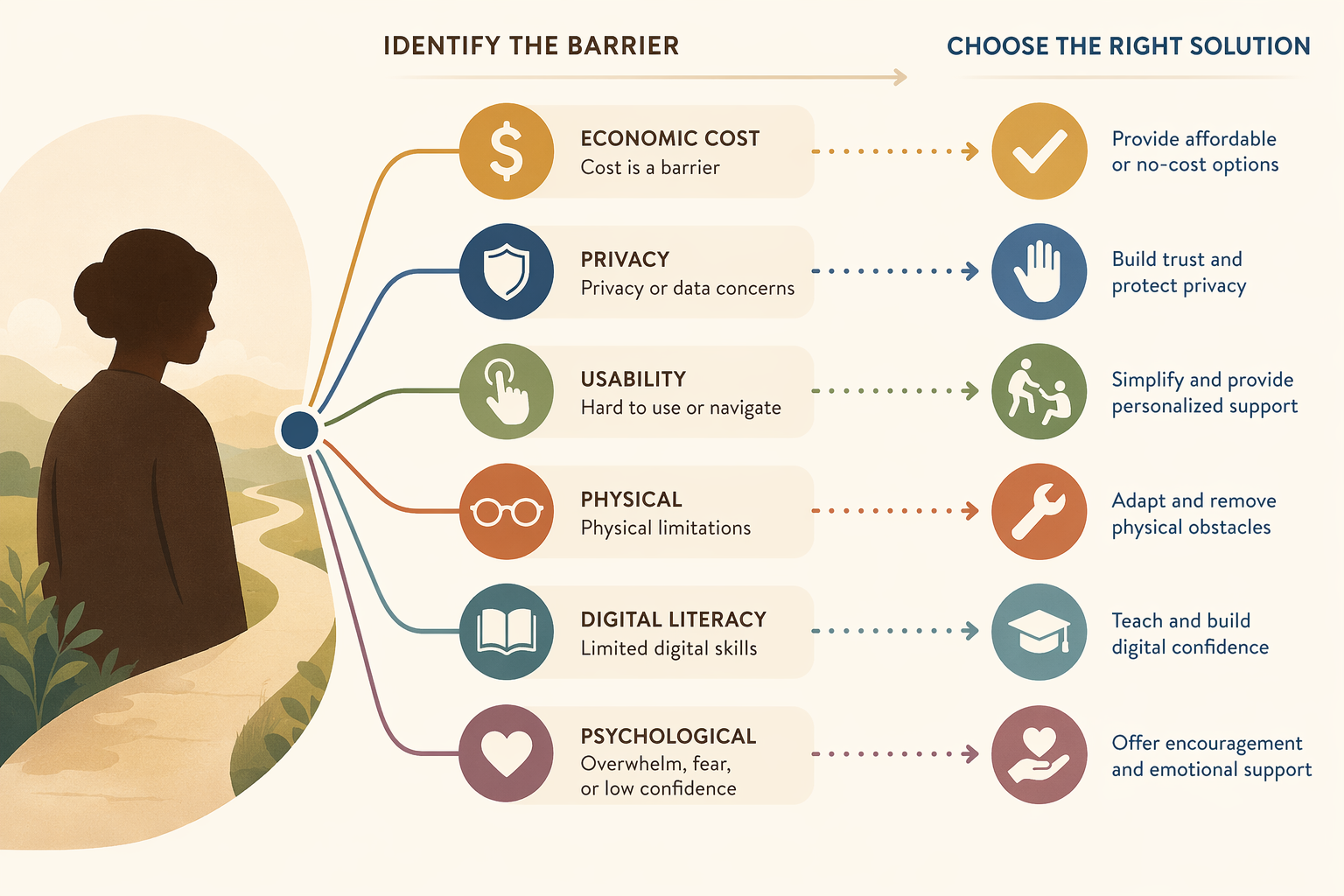
Step 1: Observe the Resistance Pattern
- Does your parent say "I can't afford it" or "It's too expensive"? → Likely the economic barrier.
- Does your parent say "I don't want them tracking me" or "It's not private"? → Likely the privacy barrier.
- Does your parent get frustrated with small buttons, confusing menus, or complex steps? → Likely the usability barrier.
- Does your parent have trouble seeing the screen, gripping the device, or typing? → Likely the physical barrier.
- Does your parent say "I don't know how" or ask basic questions about what terms mean? → Likely the digital literacy barrier.
- Does your parent seem embarrassed, defensive, or resistant to the idea that they need help? → Likely the psychological barrier.
Step 2: Ask Targeted Questions
Once you have a hypothesis about the primary barrier, ask a few follow-up questions to confirm. For example:
- "If the device were free, would you use it?" (If yes, the barrier is economic. If no, dig deeper.)
- "If I showed you exactly what data is collected and who sees it, would that help?" (If yes, the barrier is privacy.)
- "Would a larger screen or bigger buttons make it easier?" (If yes, the barrier is physical or usability.)
- "Would you feel more comfortable learning with a group of people your age?" (If yes, the barrier may be psychological or digital literacy.)
Step 3: Select the Matching Intervention
Refer to the diagnosis-to-intervention table above. Choose the intervention that matches the primary barrier. If multiple barriers are present, address them in order of impact — start with the one that, if solved, would make the biggest difference.
Also note that the same person may face different barriers for different technologies. Your parent might have privacy concerns about a home monitoring camera but usability issues with a smartphone. Treat each technology adoption decision as a separate diagnostic process.
From Barrier Diagnosis to Action: Your Next Steps
The single most important takeaway from this article is that understanding the specific barrier changes the intervention. When you know whether you are dealing with a cost problem, a privacy problem, a usability problem, a physical limitation, a knowledge gap, or an emotional resistance, the path forward becomes clear.
Here are your immediate next steps:
- Start with one barrier, not all six. Pick the technology your parent is most resistant to and use the diagnostic framework to identify the primary barrier. Do not try to solve everything at once.
- Have a conversation using the diagnostic framework. Instead of saying "You need to learn this," say "I've noticed this is frustrating. Is it the cost, the privacy, or something else?" Let their answer guide your approach.
- Explore one structured program or resource. For digital literacy, look into Senior Planet or Cyber-Seniors. For affordability, check the ACP or NCOA's digital literacy partnerships. For privacy, set up a password manager together.
- For the psychological barrier, read our guide on helping aging parents accept monitoring technology without damaging trust or dignity. It provides specific conversation scripts and emotional validation strategies.
- Visit our FAQ section for common questions about Medicare coverage for monitoring devices, privacy laws, and device costs. Our Glossary explains terms like PERS, ACP, and CAPS if you encounter unfamiliar terminology.
Technology adoption is rarely a straight line. There will be setbacks, frustrations, and days when it feels like no progress is being made. But when you understand the real barrier — not the surface resistance, but the actual obstacle — you can stop guessing and start solving.
Questions to bring to a clinician or OT
This is not medical, legal, or a family's final decision — only a framework. Bring these questions to a clinician, occupational therapist, or your local Area Agency on Aging.
Find Local HelpRelated reading
Noticed something outdated or inaccurate on this page? Flag a correction. We review every report against CDC, NIA, and AARP HomeFit guidance before updating a page.