When Technology Frustration May Signal Cognitive Decline
passive sensorReviewed: 2026-06-29
When Technology Frustration May Signal Cognitive Decline
Learn how to distinguish between your parent's normal technology frustration and early signs of dementia, and discover practical steps to adapt their environment and seek evaluation.
By Editorial Team
PERS
medical alert system
fall detection
GPS tracker
passive sensors
motion monitoring
wearable monitor
telehealth
smart home
privacy and consent
Medicare coverage
battery life
two-way communication
automatic fall detection
Helping an older parent with technology often begins in a very ordinary scene: your mother says the phone is broken, your father insists the email disappeared, or a parent who used to handle the TV remote now waits for you to come over and “fix it.” Sometimes the device really is the problem. Updates move buttons. Password rules get ridiculous. Pop-ups are written as if everyone on earth works in IT.
But the question that keeps adult children awake is not whether technology is annoying. It is whether a parent is losing a familiar chain of actions they once knew well.
That difference matters. Dr. Douglas Scharre at the Ohio State Center for Cognitive and Memory Disorders says difficulty with cellphones, computers, and TV remotes is assessed at every patient visit because certain technology struggles can be early signs of dementia or cognitive change.[1] The important word is not “technology.” The important word is “change.”
The warning sign is loss of a familiar routine
A parent who never used online banking may not want to start at 82. That is not a clinical clue by itself. A parent who has always hated smartphones may still hate smartphones. A person with limited past access to computers, lower confidence with English-language interfaces, low vision, tremor, hearing loss, or poor internet service may struggle for reasons that have nothing to do with memory.
The pattern worth noticing is different: the older adult once managed the task, then gradually cannot. The steps are no longer sticky. The button they always used is suddenly “gone.” The password they typed for years is no longer retrievable. They can still describe the goal, but the route to the goal has broken apart.
Ohio State identifies several technology behaviors that deserve attention: thinking something is wrong with the device when the real issue is inability to recall how to use it, confusing emails and text messages, being thrown off by software upgrades that previously did not cause trouble, and losing passwords that were once memorized.[1]
What you see
Usually less concerning
More concerning pattern
A new app is confusing
They never used that kind of app before
They cannot use an app they used comfortably for years
They complain about an update
The layout really changed and everyone is annoyed
A small change leaves them unable to recover or relearn
They ask for a password reset
They have many accounts and rarely use this one
They lose a password they previously knew by habit
They mix up messages
They are unfamiliar with a new platform
They repeatedly confuse email, text, voicemail, or app notifications
They blame the phone
The phone is malfunctioning
The same “broken phone” complaint appears when the task requires memory or sequencing
One bad afternoon does not tell you much. A repeated pattern across several ordinary tasks tells you more. The goal is not to catch your parent failing. It is to stop explaining away the same loss over and over as “Mom is just stubborn” or “Dad hates technology.”
Watch what happens before you fix it
The fastest way to miss the pattern is to grab the device. Many adult children do it kindly. They are tired, the parent is embarrassed, the pharmacy portal is waiting, and everyone wants the task finished. So the daughter takes the phone, taps three times, says “There,” and hands it back.
That solves the immediate problem and teaches you almost nothing. A technology support professional interviewed by Parenting Aging Parents warned against taking over the device because it prevents the older adult from learning and can erode confidence.[2] For a caregiver who is also trying to notice cognitive change, it removes the evidence you most need: where the sequence broke.
Instead, slow the moment down. Ask your parent to show you what they usually do. Do not quiz them. Do not announce that you are testing their memory. Sit beside them and watch the chain of actions.
Can they find the app or channel they intended to use?
Do they recognize the difference between a text, an email, a voicemail, and a notification?
Do they know what step comes next once the screen changes?
Do they recover after a mistake, or does one wrong tap end the whole task?
Do they blame the device even when the device is working normally?
The answer may still be ordinary frustration. Interfaces are not neutral. A banking app that hides the sign-out button, a medical portal that sends six security codes, or a smart TV that buries live television behind streaming menus can defeat capable people. Education, income, past device exposure, disability, and design quality all shape performance.
This is why comparison to your parent’s own baseline is fairer than comparison to a younger person’s habits. The question is not whether your father uses technology the way you do. The question is whether he can still do what he used to do.
The clues that deserve a note in your calendar
Start documenting when you see repeated trouble with familiar tasks. Documentation does not need to be dramatic. It can be a simple note in your phone: date, task, what happened, what helped, and whether the same issue has appeared before.
Useful notes sound concrete: “Could not remember how to open text messages from grandson; opened email three times instead.” “Said TV was broken, but input was correct; could not remember how to reach cable guide.” “Asked for help resetting a password she used daily last month.” Those details are more useful than “Mom is getting worse with technology.”
Blaming the device
Everyone blames devices sometimes. The clue is when the complaint appears in place of recall. “The phone deleted it” may mean the phone updated overnight. It may also mean your parent cannot remember where messages live anymore. When the same accusation appears across different devices or tasks, pay attention to the pattern rather than arguing about the gadget.
Confusing channels
Email, text, voicemail, patient portals, banking alerts, social media messages, and app notifications all compete for attention. Confusion is understandable. Repeatedly treating one channel as another, however, is one of the specific warning signs Ohio State names in technology-related cognitive change.[1]
This can create real-life consequences. A daughter sends a medication question by text. Her father searches email. A doctor’s office leaves a voicemail. He looks in the patient portal. A bank alert arrives. He thinks it is a personal message and clicks before reading carefully. The problem is no longer whether he likes his phone. The problem is that communication channels are no longer staying separated.
Updates that collapse the whole routine
Software updates are a genuine burden. Buttons move. Colors change. A familiar path disappears behind a new icon. Still, many people can adjust after a brief complaint. Ohio State’s concern is being thrown off by software upgrades that previously would not have caused trouble.[1]
That distinction is easy to miss because families often blame the update and stop there. Sometimes they are right. But if your parent used to adapt after a day or two and now cannot use the phone at all after a minor change, the update may have exposed a loss that was already developing.
Passwords that used to live in muscle memory
Password trouble is nearly universal, so this sign needs restraint. A rarely used account, a forced reset, or a confusing two-factor prompt can trip up anyone. The more concerning version is losing a password that was previously memorized and used often, especially when it appears alongside other familiar-task losses. Ohio State includes this among the technology difficulties clinicians ask about when evaluating possible cognitive decline.[1]
What to do when the pattern is plausible
Once you have seen the pattern more than once, you do not need to choose between panic and denial. You can make the environment safer while preserving as much independence as possible.
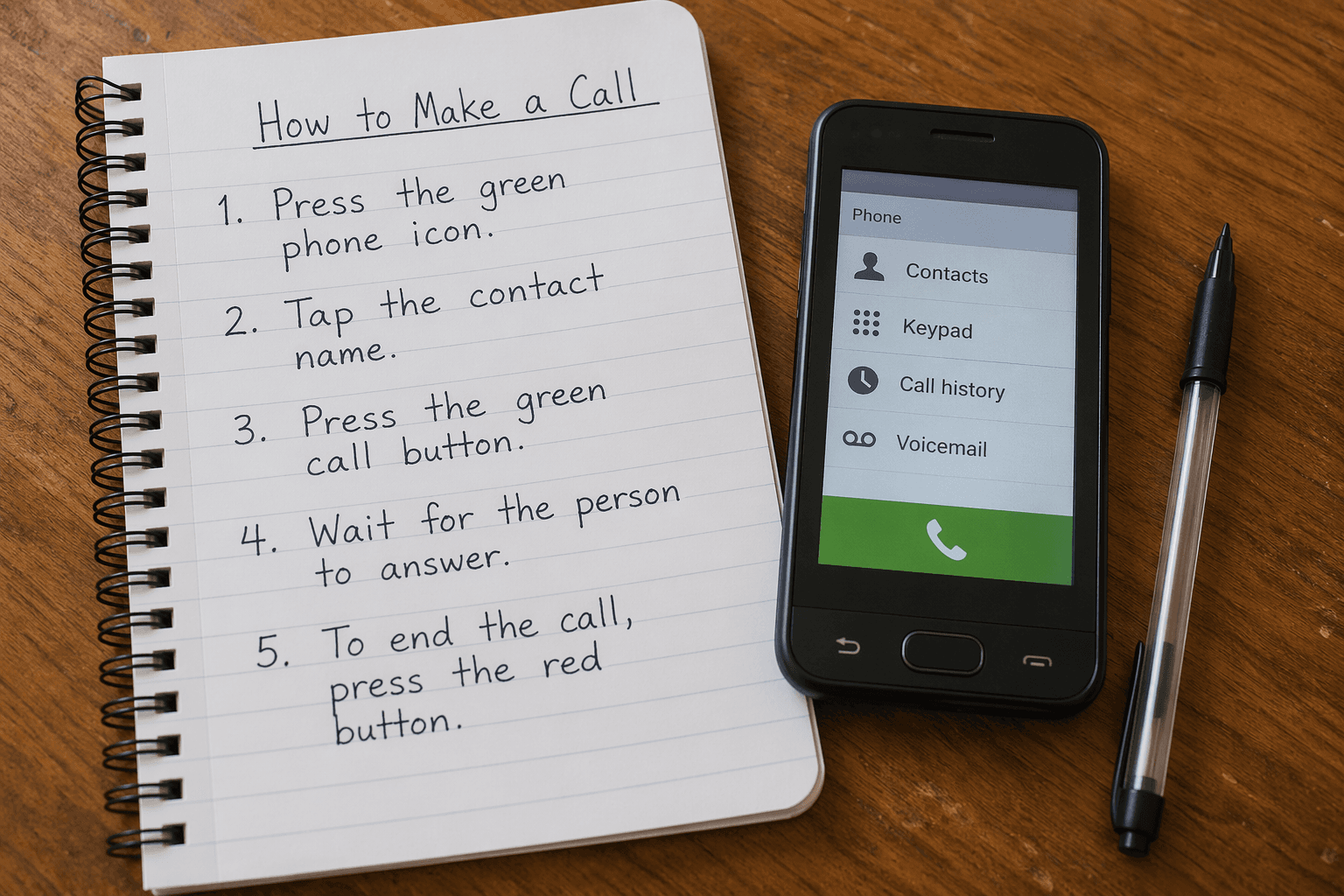
The first adjustment is usually not a new device. It is a better reference system. Ohio State recommends writing down step-by-step technology instructions, and Papa also describes using a notebook-style method when teaching older adults technology.[1][3] The notebook works best when it belongs to the older adult, not the adult child. It should sit where the task happens, use large clear writing, and describe one routine at a time.
A good page does not say “Use the app.” It says: “1. Tap the green Messages button. 2. Tap Linda. 3. Tap the white box at the bottom. 4. Type the message. 5. Tap the blue arrow.” If a step depends on a code, write where the code appears. If a mistake is common, write the recovery step: “If the screen goes dark, press the side button once.”
Then let your parent use the notebook while you watch. The point is not to make them perform from memory. The point is to see whether a stable cue restores the routine. If the written steps help, you have preserved ability. If the written steps stop helping, that is useful information for a clinician.
Simplify communication before adding more technology
Families often respond to tech trouble by adding another app, another login, another shared calendar, or another monitoring tool. Sometimes those tools are useful. But if your parent is already confusing channels, more channels can make the problem worse.
Pick the smallest reliable system. One primary phone number. One place for family messages. One written list of trusted contacts. A pre-programmed one-button landline phone can help when smartphone menus become too much, and Ohio State includes one-button phones and whiteboards among practical adaptations for people with memory loss.[1]
If you are considering sensors, alerts, or other home technology, separate two questions: what risk are you trying to reduce, and can your parent realistically use the tool? A pendant, camera, smart speaker, medication dispenser, or passive monitoring system may each solve a different problem. For a broader comparison, see this guide to types of elderly monitoring systems.
Reduce scam exposure early
Scam vulnerability deserves special attention because it turns cognitive change into immediate financial and emotional risk. Ohio State notes that early in Alzheimer’s disease, Lewy body dementia, frontotemporal dementia, or vascular dementia, people may become less suspicious and more vulnerable to fraud; later, they may lose confidence and need supervision to use technology.[1]
That does not mean one bad click proves dementia. It means reduced suspicion should be taken seriously when it appears with other changes. If a parent who used to be cautious starts responding to strange messages, sending money, opening unfamiliar attachments, or believing urgent pop-ups, tighten the environment before the next incident.
Age Safe America cites Federal Trade Commission data that seniors lose more than $3 billion annually to fraud.[4] That figure should not be used to frighten your parent into surrendering every device. It should remind families that online safety is not a side issue when memory and judgment may be changing.
Create a short written rule: “If anyone asks for money, gift cards, passwords, or account numbers, call Linda first.”
Move financial alerts to a trusted family member when appropriate and legally authorized.
Consider changing an email address if the current one is overloaded with scams or spam, an adaptation Ohio State describes for reducing exposure.[1]
Limit saved payment methods and unnecessary access to financial accounts when risk is rising.
Keep the explanation respectful: “This is to reduce junk and make the real messages easier to find,” not “You can’t be trusted.”
When to bring in a clinician
Technology trouble by itself is not a diagnosis. Progressive loss of familiar technology skills, especially alongside changes in finances, medication routines, driving, cooking, appointments, or word-finding, is a reason to ask for evaluation.
Bring your notes to the primary care physician or a memory clinic. Specific examples help more than general worry. Instead of “She can’t use her phone,” say, “She used to text her grandchildren daily. In the past two months she has repeatedly opened email instead of texts, says messages disappeared, and can no longer follow the written steps without help.”
Ohio State developed the Self-Administered Gerocognitive Exam, or SAGE, as a free online screening tool that can detect early cognitive impairment and help physicians decide whether further evaluation is needed.[1] It is a screening tool, not a home diagnosis. A normal or abnormal result still belongs in a clinical conversation, especially if daily functioning is changing.
Some parents will resist. That resistance may come from fear, pride, past experiences with doctors, or the very cognitive changes you are worried about. If the first conversation goes badly, step back from arguing about dementia and return to practical safety: “I want the phone to be easier,” “I want fewer scam messages reaching you,” or “I want the doctor to check whether anything treatable is making this harder.”
There is a real danger in treating every older adult’s technology difficulty as cognitive decline. Research on older adults and smart technology has also shown barriers such as usability, privacy concerns, cost, and confidence, but one 2022 study had a sample of 80 participants that was 81.3% White, 72.5% female, and 41.3% master’s degree educated, limiting how broadly its findings can be generalized.[5]
That limitation is worth keeping in mind at the kitchen table. Older adults do not arrive at technology with the same education, work history, income, language background, disability profile, or device exposure. A retired accountant who used spreadsheets for 30 years and a retired home health aide who never used a workplace computer may have very different baselines. Neither baseline is morally better. The clinical question is whether the person is changing from their own prior ability.
So be careful with labels. “Bad with technology” is often lazy shorthand. “Refuses to learn” may hide poor design, anxiety, vision problems, hearing problems, or a family teaching style that moves too fast. At the same time, kindness does not require denial. If a familiar routine is slipping, naming the pattern can protect the person more than pretending nothing is happening.
A practical way to respond this week
Choose one task your parent already values: texting a grandchild, answering the phone, checking email, watching a regular TV channel, or joining a telehealth visit. Watch the task without taking over. Write down where the sequence breaks. Then build one support around that exact break.
If they cannot find the right app, move it to the home screen and remove clutter around it.
If they confuse channels, reduce family communication to one main route and label it clearly.
If they lose the sequence, write the steps in a dedicated notebook and practice with their hands on the device.
If they are vulnerable to scams, reduce exposure and create a rule for checking before responding.
If the same familiar-task loss repeats, document examples and ask for medical evaluation.
For a deeper look at related warning signs, see technology troubles in older adults and cognitive decline. If concerns become diagnosis-driven, memory care planning resources may be the more appropriate next step than more gadgets.
Technology frustration is not dementia. But progressive difficulty with familiar technology tasks deserves respect, especially when it comes with device-blaming, channel confusion, update-related collapse, password loss, or reduced suspicion online. The safest response is not to shame, hover, or instantly replace every tool. It is to observe carefully, simplify deliberately, protect against immediate risks, and bring concrete examples to a clinician.
For individualized recommendations:An occupational therapist or your primary care provider can assess your specific situation and recommend the monitoring category and feature set that best fits the person's functional level, living environment, and caregiver availability. This explainer provides educational context, not a personalized recommendation.



Comments
Join the discussion with an anonymous comment.