
Caregiver decision guide
How to Build a Remote Monitoring Tech Stack for Long-Distance Caregiving
A practical guide for adult children living an hour or more from an aging parent. Learn how to combine passive activity monitoring, targeted smart devices, and a local support network into a layered tech stack that sends exception-based alerts — reducing anxiety without overwhelming you with data.
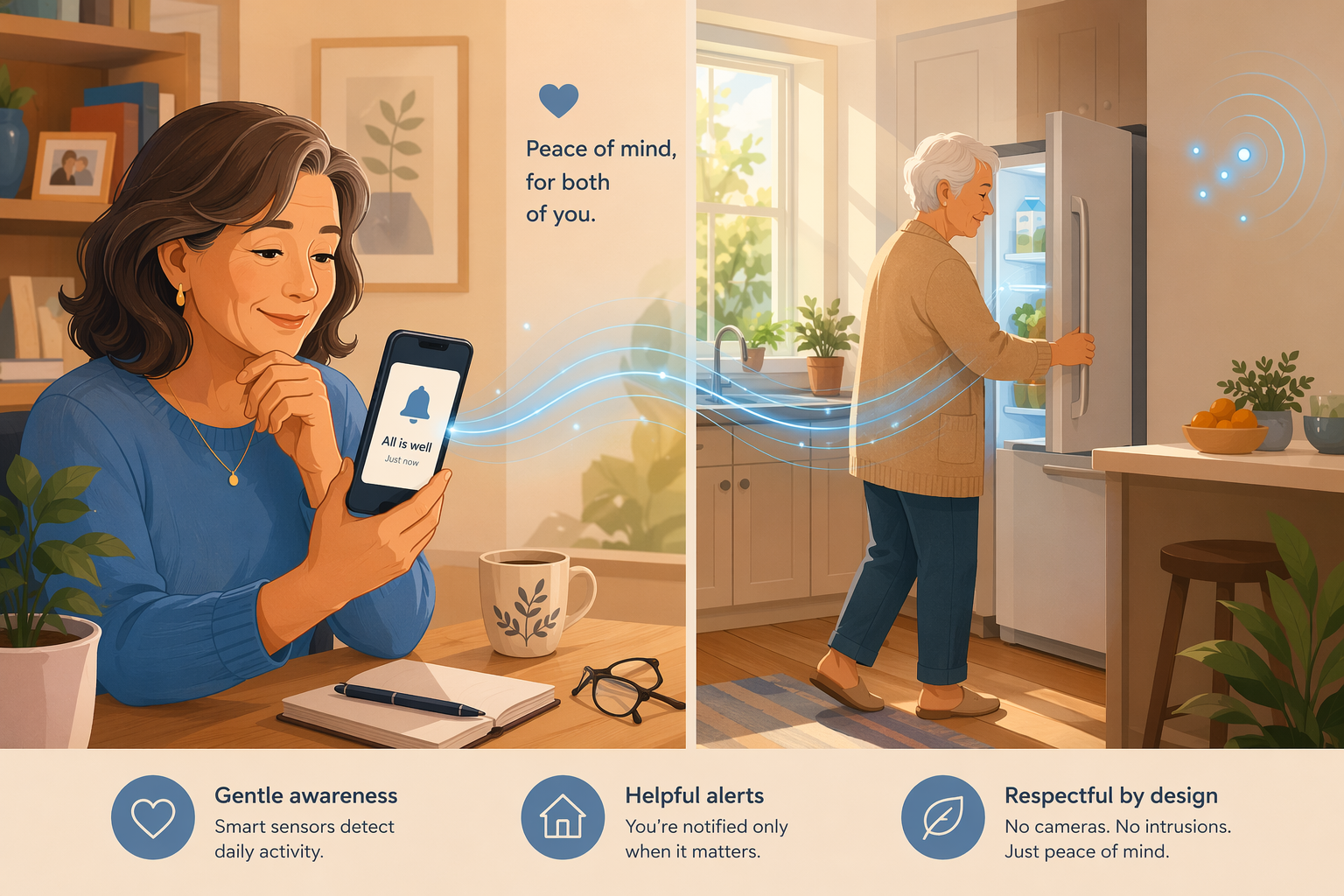
Why Traditional Monitoring Falls Short When You're Miles Away
If you live an hour or more from an aging parent, you've probably already discovered that most monitoring advice was written for someone else — the caregiver who lives down the street, stops by after work, and can check on things in person. The tools that work for them often fail for you, and not because the technology is bad. They fail because the distance changes the problem entirely.
Consider the classic medical alert pendant. It's designed for one scenario: the senior falls, presses the button, and help arrives. But what happens when your parent forgets to put it on, or can't reach it after a fall, or has early cognitive decline and doesn't recognize the device? This is what the industry calls the "button problem" — and it's the reason a significant percentage of seniors who fall and cannot get up spend hours on the floor before anyone notices, not because they lacked a device, but because they couldn't reach it, forgot they had it, or didn't press it in time. For a co-located caregiver, a missed call might prompt a quick visit. For you, it means a four-hour round trip or a frantic call to a neighbor.
Then there's the camera approach. A live video feed sounds reassuring until you find yourself checking it obsessively — ten, twenty, fifty times a day — interpreting every empty chair and dark hallway as a potential crisis. Studies show that continuous dashboards and camera feeds can increase caregiver anxiety rather than reduce it, because they deliver constant data without context. You see that your parent hasn't walked through the living room in three hours, but you don't know if they're napping, reading in the bedroom, or on the floor.
The numbers tell the story of a rapidly growing need. According to the AARP-NAC 2025 report, there are now 63 million family caregivers in the United States — a 45% increase from 2015. More than 10% of those caregivers live an hour or more away from their care recipient. And remote monitoring use by caregivers has nearly doubled, jumping from 13% in 2020 to 25% in 2025. That's millions of people trying to bridge a distance gap with technology, often without a roadmap designed for their specific situation.
The good news is that a different approach exists — one built specifically for the distance caregiver's reality. It doesn't depend on your parent remembering to press a button. It doesn't require you to watch a live feed. And it doesn't leave you guessing between silence and crisis.
The Exception-Based Alert Philosophy: Less Noise, More Signal
The core idea behind an effective long-distance monitoring stack is surprisingly simple: the system should only notify you when something meaningfully changes. Not when your parent gets up for their morning coffee. Not when they walk from the bedroom to the bathroom. Not for the hundreds of routine movements that happen every day. Only when the pattern breaks.
This is the exception-based alert philosophy, and it's the single most important concept to understand when building a remote monitoring setup. Instead of delivering a firehose of data that you have to interpret, the system learns what "normal" looks like for your parent — when they typically get up, how often they visit the kitchen, what time they go to bed — and sends an alert only when something falls outside those patterns. No morning movement by 10 a.m.? Alert. Unusual bathroom activity overnight? Alert. Everything proceeding as usual? Silence.
For a long-distance caregiver, this distinction is everything. You cannot respond to frequent false alarms from 200 miles away. Every unnecessary alert triggers a cascade of worry, phone calls, and logistical gymnastics. An exception-based system respects your limited attention by delivering only the signals that actually require a response.
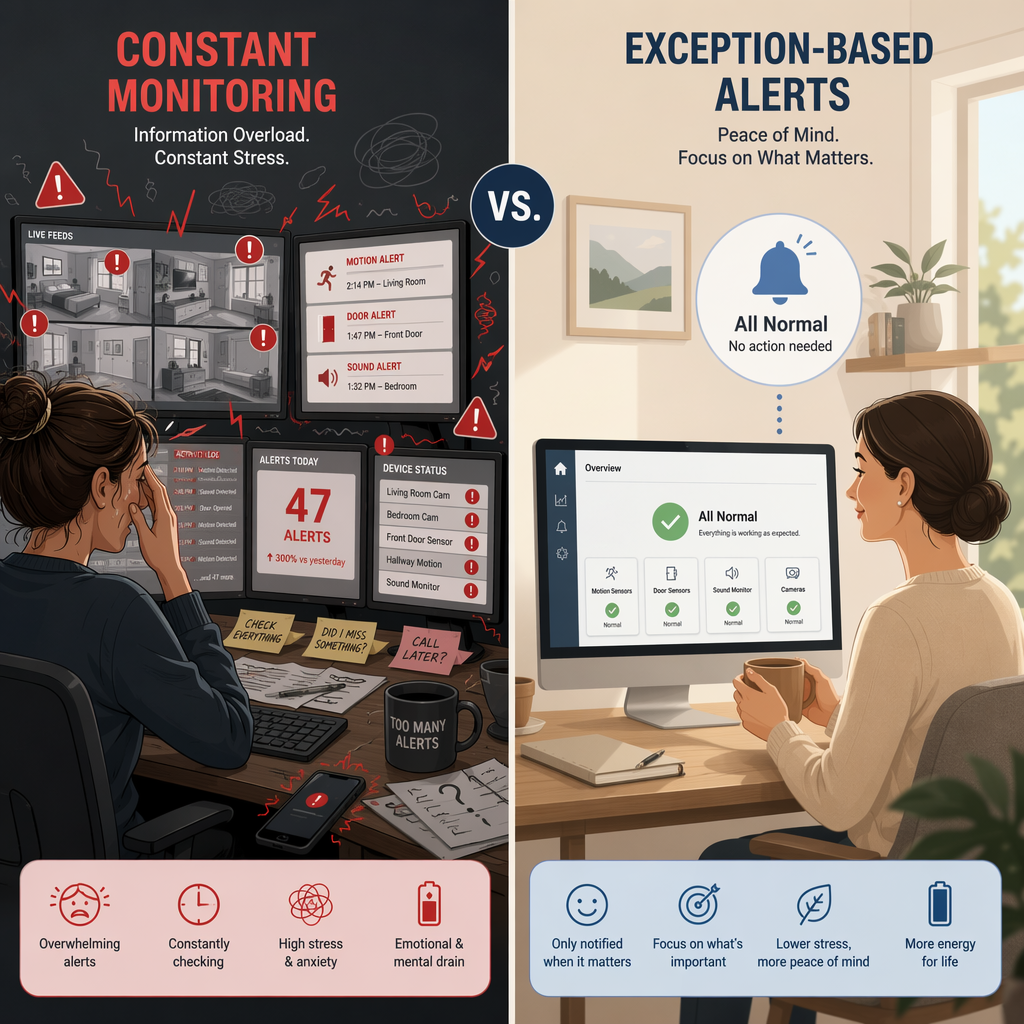
This philosophy also solves the privacy problem that makes many seniors resist monitoring. Exception-based systems don't record video or audio of daily life. They don't require cameras in the bedroom or bathroom. They use simple motion sensors that detect presence and movement — not faces, not conversations, not activities. Your parent goes about their day normally. You get a notification only when something is wrong. Everyone's dignity stays intact.
Layer 1: Passive In-Home Activity Monitoring for Daily Pattern Awareness
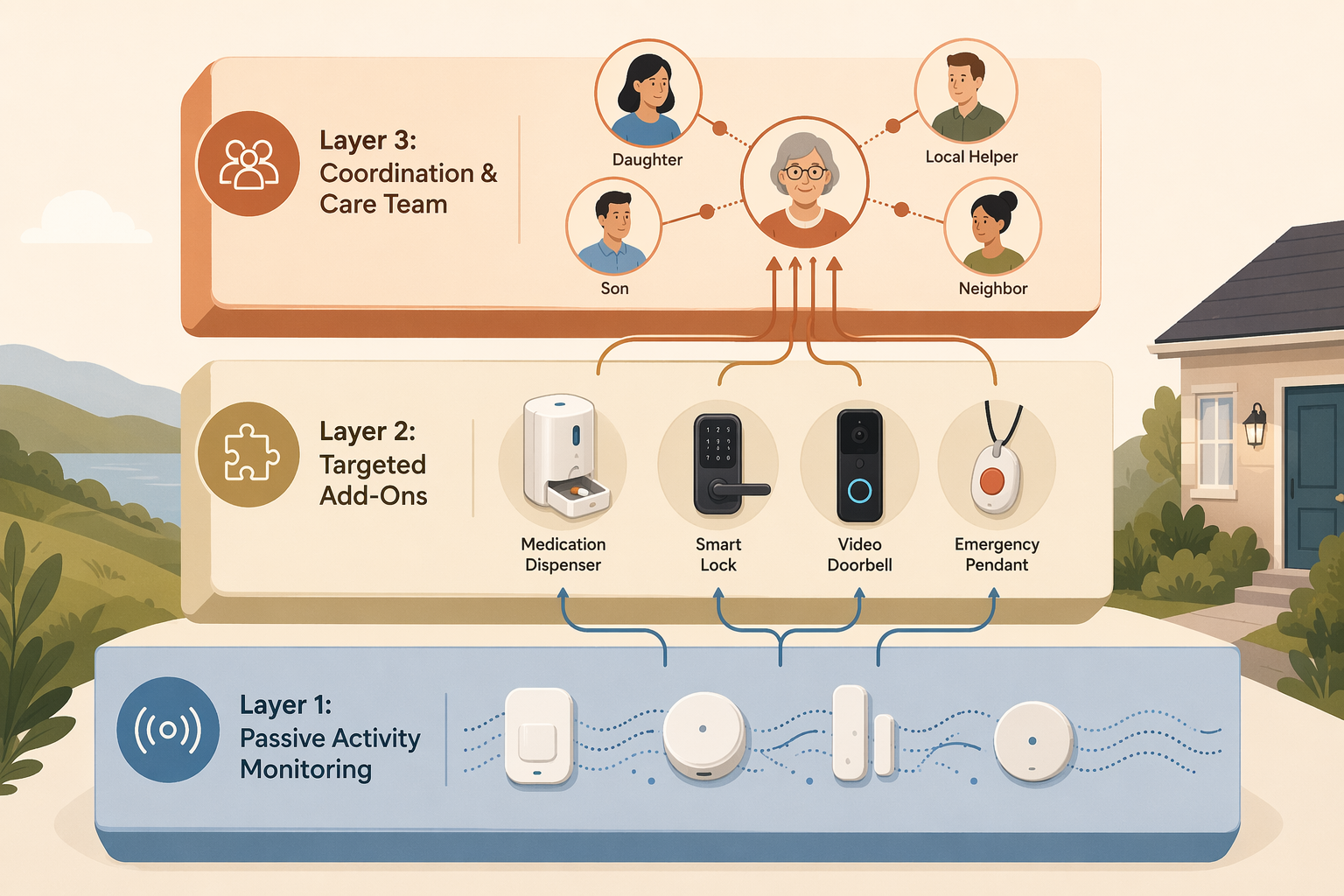
The foundation of any long-distance monitoring stack is passive in-home activity monitoring. This is the layer that fills the gap between "I haven't heard from Mom today" and "I need to call 911." It gives you pattern awareness — a sense of whether your parent's day is proceeding normally — without requiring them to wear, charge, or interact with any device.
Here's how it works: small, discreet motion sensors are placed in key areas of the home — typically the kitchen, bathroom, bedroom, and main hallway. These sensors detect movement and send data to a cloud-based system that learns your parent's routine over the first few days. Once the system has established a baseline, it begins sending exception-based alerts: no movement detected in the kitchen by 9 a.m. (possible missed breakfast or a fall), no bathroom activity for an unusually long stretch (possible issue), unusual nighttime movement (possible restlessness or confusion).
This approach is especially valuable when your parent won't wear a device — a common scenario that makes traditional medical alert systems useless. Passive monitoring doesn't require cooperation. It doesn't need to be charged. It doesn't get left in a drawer. It simply observes the environment and reports anomalies.
| Feature | Passive Activity Monitoring | Traditional Medical Alert |
|---|---|---|
| Requires senior to wear or interact with device | No | Yes |
| Learns daily routines and detects pattern changes | Yes | No |
| Sends alerts only for anomalies | Yes | No — requires button press |
| Works if senior is unconscious or confused | Yes (detects lack of movement) | No |
| Monthly cost range | $30 – $199 | $20 – $60 |
| Cameras required | No | No |
Costs for passive monitoring vary significantly by provider and feature set. Basic systems start around $30 per month, while AI-powered platforms with advanced pattern learning and family caregiver apps range from $79 to $199 per month. Some providers charge an initial equipment fee; others include sensors in the monthly subscription.
For a more detailed comparison of passive vs. wearable approaches — including why passive monitoring is often the better choice when a parent resists wearing devices — see our guide on When Your Parent Won't Wear the Device.
Layer 2: Targeted Add-Ons for Specific Risks
Passive activity monitoring gives you the baseline — the knowledge that your parent's day is proceeding normally. But it doesn't address every risk. That's where targeted add-ons come in. The key word is targeted. You don't add every device on the market. You add only the ones that address your parent's specific health profile, living situation, and personality.
Think of Layer 2 as a set of specialized tools that you deploy only where they're needed. If your parent has a chronic condition that requires daily medication, you add a smart medication dispenser. If they're prone to wandering or have mild cognitive decline, you add smart locks and a door sensor. If they're generally healthy but you worry about falls, you add an emergency pendant or watch — not as the primary system, but as a backup for the rare event when they might need to summon help.
| Add-On | What It Does | Best For | Approximate Cost |
|---|---|---|---|
| Smart medication dispenser | Dispenses pre-loaded doses on schedule; alerts caregiver if dose is missed | Parents with complex medication regimens or memory issues | $30 – $45/month (e.g., Hero Smart Pill Dispenser) |
| Smart lock | Allows remote locking/unlocking; can grant temporary access to home care aides or neighbors | Parents with mild cognitive decline; enabling local helper access | $150 – $300 (one-time hardware) |
| Video doorbell | Shows who is at the door; records visitors; can detect package deliveries | General awareness of visitors and package safety | $50 – $200 (hardware) + optional cloud storage ($3 – $10/month) |
| Emergency pendant or watch | One-button call for help; some models include automatic fall detection | Backup emergency layer for parents willing to wear a device | $20 – $60/month + possible equipment fee ($0 – $200) |
| Smart plug | Remote on/off control for lamps, appliances; can be scheduled | Preventing left-on appliances; creating the appearance of occupancy | $15 – $30 (one-time hardware) |
The critical rule for Layer 2 is: don't add what you don't need. Every additional device is another thing to maintain, another potential point of failure, and another source of alerts. A well-designed stack might include only one or two add-ons beyond the passive monitoring foundation. The goal is coverage, not completeness.
For example, a parent recovering from hip replacement surgery might benefit from a fall-detection pendant worn during the high-risk recovery period, plus a smart medication dispenser to manage pain medications and blood thinners. A parent with early-stage Alzheimer's might need smart locks to prevent wandering and a stove sensor to prevent kitchen fires — but probably doesn't need a medication dispenser if they're still managing their own pills.
Layer 3: The Coordination Layer — Bridging Tech with Local Support
This is the layer that most monitoring guides miss entirely — and the one that makes the difference between a tech stack that reduces anxiety and one that increases it. Layer 3 is the coordination layer: the system of shared tools and local relationships that turns raw monitoring data into actionable support.
Here's the problem that Layer 3 solves. You get an alert: your parent hasn't moved from the bedroom since yesterday evening. You're 200 miles away. What do you do? You could call your parent — but if they've fallen, they might not be able to answer. You could call 911 — but that might send emergency services for a false alarm. You could get in the car — but that's a four-hour drive. Without a local support network, every alert becomes a crisis management exercise.
The coordination layer solves this by connecting you with people who are physically close enough to respond. This includes:
- Shared care coordination apps (e.g., Carely, Caring Village, Lotsa Helping Hands) that let you assign tasks, share updates, and communicate with a care team — including family members, neighbors, and professional caregivers
- A local support network you've built in advance: a neighbor who has a spare key, a friend from the senior center who checks in, a home care aide who visits twice a week
- A clear escalation protocol: if you get an alert and can't reach your parent by phone, the first call goes to the neighbor or home care aide, not 911
The National Institute on Aging recommends that long-distance caregivers create a shared online calendar, attend telehealth visits remotely, and identify a local point person who can respond to urgent situations. This isn't optional — it's the infrastructure that makes remote monitoring viable.
For a deeper exploration of how monitoring choices affect caregiver stress — including a framework for matching technology to your specific worry patterns — see our guide on Elderly Monitoring Systems That Actually Reduce Caregiver Burnout.
How to Choose the Right Mix for Your Parent's Situation
Not every parent needs every layer. The right tech stack depends on their current health status, their living situation, and — just as importantly — their personality. A parent who values independence and resists being "watched" will need a different setup than one who welcomes the safety net.
Here are three common scenarios and the recommended approach for each:
| Scenario | Priority Layers | Key Add-Ons | Approximate Monthly Cost |
|---|---|---|---|
| Post-hospital recovery (e.g., hip replacement, stroke recovery) | Layer 1 (passive monitoring) + Layer 2 (fall detection, medication) + Layer 3 (coordination) | Fall-detection pendant, smart medication dispenser, temporary home care aide coordination | $80 – $150/month |
| Early cognitive decline (living alone, mild memory issues) | Layer 1 (passive monitoring) + Layer 2 (safety devices) + Layer 3 (coordination) | Smart locks, stove sensor, door sensors, shared care app with local family/neighbors | $60 – $120/month |
| Generally healthy but far away (no major health issues, lives independently) | Layer 1 (passive monitoring) + Layer 3 (coordination) | Minimal add-ons; focus on pattern awareness and a simple check-in app | $30 – $80/month |
For a more detailed decision framework that accounts for specific health conditions, risk levels, and living arrangements, see our comprehensive guide on Choosing the Right Monitoring Technology for an Aging Parent.
The Remote Caregiver Burnout Trap — and How the Right Stack Reduces Anxiety
There's a cruel irony in remote monitoring: a poorly designed setup can make caregiver anxiety worse, not better. The average family caregiver already spends $7,200 per year out of pocket on caregiving expenses, according to the Caregiver Action Network. Add a monitoring system that floods you with alerts, and you're paying more for the privilege of being worried all the time.
The burnout trap works like this. You install a camera or a basic motion sensor that sends a notification every time it detects movement. At first, this feels reassuring. But within days, you're checking your phone constantly. Every notification triggers a spike of adrenaline. You start interpreting normal events — a trip to the bathroom at 3 a.m., a longer-than-usual stay in the kitchen — as potential emergencies. You're not less anxious. You're more anxious, with data to fuel it.
The three-layer stack with exception-based alerts is designed specifically to avoid this trap. Here's how:
- Layer 1 filters out routine events so you only hear about meaningful changes. No more interpreting every movement as a potential crisis.
- Layer 2 addresses specific risks with targeted tools, so you're not relying on a single system to cover every scenario.
- Layer 3 gives you a response plan. When an alert does come, you know exactly who to call and what to do — no panic, no paralysis.
The result is a system that respects your attention and your emotional bandwidth. You're not monitoring your parent's every move. You're receiving only the signals that matter, and you have a team in place to act on them. That's the difference between a tech stack that adds to your burden and one that lightens it.
Sample Setups for Three Common Scenarios
To make this concrete, here are three complete sample setups. Each includes the recommended layers, the specific devices or services, and how the exception-based alerts would work in practice.
Scenario 1: Post-Hospital Recovery (Hip Replacement)
Your 78-year-old mother is returning home after hip replacement surgery. She'll be on blood thinners and pain medication for several weeks. Her mobility is limited, and the fall risk is high.
- Layer 1: Passive activity monitoring with sensors in the bedroom, bathroom, kitchen, and living room. The system learns her recovery routine — frequent bathroom trips, limited kitchen activity, extended rest periods.
- Layer 2: Fall-detection pendant worn during waking hours (she's willing to wear it short-term). Smart medication dispenser pre-loaded with pain meds and blood thinners, set to alert you if a dose is missed.
- Layer 3: A home care aide visits twice daily for the first two weeks. You've shared access to the monitoring app with the aide and a neighbor who has a spare key. The escalation protocol: alert → call mother → if no answer, call aide → if aide can't reach her, call neighbor with key.
- Exception alerts you'd receive: No movement detected by 10 a.m. (possible fall or complication). Missed medication dose. Fall detected by pendant (automatic, no button press needed).
Scenario 2: Early Cognitive Decline (Living Alone)
Your 82-year-old father has mild cognitive impairment. He's still living independently, but you've noticed he sometimes forgets to eat, leaves the stove on, and has become disoriented at night.
- Layer 1: Passive activity monitoring with sensors in the kitchen, bedroom, bathroom, and front door. Pattern learning is critical here — the system needs to establish his baseline before it can detect meaningful changes.
- Layer 2: Smart lock on the front door (you can lock/unlock remotely; set to auto-lock at 9 p.m.). Stove sensor that automatically shuts off the burners if left unattended. Video doorbell for visitor awareness.
- Layer 3: A shared care app with your sibling (who lives 30 minutes away) and a neighbor who checks in every evening. The escalation protocol: alert → call father → if confused or unable to answer, call sibling → if sibling can't respond, call neighbor.
- Exception alerts you'd receive: No kitchen activity by noon (possible missed meal). Front door opened between 11 p.m. and 6 a.m. (possible wandering). Unusual bathroom frequency overnight (possible UTI or confusion).
Scenario 3: Generally Healthy but Far Away
Your 75-year-old mother is healthy, active, and lives independently — but she's 500 miles away. You don't have specific health concerns, but you worry about the long silences between phone calls.
- Layer 1: Passive activity monitoring with sensors in the kitchen and bedroom only. Minimal setup — you just want to know she's moving through her day normally.
- Layer 2: None initially. You might add a video doorbell later if she starts getting packages or if you're concerned about visitor safety.
- Layer 3: A simple check-in app (e.g., Snug Safety) where she confirms she's okay each morning. If she doesn't check in by 10 a.m., you get an alert and call her. You've also identified a neighbor through her church community who has agreed to be an emergency contact.
- Exception alerts you'd receive: No morning movement detected by 10 a.m. (possible issue). No check-in confirmation by 10 a.m. (backup alert from the check-in app).
In all three scenarios, the total monthly cost is a fraction of what you'd pay for assisted living, which ranges from $4,000 to $8,000 per month. Even the most comprehensive setup — passive monitoring plus multiple add-ons — typically costs between $100 and $200 per month. If the right tech stack helps your parent stay home safely for even one additional month per year, it pays for itself many times over.
Questions to bring to a clinician or OT
This is not medical, legal, or a family's final decision — only a framework. Bring these questions to a clinician, occupational therapist, or your local Area Agency on Aging.
Find Local HelpRelated reading
- Elder Care Assistance from a Distance: A Long-Distance Caregiver's Guide to Assessing, Arranging, and Monitoring Care Remotely
- Should You Move Your Aging Parents Closer to You? A Decision Guide for Caregivers
- The Working Caregiver's Survival System: A 5-Step Framework for Balancing Job and Eldercare Without Burning Out
Noticed something outdated or inaccurate on this page? Flag a correction. We review every report against CDC, NIA, and AARP HomeFit guidance before updating a page.