
The Post-Fall Coordination Playbook: How to Manage Home Care, OT, Contractors, and Monitoring Tech as a Family Caregiver
After a parent's fall, families must coordinate across home care, occupational therapy, home modification contractors, and monitoring technology — each with its own timeline and language. This guide provides a structured workflow, communication templates, and a domain-and-owner framework to prevent critical handoff failures and keep your parent safe at home.
Why Service Coordination Fails After a Fall
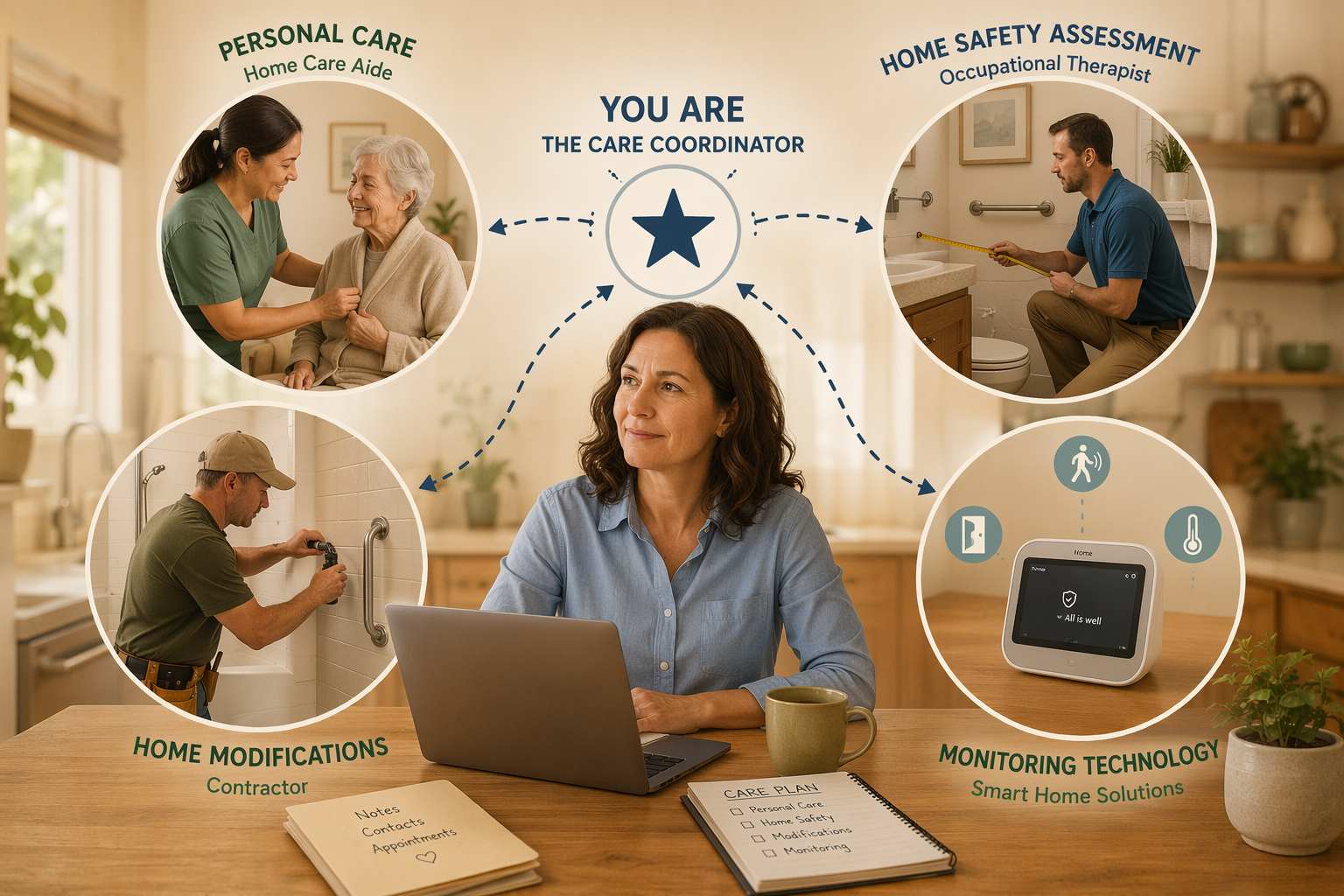
A parent's fall does not create a single problem. It creates a cascade of them — and each one lands in a different service category. The home care agency that handles bathing and dressing. The occupational therapist who evaluates bathroom safety. The contractor who installs grab bars. The monitoring technology company that ships a medical alert system. These four providers operate on different timelines, use different terminology, bill through different channels, and almost never talk to one another.
The result is a coordination gap that falls squarely on the family. Research indicates that approximately 35% of adults over 65 have no one assisting them with care coordination, and 42% perceive poor coordination or conflicting advice from their providers. When you are the de facto coordinator — often while holding down a full-time job and managing your own household — the risk of a critical handoff failure is high.
The four-service gap is not a theoretical problem. Consider a typical sequence: the hospital discharge planner refers your parent to home health and recommends an OT evaluation. The OT identifies that the bathroom needs grab bars and a shower chair. The home care aide arrives and does not know which side the OT said to install the grab bar on. The monitoring system you ordered arrives before the bathroom modifications are complete, so the base station sits in a box. Meanwhile, a medication change from the hospital has not been communicated to the home care agency. Each of these failures is preventable — but only if you have a system for managing the handoffs.
The Post-Fall Coordination Workflow: Assess → Assign → Document → Communicate → Monitor
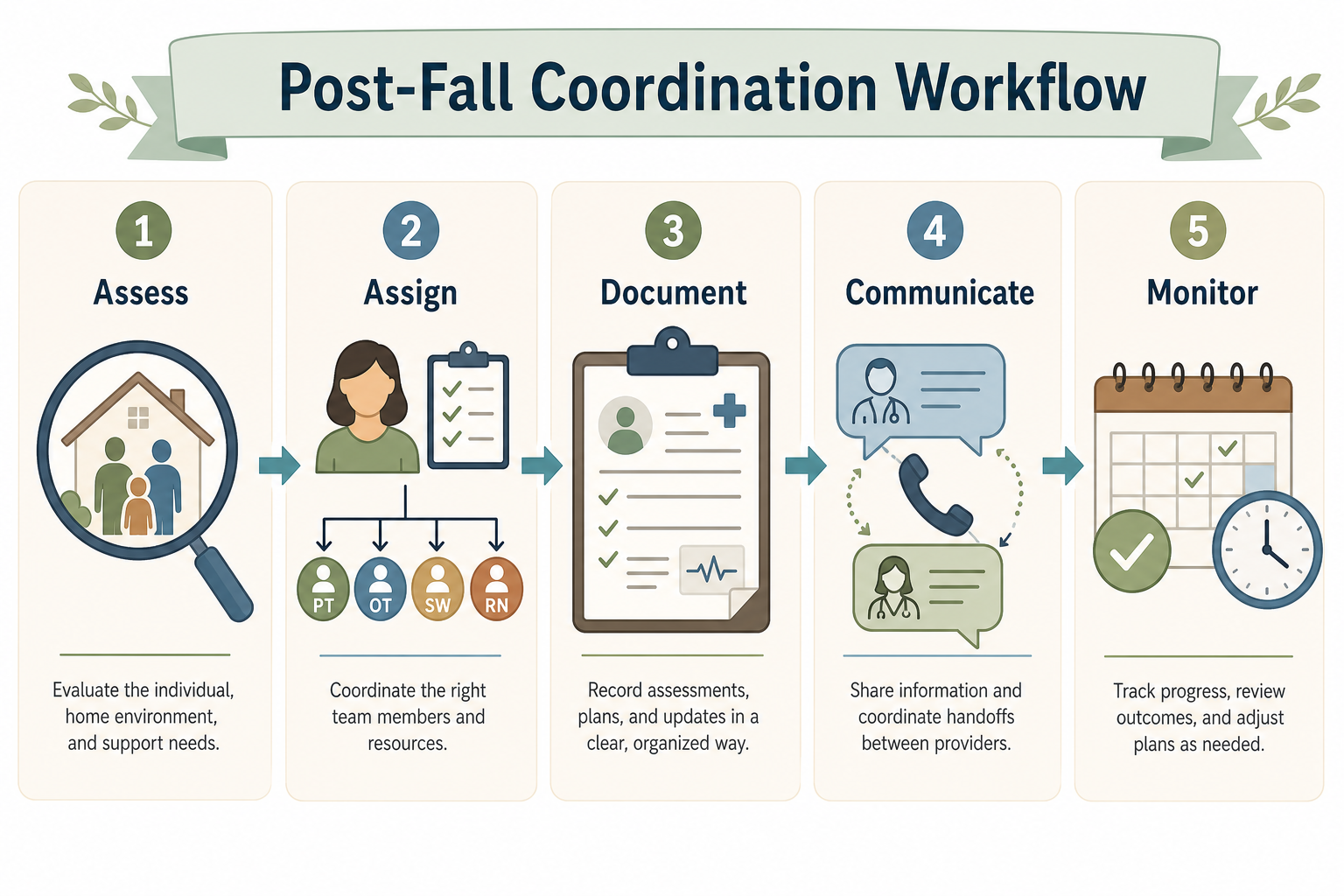
The workflow below is designed to be used in order, but you will return to earlier steps as new providers enter the picture or as your parent's needs change. Each step produces a concrete output — a completed assessment, an assigned owner, a document — that feeds into the next step. The goal is not perfection; it is preventing the most dangerous gaps.
Step 1: Assess — Map the Four Service Domains
Before you can assign tasks or communicate with providers, you need a clear picture of what services are needed and where the gaps are. Start by assessing needs across four domains. Not every family will need all four, but most post-fall situations touch at least three.
| Service Domain | What It Covers | Typical Provider | Key Questions to Ask |
|---|---|---|---|
| Personal Care | Bathing, dressing, toileting, meal preparation, medication reminders, mobility assistance | Home care agency, home health aide, personal care aide | What ADLs and IADLs does my parent need help with? How many hours per day? Is a home health aide or a personal care aide more appropriate? |
| Home Safety Assessment | Fall risk evaluation, balance and strength assessment, adaptive equipment recommendations, transfer technique training | Occupational therapist (OT), physical therapist (PT) | Has an OT evaluated the home environment? Are there specific room hazards? What equipment (grab bars, raised toilet seat, shower chair) is recommended? |
| Structural Modifications | Grab bar installation, ramp construction, stair lift, doorway widening, bathroom remodel, lighting upgrades | CAPS-certified contractor, general contractor, handyman | Which modifications are urgent (e.g., bathroom grab bars) vs. longer-term (e.g., stair lift)? What is the budget? Are there funding sources (VA grants, Medicaid waivers)? |
| Monitoring Technology | Medical alert / PERS, fall detection, passive home sensors, GPS trackers, medication dispensers | Medical alert system provider, smart home vendor, telehealth platform | Does my parent need wearable help button or passive monitoring? What is the monthly cost? Is there Medicare or Medicaid coverage? |
For each domain, write down the current status: service in place, service scheduled, service needed but not yet arranged, or not applicable. This one-page assessment becomes the foundation for everything that follows. It also reveals where the biggest coordination risks are — for example, if the OT assessment is scheduled but no contractor has been identified to act on the recommendations.
Step 2: Assign — Create a Domain-and-Owner Framework
Once you know what services are needed, the next step is to assign a primary owner and a backup owner for each domain. This is the single most effective tool for preventing dropped tasks. When everyone assumes someone else is handling the contractor coordination, the grab bars do not get installed.
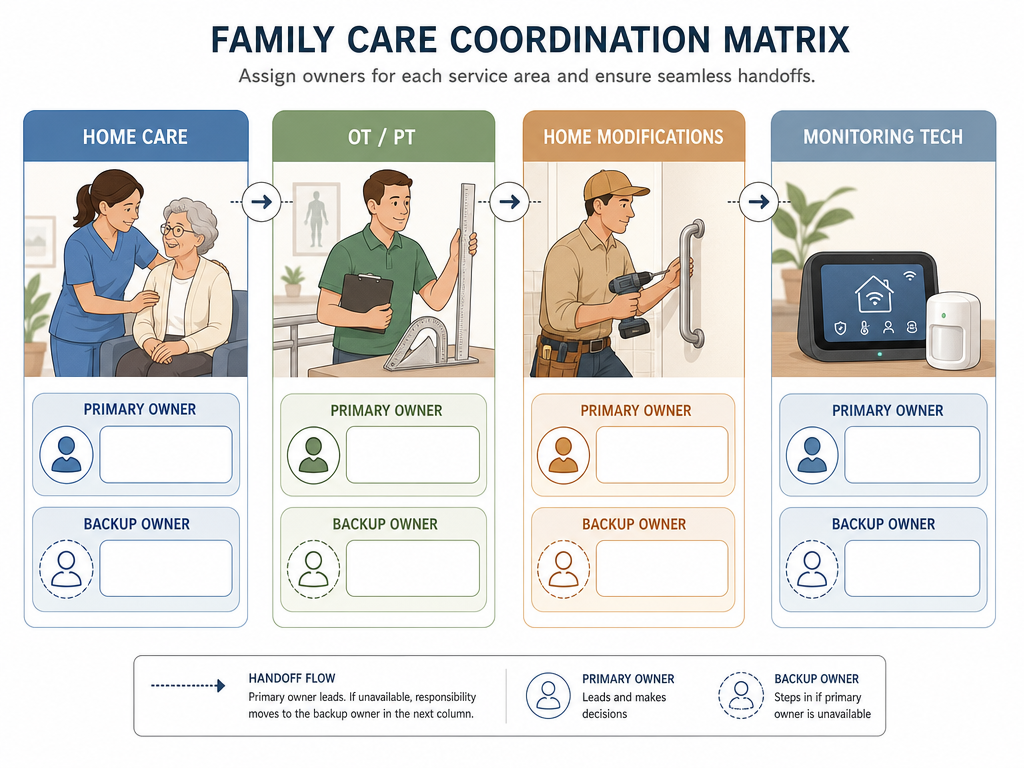
Use the following template to build your framework. Copy it into a shared document or spreadsheet that all family members and involved providers can access.
| Domain | Primary Owner | Backup Owner | Key Tasks | Next Deadline |
|---|---|---|---|---|
| Personal Care | Sibling A (lives nearby) | Sibling B (long-distance) | Interview home care agencies, set up daily schedule, train on OT recommendations | Agency interview by [date] |
| Home Safety (OT/PT) | You (primary caregiver) | Sibling A | Schedule OT evaluation, share report with contractor, follow up on equipment orders | OT eval on [date] |
| Structural Modifications | Sibling B (has contractor experience) | You | Get OT report to contractor, obtain quotes, schedule installation, verify completion | Contractor quote by [date] |
| Monitoring Technology | You | Sibling B | Research device categories, verify Medicare/Medicaid coverage, order and set up device | Device ordered by [date] |
When choosing owners, consider proximity, availability, and specific skills. A sibling who works in construction is a natural fit for the contractor domain. A sibling who lives nearby can handle the hands-on home care coordination. The backup owner's job is to step in if the primary owner is unavailable — not to share the work equally. This prevents the common pattern where tasks fall through the cracks because everyone assumed someone else was handling them.
Step 3: Document — Build a Single Source of Truth
The most common coordination failure is information asymmetry: the home care aide does not know about the medication change because it was communicated to the family but not to the agency. The contractor does not know which grab bar model the OT specified because the OT report was emailed to you but never forwarded. A single source of truth — a shared document that every provider can access — eliminates this problem.
Your single source of truth should include the following documents, all kept in one place (a shared cloud folder, a physical binder at your parent's home, or both):
- One-page care plan summary: A single page that lists diagnoses, allergies, medications, emergency contacts, primary care physician, and a brief summary of the post-fall care goals. Every provider should receive this on day one.
- Provider contact map: A table with every provider's name, role, organization, phone number, email, and preferred contact method. Include the OT, the home care agency supervisor, the contractor, the monitoring tech support line, and all relevant family members.
- Medication list: A current, reconciled list of all medications — including over-the-counter drugs and supplements — with dosages, frequencies, and the prescribing provider. Update this immediately after any hospital discharge or doctor visit. Medication errors are a leading cause of hospital readmission among older adults.
- Daily log template: A simple form that the home care aide or family member fills out each shift. Include fields for: date, time, blood pressure (if monitored), meals eaten, pain level, any falls or near-falls, mood, and notes. This log becomes the primary communication tool between shifts and between the home care aide and the family.
- OT/PT recommendations summary: A bullet-point list of every recommendation from the OT or PT evaluation, organized by room. This is the document you will hand to the contractor. Without it, the contractor is guessing.
Step 4: Communicate — Templates for Provider Handoffs and Family Meetings
Good documentation is useless if it is not shared. The communication step is where you actively push information to the people who need it, rather than waiting for them to ask. Below are three templates designed for the most common coordination conversations.
Provider-to-Provider Handoff Form
Use this form whenever one provider needs to share information with another — for example, when the OT needs to tell the contractor exactly where to install grab bars. Do not rely on verbal handoffs.
| Field | Content |
|---|---|
| From provider | Jane Doe, OT, ABC Home Health |
| To provider | Bob Smith, Contractor, XYZ Remodeling |
| Patient | Mary Johnson |
| Date | 2026-06-22 |
| Summary of recommendation | Install two 18-inch grab bars in the master bathroom shower: one on the back wall at 33-36 inches above the floor, one on the side wall at the same height. Install a raised toilet seat with arms (height: 17-19 inches). Remove the existing bath mat and replace with a non-slip shower mat. |
| Supporting documents attached | OT evaluation report (pages 3-4), bathroom diagram with measurements |
| Follow-up needed by | 2026-07-01 — please confirm installation date and share photos of completed work |
| Family contact for questions | You (555-123-4567, [email protected]) |
Send this form by email with the supporting documents attached. CC yourself and any other family members who need visibility. The key is to make the handoff explicit and time-bound — not a vague "I'll let the contractor know."
Family Meeting Agenda (1-Hour Timed)
Weekly family meetings prevent the "I thought you were handling that" dynamic. Keep them short and structured. A recommended agenda includes:
- Check-in on each domain (5 minutes per domain): What happened this week? What is the next deadline? Any issues? The domain owner reports; the backup owner confirms they are aware.
- New developments (10 minutes): Any changes in your parent's condition, new provider recommendations, or unexpected costs.
- Decisions needed (10 minutes): What decisions are pending? Who is responsible for making them? By when?
- Open floor (5 minutes): Any concerns that do not fit into the above categories.
- Assign action items and confirm next meeting time (5 minutes).
Assign one person to take notes and share them within 24 hours. The notes become part of the single source of truth.
Daily Log for Home Care Aides
The daily log is the most important communication tool between shifts and between the home care aide and the family. It should be a physical notebook or a shared digital document that stays at your parent's home. Each shift, the aide fills out:
| Field | Example Entry |
|---|---|
| Date and shift time | 2026-06-22, 9:00 AM - 1:00 PM |
| Medications administered | Lisinopril 10 mg at 9:00 AM, Metformin 500 mg at 9:30 AM |
| Meals and fluids | Ate half of breakfast, drank 8 oz water |
| Pain level (0-10) | 3/10 in right hip |
| Any falls or near-falls | None |
| Mood and behavior | Alert, cooperative, slightly anxious about the contractor visit tomorrow |
| Notes for family | The OT called to confirm the grab bar measurements. I wrote them on the sticky note on the fridge. |
Step 5: Monitor — Weekly Check-Ins and Early Warning Signs
The coordination workflow is not a one-time setup. It requires ongoing attention, especially in the first month after a fall when multiple providers are entering and exiting the picture. A weekly 15-minute check-in — either as a family call or a brief review of the shared documents — is usually sufficient to maintain momentum.
During each check-in, ask three questions:
- What happened this week? Review the daily log, any provider communications, and progress on the domain tasks.
- What is next? Confirm the deadlines for the coming week. Is the contractor scheduled? Has the monitoring device arrived?
- Are there any issues? Look for early warning signs that coordination is breaking down.
Early warning signs that coordination is failing include:
- Missed appointments or rescheduled visits without explanation.
- Conflicting advice from different providers (e.g., the OT recommends one type of walker, the PT recommends another).
- Equipment that was ordered but not installed, or installed incorrectly.
- The home care aide does not know about a recent medication change.
- Your parent reports that "no one told them" about a scheduled service.
- A provider asks for information that should already be in the shared documents.
If you spot any of these signs, do not wait for the weekly check-in. Address them immediately by referring to the domain-and-owner framework and using the handoff form to re-establish clear communication.
Common Failure Points and How to Fix Them
Even with a solid workflow, certain failure points recur across almost every post-fall coordination effort. Below are the most common ones, along with specific actions you can take to prevent or fix them.
| Failure Point | Why It Happens | How to Fix It |
|---|---|---|
| The contractor does not get the OT report | The OT sends the report to you, and you assume the contractor will ask for it. The contractor starts work based on a verbal description. | Use the provider-to-provider handoff form. Send the OT report directly to the contractor with a clear subject line: "OT Recommendations for [Parent's Name] — Action Required." CC yourself. |
| Monitoring tech arrives before the home is prepped | You order a medical alert system or passive sensors immediately after the fall, but the bathroom modifications are not complete. The device sits unused. | Coordinate the delivery date with the contractor's installation schedule. If the device arrives early, have a family member install it temporarily or return it and re-order once the modifications are done. Consider passive monitoring as an alternative to wearable devices that require a prepared home environment. |
| Home care shifts change without a proper handoff | The home care agency sends a different aide without notifying the family. The new aide does not know the daily routine or the OT recommendations. | Require the agency to notify you at least 24 hours before any shift change. Keep the daily log and the one-page care plan summary in a visible location at your parent's home. Train each new aide on the log during their first shift. |
| Medication changes are not communicated | A doctor changes a medication during a follow-up visit. The change is noted in the discharge summary but never reaches the home care aide or the family medication list. | Designate one family member as the medication manager. That person attends every medical appointment and updates the medication list within 24 hours of any change. Share the updated list with the home care agency and the pharmacy immediately. |
| The OT and PT give conflicting recommendations | The OT recommends a rollator for indoor use; the PT recommends a standard walker for balance. The family does not know which to follow. | Schedule a joint call or visit with both therapists. Ask them to agree on a single recommendation and document it in the care plan. If they cannot agree, ask the primary care physician to make the final call. |
When to Escalate: Professional Care Managers and PACE Programs
The coordination workflow in this article is designed for families who are managing the process themselves. But there is a limit to what even the most organized family can handle. If you find yourself spending more than 5-10 hours per week on coordination, if the complexity of your parent's medical needs is growing, or if family disagreements are blocking decisions, it may be time to bring in a professional.
Geriatric Care Managers
A geriatric care manager (also called an aging life care professional) is a licensed professional — often a social worker, nurse, or gerontologist — who specializes in assessing needs, coordinating services, and monitoring care for older adults. They can take over the domain-and-owner framework, manage provider handoffs, and serve as the single point of contact for all providers. This is particularly valuable for long-distance caregivers who cannot be on-site for contractor visits or OT evaluations.
To find a geriatric care manager, start with the Aging Life Care Association's directory. Interview at least two candidates, asking about their experience with post-fall coordination, their familiarity with local contractors and home care agencies, and their fee structure (most charge by the hour, typically $100-$200 per hour).
PACE Programs
The Program of All-Inclusive Care for the Elderly (PACE) is a Medicare and Medicaid program that provides comprehensive medical and social services — including primary care, OT, PT, home care, transportation, meals, and adult day health centers — through a single interdisciplinary team. PACE is designed for adults 55 and older who meet their state's nursing home level of care but can live safely in the community with coordinated support.
PACE data from program evaluations shows promising outcomes: participants have an 8% emergency room visit rate compared to 15% in Medicare Advantage programs, and 90% of participants report being satisfied with their care. Depression rates among new participants dropped from 27% to 5% after nine months in the program. PACE participants also lived an average of two years longer than a similar group that moved into a nursing home.
Despite these outcomes, only about 1 in 8 eligible seniors are enrolled in PACE. The program is not available in all areas, and eligibility requirements vary by state. To find out if PACE is available in your parent's area, use the NPA's "Find a PACE Program" tool. If PACE is not an option, look for a local Program of All-Inclusive Care (a similar model) or a Medicaid Home and Community-Based Services (HCBS) waiver that may cover care coordination.
Whether you manage coordination yourself or bring in a professional, the core principle remains the same: the handoffs between providers are where the most dangerous gaps occur. A structured workflow — assess, assign, document, communicate, monitor — turns those handoffs from points of failure into points of strength.
For a broader framework on building a sustainable family caregiving plan that extends beyond the post-fall period, see our guide on building a sustainable family caregiving plan. It covers the Assess-Plan-Act-Adapt cycle that complements the provider coordination mechanics in this playbook.
Related reading
Noticed something outdated or inaccurate on this page? Flag a correction. We review every report against CDC, NIA, and AARP HomeFit guidance before updating a page.
Part of the Fall Prevention section.