
Caregiver decision guide
Elderly Monitoring Systems: The 3 Main Types for Aging at Home
This guide explains the three distinct categories of elderly monitoring systems—medical alert/PERS, activity/wellness monitoring, and clinical remote patient monitoring—and why choosing the wrong type can lead to wasted money and a false sense of security. Learn which category addresses your parent's primary risk.
The hard part about shopping for elderly monitoring systems is that the word monitoring gets stretched across products that are built for completely different problems. After a fall, a hospital discharge, or the first time a parent seems confused getting home from a familiar place, everything sounds protective. A pendant, a wall sensor, a blood pressure cuff, an app dashboard, a camera, a smart speaker: all of it is sold near the same anxious moment.
That anxious moment is common. Nearly 75% of medical alert buyers surveyed by NCOA bought after a fall or medical emergency, which explains why so many families start with the most visible emergency product rather than the product that best matches the risk they are actually trying to reduce.[1]
The first sorting question is not “Which device has the most features?” It is “What are we most afraid no one will notice in time?” If the answer is a fall or sudden emergency, that points toward a medical alert system. If the answer is a slow change in routine, wandering risk, skipped meals, or not getting out of bed, that points toward activity and wellness monitoring. If the answer is a chronic condition that needs blood pressure, weight, oxygen, glucose, or other vital-sign trends reviewed by a care team, that points toward clinical remote patient monitoring.
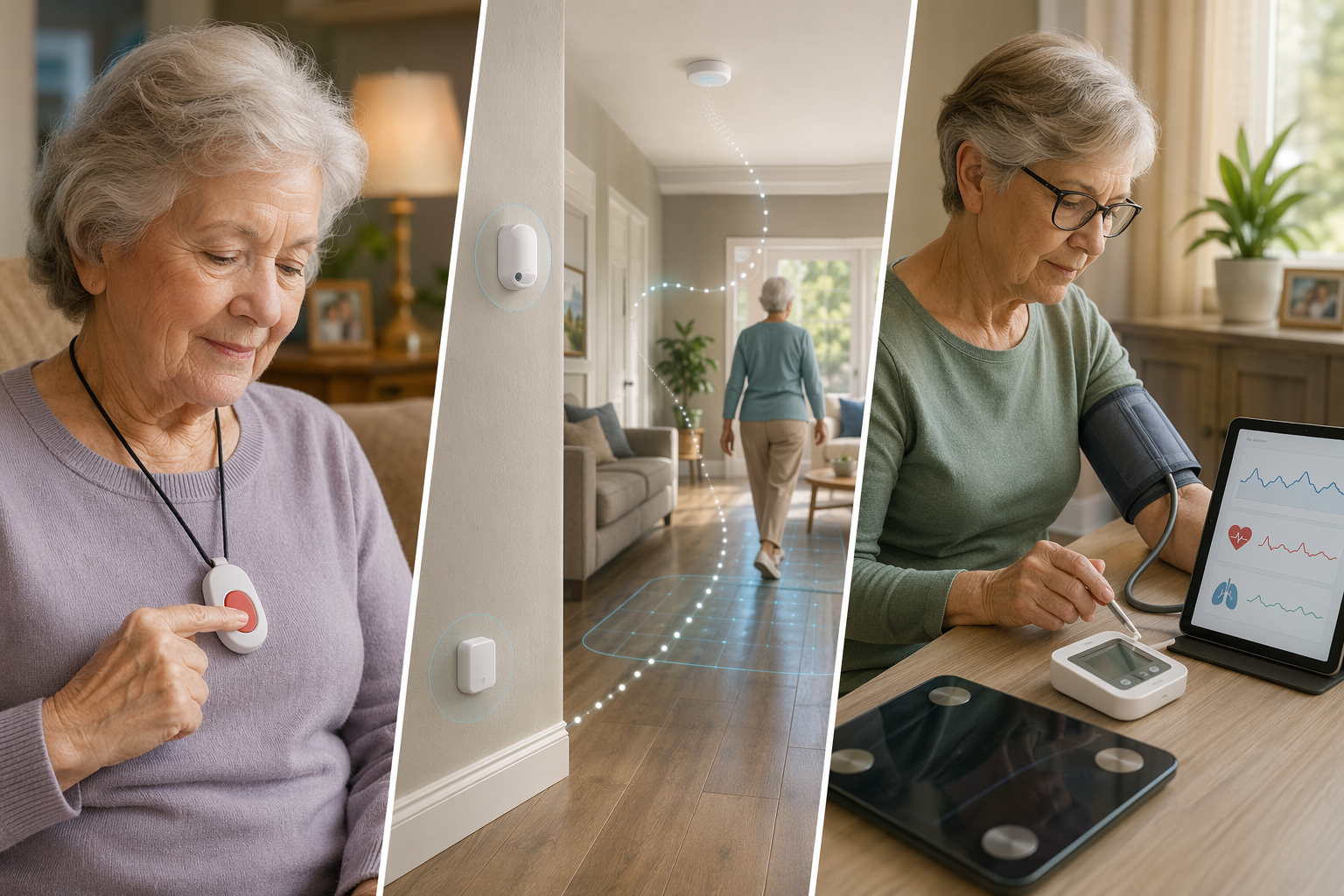
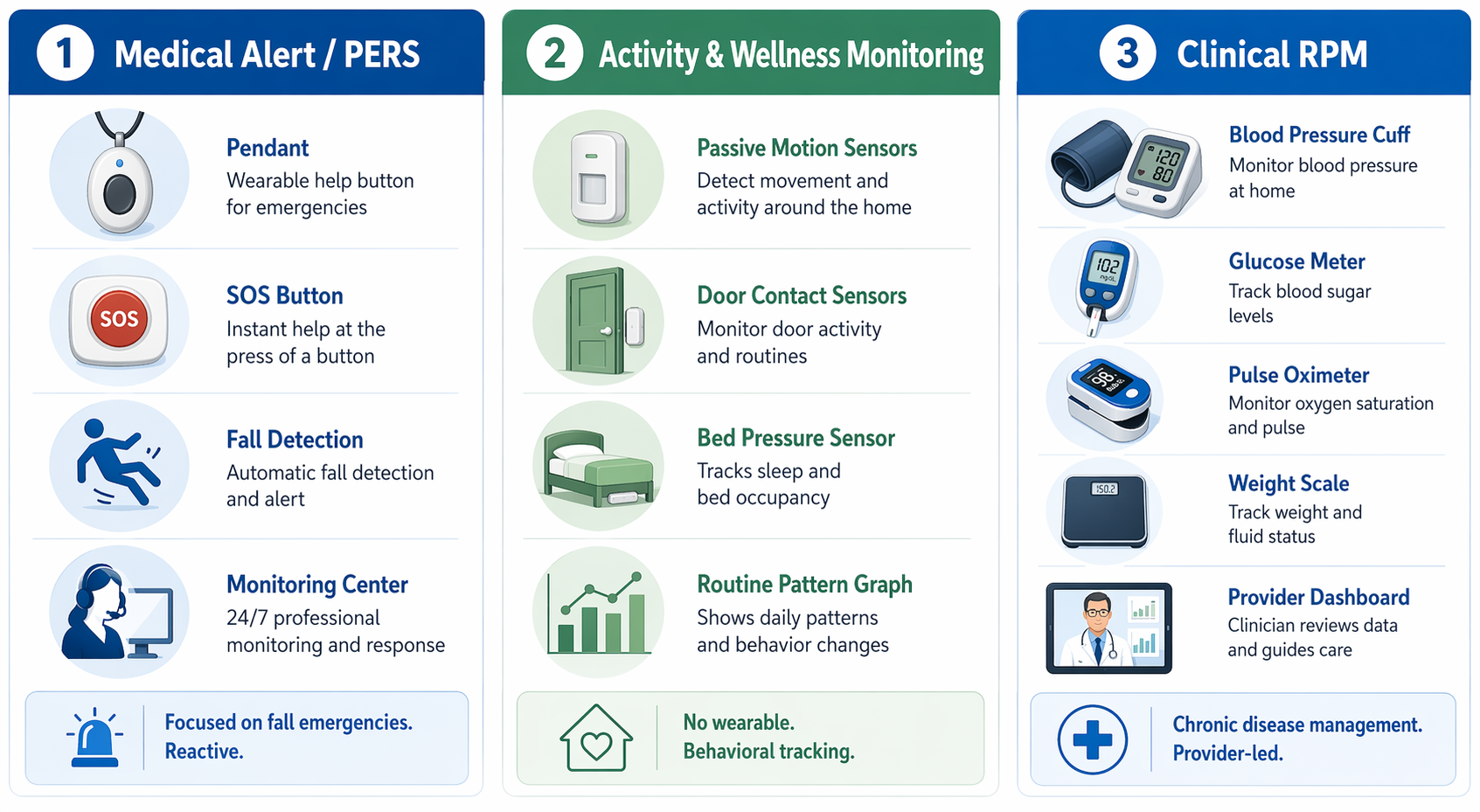
The Three Categories Are Built for Different Risks
Aging at home is not one risk. It can mean a parent who is steady most days but would be stranded after a fall. It can mean someone with mild cognitive decline who still resents being watched but has begun leaving the house at odd hours. It can mean heart failure, hypertension, diabetes, or COPD, where the danger is not a single incident but a trend that worsens over days or weeks.
That distinction matters because older adults are not asking for a house full of gadgets. In AARP’s 2024 survey, 79% of adults 50 and older said they wanted to remain in their own homes as they age.[2] Monitoring can support that wish when it is narrow enough to be useful and respectful enough to be tolerated. It becomes something else when every concern gets answered with the same device.
| Category | Primary risk it addresses | How it usually works | What it does not solve |
|---|---|---|---|
| Medical alert / PERS | Falls, sudden emergencies, urgent calls for help | Wearable button, base station or mobile device, optional fall detection, 24/7 monitoring center | Routine decline, wandering patterns, chronic disease trend management |
| Activity and wellness monitoring | Changes in daily routine, possible wandering, inactivity, missed meals, unusual overnight activity | Passive sensors such as motion, door/contact, bed, chair, or pressure sensors; caregiver alerts when patterns change | Immediate clinical diagnosis, emergency response if no response pathway exists, vital-sign management |
| Clinical remote patient monitoring | Chronic disease trends that a provider needs to review | Connected medical devices such as blood pressure cuffs, scales, pulse oximeters, or glucose meters send readings to a care team | General home safety, wandering, whether someone is eating, bathing, or moving normally |
The market around these products is large enough that families will keep seeing new combinations. Research and Markets estimates the elderly monitors market at $4.66 billion in 2026, with a projected $7.19 billion by 2030.[3] That size is useful context, but it should not make the decision feel more scientific than it is. The purchase still has to come back to the parent in front of you and the one risk that most needs a response.
Medical Alert Systems: Best for Sudden Emergencies
Medical alert systems, often called personal emergency response systems or PERS, are the category most families recognize first. The older adult wears a pendant, wrist button, or mobile device. If something happens, they press the button and reach a monitoring center. Some systems add automatic fall detection, which attempts to detect a fall even if the person cannot press the button.
This is a reactive service. That is not a criticism; it is the point. A good medical alert system shortens the distance between an emergency and help. It is a reasonable first look when the main concern is a parent who lives alone, has fallen before, is afraid of getting trapped on the floor, or needs a simple way to call for help without reaching a phone.
The practical details are concrete. NCOA’s 2026 medical alert comparisons list monthly fees from $20 to $60, equipment fees from $0 to $200, and fall detection add-ons from $5 to $12 per month. In NCOA testing, response times ranged from 22 to 51 seconds; in-home ranges ran from 200 to 1,400 feet; and mobile-device battery life ranged from 2 to 10 days.[1]
Those numbers should be used as benchmarks, not as a substitute for fit. A pendant with a long in-home range still depends on the person wearing it. Fall detection can be useful, but it is an add-on with limits, not a guarantee that every fall will be detected. A mobile unit with a short battery life creates a new job for the older adult or caregiver: keeping the thing charged.
The false comfort comes when a medical alert is asked to do quiet, routine surveillance. It may help after a fall. It does not tell you whether your father has stopped opening the refrigerator, whether your mother has started pacing at 2 a.m., or whether someone with cognitive decline is leaving through the back door. If the family’s real fear is “something is changing and no one sees it,” a button is only part of the answer.
Where a Medical Alert Fits
- A parent is cognitively able and willing to wear or carry the device.
- The main concern is calling help quickly after a fall, chest pain, weakness, or another urgent event.
- There is a clear response path: monitoring center, family contacts, emergency services, or a combination.
- The home layout, yard, and usual walking routes are within the device’s range or covered by a mobile option.
Activity and Wellness Monitoring: Best for Routine Changes
Activity and wellness monitoring is the category many families need explained twice because it is neither a camera system nor a medical alert button. These systems usually use passive sensors placed around the home: motion sensors in common rooms, contact sensors on doors, pressure sensors on beds or chairs, and sometimes appliance or medication-related sensors. The point is not to record what a parent says or does minute by minute. The point is to notice whether the shape of the day has changed.
A passive system might show that a parent is getting up much later than usual, entering the kitchen less often, opening the front door overnight, spending unusually long periods in the bathroom, or not returning to bed. Depending on the product, caregivers may receive alerts, dashboards, or daily summaries. The better question is not whether the system is “smart.” It is whether the alert corresponds to a decision someone is prepared to make.
This is where dignity and usefulness meet. A parent who refuses a camera may accept a door sensor. A parent who will not wear a pendant may still live comfortably with motion sensors that do not require daily action. But passive monitoring still observes the household, and that deserves an honest conversation wherever the parent has capacity to participate. Consent is not a formality just because the device has no lens.
The research is promising, especially for detecting changes associated with function, mood, and cognition, but it needs careful wording. A 2022 scoping review of 30 in-home monitoring studies from 2016 through 2021 found that passive infrared motion sensors appeared in 21 studies, contact sensors in 19, and pressure sensors in 13.[4] That shows where the research base has concentrated; it does not mean every commercial home system can accurately interpret every behavior.
The same review included studies reporting depression detection up to 96% accuracy, loneliness estimation using sensor data, mild cognitive impairment detection through task-completion time analysis, and fall-detection experiments using millimeter-wave radar and Wi-Fi-based approaches with reported accuracies of 98.74% and 95% respectively.[4] Those figures are worth attention because they point beyond the pendant. They also come from study settings and specific methods, not from a universal guarantee that a home sensor package will diagnose loneliness, depression, cognitive decline, or falls in everyday use.
For a family worried about wandering, passive monitoring may be more relevant than a blood pressure cuff or a basic emergency pendant. A door sensor can tell someone that the front door opened at an unusual time. A motion pattern can show repeated nighttime movement. A bed sensor can show that someone did not return to bed. None of that proves intent, and none of it replaces supervision when wandering is already dangerous. But it watches the category of risk the family is actually naming.
The false comfort here is subtler than with a pendant. A dashboard can make a caregiver feel informed while still leaving no one responsible for checking, interpreting, or acting. If an alert says “unusual activity,” who receives it? At what hour? What happens if that person is driving, asleep, or in a meeting? Passive monitoring is only as strong as the response plan behind it.
Where Passive Monitoring Fits
- The main concern is changed routine rather than a single emergency event.
- The parent forgets or refuses wearables but may accept discreet non-camera sensors.
- Family members need to know about missed meals, unusual inactivity, door exits, or overnight movement.
- There is a named person who will receive alerts and a realistic plan for responding.
Clinical RPM: Best for Chronic Disease Trends
Clinical remote patient monitoring, usually shortened to RPM, belongs in a different mental folder. It is not general home safety monitoring. It is a healthcare workflow built around measurements that matter to a clinician: blood pressure, weight, blood glucose, oxygen saturation, and other condition-specific readings.
The value is in trends. One blood pressure reading may be useful, but a pattern over weeks can tell a care team more about whether medication, diet, fluid status, symptoms, or adherence need attention. Some RPM programs use cellular-connected devices to reduce setup problems for older adults who do not want to pair devices, manage Wi-Fi, or troubleshoot apps.[5]
RPM is most relevant when a clinician is involved and the parent has a condition where regular measurements change care decisions. It may be available through a physician group, health system, home health program, or vendor working with a provider. Medicare reimbursement can apply under specific RPM CPT codes for qualifying chronic conditions, but that is not the same as saying any device bought online becomes covered medical monitoring.[5]
This category can be medically important and still be the wrong answer to a home safety problem. A connected scale may help flag fluid retention for someone with heart failure. It will not tell you whether that person left the stove on. A pulse oximeter may help track oxygen saturation. It will not show whether someone has stopped bathing or is opening the exterior door in the middle of the night.
Where RPM Fits
- The parent has a chronic condition where regular measurements influence care.
- A clinician or care team will review the data and decide what changes require follow-up.
- The parent can use the devices, or the program removes setup barriers through cellular connectivity or caregiver support.
- The family understands that RPM does not monitor daily living patterns unless it is paired with another system.
Hybrids Do Not Remove the Need to Choose a Primary Risk
Some products blend categories. A medical alert pendant may include location tracking or activity data. A wellness monitoring platform may offer emergency call features. An RPM vendor may add caregiver dashboards. Those combinations can be useful, but they can also make the sales page feel more complete than the care plan.
When a product crosses categories, ask which function is strongest and which one is secondary. A pendant with a step count is still mainly an emergency response device if no one is analyzing daily routines. A passive sensor system with an alert button is still mainly a pattern-monitoring tool if it does not connect to a 24/7 response center. A blood pressure program with a caregiver app is still RPM if the central workflow is clinical review of vital signs.
This is also where privacy decisions become practical rather than abstract. A cognitively intact parent may reasonably choose a wearable over passive sensors because it gives them more control. A parent with memory loss may be safer with door and motion sensors because a wearable will end up on the dresser. A camera may answer some questions quickly, but it may also be the option a parent experiences as the deepest intrusion. The least invasive useful system is usually a better starting point than the most comprehensive one.
A Risk-First Way to Decide
Before comparing brands, write one sentence that names the primary risk. Keep it plain. “She fell and could not reach the phone.” “He is leaving the house at night.” “Her blood pressure is uncontrolled and the doctor wants regular readings.” “We do not know whether he is eating during the day.” The sentence will usually point to a category faster than a feature checklist does.
| If the main worry is... | Start with... | Be careful about... |
|---|---|---|
| A fall or sudden emergency with no one nearby | Medical alert / PERS | Assuming fall detection or a button can notice routine decline |
| Wandering, skipped meals, unusual sleep, or changed activity | Activity and wellness monitoring | Buying a dashboard without deciding who responds to alerts |
| Heart failure, hypertension, diabetes, COPD, or another monitored chronic condition | Clinical RPM through a provider-led workflow | Treating vital-sign devices as home safety monitoring |
| General decline that is already unsafe | A broader care assessment, not only technology | Using monitoring to postpone help that is already needed |
A hypothetical example makes the mismatch clear. If a father fell in the kitchen, wears a pendant, and understands when to press it, a medical alert system may address the most immediate gap. If the same father later stops opening the refrigerator and begins sleeping in a chair all day, the pendant has not failed; it was never built to answer that question. The family’s monitoring problem has changed.
The reverse is just as important. A passive sensor system may show that a mother is moving normally around the house, but if she has unstable blood pressure and her clinician needs regular readings, activity data cannot substitute for RPM. The sensor is describing movement, not managing a medical trend.
When Monitoring Is the Wrong Size for the Problem
There are situations where a device can support a plan but should not be allowed to stand in for one. Repeated falls, dangerous wandering, medication errors with serious consequences, leaving burners on, severe confusion, or a caregiver who cannot sleep because alerts are constant may mean the home setup needs more than monitoring. That could involve a clinician, home health, paid caregiving, environmental changes, family scheduling, or a different living arrangement.
This is not a failure of technology. It is a boundary. Monitoring notices, measures, or routes a call. It does not lift someone off the floor unless responders arrive. It does not make a person accept help. It does not turn an unsafe home into a safe one by sending more notifications to a tired daughter at work.
Once the category is clear, the next useful work is narrower: compare systems by response path, sensor type, privacy tradeoff, setup burden, caregiver workload, cost, and what happens when the parent refuses or forgets the device. For that next pass, use How to Choose an Elderly Monitoring System: 7 Dimensions to evaluate specific products, medical alert versus remote patient monitoring for the emergency-versus-clinical distinction, and Beyond the Pendant: Passive Monitoring Systems if routine changes are the real concern.
If privacy is the sticking point, compare passive sensors, wearables, and cameras. If the conversation with a parent keeps going badly, start with why an older parent resists technology or how to talk to an aging parent about elderly monitoring systems. If the risk has already outrun what alerts can reasonably handle, read When Monitoring Is Not Enough and look at broader elderly home care options.
The safest purchase begins before the purchase: name the risk, choose the category built for that risk, and decide who responds when the system notices something.
References
- Best Medical Alert Systems in 2026, NCOA.
- New Home Monitoring Devices Offer Help to Caregivers, AARP.
- Elderly Monitors Market Report 2026, Research and Markets, 2026.
- In-Home Monitoring Technology for Aging in Place: Scoping Review, PMC/NIH, 2022.
- In-Home Monitoring Systems for the Elderly: Complete Guide, 1bios.
Questions to bring to a clinician or OT
This is not medical, legal, or a family's final decision — only a framework. Bring these questions to a clinician, occupational therapist, or your local Area Agency on Aging.
Find Local HelpRelated reading
Noticed something outdated or inaccurate on this page? Flag a correction. We review every report against CDC, NIA, and AARP HomeFit guidance before updating a page.