
Caregiver decision guide
What Elderly Monitoring System Is Right for Your Parent? A Decision Framework Based on Health Profile, Living Situation, and Risk Level
A practical, product-neutral guide for adult children caregivers who know their parent needs monitoring but feel overwhelmed by options. Learn how to match system features — fall detection, GPS tracking, passive sensors, vital sign monitoring — to your parent's specific risk profile, with cost comparisons and red-flag thresholds for when monitoring alone is not enough.
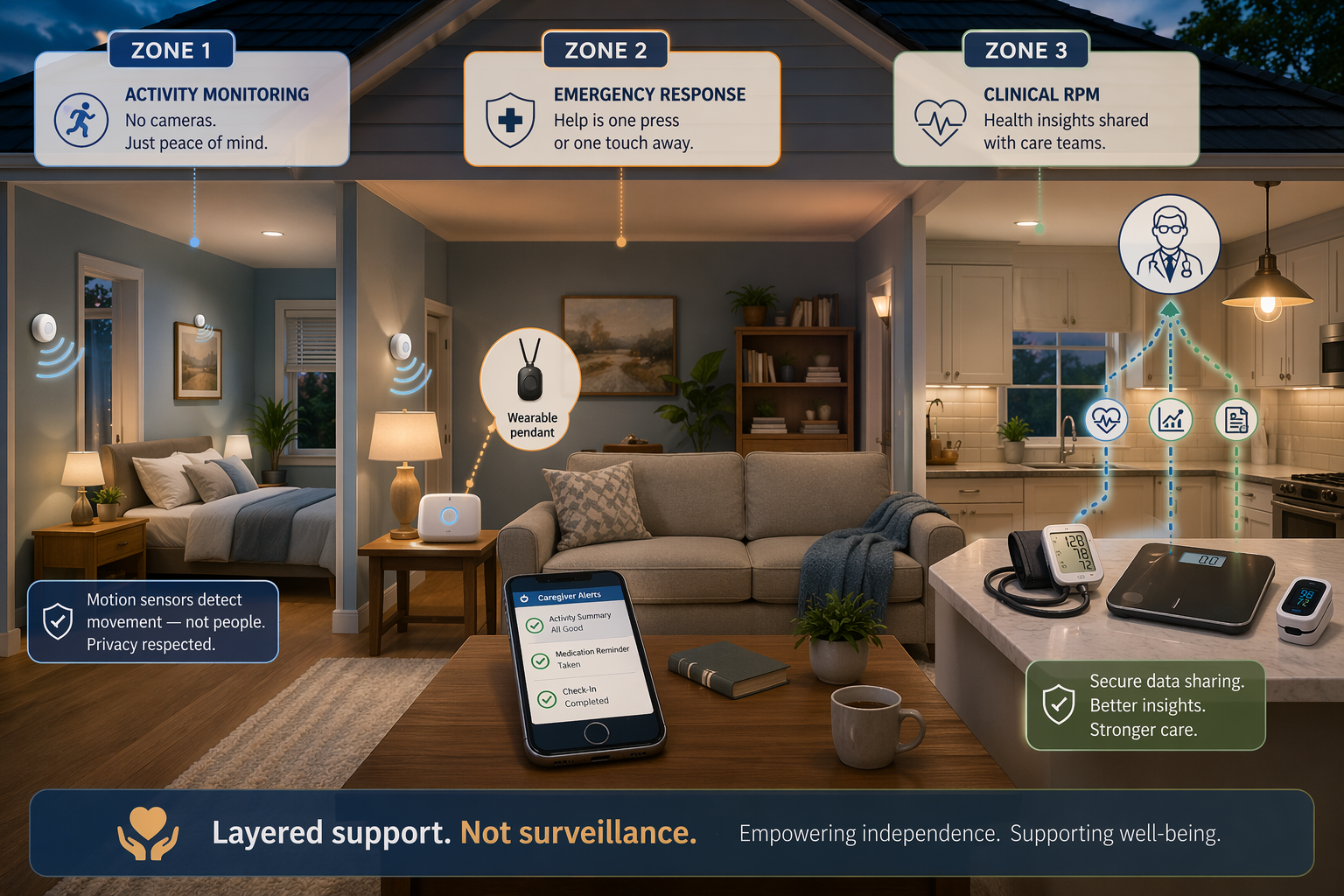
Why the Right Monitoring System Starts with Your Parent's Risk Profile, Not a Product List
If you are reading this, you have likely already crossed the threshold from wondering whether your parent needs monitoring to knowing they do. The question is no longer "if" but "what kind." And that is where the overwhelm sets in. Medical alert systems, passive sensors, GPS trackers, wearable health monitors, telehealth platforms — the options blur together quickly, and most comparison guides only add to the noise by leading with brand names and feature lists.
The common mistake is starting with the technology. A better approach starts with a single honest question: What is the primary risk my parent faces right now? The answer to that question — not a product review — should drive every decision that follows. This guide provides a practical, product-neutral framework built around four real-world risk profiles. Use it to match system features to your parent's specific situation, compare costs across system types, and recognize when monitoring alone is not enough.
The Four Risk Profiles: A Practical Self-Assessment for Families
Most seniors do not fit neatly into a single category, but identifying the dominant risk profile helps you prioritize which monitoring capability matters most. Use the descriptions below to assess your parent's situation. If multiple profiles apply — and many seniors will have overlapping risks — start with the profile that creates the greatest immediate safety concern.
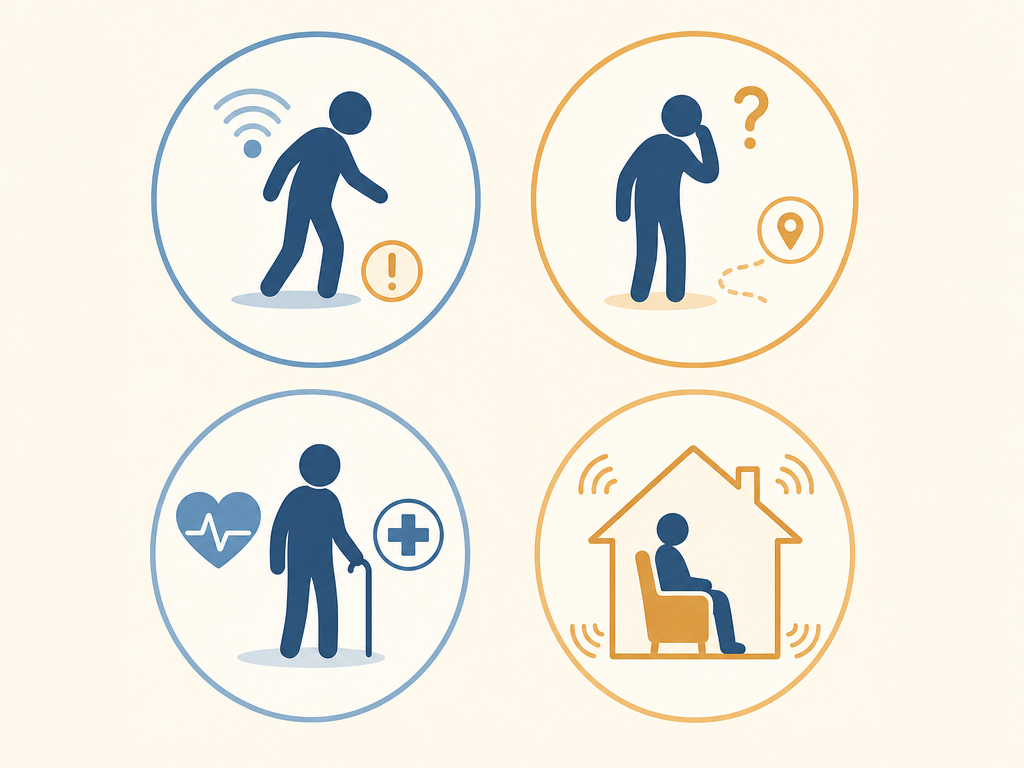
Profile 1: Elevated Fall Risk but Cognitively Intact
More than 28% of adults aged 65 and older fall each year, according to CDC data cited in the NCOA's 2026 review. If your parent has already experienced a fall — or has known risk factors like balance issues, muscle weakness, or medications that cause dizziness — this is the profile to address first. Nearly 75% of medical alert system buyers make the purchase after a fall or emergency, the NCOA found in its February 2025 survey.
The primary monitoring goal here is emergency response. Your parent is cognitively capable of using a device but needs a reliable way to call for help if they fall and cannot get up. Automatic fall detection is the most requested feature among recent buyers, though it adds $5–12 per month to the base cost of a medical alert system.
Profile 2: Early Cognitive Decline or Wandering Risk
When memory loss, confusion, or a dementia diagnosis enters the picture, the monitoring equation changes fundamentally. A wearable help button becomes unreliable because the person may forget to wear it, may not recognize they have fallen, or may wander away from home and be unable to describe their location. The PMC scoping review of 30 studies on in-home monitoring found that passive sensor systems can detect falls without requiring the user to press a button, with radar-based detection achieving up to 98.74% accuracy in research settings.
The primary monitoring goal here is location tracking and passive safety. For someone with cognitive decline, the system must work without requiring active participation. Passive motion sensors, door contact sensors, and GPS trackers become more valuable than wearable alert buttons. The same PMC review noted that in-home monitoring can reduce caregiver burden for those caring for seniors with cognitive impairment, especially those who wander at night.
Profile 3: Multiple Chronic Conditions Needing Clinical Oversight
If your parent manages conditions like hypertension, diabetes, heart failure, or COPD, their monitoring needs extend beyond safety into clinical data tracking. Consumer-grade medical alert systems cannot measure blood pressure, blood glucose, or oxygen saturation. This is where Remote Patient Monitoring (RPM) enters the picture. RPM is Medicare-reimbursable for qualifying patients with chronic conditions, according to 1bios Health, and involves devices like blood pressure cuffs, glucose meters, pulse oximeters, and weight scales that transmit data directly to a healthcare provider.
The primary monitoring goal here is vital sign tracking and data sharing with providers. This profile may also benefit from a medical alert system as a secondary layer, but the core need is clinical oversight that consumer systems cannot provide.
Profile 4: Generally Healthy but Living Alone
Many older adults are in good health but live alone, often in a different city or state from their adult children. The concern here is not a specific medical event but the unknown: What if something happens and no one knows? A 2024 AARP report found that 75% of surveyed Americans aged 50 and older plan to age in place, and a University of Michigan poll cited by the NCOA found that 88% of adults ages 50–80 feel it is important to remain in their homes.
The primary monitoring goal here is daily check-in and activity pattern awareness. A simple medical alert system may provide peace of mind, but passive activity monitoring — which learns the senior's daily routines and alerts caregivers when something is off, like no motion detected in the morning — often serves this profile better because it does not require the senior to take any action.
Matching Features to Risk Profiles: What Actually Matters for Each Situation
Once you have identified the primary risk profile, the next step is matching specific features to that profile. The table below maps the four profiles to the features that matter most — and those that are less critical — so you can focus your evaluation on what will actually make a difference.
| Risk Profile | Primary Goal | Key Features to Prioritize | Features That Are Less Critical |
|---|---|---|---|
| Elevated fall risk, cognitively intact | Emergency response | Automatic fall detection (pendant/neck worn), two-way voice communication, cellular connectivity, long battery life | GPS tracking, vital sign monitoring, medication reminders |
| Cognitive decline / wandering risk | Location tracking & passive safety | Passive motion sensors, door contact sensors, GPS tracker, no-wearable-required operation, caregiver alert system | Vital sign monitoring, two-way voice (may confuse user), medication reminders |
| Multiple chronic conditions | Clinical data sharing with providers | FDA-cleared RPM devices (BP cuff, glucose meter, pulse ox, scale), Medicare-reimbursable platform, data integration with provider EMR | GPS tracking, passive activity monitoring (secondary), fall detection (secondary) |
| Healthy but living alone | Daily check-in & pattern awareness | Passive activity monitoring, motion-based routine learning, caregiver alert for deviations, simple wearable or no-wearable option | Clinical RPM, GPS tracking, medication reminders |
A few important details about specific features:
- Fall detection placement matters. The NCOA notes that wrist-worn fall detection is less accurate than pendant- or neck-worn devices, based on published research. If fall detection is a priority, choose a system that offers a pendant or wall-mounted option rather than relying solely on a wristband.
- Passive sensors avoid the compliance problem. For the cognitive decline profile, the biggest limitation of wearable alert systems is that the user must remember to wear and activate the device. The PMC review found that passive infrared (PIR) motion sensors and contact sensors were the most common sensor types across 30 studies, precisely because they require no action from the senior.
- RPM is a clinical tool, not a consumer product. For the chronic conditions profile, RPM provides oversight that no consumer alert system can match. However, it requires a qualifying diagnosis and a provider who participates in Medicare's RPM program. It is not something you can purchase directly.
Cost Comparison Across System Types: What You Can Expect to Pay
Cost is a practical constraint for most families, but it is important to evaluate it in context. The most expensive system is worthless if the senior will not use it, and the cheapest system is a waste of money if it does not address the primary risk. The table below provides current pricing ranges across the main system types.
| System Type | Monthly Cost | Equipment Cost | Best For | Notes |
|---|---|---|---|---|
| Medical alert system (with fall detection) | $20–$60/month | $0–$100 (often included or minimal) | Fall risk profile; cognitively intact seniors | Fall detection adds $5–12/month. Cellular models achieve higher adherence than WiFi-dependent (1bios Health). |
| Passive activity / wellness monitoring | $50–$100/month | $300–$900 upfront (sensor kit) | Living alone profile; cognitive decline profile | No wearable required. Camera-free models address privacy objections (AARP). Some offer rental options. |
| Clinical Remote Patient Monitoring (RPM) | Often $0 out-of-pocket for Medicare beneficiaries | Varies; often provided by the RPM program | Chronic conditions profile | Medicare-reimbursable for qualifying patients with hypertension, diabetes, heart failure, or COPD. Requires provider participation. |
A few cost-related observations from the research:
- Medical alert systems from tested brands like Medical Guardian ($36.95/month starting), Bay Alarm Medical ($24.95/month), and MobileHelp ($25.95/month) represent the lower end of the cost spectrum, but response times vary — NCOA testing found response times ranging from 22 seconds (LifeFone) to 51 seconds (Bay Alarm Medical).
- Passive monitoring kits have higher upfront costs — the CarePredict @Home Kit was priced at $449.99 plus $69.99/month, and Caregiver Smart Solutions Deluxe+ Monitoring Kit at $299 plus $49/month (AARP, 2020). More recent systems like envoyatHome charge $99/month plus a $399 equipment fee.
- RPM costs are typically covered by Medicare Part B for qualifying patients, making it the most affordable option for seniors with eligible chronic conditions — but only if their provider offers an RPM program.
Critical Non-Feature Considerations: Connectivity, Battery Life, Consent, and Privacy
The features that determine real-world success are often the ones that do not appear on product comparison charts. These four factors can make the difference between a system that gets used daily and one that sits in a drawer.
Cellular vs. WiFi Connectivity
According to 1bios Health, cellular connectivity achieves higher adherence among older adults than WiFi-dependent systems because it requires no patient technical setup. If your parent does not have reliable home internet — or is not comfortable managing a WiFi network — a cellular-based system is the safer choice. The NCOA's tested medical alert systems all use cellular backup as a standard feature, recognizing that WiFi can fail during power outages or network disruptions.
Battery Life and Charging Burden
A device that needs to be charged every night is a device that will be left uncharged. The NCOA's testing found that LifeFone's at-home system offers a 10-day battery life, which significantly reduces the charging burden compared to devices that require daily charging. For seniors with cognitive decline, passive sensors that plug into wall outlets or use long-life batteries eliminate the compliance problem entirely.
Consent and the Privacy Model
This is the most emotionally charged consideration — and the one most likely to determine whether your parent accepts the system at all. As the founder of Caregiver Smart Solutions told AARP in 2020, "People don't want anybody watching them. They don't like that 1984 stuff." Camera-based systems may provide the most detailed view of a senior's activity, but they also raise the strongest privacy objections. Camera-free passive sensor systems — which use motion detectors, door sensors, and pressure mats to track activity patterns without recording video or audio — address these concerns directly.
The conversation about monitoring should happen before any equipment is installed. Be transparent about what will be monitored, who will have access to the data, and what the system cannot do. For seniors with cognitive impairment, this conversation may need to include the person's healthcare proxy or legal guardian.
Ease of Use for the Senior
If the system requires the senior to press a button, charge a device, or interact with an app, it will fail for a significant portion of users. The PMC review's finding that passive sensors were the most common technology across 30 studies reflects a practical reality: systems that require no active participation achieve higher real-world compliance. For seniors who are not tech-savvy or who have cognitive decline, a system that works silently in the background is far more likely to succeed than one that demands daily interaction.
Red-Flag Moments: When Monitoring Alone Is Not Enough
Monitoring technology is a powerful tool, but it has limits. There are situations where no system — no matter how sophisticated — can replace human supervision or a higher level of care. Recognizing these red flags early can prevent a crisis.
- Frequent falls despite monitoring. If your parent is falling repeatedly, a medical alert system will ensure help arrives, but it will not address the underlying cause. Repeated falls may indicate a need for physical therapy, medication review, or a higher level of supervision.
- Significant weight loss or dehydration. Passive sensors can detect changes in kitchen activity, but they cannot ensure your parent is eating and drinking adequately. Unexplained weight loss or signs of dehydration warrant a medical evaluation.
- Medication mismanagement that persists despite reminders. Automated medication dispensers and reminder systems can help, but if your parent is consistently missing doses or taking incorrect amounts, this may signal cognitive decline that requires in-person oversight.
- Wandering that cannot be contained by passive alerts. GPS trackers and door sensors can alert you when your parent leaves the home, but if wandering is frequent or occurs at night, the risk of injury or getting lost may exceed what monitoring can manage safely.
- Rapid cognitive decline. If your parent's memory, judgment, or ability to perform daily activities is deteriorating noticeably over weeks or months, monitoring technology is a stopgap, not a solution. A geriatric assessment is needed to determine the appropriate level of care.
If any of these red flags are present, consider consulting a geriatric care manager or your parent's primary care provider. They can help you evaluate whether additional in-home support, adult day programs, or a transition to assisted living or memory care is appropriate. Monitoring technology can extend the time a senior lives safely at home, but it cannot substitute for human care when the need exceeds what technology can address.
Actionable Checklist: How to Evaluate Monitoring Options as a Family
Use this checklist as a structured guide when evaluating monitoring options. It is designed to be printed and discussed as a family before any purchase is made.
- Identify the primary risk profile. Using the four profiles above, determine which risk is the most immediate safety concern. If multiple profiles apply, rank them by urgency.
- List the top 3–5 features that address that risk. Refer to the feature-matching table. Write down the specific capabilities the system must have — automatic fall detection, passive motion sensors, cellular connectivity, etc.
- Discuss consent and privacy preferences with your parent. Have the conversation before you shop. Be honest about what will be monitored and why. If your parent is strongly opposed to cameras, focus on camera-free passive sensor systems.
- Check cellular vs. WiFi availability in the home. If your parent does not have reliable internet or is not comfortable with WiFi, prioritize cellular-based systems. Verify cellular coverage in their specific location.
- Verify Medicare or insurance coverage for RPM if applicable. If your parent has qualifying chronic conditions, ask their provider whether they offer an RPM program. This may be the most cost-effective option and provides clinical oversight that consumer systems cannot match.
- Consider a trial period or rental option. Before committing to a long-term contract, ask about 30-day risk-free trials or month-to-month agreements. This is especially important for passive monitoring systems, which have higher upfront equipment costs.
- Plan a 30-day review. After installation, set a calendar reminder to evaluate whether the system is being used consistently and whether it is addressing the primary risk. If your parent is not wearing the device, not charging it, or ignoring alerts, the system is not working — regardless of its specifications.
For additional guidance on specific technology categories, see our guide to wearable health monitors for the fall risk profile, and our step-by-step guide on helping seniors with dementia use technology for the cognitive decline profile. If you are evaluating whether monitoring is sufficient or whether a higher level of care is needed, our aging-in-place remodel cost vs. assisted living decision guide provides a framework for that larger decision.
Questions to bring to a clinician or OT
This is not medical, legal, or a family's final decision — only a framework. Bring these questions to a clinician, occupational therapist, or your local Area Agency on Aging.
Find Local HelpRelated reading
Noticed something outdated or inaccurate on this page? Flag a correction. We review every report against CDC, NIA, and AARP HomeFit guidance before updating a page.