
Caregiver decision guide
Beyond the Panic Button: A Caregiver's Guide to Technology Categories That Support Aging in Place
Many caregivers default to buying fall-detection pendants or cameras, only to see them abandoned. This guide provides a category-level framework for matching technology to your parent's actual risk profile, covering medical alerts, passive sensors, smart home devices, wearables, telehealth, and medication management tools.

Why the Panic Button Isn't a Plan: The Problem with Fear-Based Tech Purchases
A fall. A wandering episode. A missed medication dose. These moments of crisis are the most common triggers for a technology purchase in caregiving. The instinct is understandable: buy a medical alert pendant, install a camera, get something — anything — that promises to prevent the next scare. But this fear-based approach often leads to devices that end up in a drawer within weeks.
The problem isn't the technology itself. It's the mismatch between what the device requires and how your parent actually lives. A pendant is only useful if it is worn and charged. A camera only helps if someone watches the feed. When the compliance burden falls on an older adult who may already be managing memory changes, mobility limitations, or simply a strong preference for privacy, abandonment is the predictable outcome.
The technology landscape for aging in place has matured far beyond the panic button. There are now at least six distinct categories of tools, each with a different compliance burden, privacy model, and problem it solves. The goal of this guide is to help you understand those categories so you can match technology to your parent's actual risk profile — not to the fear you felt after the last incident.
For a deeper look at why passive systems often succeed where pendants fail, see our existing guide on Why the Panic Button Isn't Enough, which focuses specifically on the limitations of wearable-only approaches.
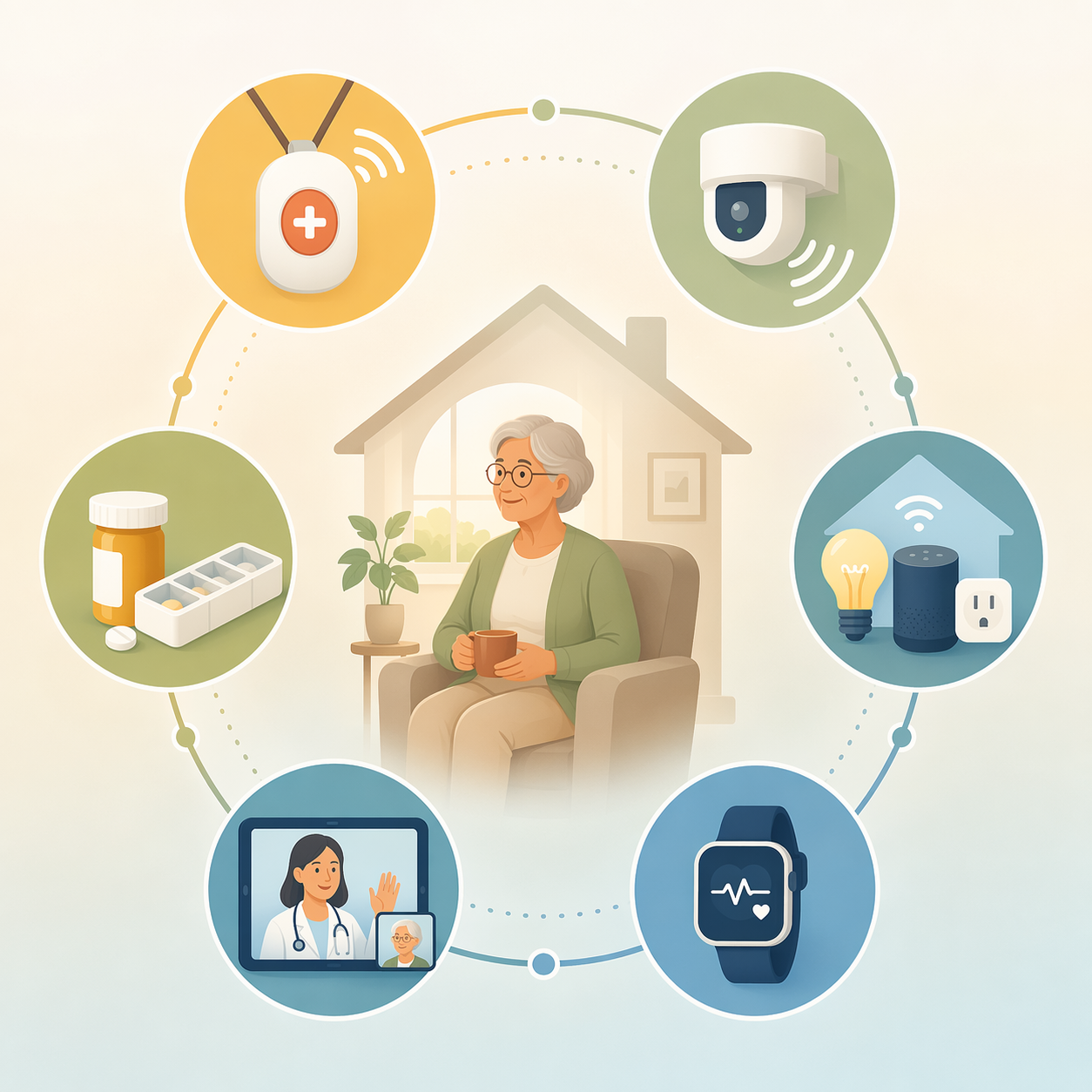
The Six Technology Categories That Support Aging in Place
Before you can evaluate specific products, you need a map of the landscape. Each category below solves a different problem, places a different burden on the user, and has a different privacy profile. Understanding these differences is the first step toward a system that actually gets used.
| Category | What It Solves | Compliance Burden | Privacy Model | Best For |
|---|---|---|---|---|
| Medical Alert Systems (PERS) | Emergency response after a fall or sudden event | High — must be worn and charged | Active — user presses button or system detects fall | Active, mobile older adults who will consistently wear a device |
| Passive Remote Monitoring | Detecting changes in daily patterns (mobility, sleep, bathroom visits) | None — sensors are placed in the home | Passive — no video or audio; motion and door sensors only | Older adults who resist wearables or have memory issues |
| Smart Home Devices | Automating safety (lights, stove shut-off, door locks) | Low — devices work automatically once installed | Varies — some use motion, some use cameras | Older adults living alone who forget routine tasks |
| Health Wearables | Tracking vital signs, activity, sleep, and fall detection | Moderate to high — must be worn and charged regularly | Active — data is collected and transmitted continuously | Tech-comfortable older adults managing chronic conditions |
| Telehealth Platforms | Remote consultations, medication reviews, and chronic disease management | Low — requires a device and internet for scheduled visits | Active — direct interaction with a provider | Older adults with multiple specialists or limited mobility |
| Medication Management Tools | Dispensing correct doses, sending reminders, and alerting caregivers to missed doses | Low to moderate — automated dispensers require refilling | Active — alerts are sent to the caregiver | Older adults managing multiple daily medications |
For a more detailed breakdown of each category, including specific feature comparisons and product-neutral evaluation criteria, see our comprehensive guide on Monitoring Technology Categories for Seniors in 2026.
How to Evaluate Each Category: Key Dimensions That Matter
Once you understand the categories, the next step is evaluating them against the dimensions that actually affect whether a system works for your parent. These dimensions cut across categories and give you a common language for comparison.
| Evaluation Dimension | What to Ask | Why It Matters |
|---|---|---|
| Fall Detection | Does it detect falls automatically, or does the user need to press a button? | Automatic detection is critical if your parent may be unable to press a button after a fall. |
| Battery Life | How often does the device need to be charged? Is there a low-battery alert? | Short battery life increases the compliance burden and the risk of the device being dead when needed. |
| Range | Does the device work throughout the home and yard, or only near a base station? | Limited range means the device is useless in the areas where your parent actually spends time. |
| Response Time | How quickly is an alert sent to a caregiver or monitoring center? | For fall detection and medical alerts, every minute matters. |
| Privacy Model | Does the system use video, audio, motion sensors, or no recording at all? | Privacy concerns are the number one barrier for non-users of smart technology, according to a 2022 study of older adults published in Frontiers in Computer Science. |
| Cost | Is there an upfront device cost, a monthly subscription, or both? Does Medicare cover it? | Ongoing costs can be a barrier. Medicare coverage for monitoring technology is limited and varies by plan. |
When comparing passive and wearable systems specifically, our guide on Passive vs. Wearable Elderly Monitoring provides a detailed trade-off analysis, particularly for caregivers of parents with memory concerns.
Matching Technology to Your Parent's Situation: A Decision Framework
The right technology category depends on three factors: your parent's health profile, their living situation, and their attitude toward technology. Below are four common scenarios and the categories that typically fit best.
- Parent with early memory changes, living alone: Passive remote monitoring is often the best starting point. It detects changes in daily patterns — like increased nighttime bathroom visits or missed morning activity — without requiring your parent to remember to wear or charge anything. Research cited by monitoring guides notes that two or more bathroom trips per night are associated with higher fall risk, and passive sensors can detect this pattern early.
- Parent living alone with fall risk, no cognitive issues: A medical alert system with automatic fall detection is appropriate, but only if your parent is willing to wear it consistently. If they resist, consider a passive system as a backup that does not depend on their compliance.
- Parent with multiple chronic conditions (diabetes, heart disease, hypertension): Health wearables combined with a telehealth platform can provide continuous monitoring and regular check-ins. Remote patient monitoring has been shown to reduce hospital readmissions by 25% in a meta-analysis, according to aggregated data from multiple studies.
- Parent who is resistant to wearables and cameras: Passive sensors and smart home devices are the least intrusive options. They do not require any action from your parent and do not record video or audio, which addresses the privacy concerns that are the top barrier for non-users of smart technology.
For a more detailed decision tool that walks through each scenario step by step, see our Elderly Monitoring Systems Decision Framework, which matches technology to health profile, living situation, and risk level.
Red Flags: When a Technology Category Is No Longer Enough
Technology is a powerful tool, but it has limits. There are clear signs that a single category — or even a combination of categories — is no longer sufficient to keep your parent safe at home.
- Frequent falls despite a pendant: If your parent is falling repeatedly and the pendant is being worn, the technology is doing its job — but it is not preventing the falls. This signals a need for a fall prevention assessment, home modifications, or increased human supervision.
- Undetected wandering: If your parent with dementia is leaving the home without being detected, a passive sensor system with door alerts or a GPS tracker may be needed. If wandering continues despite these measures, it may be time to consider a higher level of care.
- Medication non-adherence despite reminders: Automated dispensers and reminder apps work for many, but if your parent is still missing doses, the issue may be cognitive decline that requires hands-on assistance.
- Social isolation or depression: No technology category addresses loneliness. If your parent is withdrawing from social contact, technology should be supplemented with regular human interaction, whether from family, friends, or a paid companion.
When technology alone is no longer sufficient, a hybrid model combining human care and monitoring may be the next step. Our guide on 24-Hour Care at Home for the Elderly explores how technology can reduce the cost and human hours required for around-the-clock care.
How to Talk to Your Parent About Monitoring Technology
The most sophisticated technology system in the world is useless if your parent refuses to participate. The conversation about introducing monitoring technology is often harder than the technical setup. The key is to frame the discussion around safety and continued independence, not surveillance or loss of control.
- Start with their goal, not your fear: Ask your parent what they want — to stay in their home, to maintain their routine, to avoid moving to a facility. Then show how technology can help achieve that goal. The conversation becomes about enabling independence, not about preventing disaster.
- Acknowledge privacy concerns directly: Do not dismiss their worries. Explain exactly what the technology does and does not record. For passive sensors, emphasize that there is no video or audio. For wearables, explain that the data is only shared with you and their doctor.
- Offer a trial period: Many monitoring services offer month-to-month subscriptions. Propose a 30-day trial with the understanding that if it does not work for them, you will remove the system. This reduces the pressure of a permanent decision.
- Involve them in the choice: If possible, let your parent choose between two or three options. Having a sense of control over the decision increases the likelihood of acceptance and consistent use.
The AARP 2026 Tech Trends report found that about 9 in 10 adults ages 50 and older now own smartphones, and two-thirds agree that technology enriches life and helps with daily tasks and aging. Your parent may be more open to technology than you assume — especially if the conversation is framed around their priorities, not your anxieties.
Resources for Further Learning and Financial Help
Making a final decision about monitoring technology often requires more research. The following resources can help you evaluate options, understand costs, and find financial assistance.
- National Council on Aging (NCOA): Provides guides on aging in place technology, fall prevention, and benefits enrollment. Their resources are independently reviewed and not tied to any product vendor.
- Administration for Community Living (ACL): Offers information on state and local programs that may help fund home modifications and assistive technology for low-income older adults.
- Medicare Coverage: Medicare Part B covers some remote patient monitoring services for chronic conditions, but coverage for personal emergency response systems and passive sensors is limited. Check the official CMS website for the most current coverage rules, as policies change frequently.
- AARP 2026 Tech Trends: The full report provides data on technology adoption, purchase intentions, and barriers among adults 50 and older. It is a useful reference for understanding what your parent's peers are using and how they feel about it.
For a practical guide on assembling a complete remote monitoring system from multiple categories, see our article on How to Build a Remote Monitoring Tech Stack for Long-Distance Caregiving.
Questions to bring to a clinician or OT
This is not medical, legal, or a family's final decision — only a framework. Bring these questions to a clinician, occupational therapist, or your local Area Agency on Aging.
Find Local HelpRelated reading
Noticed something outdated or inaccurate on this page? Flag a correction. We review every report against CDC, NIA, and AARP HomeFit guidance before updating a page.