
Caregiver decision guide
The Smart Home Integration Ladder for Senior Safety: A Staged Approach from Fall Detection to Full-Home Monitoring
This guide provides a systematic, four-stage plan for adult children to integrate smart home safety technology for an aging parent. Instead of a daunting overhaul, it outlines a progressive ladder—from emergency response to health monitoring—to build a cohesive, less overwhelming system that supports aging in place.
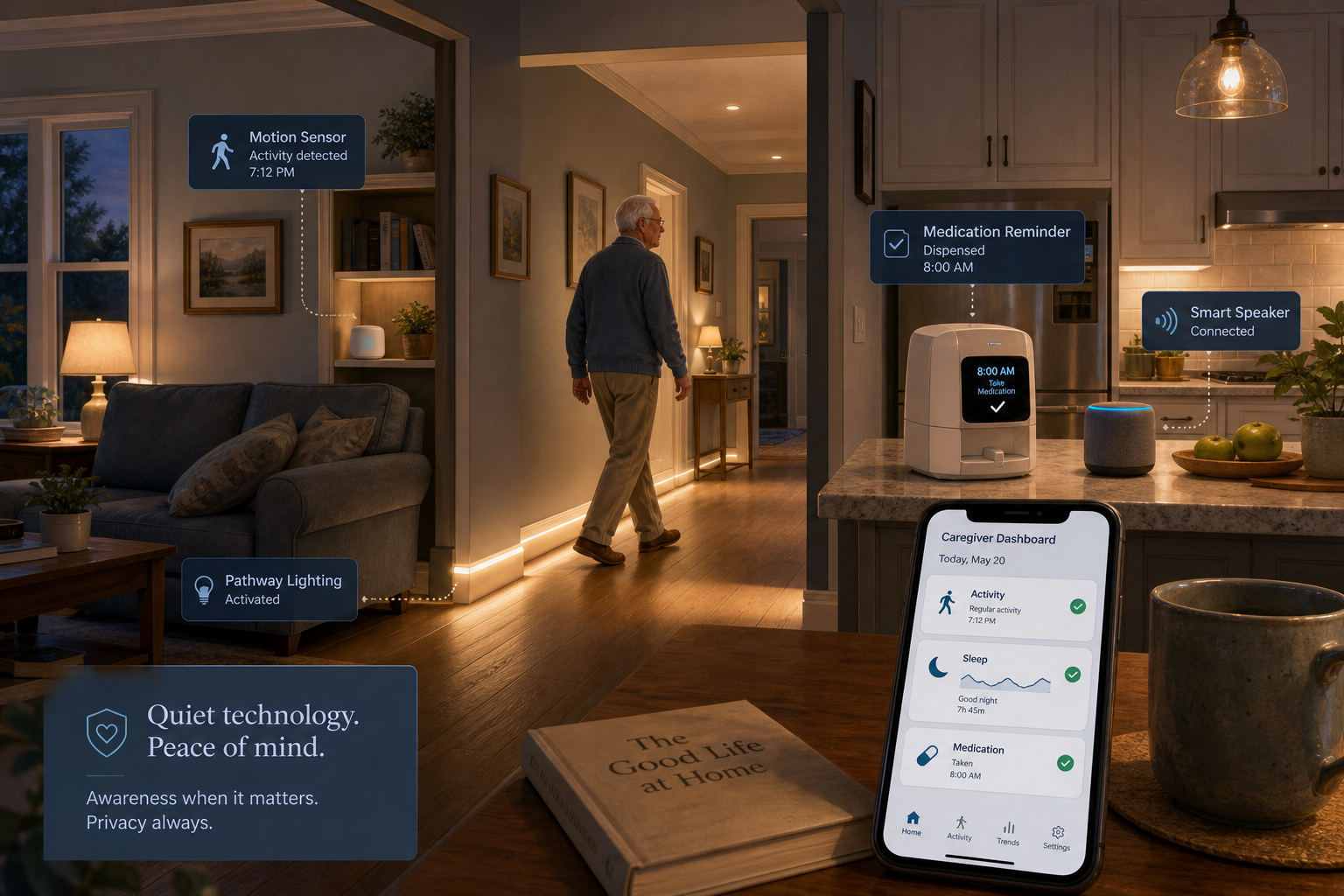
Why a Staged Approach Works Better Than a Smart Home Overhaul
The numbers are sobering and they drive the urgency. More than one in four older adults falls each year, according to the CDC, and those falls led to an estimated 38,000 deaths among people 65 and older in 2021. The total healthcare cost of non-fatal fall injuries reached $80 billion in 2020, with 67% of that burden carried by Medicare. Meanwhile, 75% of Americans ages 50 and older say they plan to age in place, according to AARP's 2024 Home and Community Preferences Survey. Yet the same survey reveals a persistent gap: many older adults feel technology is not designed with their needs in mind, and nearly two-thirds say usability concerns make them hesitant to adopt smart home devices.
This gap between intention and adoption is where the staged integration ladder comes in. Rather than purchasing and installing a full suite of smart home devices in one go — a strategy that often leads to unused gadgets, frustrated users, and abandoned systems — a progressive build-up lets you and your parent add capabilities one layer at a time. Each stage creates a functional safety net on its own, and later stages build on the foundation already in place. The result is a system that feels manageable, not overwhelming, and one that can adapt as your parent's needs evolve.
Stage 1: Emergency Access and Automated Lighting
Stage 1 is the foundation. Its goal is simple: ensure your parent can call for help from anywhere in the home, and reduce the risk of a fall during the most dangerous part of the day — the nighttime trip from bed to bathroom.
Voice-Activated Emergency Help
A traditional PERS (personal emergency response system) pendant or wristband remains a reliable option, but voice-activated services have emerged as a compelling alternative. In Wirecutter's testing, Alexa Emergency Assist — available at roughly $6 per month or $59 per year — had the fastest response time among the medical alert systems evaluated. It works through existing Amazon Echo devices, which means no additional hardware to wear or remember to charge. Your parent simply says, "Alexa, call for help," and the service connects to a 24/7 emergency response center.
This approach addresses a common barrier: seniors who resist wearing a pendant or who forget to put it on after bathing or changing clothes. A voice-activated system is always available as long as the speaker is plugged in and within earshot.
Automated Nighttime Path Lighting
Falls are not random. The CDC notes that many are caused by a combination of risk factors including lower body weakness, balance difficulties, and home hazards. The bed-to-bathroom route at night is a well-documented hazard zone. Smart bulbs or plug-in night lights with motion sensors can illuminate this path automatically when your parent's feet hit the floor, reducing the need to fumble for a lamp switch in a disoriented state.
- Place a motion-activated smart bulb in the bedroom, bathroom, and hallway along the route.
- Set the brightness to a soft, non-glaring level — enough to see clearly but not so bright that it fully wakes the user or disrupts sleep for a partner.
- Use a smart plug for an existing lamp if replacing a bulb is not practical.
Stage 2: Activity and Fall Detection
Once the emergency-response foundation is in place, Stage 2 adds the layer that gives you — the family caregiver — visibility into your parent's daily patterns and the ability to detect falls automatically, even when your parent cannot press a button or speak.
Wearable Fall Detection
The Apple Watch, which includes built-in fall detection and crash detection, has done more than any single product to legitimize the wearable fall-detection market, according to the AARP AgeTech Collaborative. When a hard fall is detected and the wearer does not respond within a set period, the watch automatically calls emergency services and sends a message to designated contacts. Similar capabilities are now available across multiple smartwatch platforms.
The key consideration here is adoption. A wearable is only useful if it is worn. Some seniors find smartwatches uncomfortable, confusing, or easy to forget. If your parent resists a wrist-worn device, Stage 2 can still be built using non-wearable sensors.
Camera-Free Activity and Fall Sensors
Camera-free sensors address the privacy concerns that often lead seniors to reject visual monitoring. These devices use passive infrared, radar, or other non-visual technologies to detect movement, presence, and falls without recording images or sound.
| Sensor Type | What It Detects | Privacy Profile | Best For |
|---|---|---|---|
| Passive infrared (PIR) motion sensor | Movement in a room or zone | No image or sound data | Tracking whether someone entered the kitchen or bathroom |
| Bed occupancy sensor | Presence in bed, time in bed, restlessness | No image or sound data | Detecting nighttime bathroom trips or unusual sleep patterns |
| Radar-based fall sensor (e.g., Vayyar HOME) | Falls, presence, movement patterns | No image data; uses radio waves | Fall detection in rooms where wearables may not be worn |
| Door and cabinet sensors | Open/close events | No image or sound data | Monitoring medication cabinet access or front door activity |
Systems like Caregiver Smart Solutions use non-camera motion sensors to track activities — from coffee pot use to TV watching — and alert caregivers to out-of-ordinary patterns. For example, getting up five times at night to use the bathroom could signal a urinary tract infection before it becomes a crisis. CarePredict's Tempo Series 3 uses a wrist device and room beacons to detect changes in daily activity patterns and even humidity levels that indicate showering, rating activity on a scale from 1 to 10.
Stage 3: Environmental Safety Sensors
Falls are the most visible threat, but they are not the only one. Stage 3 addresses the non-fall hazards that become more dangerous as mobility, vision, or memory decline: fire, carbon monoxide, flooding, unlocked doors, and extreme temperatures. These sensors protect against emergencies that your parent may not recognize or may be unable to respond to quickly.
- Smart smoke and carbon monoxide alarms. These interconnect wirelessly, so if one alarm detects smoke in the basement, every alarm in the house sounds. They also send alerts to your phone, so you know about a potential fire even when you are not there.
- Water leak sensors. The YoLink Water Leak Sensor 4, tested by Wirecutter, detects water within two seconds and emits an 87 dB alarm while sending a smartphone alert. Placed near the water heater, under the kitchen sink, or behind the toilet, these sensors can prevent a slow leak from becoming a costly flood.
- Smart locks. A keypad or fingerprint lock eliminates the need for physical keys, which can be lost or forgotten. It also lets you grant access to home health aides, repair technicians, or neighbors remotely, and you receive a notification each time the door is used.
- Temperature and humidity monitors. Extreme indoor temperatures — whether from a malfunctioning furnace in winter or a broken air conditioner in summer — pose serious health risks for older adults. A smart temperature sensor can alert you if the home falls outside a safe range.
For seniors with memory concerns, Stage 3 sensors serve an additional purpose: they create a safety buffer around behaviors that may become unsafe. A stove sensor can detect when a burner has been left on. A door sensor can alert you if your parent leaves the house at an unusual hour. These are not surveillance tools — they are early-warning systems that allow you to respond before a situation escalates.
Stage 4: Health Monitoring and Medication Management
The final stage moves beyond safety and into proactive health management. Stage 4 devices help manage chronic conditions, track vital signs, and ensure medication adherence — the daily routines that keep your parent stable and out of the hospital.
Smart Pill Dispensers
Medication errors — missed doses, double doses, wrong pills — are a leading cause of hospital readmission among older adults. A smart pill dispenser automates the process. The Hero Smart Pill Dispenser, for example, holds up to 90 days' worth of up to 10 different medications and dispenses the correct dose at the scheduled time. It also sends a notification to your phone if a dose is missed, so you can follow up rather than wonder. The service costs approximately $45 per month with a one-year commitment, or $30 per month with an annual plan.
Vital Sign Wearables and Telehealth Integration
Wearable health monitors can track heart rate, blood oxygen saturation, sleep quality, and activity levels. When integrated with a telehealth platform, this data can be shared directly with your parent's primary care provider, enabling remote monitoring of chronic conditions like hypertension, diabetes, or atrial fibrillation. The key is choosing devices that sync with the same platform your parent's provider uses — otherwise the data sits in an app that no one reviews.
Telehealth integration is particularly valuable for long-distance caregivers. A video visit through a device like the Amazon Echo Show — which has a 13-megapixel camera for clear video calls — allows you to join a doctor's appointment remotely, or simply have a face-to-face check-in that reveals more about your parent's condition than a phone call ever could.
Choosing an Integration Hub: Alexa, Google Home, Apple Home, or Matter
As you add devices across stages, they need a central platform to communicate with each other and with you. The hub you choose determines which devices are compatible, how voice control works, and what data leaves the home.
| Platform | Voice Assistant | Device Compatibility | Privacy Model | Best For |
|---|---|---|---|---|
| Amazon Alexa | Alexa | Broadest ecosystem; thousands of compatible devices | Voice recordings stored in cloud; can be deleted manually | Homes already using Echo devices; broadest device selection |
| Google Home | Google Assistant | Strong compatibility; tight integration with Google services | Voice recordings stored in cloud; auto-delete options available | Households already using Android or Google services |
| Apple Home (HomeKit) | Siri | Narrower ecosystem; devices must be HomeKit-certified | Strongest privacy; on-device processing where possible | Apple-centric households; maximum privacy priority |
| Matter | Platform-agnostic | Cross-platform standard; works with Alexa, Google, Apple | Varies by platform; standard defines local control option | Future-proofing; mixing devices from multiple ecosystems |
For most families, the simplest path is to start with the platform that matches your parent's existing smartphone and comfort level. If they already use an iPhone, Apple Home provides the most seamless experience. If they are comfortable with an Echo device for music and timers, Alexa is the natural choice. The Matter standard, supported by all major platforms, is reducing the compatibility friction between ecosystems, making it easier to add devices later without being locked into a single brand.
Privacy, Consent, and Family Communication
Privacy is not the central thesis of this guide, but it is a non-negotiable component of every stage. The AARP AgeTech Collaborative research found that both caregivers and care recipients are sensitive to boundaries around data sharing. Participants feared that data could be used against them — for example, to deny insurance coverage. At the same time, they were willing to share information if they saw a clear benefit.
The camera-free sensors in Stage 2 address the most common objection to home monitoring: the feeling of being watched. A motion sensor that detects movement without recording images feels fundamentally different from a camera in the living room. Wirecutter's testing also emphasizes that installation of any monitoring device — especially cameras — must be a decision made between the senior and the caregiver, with full transparency about what is being recorded and who has access.
Cost Overview and Your Recommended Next-Step Checklist
The total cost of a staged smart home system varies widely based on the size of the home, the number of devices, and whether you choose monthly subscription services or one-time purchases. The table below provides illustrative ranges for each stage.
| Stage | Typical Devices | Upfront Cost Range | Monthly/Annual Cost Range |
|---|---|---|---|
| Stage 1: Emergency Access & Lighting | 1–2 smart speakers, 2–4 smart bulbs or plugs | $50–$200 | $6–$12/month for emergency response service |
| Stage 2: Activity & Fall Detection | 1–3 motion sensors, 1 bed sensor, 1 radar fall sensor, 1 wearable | $150–$600 | $0–$30/month (some systems have subscription tiers) |
| Stage 3: Environmental Safety | 2–4 smart smoke/CO alarms, 2–3 water leak sensors, 1 smart lock, 1 temperature sensor | $200–$500 | $0 (most devices are one-time purchase) |
| Stage 4: Health Monitoring | 1 smart pill dispenser, 1 vital sign wearable, optional telehealth platform | $100–$400 | $30–$45/month for dispenser service; variable for telehealth |
Where to Start: Your Stage 1 Checklist
If you are reading this and feeling the weight of decision paralysis, start here. Stage 1 alone will meaningfully reduce your parent's fall risk and give you a communication channel for emergencies. Complete these steps before researching any Stage 2 devices.
- Choose a voice-activated emergency service (Alexa Emergency Assist or equivalent) and set up the smart speaker in a central location — typically the living room or kitchen, where your parent spends the most waking hours.
- Test the emergency call function together. Have your parent practice saying the wake word and the help command so they feel confident using it in a real emergency.
- Install motion-activated smart bulbs or plug-in night lights along the bed-to-bathroom route. Set them to a soft brightness level and test the path at night to ensure there are no dark spots.
- If your parent prefers a wearable PERS over a voice-activated system, set up the base station and charging routine. Place a secondary help button in the bathroom, where falls are most common.
- Create a shared list of emergency contacts and ensure both you and your parent know how the system will notify you when help is called.
Once Stage 1 is running smoothly — typically after two to four weeks of regular use — you can begin evaluating which Stage 2 sensors would address your parent's specific risk profile. A parent with unsteady gait may benefit from a radar-based fall sensor in the bathroom. A parent with early memory changes may benefit more from bed sensors that track nighttime restlessness. The staged approach lets you match the technology to the need, rather than buying a full system and hoping it fits.
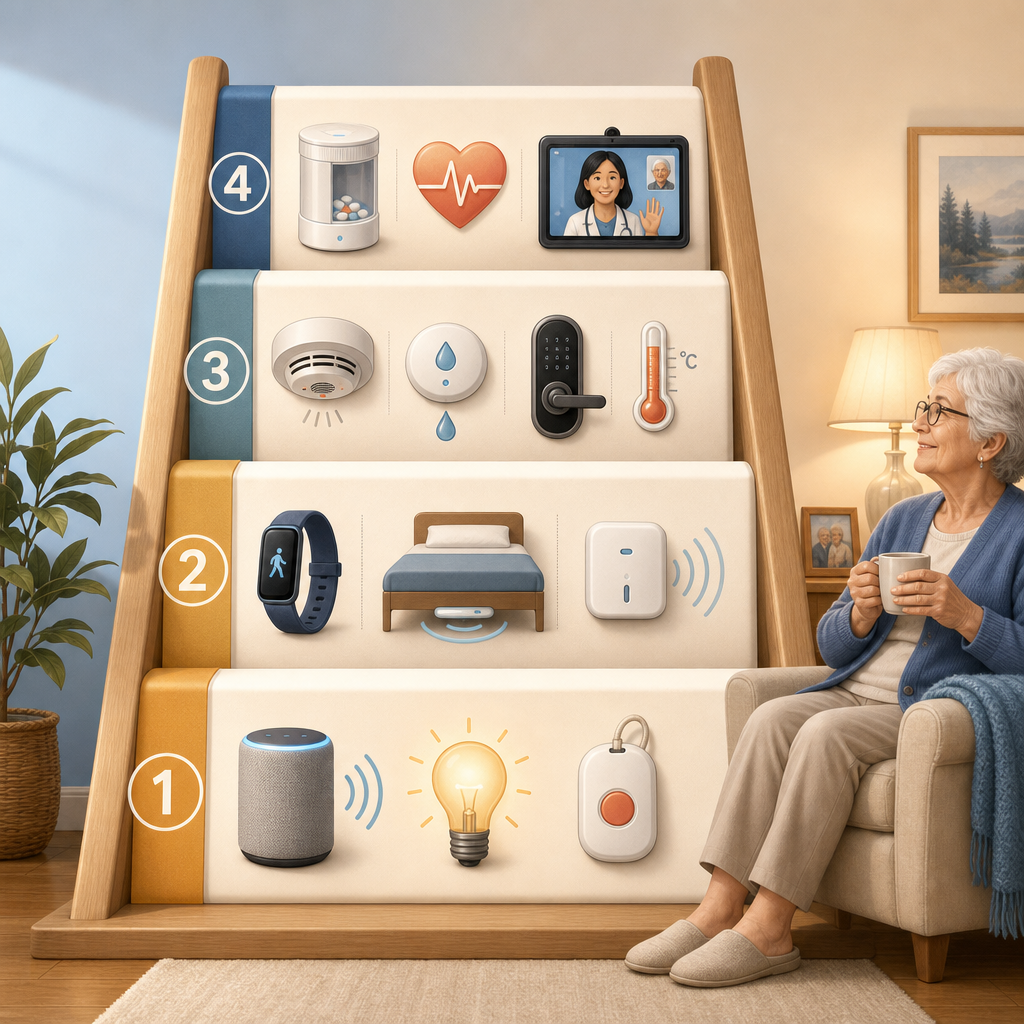
If you are managing your parent's care from a distance, the staged approach is especially valuable. Each layer adds a new data stream to your caregiver dashboard — motion patterns, fall alerts, environmental alarms, medication adherence — without requiring you to be physically present to interpret it. For a complete framework on coordinating care across time zones, see our Long-Distance Caregiving guide.
The goal of the staged integration ladder is not to build a perfect smart home. It is to build a safety net that grows with your parent — one that starts with the most urgent need (emergency access) and expands only as fast as your parent's comfort and your budget allow. Start with Stage 1. Get it working. Then decide whether the next rung of the ladder makes sense for your family.
Questions to bring to a clinician or OT
This is not medical, legal, or a family's final decision — only a framework. Bring these questions to a clinician, occupational therapist, or your local Area Agency on Aging.
Find Local HelpRelated reading
- Beyond the Panic Button: A Caregiver's Guide to Technology Categories That Support Aging in Place
- Privacy vs. Safety: Navigating the Ethical Decision of Monitoring an Aging Parent at Home
- What Elderly Monitoring System Is Right for Your Parent? A Decision Framework Based on Health Profile, Living Situation, and Risk Level
Noticed something outdated or inaccurate on this page? Flag a correction. We review every report against CDC, NIA, and AARP HomeFit guidance before updating a page.